We do have a color selector, it must not be well declared in the PR I think (maybe it’s set as « sensor »?)
Hello @AlexTrovato
Be careful with the colors, you need to use the xyToInt function (and vice versa) for the colors
I’ll take a look at your PR as soon as I can (pretty busy at the moment  )
)
@pierre-gilles I’ll check ASAP for « sensor ». Normally this concept is detected according to the characteristics received by zigbee2mqtt, but the color is a bit particular.
@cicoub13 I think I’ll use xyToInt, but it must be related to the point above, sensor vs actuator.
If the apéro doesn’t get the better of me, I’ll do it tonight, otherwise tomorrow 
Thanks to everyone!
So my question for @Albenss, when you updated your device, did you have to delete it or was there an « Update » button?
Correction of the « color » feature OK.
New image under construction. The image should be available at 10:00 a.m. (in ~1 hour).
No, I just ran the test again, I switch from the official image to yours and I have nothing, but I have some quite strange behavior:
- The first time I go to the Devices page of the Z2M integration, no device is visible. If I switch tabs like « Zigbee Discovery » and go back to « Devices » my devices are visible again
- Impossible to Edit a device, it loops and in the logs I only have Warnings about « feature […] not configured in Gladys. »
- The update button does not seem to appear
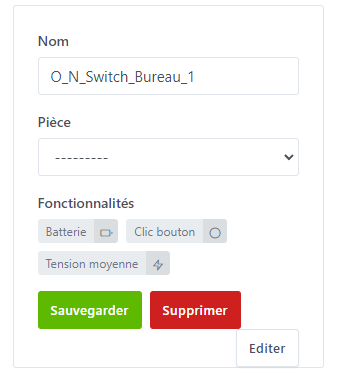
I still cleared the browser cache and switched to private browsing, so the only solution in my case is to delete them from Gladys and then re-add them.
Edit: however, the correction on the color selector is perfectly functional, and that’s great 
Ok thanks,
So for the update button, there will still be work to do,
But to reassure the code reviewers, it’s another PR.
@Albenss I forgot to mention that the « update » button should be on the « discovery » tab.
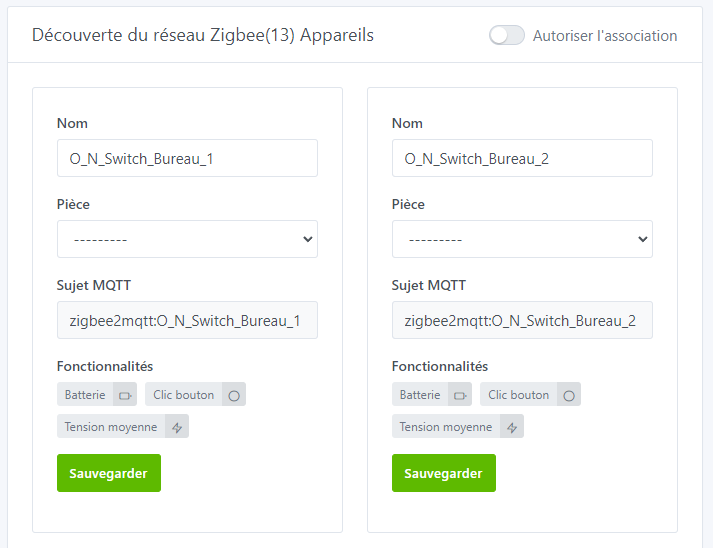
You made me doubt about the refresh of the « Devices » and « Discovery » pages, and indeed, I had a conflict on a GET.
I fixed that, as well as the « update » button, the image is being built, it will take 1h+, so by 11:00 the new image will be ready (for a few UI corrections).
Still no « Update » button on my side, but indeed it is now possible to edit the old devices added by the official image.
For information, the procedure I carried out to test was that I deleted all the devices from Gladys, I went back to the official image to add the Z2M devices, I switched back to your image and I deleted the cache to be sure (that way I am more or less sure to be consistent with the tests)
Hello everyone!
For information, I just merged the PR from @AlexTrovato!! 
Bravo for all the work done and all the relevant feedback that has been given here 
I just launched a build on the « dev » tag (gladysassistant/gladys:dev)
The build will be available in about an hour (Follow here: https://github.com/GladysAssistant/Gladys/actions/runs/1407311060)
I’m looking for testers as usual
Hello, nothing to say on my side, I just don’t see the « Update » button as discussed earlier, but by discovering the devices again and saving them, it updates them.
Everything is functional on my side.
The only remaining issues are display problems on the dashboard that I mentioned in the Dashboard follow-up regarding the new feature, but that’s all.
Bravo to all the devs / testers.
This button is not part of the release
It will come when this PR is merged, currently under discussion:
https://github.com/GladysAssistant/Gladys/pull/1335#pullrequestreview-797311099
So far, on my side, all good.
I have replaced most of the existing devices with the « new » ones detected and everything is functional.
[EDIT] Some components that were not supported are now… But in degraded mode because not really controllable (radiator thermostatic head).
Hello, I am becoming more and more interested in Zigbee. If I understand correctly, the last PR allows making Zigbee devices compatible without having to add them to Gladys’s code, but the device still needs to be in the list of devices in the base zigbee2mqtt project, right?
Hence my question, if a device is not in the zigbee-herdsman-converters project and someone adds it, do we have to wait for a release of zigbee2mqtt + a release of Gladys or just a new version of zigbee2mqtt and then the zigbee2mqtt container updates automatically?
Yes, that’s it
Correct
Only zigbee2mqtt, it updates on its own
Good evening,
After a lot of back and forth in the Git maze to see what was included or not in my version 4.6.0 of Gladys, I finally managed to test the atrovato branch, which seems to behave quite well!
I have several Gledopto lamps (GL-D-004P & GL-D-006P) and the integration went smoothly. The use in scenes is fully functional (color, temperature, brightness & on-off).
""
And if everything goes well, Gladys should be able to start all these lamps tomorrow morning… Wait & see
EDIT: It works, I can now dive a little more into the functioning of Gladys!
However, I notice that the devices added remain in the « Zigbee Discovery » tab, even though they are already present in « Devices ». (They disappear at the moment of the click to add, but they come back when the page is reloaded.) Knowing that this is my first installation of Gladys that actually controls something, I don’t really have any background to say whether this is something desired or not 
Indeed, I see the issue, I will make a correction in this regard.
Thank you for your feedback.
So, while waiting for it to be merged into 4.6.0, I generated a new Docker image atrovato/gladys:zigbee2mqtt with the fix (and the « update device » button to distinguish between already registered devices and newly discovered ones).