AI agent, MCP server

Hello everyone,

In recent years we’ve seen a big wave around AI and more recently there’s been increasing talk of AI agents; many of us have probably already used them.

I got into the world of MCP servers and thought it would be useful to have one directly in Gladys. For those who don’t know, MCP stands for Model Context Protocol, a protocol conceived by Anthropic, the team behind the Claude models. It allows exposing tools and functions that agents can call to get additional information or interact with real-world devices. It’s an open protocol, and most of the big names in the field started implementing it after Anthropic, including OpenAI and, more recently, Perplexity.

I’ve developed a first version of the service that acts as a server. For now it allows:

  • retrieve sensor values (temperature, humidity, open/closed state…)
  • view cameras; I’m not sure it’s possible to display the camera image in the agent chat, but depending on the capabilities of the model used, it can describe what it sees
  • turn lights on/off in a room

Here is the demo in my dev environment (the temperatures aren’t necessarily meaningful, and the cameras are public cameras).

In the demo, I use the agent associated with GitHub Copilot in VSCode, but normally if you have Claude or another MCP-compatible agent on your computer it should work.

The exposed functions still need improvement, I think, but it already seems pretty good and you can imagine many possibilities. We also probably need to add more security to authenticate the connecting agent.

The PR (pull request) is here

In the next few hours a Docker image will be available bertrandda/gladys:mcp-server

For now it’s backend-only so nothing visible in the list of services. To test you can use the route /api/v1/service/mcp/proxy in your agent’s configuration. Be careful: the route is not secured, so don’t test it if the machine you use to run Gladys is exposed to the internet.

Feel free to test and tell me what you think.

13 Likes

I’m not very familiar with the technical side of all that, but I find the video demo very interesting!!

3 Likes

Hello @bertrandda

I must admit I’m really blown away by the demo :heart_eyes: Great work :slight_smile:

I am (AHMA like many others here …) very interested in more technical information, for example the hardware used, or how to interconnect Gladys and the MCP server.

Could we also imagine replacing the manual prompt with an STT solution, since I’m already implementing a « home-made » audio solution at my place that supports multi-room, with Gladys answering me, and we’re then not far from being able to naturally converse with Gladys :+1:

3 Likes

Very happy that there’s so much interest in this work!

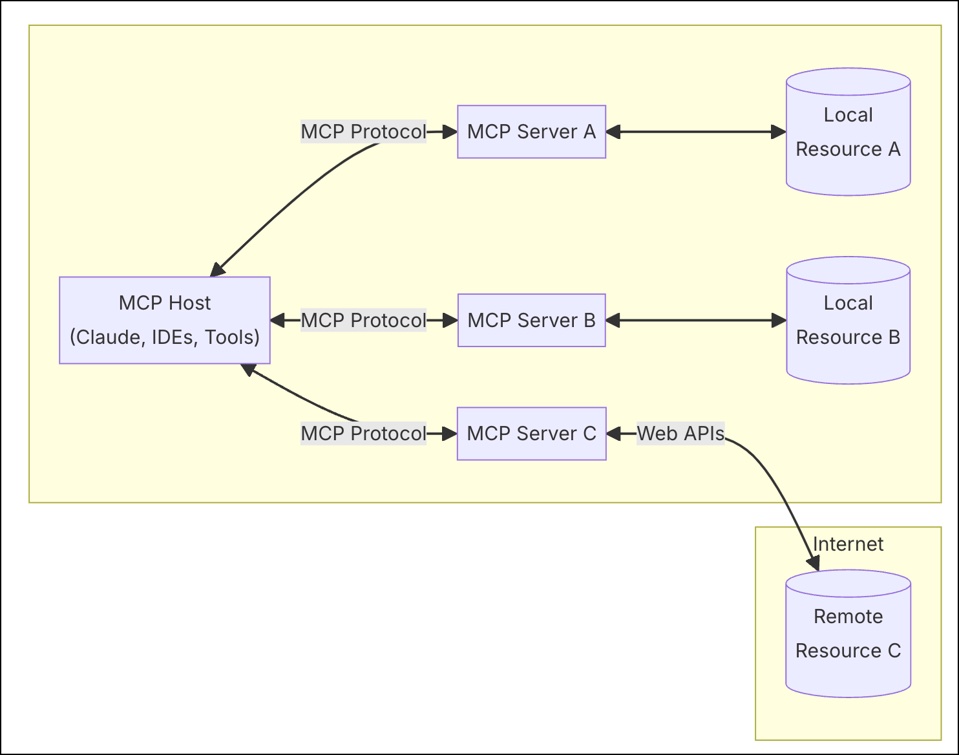
To explain a bit more, here is a diagram of a setup operating with the MCP protocol

So there’s the host which contains the MCP client; today these are often well-known agents such as Claude Desktop, ChatGPT… that integrate this client. As I was saying, in the demo video above, it’s the agent present in VSCode with GitHub Copilot.
Its work will be, on one hand, to converse with the LLM (often Claude Sonnet or GPT-4) which will handle understanding requests and analyzing data, and on the other hand to interact with the MCP server.

The MCP server takes care of declaring functions that the MCP client can call to interact with the resource (in our case the resource is Gladys, but it can be a database, Google Drive, Slack… any local or remote tool). In our case, for now, 4 functions:

  • device.get-state to obtain sensor data
  • camera.get-image to retrieve camera images
  • light.turn-(on|off) to turn a room’s lights on/off
  • scene.start to start a scene

Now if we look more closely while keeping it simple at how the host part works, when we use for example Claude Desktop, here’s what will be done:

  • At startup, Claude Desktop will ask all MCP servers to which it is connected for the available functions that each offers (in our case device.get-state, camera.get-image…)
  • When the user asks Claude Desktop something (say « Give me the living room temperature ») it will send the question to the LLM specifying in the request context that it has access to several functions and that if the user’s request requires it, one of those functions can be called
  • The LLM replies to Claude Desktop, « I need you to use device.get-state with the parameter the room salon »
  • Claude Desktop calls the function of Gladys’ MCP server device.get-state(salon) and returns the requested data to the LLM
  • The LLM builds the response with this new data and returns it to Claude Desktop which displays it to you

It’s important to understand that it’s not Gladys answering here; Gladys only returns a state and the LLM constructs the response. I don’t know if you use Google Home, HomeKit/Siri or Amazon Alexa with Gladys but I think we can draw a parallel to make it clear. We have a Gladys service that exposes devices through a protocol, and the Claude Desktop client (which we could compare to the Google Home app, Apple Home or even Siri) makes requests to that service to get information. The advantage compared to those proprietary solutions is that MCP is an open protocol and implementable by anyone (client or server). So to answer your question:

we can very well imagine an MCP client integrated with an STT model (whether cloud or local) and communicating with Gladys via MCP.

To answer your other question:

Short answer the MCP server is already integrated into Gladys via the service I developed; the connection you’ll need to make is between the agent/MCP client and the MCP server (see tutorial at the end of this post).
The Long answer will be a bit technical but to best explain the choice to make it a service and to understand the tutorials below, it’s worth it.
For the connection between the MCP client and MCP server we have 2 possible communication methods:

  • either via stdio (standard input/output)
  • or via HTTP (over the network)
    stdio is the original communication method of MCP: the MCP client will spawn a subprocess that runs the server and listen to the process’s input/output (schematically it’s like it has a keyboard to write and reads the terminal logs to communicate). There are more agents compatible with stdio than with HTTP but because the server must run on the same machine as the agent, that implies developing and managing a new project alongside Gladys.
    HTTP allows the MCP client and MCP server to communicate over the network when they are not on the same machine. It makes it possible to group the MCP server and the resource in the same place. Integrating the MCP server into a Gladys service has several advantages
  • at the code level, it seemed the simplest to me, to have easy access to all Gladys data and functions
  • at the project structure level, it avoids having to maintain a second MCP-server-Gladys project in addition to Gladys
  • if one day MCP clients come out on phones (or speakers like you mentioned), it’s likely this will be done over HTTP because installing an MCP server on such devices will necessarily be more complicated
  • if the agent you use is not compatible with MCP via HTTP you can use mcp-proxy which acts as a bridge between stdio and HTTP (I explain below how to use it).

For the connection tutorials, here are some explanations for VSCode (directly via HTTP), Claude Desktop and Perplexity (use of mcp-proxy because Claude Desktop and Perplexity are currently only compatible with stdio). If you have other agents, we can look at that together.


VSCode with GitHub Copilot

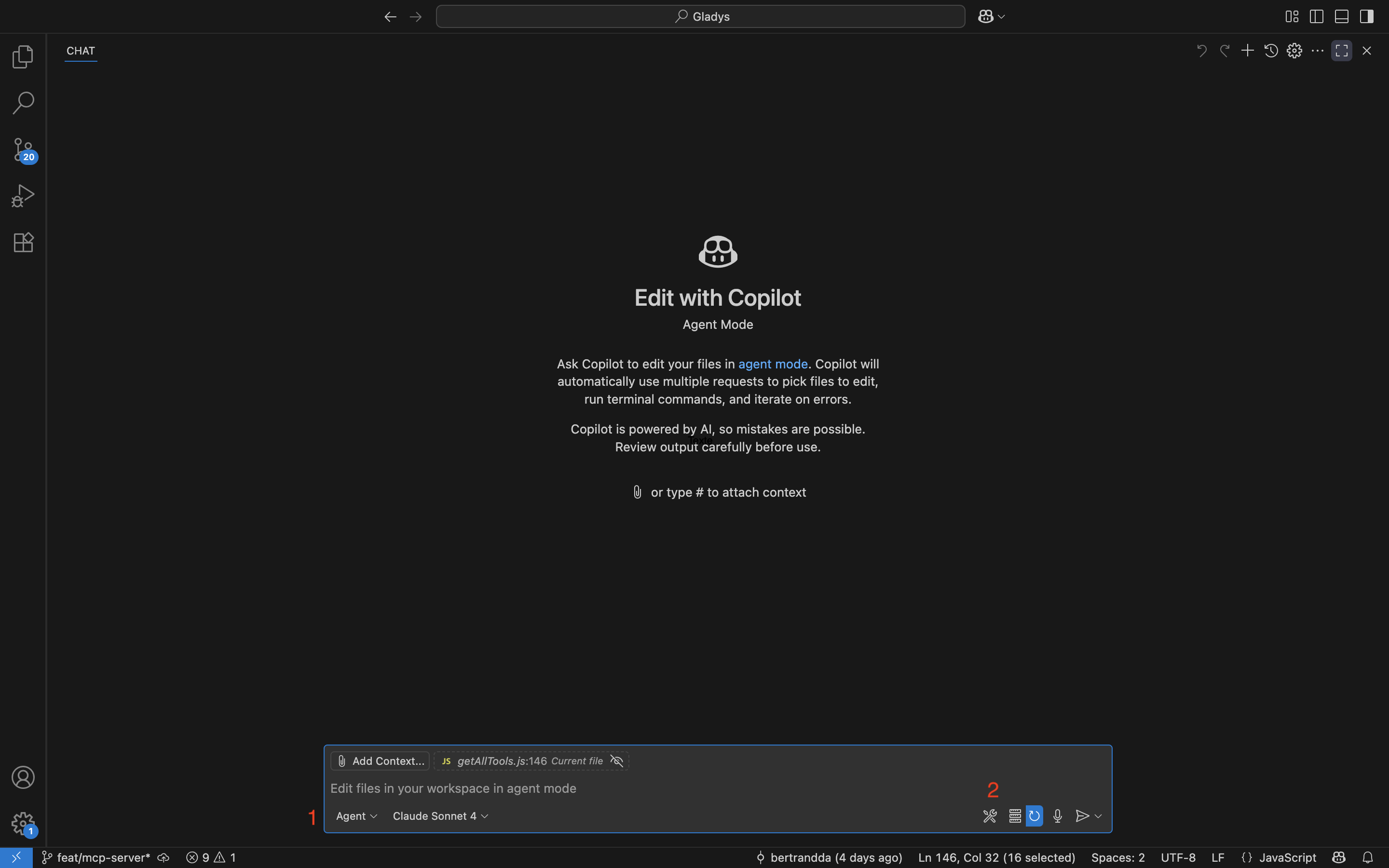
You start the Copilot Chat.
At the bottom select Agent then click on the wrench icon

In the dropdown that opens, at the very bottom choose « Add more Tools… »

« Add MCP Server »

« HTTP »

Finally enter this URL http://GLADYS_IP_ADDRESS/api/v1/service/mcp/proxy replacing GLADYS_IP_ADDRESS with the IP address of your Gladys.
Choose a name and you’re good to go — you should be able to use it in your Copilot Agent

For more information: Use MCP servers in VS Code


Claude Desktop and Perplexity do not yet support MCP servers (they have announced support coming soon), so it is necessary to use mcp-proxy

For installation everything is detailed here GitHub - sparfenyuk/mcp-proxy: A bridge between Streamable HTTP and stdio MCP transports

Claude Desktop

Once mcp-proxy is installed, start Claude Desktop
In Settings → Developer → Local MCPs click « Edit Config »
In a text editor modify the file claude_desktop_config.json so that it looks like

{
    "mcpServers": {
        "mcp-proxy": {
            "command": "FULL_PATH/mcp-proxy",
            "args": [
                "http://GLADYS_IP_ADDRESS/api/v1/service/mcp/proxy",
                "--transport",
                "streamablehttp"
            ],
            "env": {}
        }
    }
}

To find FULL_PATH, in a command terminal type where mcp-proxy (on macOS/Linux, for Windows type where.exe mcp-proxy) and replace FULL_PATH with the path obtained.

Also replace GLADYS_IP_ADDRESS with the IP of your Gladys

Save the configuration then restart Claude; if everything went well you should be able to access the MCP functions in the chat

Perplexity

Once mcp-proxy installed, start Perplexity
In Settings → Connectors → Add a connector
Select the « Advanced » tab
Give it a name « Gladys »

Modify the config so it looks like

{
  "args" : [
    "http://GLADYS_IP_ADDRESS/api/v1/service/mcp/proxy",
    "--transport",
    "streamablehttp"
  ],
  "command" : "FULL_PATH/mcp-proxy",
  "env" : {}
}

To find FULL_PATH, in a command terminal type where mcp-proxy (on macOS/Linux, for Windows type where.exe mcp-proxy) and replace FULL_PATH with the path obtained.

Also replace GLADYS_IP_ADDRESS with the IP of your Gladys

Save the configuration then wait for Perplexity to correctly detect all the functions; if everything went well you should be able to access the MCP functions in the chat.

For more information: https://www.perplexity.ai/help-center/en/articles/11502712-local-and-remote-mcps-for-perplexity


I’ve tried to be as complete and clear as possible; I hope this answered your questions. Even though the protocol is already a few months old, it’s still in its early days — it’s very promising especially seeing all the AI giants implementing it. So if the connection configuration seems complicated, don’t hesitate to ask for help and that will allow improving the tutorials based on user feedback.

6 Likes

Hi @bertrandda, your demo is really very informative and the results are really great!
And since I like to tinker, I’m testing your docker image bertrandda/gladys:mcp-server but my VSCode (default) tells me this when I ask for the temperature of my Dyson:

I see that you are using Gladys (home automation system) with a configuration at http://192.168.xxx.yyy/api/v1/service/mcp/proxy. However, I cannot directly access the temperature of your Dyson because:

I only have the mcp.json configuration file which shows the server URL
I don’t have the necessary permissions to query the Gladys API
I don’t know if your Dyson is configured in Gladys
To obtain the temperature of your Dyson, you can:

Check the Gladys web interface directly at http://192.168.xxx.yyy
Use the official Dyson app on your phone
Access the Gladys API with the correct permissions
I cannot read this information from the single configuration file that I see.

Anyway, not being a dev, I’m stuck… If you have any tips I’m all ears :slight_smile:

EDIT: my mcp.json if that helps

{
	"servers": {
		"github": {
			"type": "http",
			"url": "https://api.githubcopilot.com/mcp/",
			"gallery": true
		},
		"gladys-mcp": {
			"url": "http://192.168.xxx.yyy/api/v1/service/mcp/proxy",
			"type": "http"
		}
	},
	"inputs": []
}

EDIT 2: I have the impression that communication isn’t working properly…?

2025-08-03 20:56:51.000 [info] Starting server gladys-mcp
2025-08-03 20:56:51.004 [info] Connection state: Starting
2025-08-03 20:56:51.029 [info] Starting server from LocalProcess extension host
2025-08-03 20:56:51.032 [info] Connection state: Running
2025-08-03 20:56:51.164 [info] Connection state: Error Error sending message to http://192.168.xxx.yyy/api/v1/service/mcp/proxy: TypeError: fetch failed
2025-08-03 20:56:51.165 [error] Server exited before responding to `initialize` request.

Do you need the port with the IP? On my test Gladys it’s 8001
OK you need to include the port! but I still have a small error it seems.

2025-08-03 21:01:41.138 [info] Starting server gladys-mcp
2025-08-03 21:01:41.140 [info] Connection state: Starting
2025-08-03 21:01:41.151 [info] Starting server from LocalProcess extension host
2025-08-03 21:01:41.157 [info] Connection state: Running
2025-08-03 21:01:41.158 [debug] [editor -> server] {"jsonrpc":"2.0","id":1,"method":"initialize","params":{"protocolVersion":"2025-06-18","capabilities":{"roots":{"listChanged":true},"sampling":{},"elicitation":{}},"clientInfo":{"name":"Visual Studio Code","version":"1.102.3"}}}
2025-08-03 21:01:41.224 [debug] [server -> editor] {"result":{"protocolVersion":"2025-06-18","capabilities":{"resources":{},"tools":{"listChanged":true}},"serverInfo":{"name":"Gladys","title":"Gladys","version":"1.0.O"}},"jsonrpc":"2.0","id":1}
2025-08-03 21:01:41.224 [debug] [editor -> server] {"method":"notifications/initialized","jsonrpc":"2.0"}
2025-08-03 21:01:41.225 [debug] [editor -> server] {"jsonrpc":"2.0","id":2,"method":"tools/list","params":{}}
2025-08-03 21:01:41.226 [debug] 404 status connecting to http://192.168.xxx.yyy:8001/api/v1/service/mcp/proxy for async notifications; they will be disabled: {"status":404,"code":"NOT_FOUND","message":"Route /v1/service/mcp/proxy not found"}
2025-08-03 21:01:41.264 [debug] [server -> editor] {"result":{"tools":[{"name":"camera_get-image","title":"Get image from camera","description":"Get image from specific camera or specific room.","inputSchema":{"type":"object","properties":{"room":{"type":"string","enum":["maison"],"description":"Room to get image from."}},"required":["room"],"additionalProperties":false,"$schema":"http://json-schema.org/draft-07/schema#"}},{"name":"light_turn-on","title":"Turn on light","description":"Turn on a light in a specific room.","inputSchema":{"type":"object","properties":{"room":{"type":"string","description":"Room to turn on the light in."}},"required":["room"],"additionalProperties":false,"$schema":"http://json-schema.org/draft-07/schema#"}},{"name":"light_turn-off","title":"Turn off light","description":"Turn off a light in a specific room.","inputSchema":{"type":"object","properties":{"room":{"type":"string","description":"Room to turn off the light in."}},"required":["room"],"additionalProperties":false,"$schema":"http://json-schema.org/draft-07/schema#"}},{"name":"scene_start","title":"Start scene","description":"Start a home automation scene.","inputSchema":{"type":"object","properties":{"scene":{"type":"string","enum":[],"description":"Scene name to start."}},"required":["scene"],"additionalProperties":false,"$schema":"http://json-schema.org/draft-07/schema#"}},{"name":"device_get-state","title":"Get states from devices","description":"Get last state of specific device type or in a specific room.","inputSchema":{"type":"object","properties":{"room":{"type":"string","enum":["maison"],"description":"Room to get information from."},"sensor_type":{"type":"array","items":{"type":"string","enum":["temperature-sensor","humidity-sensor"]},"description":"Type of sensor to query, empty array to retrieve all sensors."}},"additionalProperties":false,"$schema":"http://json-schema.org/draft-07/schema#"}}]},"jsonrpc":"2.0","id":2}
2025-08-03 21:01:41.265 [info] Discovered 5 tools
2025-08-03 21:01:41.314 [warning] 1 tools have invalid JSON schemas and will be omitted
1 Like

In my test docker, I only have a Dyson that I can start and stop (via Matterbridge).
Would it be simple to add turning on/off a plug or switch (I don’t know if it’s different in Gladys)? I’d like to test more complex requests like that :wink:


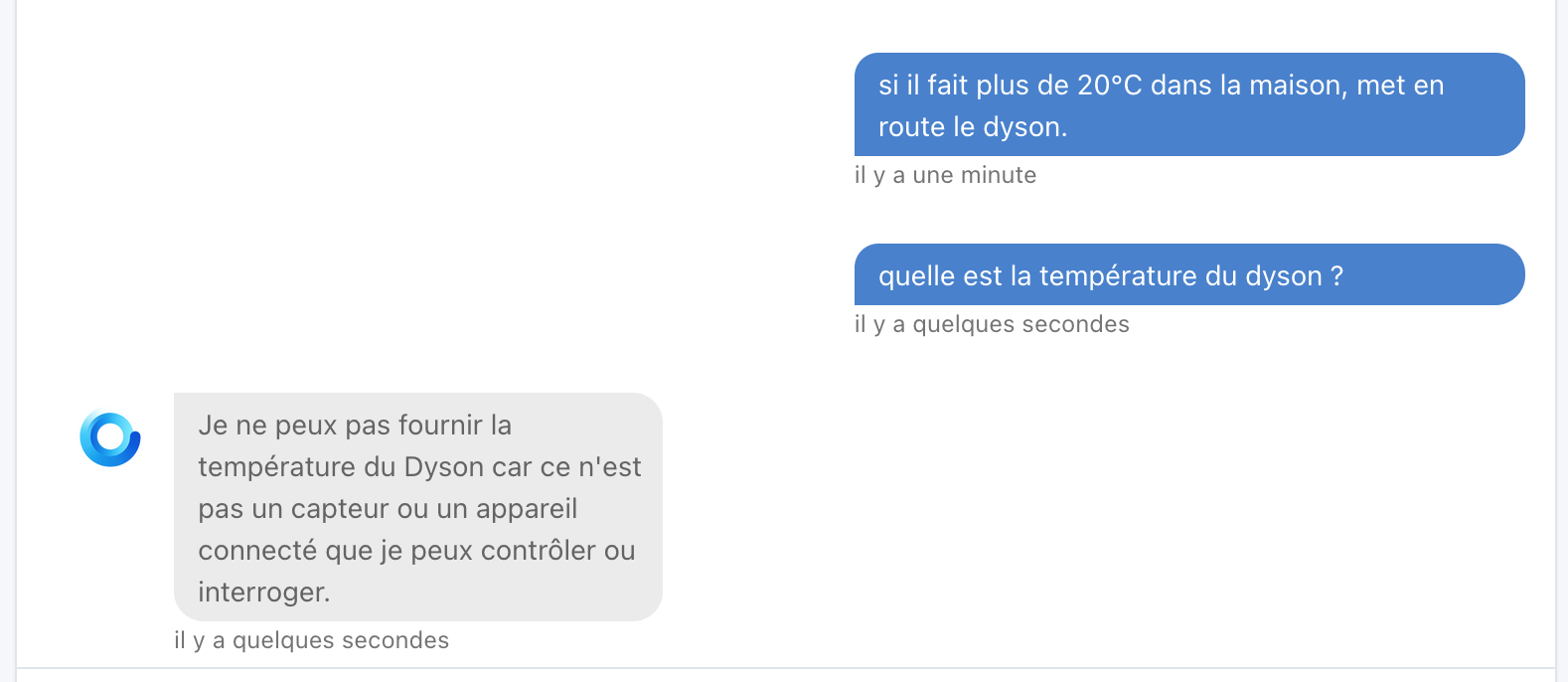
In any case it’s very promising and it responds better (at least I think) than ChatGPT in GladysPlus:

By the way, what would be the differences between chatting with Gladys/ChatGPT and your service?

1 Like

Great that you managed, you do need to add the port for it to work correctly with the IP.

Indeed, I see two errors. The line with the 404 is normal; for now I’ve only implemented the declaration of tools, there are several other MCP features including what’s called notifications, I’ll take care of that later. The line with the invalid schema error isn’t important. You don’t have a scene on your test docker, right?

Of course, I’ll try to do it soon.

These are two different AI implementations. Technically speaking, with Gladys Plus you make a request, the model identifies the request and sends Gladys the intent of the request and Gladys replies to you. Here, with the MCP service you talk with an agent external to Gladys that has the ability to read/write Gladys data while it creates your response. Functionally I’m not sure—I don’t use Gladys Plus’s ChatGPT—but with an agent+MCP you can chain questions, even use multiple devices in requests; I think if you configure your agent well you should have more possibilities with MCPs. That’s where Gladys Plus has an advantage: you don’t have to configure anything, the AI is implemented directly, and you can also use it in scenes.

1 Like

Hi @bertrandda, very cool little development :slight_smile:

Indeed, you need to authenticate the connection between the MCP client and Gladys, otherwise it’s a free-for-all ^^

@jean_bruder There’s ElevenLabs (the company I use notably for the voice of Gladys Plus!) that developed 11ai, a voice assistant that plugs into MCPs, so it’s compatible with this development:

2 Likes

Indeed, I don’t have one.

Would the goal be to have an agent+MCP add-on in Gladys in addition to/replacing ChatGPT, or to talk to Gladys from « outside » Gladys?
I must admit I don’t have a Google Home, Siri or Alexa because I’m not into cloud at all for those things, and maybe that’s where your dev fits in…

It’s still cloud in any case :stuck_out_tongue: The only way to run AI locally for now would be to have a machine with a good GPU, quite a bit of RAM and install an open-source model that runs locally, but well, it’s not cheap and it consumes a lot.
Afterwards, maybe we’ll have affordable mini-PCs with chips dedicated to AI in the future; it’s coming little by little on Beelink’s side with the Beelink SER9 for example (Available at €1599).

Performance is rather decent with simple prompts (Benchmark: Beelink | Performance Comparison between Beelink SER9 Pro HX370 and SER9 Pro AI), in my opinion this will become widespread in the future, we’re at the very beginning!

In the meantime, the cloud is a good option; it’s progressing so fast that it would be silly to equip yourself with hardware that would be obsolete in 6 months, whereas on the cloud side it’s constantly renewed and cost per token has only been decreasing for the past 2 years!

1 Like

[quote="pierre-gilles, post:

Very interesting project, but I see that MCPs must be accessible via a public URL for it to work. For now the service can only work if the agent is on the same network as Gladys. Once the service is stable locally, it might be worth creating an authenticated Gladys Plus route that redirects to the user’s MCP service — what do you think?

Totally! :slight_smile:

@mutmut I’ve just updated the image to add the switches. Can you check if that works for you and if it functions properly?

@bertrandda image updated but it doesn’t seem to work even though I do have switches

If you have any feedback from a real Zigbee plug I’d be interested. I developed this with virtual MQTT devices.

More broadly, I see that relying solely on selectors for device features may not be very relevant and, due to a lack of information, causes misunderstandings on the agent’s side. There’s certainly still room to improve this.

Hi @bertrandda,

Have you continued working on this topic since then, or not much? :slight_smile:

It’s really a nice topic, I think. Don’t hesitate to ask if you need help to move forward!

Yes, I’m still making progress — I recently added the session system and the resources to allow the agent to retrieve the house structure (not all agents are compatible with the resources but it will be interesting for those that are). I’ll push all that and generate a new image. What’s left mainly is the authentication part. I’m wondering whether there should be a global authentication (Gladys authenticates the origin of the request via an API key and then the service handles the response) or if I should do it directly at the service level (the service handles key generation + authentication). I think that at the Gladys level it would be cleaner and would allow having a real key system for all the other API routes, but it might take longer to develop.

So cool all of that :slightly_smiling_face:

For authentication, you told me that many systems require an API available on the internet — do you want me to make a Gladys Plus route available to you right now?

It’s pretty trivial to do on my side since we already have it working for several integrations (Owntracks, Netatmo, etc…)

It would look something like:

https://api.gladysgateway.com/v1/api/mcp/:CLE_API

Edit: I didn’t wait for your answer, I quickly made a small PR, with 3 routes:

GET https://api.gladysgateway.com/v1/api/mcp/:CLE_API
POST https://api.gladysgateway.com/v1/api/mcp/:CLE_API
DELETE https://api.gladysgateway.com/v1/api/mcp/:CLE_API

To match the 3 routes you have locally

Otherwise, for local authentication, we already have an API key mechanism in Gladys (see session.createApiKey), but for now it has never been exposed in the interface nor in any service, but it works :wink:

@bertrandda It’s available in PROD on Gladys Plus, you can use the 3 routes :wink:

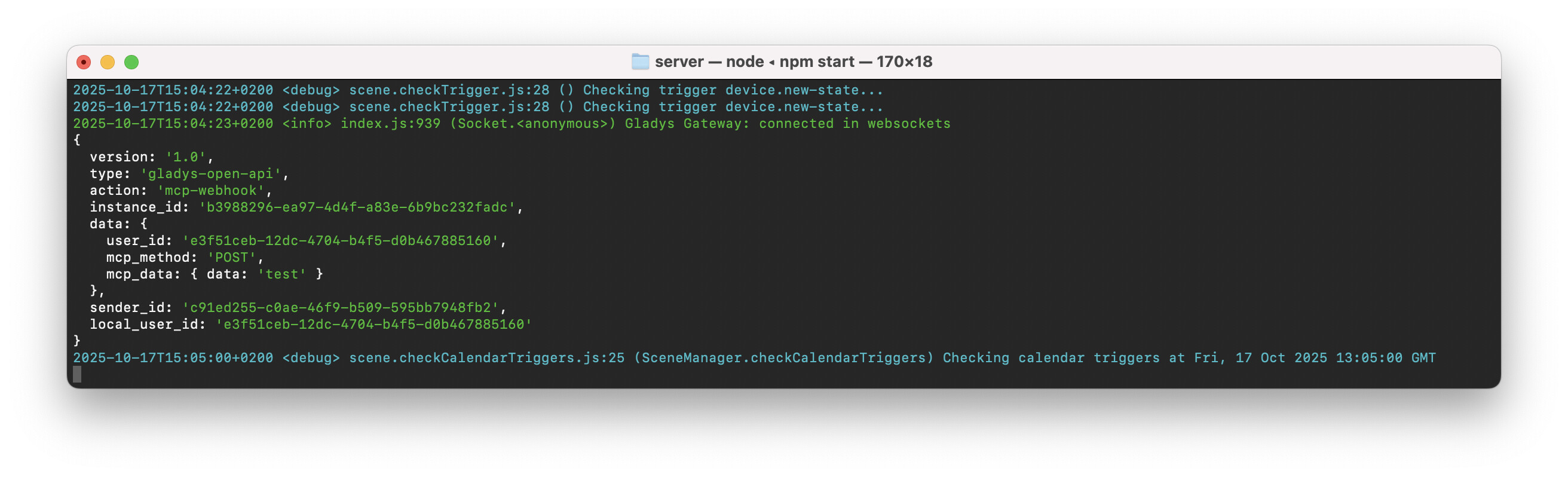
If you look at the code in gateway.handleNewMessage.js, you receive an event as soon as an API call arrives on the local instance, for testing I added this on my side at the end of the file:

  if (data.type === 'gladys-open-api' \u0026\u0026 data.action === 'mcp-webhook') {
    console.log(data);
    cb({ status: 200 });
  }

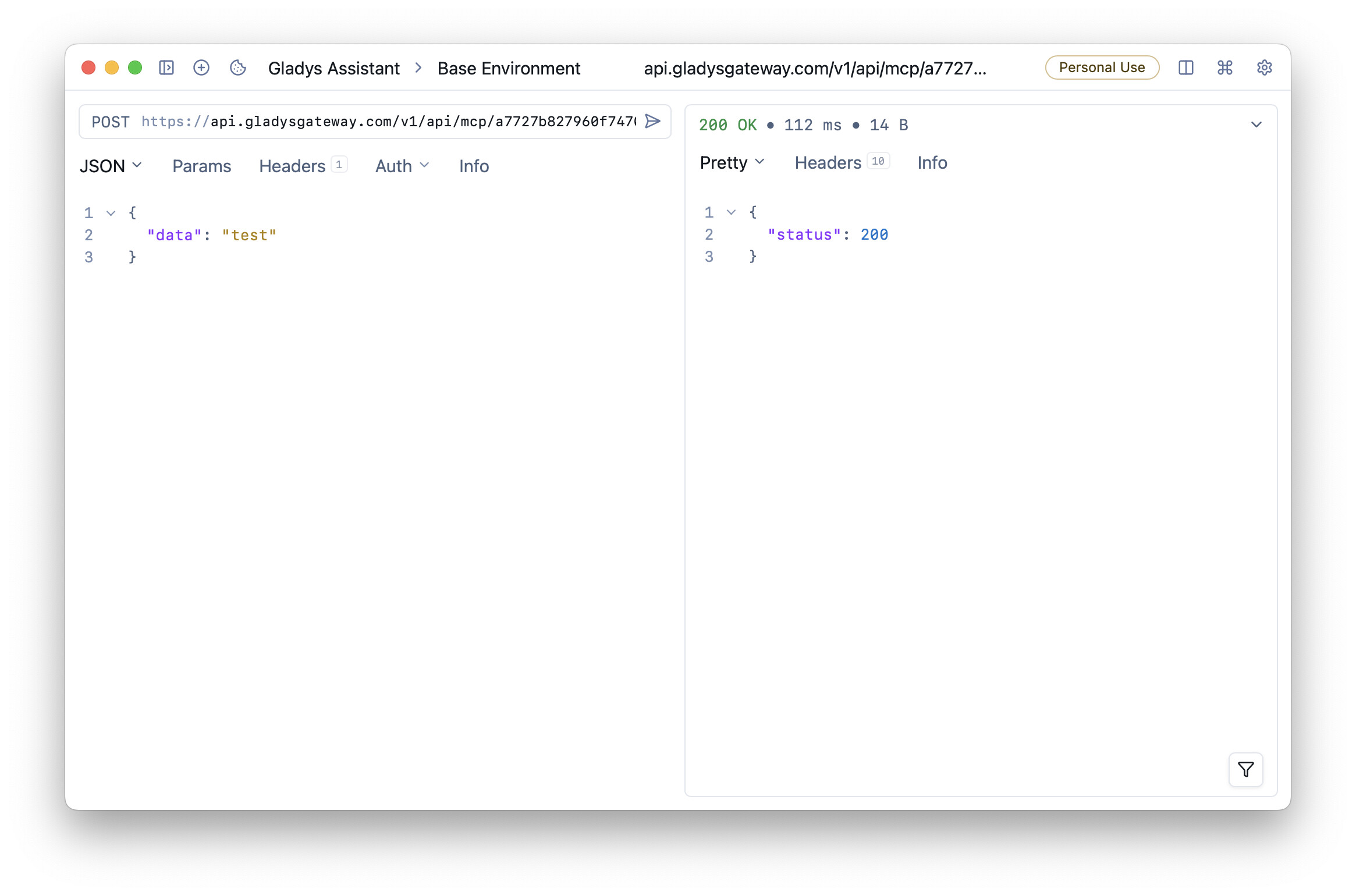
If I call the API with some data:

I do receive a « status »: 200 in response, and I can see the API call go through locally:

The mcp_method attribute will contain ‹ POST ›, ‹ GET › or ‹ DELETE ›.

The mcp_data attribute will contain the data passed in the body.

The local_user_id attribute corresponds to the local Gladys user’s ID.

You can call cb({ status: 200 }); with whatever you want; that’s what will send a JSON response back to the caller.

Don’t hesitate if you have any questions :wink:

At least, via Gladys Plus all authentication is already handled nicely and available through an open API, so it’s convenient for this kind of case.

2 Likes