Feature description
I have a wireless IKEA button that allows me to adjust the brightness of a bulb when it is directly associated with it.
Via Gladys and Zigbee2MQTT, I don’t have the possibility to do the same thing.
Node-Red allows this via an infinite loop, but it’s not great in terms of performance, database storage, and user experience.
I would like to be able to adjust the light intensity or light with buttons designed for this, which have a + and a -.
I was going to open a feature request today that also concerns the light sliders…
I’m responding here to see if I should create another topic or not in the end.
What is complicated when you have several bulbs is that they can all have the same brightness/color temperature… So here we do it by eye by playing with the slider.
I was thinking on my side of a display in numbers when you slide (like a cursor with a value written in it). That way you can easily adjust the bulbs to the same value.
Something like this: https://stackoverflow.com/questions/10004723/html5-input-type-range-show-range-value
But even better with the value integrated at the point of the slider that you move.
Good evening guim31,
To help out, I did this on Node-Red, I have 2 sliders and a display following the slider you move, the corresponding value is displayed, it’s not great but it does the job 
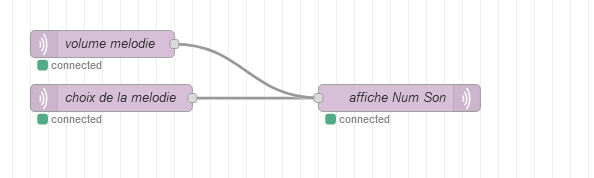
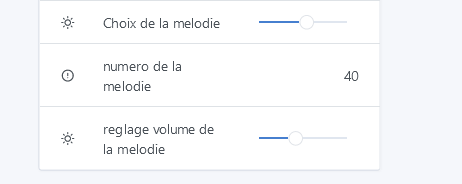
Indeed, it’s not ideal, but it’s a nice little hack! 
Except that in my case I have a physical button that is not managed by Gladys and not natively by Node-RED I think 
Otherwise, not bad the tip, it can be very practical!
Hello lmilcent,
Out of curiosity, what is this button?
Isn’t it compatible with a Hue bridge? I thought the bulbs were. But you need a Hue bridge to see it
I noticed that IKEA allows you to physically pair the +/- buttons with a bulb to control its brightness.
It doesn’t even go through a proprietary hub.
How could we set up this kind of pairing in Gladys? Because looking at triggers in scenes, we could do:
- Trigger on value
DOWN,Light Downor an equivalent action sent by the button - Decrease the brightness in steps, smoothly, as long as the button does not send another value (for example
STOPorUP). The user can choose the value in milliseconds between each step.
This way, Gladys uses few resources to dim a bulb, and the physical dimmer buttons are still managed via scenes.
I did a test in Node-RED, but my loop was too fast and caused 100% CPU usage.
I think this issue can be solved with a « While » action in scenes.
What this allows you to do:
While : action = « brightness_move_up » and brightness < 100
Then :
- Brightness = brightness + 10
- Wait 200ms
I think there could be a feature request for this « while » block 
However, that will come after this topic is finished :
In theory, it’s a good solution.
In practice, it needs to be tested for this particular case.
I had to make a « pair » in Z2M directly so that the button could control my bulb’s brightness in a « smooth » way.
Otherwise manually, with NodeRed for example, you could see the different brightness levels in steps, without it being « smooth ». Not bothersome but less pleasant to live with.
Okay, so does this feature request still make sense?
Yes, basically the idea is to offer an option in the Gladys service to configure the button / LED pair, as you can do manually in Z2M.
So that nobody has to use the Z2M UI, and can do everything in Gladys.
Honestly, I don’t know if we want to copy this feature into Gladys if it already exists in Zigbee2mqtt.
And I’m not sure we want to highlight this feature; pairing a button with a lamp brings a lot of drawbacks: for one, you can no longer use the button in Gladys.
So you end up with a « simple » button that only does on/off/brightness control. For me, the whole point of Gladys is to be able to make smart buttons.
For example, at my place all my IKEA buttons have different behaviors depending on the time of day: during the day, they turn the ceiling light on at full power, and at night they turn on the LED strip on the floor (no ceiling light), or set the ceiling light to reduced brightness. To get full power at night, I configured a long press on the button.
If I had paired my button, I wouldn’t have been able to do any of that!
[quote=« pierre-gilles, post:14, topic:6909 »]
For example, at my
It’s true that it’s a major drawback.
The « while » loop remains useful in many cases; I’ll make the request!
I propose closing this request.