Hello,
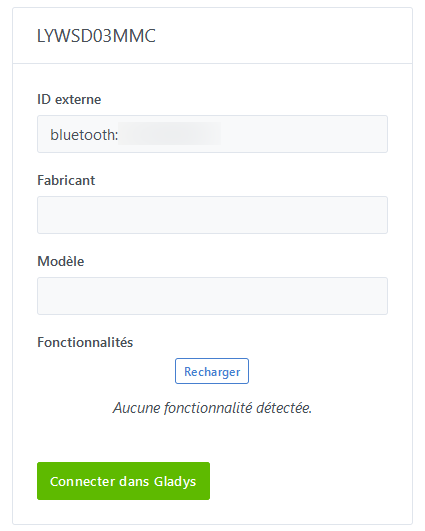
I just tested the module in Gladys, and my humidity and temperature sensors are not recognized.
Any idea how I can get more info from the logs?
Gladys is running the official Docker version for now.
Yes indeed, that’s the very subject of the discussion. Not having this device myself, I’m asking for help from those who have it and are a bit technical.
I started the container with the environment variable NODE_ENV=dev but I no longer see any logs. Is this normal?
My mistake, I just reread all the messages and I understand the extent of the problem better.
Well, rather there are many problems.
In itself, I have 6 sensors (one per room), I can send you one to help you dev in better conditions!
It would be a medium-term loan, let’s say 
Send me your postal address in a message and we’ll organize it if you’re interested.
Hello @AlexTrovato,
I also wanted to debug a bit with your software to include my Aqara Bluetooth temperature sensors.
I followed the installation instructions you wrote on GitHub to the letter, but when I run npm start, I get this error:
 pi@gladys:~/gladys-bluetooth-analyzer $ npm start

> gladys-bluetooth-analyzer@1.0.0 start
> node index.js

node:internal/modules/cjs/loader:928
  throw err;
  ^
Error: Cannot find module '../../gladys/server/services/bluetooth/lib/utils/bluetooth.getCharacteristic'
Require stack:
- /home/pi/gladys-bluetooth-analyzer/services/xiaomi/LYWSD03MMC.js
- /home/pi/gladys-bluetooth-analyzer/services/xiaomi/run.js
- /home/pi/gladys-bluetooth-analyzer/services/xiaomi/index.js
- /home/pi/gladys-bluetooth-analyzer/services/index.js
- /home/pi/gladys-bluetooth-analyzer/steps/serviceSelection.js
- /home/pi/gladys-bluetooth-analyzer/steps/index.js
- /home/pi/gladys-bluetooth-analyzer/index.js
    at Function.Module._resolveFilename (node:internal/modules/cjs/loader:925:15)
    at Function.Module._load (node:internal/modules/cjs/loader:769:27)
    at Module.require (node:internal/modules/cjs/loader:997:19)
    at require (node:internal/modules/cjs/helpers:92:18)
    at Object.<anonymous> (/home/pi/gladys-bluetooth-analyzer/services/xiaomi/LYWSD03MMC.js:1:31)
    at Module._compile (node:internal/modules/cjs/loader:1108:14)
    at Object.Module._extensions..js (node:internal/modules/cjs/loader:1137:10)
    at Module.load (node:internal/modules/cjs/loader:973:32)
    at Function.Module._load (node:internal/modules/cjs/loader:813:14)
    at Module.require (node:internal/modules/cjs/loader:997:19)
    at require (node:internal/modules/cjs/helpers:92:18)
    at Object.<anonymous> (/home/pi/gladys-bluetooth-analyzer/services/xiaomi/run.js:3:20)
    at Module._compile (node:internal/modules/cjs/loader:1108:14)
    at Object.Module._extensions..js (node:internal/modules/cjs/loader:1137:10)
    at Module.load (node:internal/modules/cjs/loader:973:32)
    at Function.Module._load (node:internal/modules/cjs/loader:813:14)
    at Module.require (node:internal/modules/cjs/loader:997:19)
    at require (node:internal/modules/cjs/helpers:92:18)
    at Object.<anonymous> (/home/pi/gladys-bluetooth-analyzer/services/xiaomi/index.js:1:17)
    at Module._compile (node:internal/modules/cjs/loader:1108:14)
    at Object.Module._extensions..js (node:internal/modules/cjs/loader:1137:10)
    at Module.load (node:internal/modules/cjs/loader:973:32) {
  code: 'MODULE_NOT_FOUND',
  requireStack: [
    '/home/pi/gladys-bluetooth-analyzer/services/xiaomi/LYWSD03MMC.js',
    '/home/pi/gladys-bluetooth-analyzer/services/xiaomi/run.js',
    '/home/pi/gladys-bluetooth-analyzer/services/xiaomi/index.js',
    '/home/pi/gladys-bluetooth-analyzer/services/index.js',
    '/home/pi/gladys-bluetooth-analyzer/steps/serviceSelection.js',
    '/home/pi/gladys-bluetooth-analyzer/steps/index.js',
    '/home/pi/gladys-bluetooth-analyzer/index.js'
  ]
}
npm ERR! code 1
npm ERR! path /home/pi/gladys-bluetooth-analyzer
npm ERR! command failed
npm ERR! command sh -c node index.js

npm ERR! A complete log of this run can be found in:
npm ERR!     /home/pi/.npm/_logs/2020-12-14T21_11_46_098Z-debug.log
The debug file logs:
pi@gladys:~ $ cat /home/pi/.npm/_logs/2020-12-14T21_11_46_098Z-debug.log
0 verbose cli [ '/usr/bin/node', '/usr/bin/npm', 'start' ]
1 info using npm@7.0.15
2 info using node@v15.4.0
3 timing config:load:defaults Completed in 7ms
4 timing config:load:file:/usr/lib/node_modules/npm/npmrc Completed in 8ms
5 timing config:load:builtin Completed in 9ms
6 timing config:load:cli Completed in 7ms
7 timing config:load:env Completed in 1ms
8 timing config:load:file:/home/pi/gladys-bluetooth-analyzer/.npmrc Completed in 0ms
9 timing config:load:project Completed in 3ms
10 timing config:load:file:/home/pi/.npmrc Completed in 0ms
11 timing config:load:user Completed in 0ms
12 timing config:load:file:/usr/etc/npmrc Completed in 0ms
13 timing config:load:global Completed in 1ms
14 timing config:load:cafile Completed in 1ms
15 timing config:load:validate Completed in 1ms
16 timing config:load:setUserAgent Completed in 2ms
17 timing config:load:setEnvs Completed in 4ms
18 timing config:load Completed in 37ms
19 verbose npm-session fadeba8c89d8068d
20 timing npm:load Completed in 73ms
21 timing command:run-script Completed in 848ms
22 timing command:start Completed in 859ms
23 verbose stack Error: command failed
23 verbose stack     at ChildProcess.<anonymous> (/usr/lib/node_modules/npm/node_modules/@npmcli/promise-spawn/index.js:64:27)
23 verbose stack     at ChildProcess.emit (node:events:376:20)
23 verbose stack     at maybeClose (node:internal/child_process:1063:16)
23 verbose stack     at Process.ChildProcess._handle.onexit (node:internal/child_process:295:5)
24 verbose pkgid gladys-bluetooth-analyzer@1.0.0
25 verbose cwd /home/pi/gladys-bluetooth-analyzer
26 verbose Linux 5.4.51-v7+
27 verbose argv "/usr/bin/node" "/usr/bin/npm" "start"
28 verbose node v15.4.0
29 verbose npm  v7.0.15
30 error code 1
31 error path /home/pi/gladys-bluetooth-analyzer
32 error command failed
33 error command sh -c node index.js
34 verbose exit 1
Thank you
Indeed, there was a small refactoring on the Bluetooth service, I just updated the utility code, it now starts.
It seems to have worked, right? I left the default selection values
✔ This tool is used to test your Bluetooth device with Gladys, do you want to continue? … yes
✔ Select the service you want to test › Generic
✔ Next step is scanning for Bluetooth devices, continue? … yes
✔ Select device you want to analyse: › 58:2d:34:36:30:69
 → Device:
    - Name: 58:2d:34:36:30:69
    - Model: Duck_Release
    - 1 features
      - battery / integer
    - 2 params
      - loaded: true
      - manufacturer: Cleargrass Inc
✔ Continue with Generic service on this device? … yes
Now executing Generic steps...
✔ This mode will try to scan your peripheral to get maximum information, continue? … yes
No services found.
 → Peripheral:
   → Address type: public
   → Connectable: true
   → Advertisement:
     → Local name: undefined
     → Services:
   → Services (0):
✔ Did your analyse ends with success? … yes
HURRAY!!!
Please give back following data on https://github.com/atrovato/gladys-bluetooth-analyzer/issues GitHub issues
Bye!
pi@gladys:~/gladys-bluetooth-analyzer $
With this information, I can only say that your device has a battery 
However, the second part should list at least one service, the battery service, but it says 0. Could you try again, leaving 1 minute between the two steps?
 This tool is used to test your Bluetooth device with Gladys, do you want to continue? … yes
Select the service you want to test › Generic
Next step is scanning for Bluetooth devices, continue? … yes
Select device you want to analyse: › 58:2d:34:36:30:69
→ Device:
- Name: 58:2d:34:36:30:69
- Model: Duck_Release
- 1 features
- battery / integer
- 2 params
- loaded: true
- manufacturer: Cleargrass Inc
Continue with Generic service on this device? … yes
Now executing Generic steps…
This mode will try to scan your peripheral to get maximum information, continue? … yes
No services found.
→ Peripheral:
→ Address type: public
→ Connectable: true
→ Advertisement:
→ Local name: MJ_HT_V1
→ Services: 180f,180a
→ Services (0):
Did your analyse ends with success? … yes
HURRAY!!!
Please give back following data on Issues · atrovato/gladys-bluetooth-analyzer · GitHub GitHub issues
Bye!
It’s a humidity and temperature sensor, so it should provide 3 services, right?
According to what I’ve seen on other applications, to retrieve the values, you need to subscribe to one of the device’s services, and the device sends its information to its subscribers.
However, from this part:
[quote=« Jean34, post:52, topic:5669 »]
- Peripheral:
   - Address type: public
   - Connectable: true
   - Advertisement:
     - Local name: MJ_HT_V1
     - Services: 180f,180a
   - Services (0):
there are no services available (Services 0).
It is possible that my utility is not complete.
Have you tried the other mode?
I just added more logs to the Generic mode. But I’m not sure about it (still developing blindly).
@lmilcent sorry I forgot to reply to you, thanks for your suggestion, but I will refuse, as I’m not sure I have enough availability to work on the subject quickly, it may turn into a long term. And in the end, it would be cheaper in shipping costs than I buy one.
However, I’m surprised that no dev has this sensor…
No problem 
I agree with you, given the price and the usefulness of the sensor, I’m surprised that few developers own one.
Hi, these are sensors from AliExpress or Bangood, I’m not sure. I’ll check it out soon, but right now I’m not sure where I need to register. I’ll look into it, thanks for your responses anyway. I’ll also try the other mode and send you the feedback.
[quote=« Jean34, post:56, topic:5669 »]où je dois m’inscrire
[/quote]
This is developer language, I think…
This is not for you to do, it’s @AlexTrovato’s tool that needs to do it, but first he needs to find the list of services.
re, first generic tests
✔ This tool is used to test your Bluetooth device with Gladys, do you want to continue? … yes
✔ Next step is scanning for Bluetooth devices, continue? … yes
✔ Select device you want to analyze: › 58:2d:34:36:30:69 - MJ_HT_V1
◓ Exploring 58:2d:34:36:30:69 device information...noble warning: unknown peripheral 582d34363069
◑ Exploring 58:2d:34:36:30:69 device information...noble warning: unknown peripheral 582d34363069
◒ Exploring 58:2d:34:36:30:69 device information...noble warning: unknown peripheral 582d34363069
◐ Exploring 58:2d:34:36:30:69 device information...noble warning: unknown peripheral 582d34363069
◓ Exploring 58:2d:34:36:30:69 device information...noble warning: unknown peripheral 582d34363069
◑ Exploring 58:2d:34:36:30:69 device information...noble warning: unknown peripheral 582d34363069
 → Device:
    - Name: MJ_HT_V1
    - Model: undefined
    - 0 features
    - 1 params
      - loaded: true
✔ Select the service you want to test › Generic
Now executing Generic steps...
✔ This mode will try to scan your peripheral to get maximum information, continue? … yes
◓ Connecting to device...SubError [TimeoutError]: operation timed out
    at afterTimeout (/home/pi/gladys-bluetooth-analyzer/gladys/server/services/bluetooth/node_modules/bluebird/js/release/timers.js:46:19)
    at Timeout.timeoutTimeout [as _onTimeout] (/home/pi/gladys-bluetooth-analyzer/gladys/server/services/bluetooth/node_modules/bluebird/js/release/timers.js:76:13)
    at listOnTimeout (node:internal/timers:556:17)
    at processTimers (node:internal/timers:499:7)
pi@gladys:~/gladys-bluetooth-analyzer $
second attempt, after 1 minute wait between the 2 scans
✔ This tool is used to test your Bluetooth device with Gladys, do you want to continue? … yes
✔ Next step is scanning for Bluetooth devices, continue? … yes
✔ Select device you want to analyze: › 58:2d:34:36:30:69 - MJ_HT_V1
◒ Exploring 58:2d:34:36:30:69 device information...noble warning: unknown peripheral 582d34363069
◐ Exploring 58:2d:34:36:30:69 device information...noble warning: unknown peripheral 582d34363069
◓ Exploring 58:2d:34:36:30:69 device information...noble warning: unknown peripheral 582d34363069
◑ Exploring 58:2d:34:36:30:69 device information...noble warning: unknown peripheral 582d34363069
◒ Exploring 58:2d:34:36:30:69 device information...noble warning: unknown peripheral 582d34363069
◐ Exploring 58:2d:34:36:30:69 device information...noble warning: unknown peripheral 582d34363069
 → Device:
    - Name: MJ_HT_V1
    - Model: undefined
    - 0 features
    - 1 params
      - loaded: true
✔ Select the service you want to test › Generic
Now executing Generic steps...
✔ This mode will try to scan your peripheral to get maximum information, continue? … yes
No services found.
 → Peripheral:
   → Address type: public
   → Connectable: true
   → Advertisement:
     → Local name: MJ_HT_V1
     → Services: 180f,180a
     → Service data: [object Object],[object Object]
   → Services (0):
✔ Did your analysis end with success? … yes
HURRAY!!!
Please give back the following data on https://github.com/atrovato/gladys-bluetooth-analyzer/issues GitHub issues
Bye!
pi@gladys:~/gladys-bluetooth-analyzer $
3rd in Xiaomi mode
✔ This tool is used to test your Bluetooth device with Gladys, do you want to continue? … yes
✔ Next step is scanning for Bluetooth devices, continue? … yes
✔ Select device you want to analyze: › 58:2d:34:36:30:69 - MJ_HT_V1
 → Device:
    - Name: MJ_HT_V1
    - Model: Duck_Release
    - 1 features
      - battery / integer
    - 2 params
      - loaded: true
      - manufacturer: Cleargrass Inc
✔ Select the service you want to test › Xiaomi
Now executing Xiaomi steps...
✔ Select model you want to check: › LYWSD03MMC
NotFoundError: Bluetooth: no services found for 582d34363069
    at /home/pi/gladys-bluetooth-analyzer/gladys/server/services/bluetooth/lib/utils/peripheral/bluetooth.discoverServices.js:27:23
    at Peripheral.<anonymous>tooth-analyzer/gladys/server/services/bluetooth/node_modules/@abandonware/noble/lib/peripheral.js:81:7)
    at Object.onceWrapper (node:events:483:26)
    at Peripheral.emit (node:events:376:20)
    at Noble.onServicesDiscover (/home/pi/gladys-bluetooth-analyzer/gladys/server/services/bluetooth/node_modules/@abandonware/noble/lib/noble.js:309:16)
    at NobleBindings.emit (node:events:376:20)
    at NobleBindings.onServicesDiscovered (/home/pi/gladys-bluetooth-analyzer/gladys/server/services/bluetooth/node_modules/@abandonware/noble/lib/hci-socket/bindings.js:317:8)
    at Gatt.emit (node:events:376:20)
    at Object.callback (/home/pi/gladys-bluetooth-analyzer/gladys/server/services/bluetooth/node_modules/@abandonware/noble/lib/hci-socket/gatt.js:369:12)
    at Gatt.onAclStreamData (/home/pi/gladys-bluetooth-analyzer/gladys/server/services/bluetooth/node_modules/@abandonware/noble/lib/hci-socket/gatt.js:133:26)
    at AclStream.emit (node:events:388:22)
    at AclStream.push (/home/pi/gladys-bluetooth-analyzer/gladys/server/services/bluetooth/node_modules/@abandonware/noble/lib/hci-socket/acl-stream.js:33:10)
    at NobleBindings.onAclDataPkt (/home/pi/gladys-bluetooth-analyzer/gladys/server/services/bluetooth/node_modules/@abandonware/noble/lib/hci-socket/bindings.js:288:15)
    at Hci.emit (node:events:376:20)
    at Hci.onSocketData (/home/pi/gladys-bluetooth-analyzer/gladys/server/services/bluetooth/node_modules/@abandonware/noble/lib/hci-socket/hci.js:501:14)
    at BluetoothHciSocket.emit (node:events:376:20)
pi@gladys:~/gladys-bluetooth-analyzer $
le flower care en generic
✔ This tool is used to test your Bluetooth device with Gladys, do you want to continue? … yes
✔ Next step is scanning for Bluetooth devices, continue? … yes
✔ Select device you want to analyze: › c4:7c:8d:6a:45:7d - Flower care
◐ Exploring c4:7c:8d:6a:45:7d device information...noble warning: unknown peripheral c47c8d6a457d
◓ Exploring c4:7c:8d:6a:45:7d device information...noble warning: unknown peripheral c47c8d6a457d
◑ Exploring c4:7c:8d:6a:45:7d device information...noble warning: unknown peripheral c47c8d6a457d
◒ Exploring c4:7c:8d:6a:45:7d device information...noble warning: unknown peripheral c47c8d6a457d
◐ Exploring c4:7c:8d:6a:45:7d device information...noble warning: unknown peripheral c47c8d6a457d
◓ Exploring c4:7c:8d:6a:45:7d device information...noble warning: unknown peripheral c47c8d6a457d
 -> Device:
    - Name: Flower care
    - Model: undefined
    - 0 features
    - 1 params
      - loaded: true
✔ Select the service you want to test › Generic
Now executing Generic steps...
✔ This mode will try to scan your peripheral to get maximum information, continue? … yes
No services found.
 -> Peripheral:
   -> Address type: public
   -> Connectable: true
   -> Advertisement:
     -> Local name: Flower care
     -> Services: fe95
     -> Service data: [object Object]
✔ Did your analysis end with success? … yes
HURRAY!!!
Please give back the following data on https://github.com/atrovato/gladys-bluetooth-analyzer/issues GitHub issues
Bye!
pi@gladys:~/gladys-bluetooth-analyzer $
en xiaomi
✔ This tool is used to test your Bluetooth device with Gladys, do you want to continue? … yes
✔ Next step is scanning for Bluetooth devices, continue? … yes
✔ Select device you want to analyze: › c4:7c:8d:6a:45:7d
 -> Device:
    - Name: c4:7c:8d:6a:45:7d
    - Model: undefined
    - 0 features
    - 1 params
      - loaded: true
✔ Select the service you want to test › Xiaomi
Now executing Xiaomi steps...
✔ Select model you want to check: › LYWSD03MMC
NotFoundError: Bluetooth: no services found for c47c8d6a457d
    at /home/pi/gladys-bluetooth-analyzer/gladys/server/services/bluetooth/lib/utils/peripheral/bluetooth.discoverServices.js:27:23
    at Peripheral.<anonymous> (/home/pi/gladys-bluetooth-analyzer/gladys/server/services/bluetooth/node_modules/@abandonware/noble/lib/peripheral.js:81:7)
    at Object.onceWrapper (node:events:483:26)
    at Peripheral.emit (node:events:376:20)
    at Noble.onServicesDiscover (/home/pi/gladys-bluetooth-analyzer/gladys/server/services/bluetooth/node_modules/@abandonware/noble/lib/noble.js:309:16)
    at NobleBindings.emit (node:events:376:20)
    at NobleBindings.onServicesDiscovered (/home/pi/gladys-bluetooth-analyzer/gladys/server/services/bluetooth/node_modules/@abandonware/noble/lib/hci-socket/bindings.js:317:8)
    at Gatt.emit (node:events:376:20)
    at Object.callback (/home/pi/gladys-bluetooth-analyzer/gladys/server/services/bluetooth/node_modules/@abandonware/noble/lib/hci-socket/gatt.js:369:12)
    at Gatt.onAclStreamData (/home/pi/gladys-bluetooth-analyzer/gladys/server/services/bluetooth/node_modules/@abandonware/noble/lib/hci-socket/gatt.js:133:26)
    at AclStream.emit (node:events:388:22)
    at AclStream.push (/home/pi/gladys-bluetooth-analyzer/gladys/server/services/bluetooth/node_modules/@abandonware/noble/lib/hci-socket/acl-stream.js:33:10)
    at NobleBindings.onAclDataPkt (/home/pi/gladys-bluetooth-analyzer/gladys/server/services/bluetooth/node_modules/@abandonware/noble/lib/hci-socket/bindings.js:288:15)
    at Hci.emit (node:events:376:20)
    at Hci.onSocketData (/home/pi/gladys-bluetooth-analyzer/gladys/server/services/bluetooth/node_modules/@abandonware/noble/lib/hci-socket/hci.js:501:14)
    at BluetoothHciSocket.emit (node:events:376:20)
pi@gladys:~/gladys-bluetooth-analyzer $
another bluetooth sensor from the same brand as the first one
✔ This tool is used to test your Bluetooth device with Gladys, do you want to continue? … yes
✔ Next step is scanning for Bluetooth devices, continue? … yes
✔ Select device you want to analyze: › 58:2d:34:35:e1:6b - MJ_HT_V1
 -> Device:
- Name: MJ_HT_V1
- Model: Duck_Release
- 1 features
  - battery / integer
- 2 params
  - loaded: true
  - manufacturer: Cleargrass Inc
✔ Select the service you want to test › Generic
Now executing Generic steps...
✔ This mode will try to scan your peripheral to get maximum information, continue? … yes
No services found.
 -> Peripheral:
   -> Address type: public
   -> Connectable: true
   -> Advertisement:
 -> Local name: MJ_HT_V1
 -> Services: 180f,180a
 -> Service data: [object Object],[object Object]
   -> Services (0):
✔ Did your analysis end with success? … yes
HURRAY!!!
Please give back the following data on https://github.com/atrovato/gladys-bluetooth-analyzer/issues GitHub issues
Bye!
pi@gladys:~/gladys-bluetooth-analyzer $
Yes, sorry, when I say « subscribe » I mean the utility on the device.
For the Xiaomi LYWSD03MMC, it is not possible to read the data, the only way is for the device to send it, and therefore to do this, you need to subscribe so that it knows who to send it to.
So I think I understand that the Cleargrass is not exactly the same model as the LYWSD03MMC, so it’s not certain that it will work with this version, I need to do some research to see if it integrates.
Also, I see that you have updated the tool, but you need to run npm install again because I see that some information is missing.
For the Flower care, great for the information, I will take it into account ASAP (and I think it was managed by the Bluetooth module of the V3, I will see what was developed).
Thanks for all this, I just need to put it into practice.
(we might create a special topic on the forum to lighten this one and split by device?)
Yes, I did perform a git pull and then npm install before starting, and I didn’t encounter any errors except the first time when it mentioned a duplicate in the file used for installation; I don’t remember the name, and I’m on my phone right now… I renamed it to old and ran the command again without any errors.
Otherwise, yes, why not differentiate devices by topic, no problem for me.
Thanks for the information, I’ll look into it
For those who might be interested, the sources for the Mozilla WebThings Xiaomi addon are here:
Off-topic
This project is a bit obscure, I wanted to try it to test under Docker and in fact, the project is now under the name WebThings and outside of Mozilla.