Hello @AlexTrovato,
Have you found any new elements?
Now that I have a running Gladys instance, I can test with the bluetooth module and my LYWSD03MMC.
For now, they are detected, but no data received.
Hello @AlexTrovato,
Have you found any new elements?
Now that I have a running Gladys instance, I can test with the bluetooth module and my LYWSD03MMC.
For now, they are detected, but no data received.
Hello, no I haven’t had time to look. I’ll get back to it as soon as I have time.
What should I look for? If I have a bit of time, I would like to try knowing that I have a Gladys dev and the famous temperature sensors in question.
You can try to explain to me in MP, or here, or via video call, so to speak 
In short, you need to find the service and characteristic on the device that allows you to retrieve the data you want.
On Raspberry Pi, you’re talking about gattool in the command line. Once you manage to retrieve the information through it, you’ll then need to code it in NodeJS, but my priority is first to find the right services/characteristics to read on the device.
With all these keywords, I think Google will give you plenty of examples 
I found an interesting project that could even help us with some technologies.
@AlexTrovato have you seen what they offer?
It’s a kind of broker that allows you to connect to multiple home automation devices (433mhz, Bluetooth, infrared, Lora, etc.) and retransmits everything via MQTT.
Hi Alex,
You found this article (in French) that describes what you seem to be looking for for the Xiaomi LYWSD03MMC model.
Happy (re)reading
And the article describes all the steps in detail, great find!
I was following the procedure from another blog, but I had errors with the Bluetooth connections… It’s great that it’s already written on your link 
After a bit more research, there are two possibilities to read the data from the LYWSD03MMC sensors.
Connect via BLE and read the data knowing the services and characteristics.
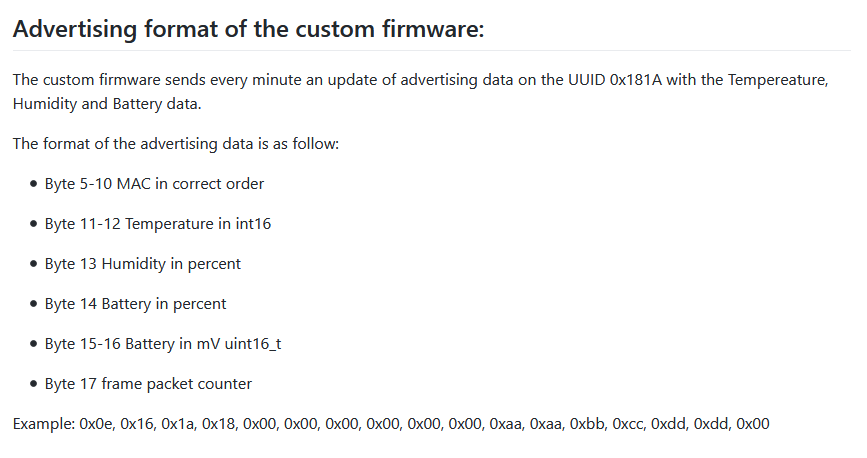
Read the broadcast message sent every minute, which does not require establishing a connection. Obviously, this solution is extremely energy-efficient as it never directly interacts with the sensor.
Unfortunately, point 2) requires decrypting the message by retrieving the decryption key beforehand.
But an alternative solution exists: flash a firmware (via your phone) to disable the encryption part.
The other advantage is that the services and characteristics are already indicated @AlexTrovato:
I will test this tutorial and give you feedback here!
I followed the tutorial and the flash works great (Chrome on W10).
A few points to note, however:
Two questions come to mind, knowing that this custom firmware allows you to read the sensor data without connecting to it and thus greatly save battery life:
Do you think it’s possible, @pierre-gilles and @AlexTrovato, to indicate in the prerequisites for this sensor that it needs to be flashed to use it?
Can we propose two modes of operation? One with regular BLE connection to the device and the other in passive mode by reading the data sent every 1 minute?
If this is the only way to use it with Gladys, yes we need to tell the user! (doc + UI)
The simplest way, certainly.
Also the most energy-efficient (passive scan).
I agree, in this case the service should display an info line with a link to the doc for sensors recognized as LYWSD03MMC.
Hello @imilicent
You put me on the right track with the sensor flash with the ATC firmware
I found a Python library that imports sensor data into MQTT
It works rather well except for the battery with a lot of tinkering
This is the library JsBergbau/MiTemperature2: Read the values of the Xiaomi Mi Bluetooth Temperature sensor 2 (github.com)
![upload://c1ZdgZnyY93zYznfNs5Nv5aqKxa.jpeg]
![upload://iyP3fQiroIwqFQI5XLktxr2HYUn.jpeg]
Integrating this into Gladys seems complicated
This solution suits me until I find something better
I’ll see about making a tutorial, in the meantime I’ve ordered other Xiaomi devices to test
Now all that’s left is to transpose all this into Node.js
Out of curiosity, I still rolled back a sensor to its original firmware version and surprisingly it also works without changing anything
However, I had to disable Bluetooth on Gladys so that my script behind it can scan my devices
Hellooooooo
Je up le topic, on va bientôt rentrer en mode « winter » et c’est là que Gladys fonctionne à fond pour moi ! ^^
Bref, quelqu’un travaille toujours sur la reconnaissance des capteurs bluetooth de Xiaomi ?
To my knowledge @Hamtaro
You have the field free
Hello,
I gave it a try: I flashed a sensor, installed the JsBergbau library on a pi zero; I manage to retrieve the values but I can’t format them correctly to send them via mqtt to gladys. Do you have any tips on the correct configuration please?
Thanks in advance.
Just a quick update on these Bluetooth sensors.
Due to their screen, I suppose, the battery lasts barely a year, compared to just 10% used on my Xiaomi Zigbee sensors.
I’m quite disappointed with the battery life, which generates a lot of waste in the end 
[Edit]
Except for the Bluetooth sensor that I flashed, which has been telling me the battery is low since the day of the flash, but it still works!
I managed to tinker with a new script, I can retrieve the values in Gladys.