@VonOx I’m creating a topic to talk about development!
So, should we set up a lightweight nginx-proxy to indicate that the image is being installed? 
@VonOx I’m creating a topic to talk about development!
So, should we set up a lightweight nginx-proxy to indicate that the image is being installed?
The page (the app rather) should be able to check the Docker part, that’s why it’s in Go for HA I think (to avoid grabbing 200Mb of npm packages).
The idea is to return a landing page on the same port as the one used by Gladys with all the hassles that come with it (if port 80 is used, Gladys won’t start). I haven’t thought much about it, I don’t know if you already have something in mind
I see the idea!
We can also make a small backend in Go, it shouldn’t be that complicated
Actually, what I see:
A container that serves a simple HTML page saying « Gladys is being configured. We are downloading the latest version of Gladys from the internet, depending on your internet connection, this can take from a few minutes to an hour »
Ideally, a progress bar shows the download progress, and errors in case of error.
Actually, the first install process can basically do:
No port issue there
I had made a small service that handled creating the containers, I just had to manage the waiting docker in addition. An image that serves a static or non-static page but extremely light. It’s the OS that manages it
By the way, I just realized it’s not up to date
https://github.com/VonOx/gladys-pi-gen/blob/gladys/gladys/02-init-gladys/files/init-containers.sh
So which one do we go with, Docker load or Docker pull?
If we create a waiting page, Docker pull could be okay, right?
Yes yes docker pull, I need to update the scripts because there’s no longer a need to include the docker images in the OS.
Vite does this gives this
Creation of the landing container
Pull the rest
Just before creating the gladys container, I stop delete the landing
#!/bin/sh

TIMEZONE=$(cat /etc/timezone)

docker_images_watchtower=$(docker images -q containrrr/watchtower)
docker_images_gladys=$(docker images -q gladysassistant/gladys)
docker_images_gladyslanding=$(docker images -q gladysassistant/gladyslanding)

# First boot, we need to be sure Landing image / container exist
if [ -n "$docker_images_gladyslanding" ]; then
  logger -t "gladys-init" "Gladys Landing image exist, Cool...."
else
  logger -t "gladys-init" "Gladys Landing image is missing, creating them...."
  docker run -d \
    --name gladys-landing \
    TODODODODODODODOD
fi

if [ -n "$docker_images_watchtower" ]; then
  logger -t "gladys-init" "Watchtower container exist, Cool...."
else
  logger -t "gladys-init" "Watchtower container missing, creating them...."
  docker run -d \
    --name watchtower \
    --restart=always \
    -v /var/run/docker.sock:/var/run/docker.sock \
    containrrr/watchtower \
    --cleanup
fi

if [ -n "$docker_images_gladys" ]; then
  logger -t "gladys-init" "Gladys container exist, Cool...."
else
  logger -t "gladys-init" "Gladys image is missing, pulling them...."
  docker pull gladysassistant/gladys:v4
  logger -t "gladys-init" "Gladys image is pulled, deleting landing container"
  docker stop gladys-landing && docker rm gladys-landing
  logger -t "gladys-init" "Gladys container is missing, creating them...."
  docker run -d \
    --restart=always \
    --privileged \
    --network=host \
    --log-opt max-size=10m \
    --name gladys \
    -e NODE_ENV=production \
    -e SERVER_PORT=80 \
    -e TZ=${TIMEZONE} \
    -e SQLITE_FILE_PATH=/var/lib/gladysassistant/gladys-production.db \
    -v /var/run/docker.sock:/var/run/docker.sock \
    -v /var/lib/gladysassistant:/var/lib/gladysassistant \
    -v /dev:/dev \
    -v /run/udev:/run/udev:ro \
    gladysassistant/gladys:v4
fi
That sounds good to me!
Just two things:
--include-restarting option to watchtower, it allows watchtower to update even containers that are in permanent restart, and therefore to fix a completely broken image I added it to the site today: Installation avec Docker | Gladys AssistantOK, no worries about the name, it’s a draft, I haven’t pushed anything yet.
I need to add scheduling to the watchtower as well.
It’s a script, but it gets the job done.
Did you schedule it?
It’s already done, 24 hours is the default now
Otherwise, I don’t know in which repo you did that but in my opinion do it in a separate repo from the main Gladys repo
Ah ok I didn’t know, I thought other settings were needed
What are you talking about, the « preparing container »?
gladys-waiting how about that as a container/image?
I’m talking about all that! The build, the script, etc…
gladys-setup-in-progress otherwise? It’s verbose but I find it explicit
Ok we’ll go with that, I don’t have much of an opinion on it, it’s a bit like variable names…
There’s already a repo for the OS build, I’ll make one for the setup in progress
Nice! So we’re dropping the Go image idea? ^^
I’m fine with the Nginx image, but then we won’t have a progress bar.
Exactly, that’s what I was talking about with the HA example, but I’m already struggling with JavaScript, so Go (I don’t know it at all) 
I’m not an expert in Go but it looks pretty simple
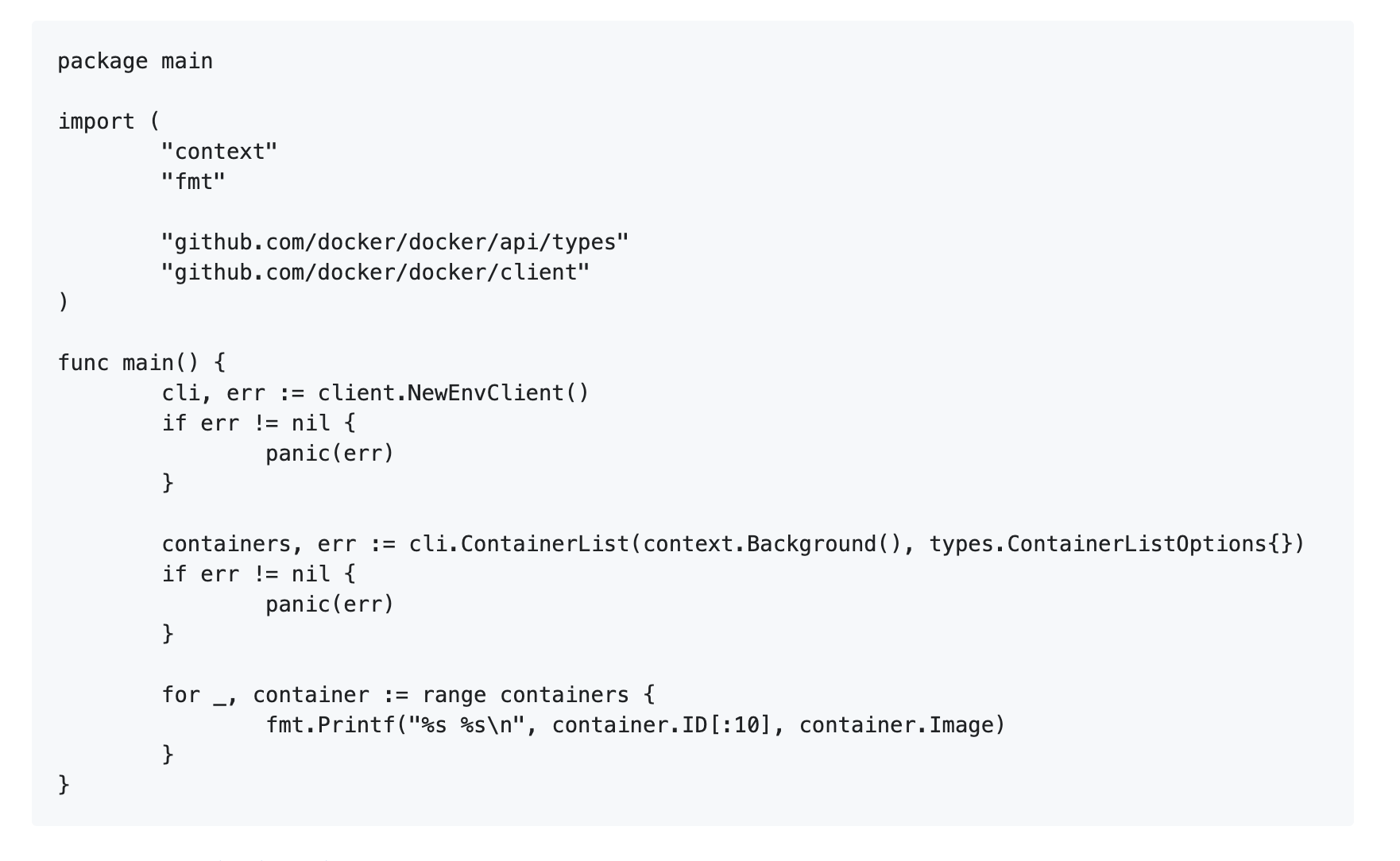
Example of a getContainers in Go with the docker client:
Cf: client package - github.com/ph/moby/client - Go Packages
After that, I agree that a Nginx container with an image might be sufficient. The only thing that worries me is that the user has no feedback in case of an error..
I built a test version that I haven’t tested in real life
I need to buy an rpi (my other 2 are in use)
https://github.com/VonOx/gladys-pi-gen/releases/download/v1.0.1/gladys-os-rpi-lite.zip
Hello!
I downloaded it, extracted it, « burned » it and inserted it into a RPi 2 (headless) and… nothing.
Did I do something wrong?
Is it designed for a RPi 2 or should I put it in the RPi 4?
By the way, the link you provided points to « https://gladys-os-rpi-lite.zip/ »…
I connected the RPi to a screen and I have a bootloop. The last message I saw was ‹ failed to come online ›
I will try again later from the beginning but after several reboots it eventually stabilized. Unfortunately, I have a ‹ connection refused › when I try to access the home page