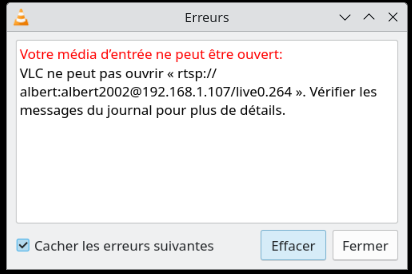
Hello,
I have just received a camera of the model listed among the compatible devices but cannot find either the RTSP stream or the HTTP address. Do I need to connect with the camera’s app to obtain them?
Thank you and have a good weekend
Hi, I’d say a bit of everything.
Normally the documentation is provided with the camera but since they’re disappearing gradually ..
You need to find the IP (network scan, in your router or in the camera app ..).
You need to create username/password. With Tapo (TP-Link) that goes through creating an account.
And finally the generic link. I found that by searching on the web and confirmed it here.
Maybe by giving the brand and the model (ref) of your camera, someone will know the link?
Hi @tiboys and thanks. The camera is:

Ideally I wouldn’t have to use an app, so if anyone already uses it I’d be grateful for any info
A bit of info here, I think:
However, you’ll inevitably have to create an account to obtain the username/password combo.
Thanks @tiboys, I’ll test by configuring it from the app. I hope I can then remove it so I can run only with Gladys 
Hello,
I’m trying to connect the Reolink camera I just bought, the same one as in the list of integrated devices, following the instructions from the video tutorial. I was able to retrieve the IP address, where the default gateway appears, the MAC address, the DNS. I copied it into the RTSP//HTTP field but it doesn’t work.
In all the camera information, I can’t find the RTSP stream anywhere.
The camera is named and protected by a password.
So my question is about the stream: How can I retrieve the information regarding this stream?
And what exactly did you put?
Did you also try it in a program like VLC to see if your URL works?
On my camera I have a checkbox to enable the connection via RTSP or direct HTTP.
New tests with the following formulas,
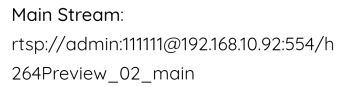
Still nothing and I also tried with VLC without success
Thanks @, I’ll take a closer look.
I just found this information:
Customer review

3.0 out of 5 stars Camera not compatible with RTSP or HTTP
Reviewed in France  on January 30, 2020
Color: Reolink E1 Pro 4mp Pan Tilt Indoor WiFi Surveillance CameraVerified Purchase
Camera with excellent image quality. The setup via mobile app is remarkably simple. Unfortunately, this camera (E1 Pro) does not export its stream in RTSP or HTTP, contrary to what is indicated in the description. You can find confirmation of this in the online manuals, if you look carefully. I was looking for an HTTP camera, so I returned this one.
I thought I could rely on the information about compatible hardware. I am going to return the camera.
Thanks @_Will_71
Other info, to test:
To reactivate them, you need to use the Reolink desktop application, go to Settings/Network/Advanced and check the RTSP box.
Once done, it integrates very simply into Jeedom and its video
You need to check the camera’s network settings via the camera’s Reolink web interface. https://192.168.XX.XX./
Enable RTSP — from memory it’s disabled by default

FYI, I moved this conversation into a separate thread to make it easier to follow
Hi @Jluc, I just saw your comments and I’m facing the same problem.
I just bought the Reolink 510A camera, and I can’t access the RTSP stream.
Also, I can’t find the correct URL for HTTP to connect directly to the stream without going through the login page.
Were you able to solve the problem?
Thanks in advance
Hi @albert, I don’t have a Reolink camera but searching online I found this:
- Log in to your camera’s IP address using a web browser.
- Click the gear-shaped icon (Settings).
- Click Network Settings.
- Click Advanced.
- Scroll down (if necessary) to Port Settings - select Configure and click.
- Go all the way down to find the RTSP switches
Otherwise, it apparently also works with the Reolink Windows app.
Source: https://www.reddit.com/r/reolinkcam/comments/twgvgg/help_with_rtsp_on_rlc510a/?tl=fr
To find your camera’s IP, you can scan your network with an app like Network Scanner on Android or iNet on iOS.
Hello @pierre-gilles ,
I found my camera’s IP with nmap. I also enabled RTSP streaming on port 554 via the Reolink mobile app. I also configured a user with admin rights, but I still can’t access the RTSP stream via VLC.
I can access the video stream via HTTP but I have to log in on the login page. My goal is to retrieve the image stream over HTTP or RTSP (either is fine) so I can process those images (with OpenCV).
Since there are authentication protections for HTTP that doesn’t help me, because I haven’t found the URL containing all the information (http://user:password@ip). If I had it I could retrieve the stream without going through the graphical interface, and I could use my image analysis scripts.
And for RTSP nothing works unfortunately
Have you tried this site?
When I enter your camera model, I get this format:
rtsp://admin:admin@192.168.1.20:554/h264Preview_01_main
Here are URLs for the streams: (to adapt, of course, to your case):
rtsp://admin:pass@tonip/live0.264
and
rtsp://IPAddress/live0.264 (Main Stream)
rtsp://IPAddress/live1.264 (Second Stream)
rtsp://IPAddress/live2.264 (Internet Stream)
rtsp://admin:@ip/live0.264 (For coding)
Already tried. I tried again and it doesn’t work, it’s strange.