Hello everyone
I just bought an Imou Ranger 2c camera, following the link in the integration chapter thinking it was compatible with Gladys since it’s on the list.
I can’t connect it to Gladys.
I have the camera’s IP address.
I tested with IpsyConnect but it doesn’t work, and even less with VLC.
First question: I don’t know what to put for the camera login? I did find the password. I found nothing in the camera’s documentation.
Second question: it’s the complete URL, but if I have the login, I might be able to make progress.
If someone owns this camera, I wouldn’t mind a bit of help. Thanks in advance
Can you show us the URL you’re using?
What type of stream is it?
I’m using this one:
rtsp://admin:MP@192.168.1.85:554/cam/realmonitor?.
I saw on the internet that the login is admin.
But I have doubts
I don’t understand whether the dot at
Hello @guim31
The point was the punctuation. I tried both forms you suggested, but it doesn’t work.

Thanks for the info @elfedagger
But it doesn’t work, here’s Gladys’s response
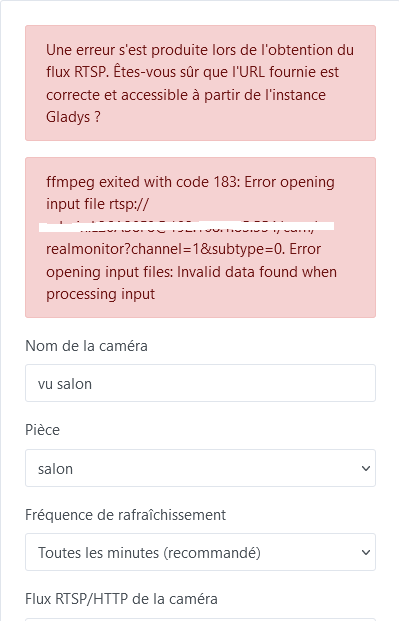
My camera is an Imou Ranger 2C, the model is IPC-K2ECP-5H2W. It is compatible with Google Home and Alexa. Here is the link to the camera on Amazon (the one I used in the Gladys integration)
https://www.amazon.fr/dp/B0CTT7R5B1?ref=ppx_yo2ov_dt_b_product_details\u0026th=1
Even in VLC it doesn’t work.
I probably don’t have the right RTSP-compatible camera?
Have you tried adding subtype=1 to the end of the URL?
Yes, I also changed the channel, I tried all the ipsyconnect URLs concerning the Imou camera
thanks to you
It’s not the same model as @elfedagger, that might be why.
But you should still be able to see your video stream in VLC with the correct URL.
My 2 cameras work with this URL, each with its own password written under the camera. I use the imou app and Gladys in parallel. Imou for motion detection and recording — I receive an email when something moves in the house — and Gladys to monitor the house via Gladys +. I first connected my cameras to the home Wi-Fi with the imou app and then retrieved the RTSP streams with Gladys. And it is indeed the camera that corresponds to the provided link; it is still in my Amazon order history.
Hello,
I’ve tried all evening, but still nothing. @elfedagger, can you confirm that your camera is on Wi-Fi and not wired via Ethernet?
Thanks for your responses, I sent an email to Imou and I’ll keep you posted
thank you
Yes, they are indeed Wi‑Fi; none of my cameras has an RJ45 port.
Good evening @elfedagger
It’s done, it works — apart from having plugged the camera into the room with the router, maybe my Wi‑Fi is a bit congested or the interference with a repeater was too strong? But I confirm it’s with the same URL as yours that it works
Thanks again for all this info
I also had to move my cameras closer to my Freebox for the setup.
Glad I could help.
Well, for me, it doesn’t work. I placed the Imou next to the Freebox and entered the URL given by @elfedagger (replacing, of course, MP and IP with their values).
All good, it’s working. It was a password issue!