(My apologies for the poor French, I’m using Google Translate.)
I use docker-compose to run Gladys. I’ve configured Zigbee2MQTT and it works sometimes. But every time the container restarts, the USB dongle is no longer connected. The message says « No Zigbee2mqtt USB dongle is attached to Gladys ».
Two devices are always listed: /dev/ttyUSB0 and /dev/AMA0. What usually resolves the problem is to pick a device that is not selected and click « Save ». It doesn’t matter which of the two is chosen.
I need to be able to restart the containers unattended, without using the UI to change the configuration each time. Can anyone help me understand what’s wrong? Thanks.
The zigbee2mqtt container is running and continues to work properly. I can access http://gladys-ip:8080/#/dashboard and see the devices. But Gladys doesn’t detect that it is running. It shows « No Zigbee2mqtt USB dongle configured, please go to… » Then I click « Save » and it works again.
These are the running containers:
$ docker ps --all
CONTAINER ID   IMAGE                       COMMAND                  CREATED         STATUS         PORTS      NAMES
eb14c756a72c   gladysassistant/gladys:v4   \"docker-entrypoint.s…\"   6 minutes ago   Up 6 minutes              myhub_gladys_1
abcc0834603d   containrrr/watchtower       \"/watchtower --clean…\"   6 minutes ago   Up 6 minutes   8080/tcp   myhub_watchtower_1
322d22c2fa6a   koenkk/zigbee2mqtt:latest   \"docker-entrypoint.s…\"   3 days ago      Up 3 days                 gladys-z2m-zigbee2mqtt
eb10f041a2a2   eclipse-mosquitto:2         \"/docker-entrypoint.…\"   8 days ago      Up 8 days                 gladys-z2m-mqtt
I wasn’t able to debug this issue. @pierre-gilles, do you have any suggestions?
Watchtower restarted my container « myhub_gladys_1 » today, and then all devices disappeared.
To make it work, I had to go to /dashboard/integration/device/zigbee2mqtt/setup and turn off and on « Enable Zigbee2MQTT ». That restarted the « gladys-z2m-mqtt » and « gladys-z2m-zigbee2mqtt » and everything worked again.
When Gladys fails like that, I can still access http://:8080/#/dashboard and see all devices working correctly, so it’s not a problem with the dongle or mosquitto/zigbee2mqtt. What can I do to make Gladys more stable?
I can suggest you not using compose and follow documentation, mqtt and zigbee2mqtt are created outside the stack ( don’t know if this is the root cause). Compose have no value here.
The zigbee2mqtt service is not starting when the container restarts as it’s marked as « manually stopped ».
$ journalctl CONTAINER_NAME=gladys | grep -i zigbee2m
Oct 12 21:40:06 dpi02 b2c767401a3d[724]: 2022-10-12T21:40:06+0100 <info> service.startAll.js:30 () Service zigbee2mqtt was manually stopped, so it is ignored at startup
Oct 12 21:42:40 dpi02 b2c767401a3d[724]: 2022-10-12T21:42:40+0100 <info> init.js:47 () Zigbee2mqtt USB dongle attached to /dev/ttyUSB0
Oct 12 21:42:40 dpi02 b2c767401a3d[724]: 2022-10-12T21:42:40+0100 <info> installMqttContainer.js:105 (Zigbee2mqttManager.installMqttContainer) MQTT broker container successfully started
Oct 12 21:42:40 dpi02 b2c767401a3d[724]: 2022-10-12T21:42:40+0100 <info> installZ2mContainer.js:73 (Zigbee2mqttManager.installZ2mContainer) Zigbee2mqtt container successfully started
Oct 12 21:42:40 dpi02 b2c767401a3d[724]: 2022-10-12T21:42:40+0100 <info> subscribe.js:12 (Zigbee2mqttManager.subscribe) Subscribing to MQTT topic zigbee2mqtt/#
The log from init.js:47 does happen until I click Save settings in the UI, which as two minutes after the container started.
[edit] platform is Raspberry Pi OS on a v4 Pi
[edit2] looks like the service table in the database has not been updated for a long time:
$ echo "select enabled, updated_at, status from t_service where name = 'zigbee2mqtt';"|sqlite3 gladys-production.db
1|2022-09-18 23:17:48.594 +00:00|STOPPED
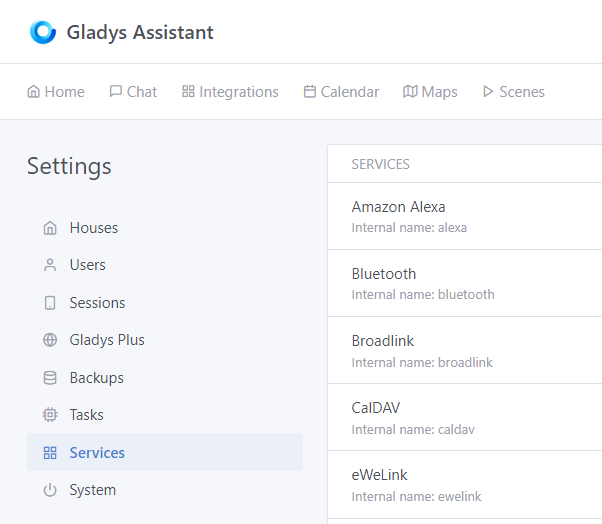
so I found the /dashboard/settings/service page and all services were set to Stopped. I don’t get why anything worked at all with it like that but whatever. I changed Zigbee2mqtt to Running and now the service starts as expected when the container restarts.
my bad. I didn’t realise the service was a separate thing to « Enable Zigbe2mqtt » being set on the Zigbe2mqtt configuration page. I have been using a bunch of Zigbee devices in Gladys for a few weeks without the service running!