Nuki integration development

The project to date

Features

The service adds the ability to:

  • control Nuki-brand connected locks: lock, unlock
  • report certain information to Gladys (battery level, lock state)

Screenshot


Integration

There are 2 possible integrations (choose one because doing both at the same time isn’t really useful)

NukiWeb API Key

Prerequisite: Gladys must have internet access at all times

  1. Activate and configure your Nuki Web account \[Nuki Web Configuration\]
    (https://help.nuki.io/hc/fr/articles/360016485718-Activer-et-désactiver-un-compte-Nuki-Web#:~:text=Activez%20Nuki%20Web%20dans%20l,dans%20l’App%20de%20Nuki.)

  1. Configure the Nuki service in Gladys by adding the API key and then performing an HTTP scan

MQTT

Prerequisite: Gladys’ MQTT is configured and functional

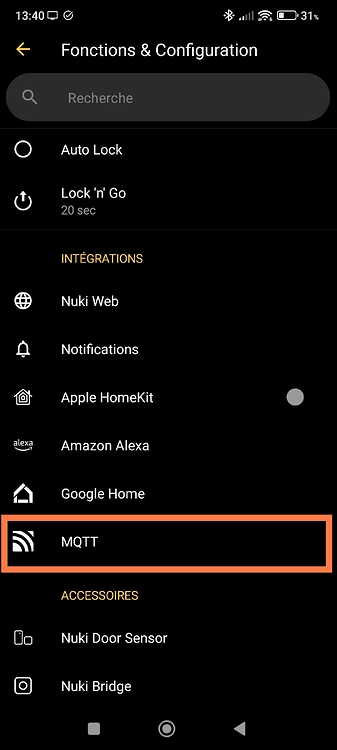
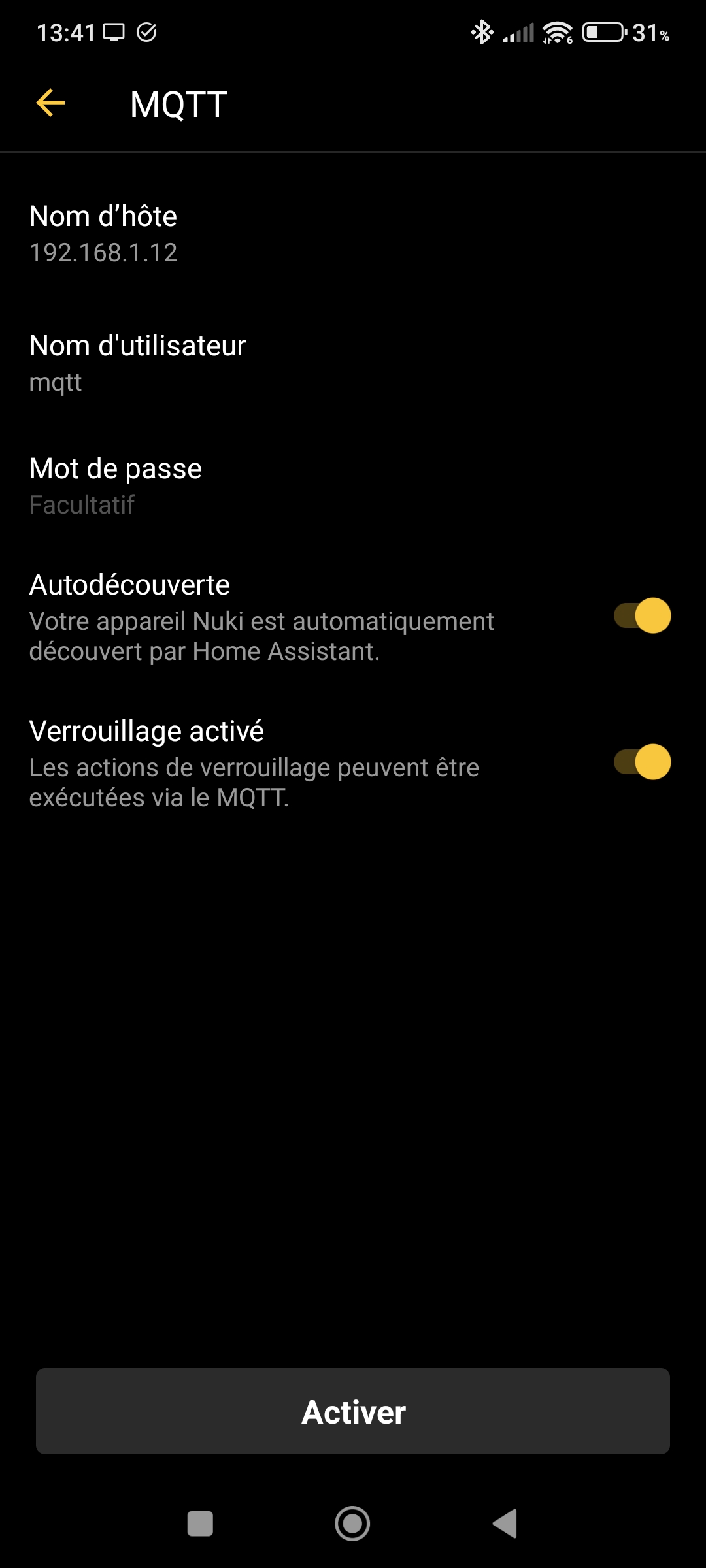
  1. Configure MQTT in the Nuki app (use the local IP of the MQTT, not the domain name) Nuki configuration with MQTT


  2. Go directly to the MQTT discovery of the Nuki service in Gladys to see your devices there

Roadmap

  • Write the documentation (although this one isn’t too bad)
  • Integrate the notion of trigger (who or what opened the lock, e.g.: User1 opened the lock, the lock performed an auto-lock …)
  • Adapt the scene part to the lock button
  • Adjust the graphical part (display the states)

Installation

The test nukidev image is here.

For more information

RFTM :wink:

Call for testers and the community

I’m asking people who have this type of device and can run tests to send me their feedback.

I have a Nuki v3 (so not available with Matter)

I’m available for additional information.

2 Likes

Thanks for this development @ProtZ, it looks great :slight_smile:

For the documentation, you can make a PR on this repo :

The documentation is markdown files in this folder (for the article in English) :

And here for the article in French :

To write the documentation, I recommend taking your screenshots in English then in French in Gladys, then writing the documentation in French, and asking ChatGPT to translate the article for you.

For your information, I mentioned this topic in the newsletter that will go out tomorrow morning :slight_smile:

I hope we’ll have testers! If we don’t have anyone by next week, we can still move forward since you tested on your side.

1 Like

Great, I just opened the PR for the docs, but I don’t know how to test it :confused:

I think there’s a small issue with your PR, it modifies more than 1,300 files :smiley:

Try starting again from master and recreating your files.

To test locally afterwards, all the instructions are in the README: GitHub - GladysAssistant/v4-website: Gladys Assistant website

Sorry, I messed up.
I’ve just redone it properly. But it’s impossible to test locally without digging a bit deeper:


Error: Illegal return statement
  
  - dev.html.template.ejs:5 ./node_modules/html-webpack-plugin/lib/loader.js!./node_modules/@docusaurus/core/lib/webpack/templates/dev.html.template.ejs
    [v4-website]/[@docusaurus]/core/lib/webpack/templates/dev.html.template.ejs:5:1

What version of Node.js are you on? You need to use Node >= 18. I’m on Node 22

Same for v22.14.0 :frowning:

I’m on v22.18.0, though I don’t know if that changes much.

Did you run git clone then yarn and finally npm start?

I just re-ran the test from a clean repo to make sure everything was fine, and everything works :thinking:

I’m responding a bit late, but I have a Nuki series (if you still need to test…)

1 Like

Still looking for testers @StephaneB!

1 Like

Ok. But I didn’t quite understand from the thread of this discussion whether it was ready to test or whether we needed to wait for changes before being able to test…

2 Likes

@ProtZ can you share the Docker image tag with us so that @StephaneB can test?

The link you posted in your original post is a private link

Sorry, I hadn’t seen that the link was private:

https://hub.docker.com/r/ngeissel/gladys/tags

docker pull ngeissel/gladys:nukidev

thanks @StephaneB, keep me posted :slight_smile:

1 Like

Hi @ProtZ,

Would you be up for doing another review via video call with screen sharing like last time?

I’m available this afternoon, or every evening this week, or during the day on Friday.

I would have liked in-person testers, but oh well, we won’t wait forever :slight_smile:

Hello @pierre-gilles ; we can arrange that,

1 Like

Yes, I’ll send you a PM!

I took the time today to test this new integration. Sorry I forgot that I had offered to do it…

I put myself in the following situation to test: in principle, not read the explanations in this post, and stick to what is written on the integration pages. And only read the explanations in this post if necessary :wink:

So far I’ve tested the Web integration. I’ll try to test the MQTT integration later in the day…

My suggestions to improve the Web integration (but overall it works very well, congratulations!!!) :

  • On the Integrations > Nuki page
    • The « Devices » page displays an interesting explanation when you don’t yet have an MQTT configuration (if I remember correctly, a text that explains there are two ways to connect: either via MQTT or via Nuki Web). But as soon as an MQTT is configured, that explanation no longer appears and you see the two buttons « MQTT Discovery » and « Web Discovery ». I think the explanation should remain visible until an actual device discovery has been performed.
    • The « Configuration » page is actually specific to the « Web » version. So maybe rename it « Web Configuration »
    • On that « Configuration » page, add a clarification to step 1: "If you do not yet have a Nuki Web account, create one by following the instructions at https://help.nuki.io/hc/fr/articles/360016485718-Activer-et-désactiver-un-compte-Nuki-Web
    • On the NukiWeb page, an API key is shown first, but I understand that this is not the key you need, and that you have to scroll down a bit on the page to generate an API token. Maybe your configuration page could clarify this in step 3: « … (Note, this is not the OAuth2 key, but rather a token to create specifically) ». And on all pages where you use the term « API Key », perhaps replace it with « API Token »?
    • When creating the API token on NukiWeb, you can check/uncheck the rights to grant. Do you need all of them? It would be good to indicate the rights that are actually necessary, so as not to grant permissions that are useless.
    • When the API key is saved in Gladys, it is displayed with asterisks, and the « Save configuration » button is active. I haven’t tried it, but if I click that button again, will it overwrite the real key previously entered (for example ‹ qslkjhqdgiuyzeart ›) with ‹ qsl**********art › and then stop working? I suggest greying out the button as long as nothing new has been entered in the API Key field…
    • After entering a valid API key, there could be a text prompting to go to the « Web Discovery » page
    • On the « Web Discovery » page, the text says « Automatic discovery… » but I didn’t immediately understand that you still had to click the « Search » button
  • On the dashboard, adding the lock with the Device widget is very clear, great. Just one detail: a click on lock/unlock takes a variable amount of time to complete, between « immediate » and several seconds. Maybe there could be an info message asking to wait to avoid accidental repeated clicks?
2 Likes

Okay, well I actually won’t be able to test the MQTT functionality, because I have a 3.0 lock and MQTT is only available on the 3.0 Pro and from 4.0 onward :smiling_face_with_tear:

Could that perhaps be a clarification to add to the initial explanation on the ‹ Devices › page and on the ‹ MQTT Discovery › page?

2 Likes

Thanks for your test @StephaneB with very pertinent remarks!

Normally, in Gladys, the click should be instantaneous, even if the action behind it takes longer to be propagated to the connected device. Is it really the case that you see the interface completely freeze?