bab85
December 1, 2023, 11:55am
21
I left the database information as in the tutorial (SQLITE_FILE_PATH=/var/lib/gladysassistant/gladys-production.db \), so the production database, I think. However, I still had to re-pair the sensors. I don’t know if that’s normal (since I was using the production database, I expected my sensors to already be recognized). In z2m there was nothing left.
Since you asked me the question, I just did a check. I realize I must have made a mistake
Will_71
December 1, 2023, 12:22pm
22
What name did you give to the folder that contains the database and config?
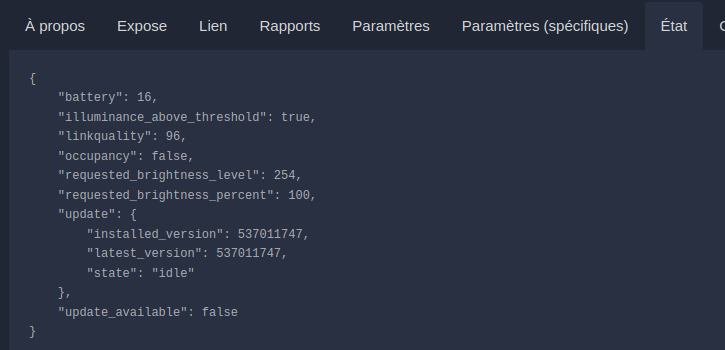
Can you go to the zigbee2mqtt page and take a screenshot of the State tab so I can see all the exposes of your sensor?
Below is an example.
bab85
December 1, 2023, 12:43pm
23
For the folder name I had to put /var/lib/gladysassistant_OWON_test: /var/lib/gladysassistant\
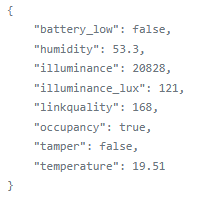
And for the status here it is:
Will_71
December 1, 2023, 1:02pm
24
Ok if you did change the name then it’s not the same config as your production, so it’s a new instance.
As for the expose tamper, it’s present — I’ll check tonight and keep you posted.
Will_71
December 1, 2023, 10:31pm
25
@bab85 ,
I’m re-testing on my side and will generate a new image.
I’ll also give you the commands to update the image on your side.
@pierre-gilles , I made a mistake https://github.com/GladysAssistant/Gladys/pull/
Will_71
December 1, 2023, 11:06pm
26
The image is ready
Voici les commandes si tu veux re-tester
docker stop gladys
docker rm gladys
docker pull willde71/gladys-test:zigbee2mqtt-owon-pir313-e
docker run .....
pour la commande stop et rm mets bien le nom que tu avais utilisé lors de ton test.docker run...
bab85
December 2, 2023, 8:11am
27
Hello,
Will_71
December 2, 2023, 1:16pm
28
@bab85 , thanks for your test.
bab85
December 3, 2023, 6:24pm
29
Thank you especially for the development and for the quick response.
Thanks for the PR @_Will_71 !
I left you some feedback:
master ← William-De71:zigbee2mqtt-add-missing-exposes-OWON-PIR313-E
ouvert 10:25PM - 01 Dec 23 UTC
### Pull Request check-list
To ensure your Pull Request can be accepted as fa… st as possible, make sure to review and check all of these items:
- [ ] If your changes affects code, did your write the tests?
- [ ] Are tests passing? (`npm test` on both front/server)
- [ ] Is the linter passing? (`npm run eslint` on both front/server)
- [ ] Did you run prettier? (`npm run prettier` on both front/server)
- [ ] If you are adding a new features/services, did you run integration comparator? (`npm run compare-translations` on front)
- [ ] Did you test this pull request in real life? With real devices? If this development is a big feature or a new service, we recommend that you provide a Docker image to the community ([french forum](https://community.gladysassistant.com/)/[english forum](https://en-community.gladysassistant.com/)) for testing before merging.
- [ ] If your changes modify the API (REST or Node.js), did you modify the API documentation? (Documentation is based on comments in code)
- [ ] If you are adding a new features/services which needs explanation, did you modify the user documentation? See [the GitHub repo](https://github.com/GladysAssistant/v4-website) and the [website](https://gladysassistant.com).
- [ ] Did you add fake requests data for the demo mode (`front/src/config/demo.js`) so that the demo website is working without a backend? (if needed) See [https://demo.gladysassistant.com](https://demo.gladysassistant.com).
NOTE: these things are not required to open a PR and can be done afterwards / while the PR is open.
### Description of change
Add tamper and battery low expose in zigbee2mqtt integration

Will_71
December 7, 2023, 1:22pm
31
I saw it — I’ll make the change tonight.
Will_71
December 7, 2023, 10:20pm
32
@pierre-gilles , I’ve made the change
Thanks for the fixes @_Will_71 ! It’s tested and good for me
I’ve merged it and it will be included in the next Gladys release!
 , because I thought I had two z2m databases and no — when I go back to my production Gladys, I have the same z2m with only the two sensors I just tested, and there’s a red cross between Gladys and MQTT in the configuration.

 on my side when trying to rebase my branch so the PR was closed.
