Good evening @AlexTrovato (zigbee expert!),
I’m noticing a curious phenomenon in the management of my Zigbee devices.
For several months, Gladys+ was running on a Synology DS218+ NAS, but I’ve noticed unbearable slowdowns with that CPU, so I decided to migrate to a Beelink BT3Pro.
Automatic restoration with previous backups did not work (zigbee2mqtt container stuck in continuous restarting), so I reconfigured my devices one by one, starting from a clean image.
For now, I kept my previous installation, so I can more easily copy the old one to the new one by comparison.
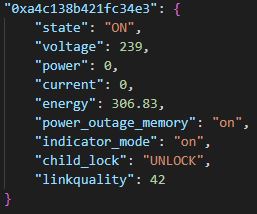
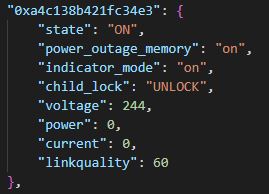
Among others, I have a Tuya TS011F_plug_1 smart plug that I use to record the output of my solar panels, and I notice that the « energy » feature is missing on my new installation.
Here is the excerpt from the two state.json files:
the first on the NAS
What is unfortunate is that the « energy » feature is the only one I really need because it is recorded every evening into Google Sheets via IFTTT.
Do you see an explanation for this phenomenon?
Thanks Alex, I hope I’ve been clear?
Hi @jparbel,
I’m sorry that the backup didn’t work during your machine migration.
To be sure I understood correctly, I’m going to try to restate your problem in my own words.
Your issue is on the zigbee2mqtt side, not Gladys (outside of the backup).
One of your devices has lost the « energy » feature, for no reason.
And we’re talking specifically about this device Tuya TS011F_plug_1 control via MQTT | Zigbee2MQTT.
I’m going through the pages of the zigbee2mqtt application to try to find whether it’s possible to disable a feature of a device, but I don’t see anything.
@AlexTrovato
Thanks for that quick reply, you translated my previous message very well.
For now the two Gladys instances are running simultaneously; one gives me the « energy » feature and the other doesn’t.
The outlet is indeed on, otherwise I wouldn’t be reporting any value.
As for the backup, it’s secondary, just a small waste of time!
The failure may have been because I was using my personal Mosquitto broker; I’m now using Gladys’s broker (I’m wondering if that’s the issue)
I think it’s mainly that the device can only communicate with one broker, so with a single key; you do need to associate the device with the chosen key (I experienced this with two BT3PRO devices, one on Gladys and the other on Jeedom).
@cce66@AlexTrovato
In fact, it works for me with 2 Zigbee dongles, and 2 installations.
The reason is simple: I use 2 different brokers: my NAS installation is connected to my Mosquitto broker while the other is connected to the Gladys broker.
That explains it, but it doesn’t solve my feature problem!
For each topic, MQTT allows managing the desired QoS; messages will be delivered:
QoS 0 : At most once
QoS 1 : At least once
QoS 2 : Exactly once
TCP ensures the reliability of transmissions on the network. But MQTT additionally handles connection losses — upon reconnection, with QoS 1 and QoS 2, any messages not transmitted are retransmitted.
In QoS 1, messages are acknowledged by the receiver; if this acknowledgment does not arrive the message is retransmitted:
MQTT QoS 1 network capture
In QoS 2, the acknowledgment itself is validated to ensure the message arrives only once:
MQTT QoS 2 network capture
In QoS 0, however, messages are simply transmitted and validated only by TCP:
The problem is that when the device publishes, the first client that receives it will acknowledge the message, and therefore the device will only publish again upon a change. It is likely that the same client will always receive the publishes and thus acknowledge them.