yeah well I looked a bit, ran some commands but nothing, and on top of that it’s all Greek to me LoL, I think I’m going to reinstall everything if I remember how to do it
the recovery method gives nothing — unknown command
yeah well I looked a bit, ran some commands but nothing, and on top of that it’s all Greek to me LoL, I think I’m going to reinstall everything if I remember how to do it
the recovery method gives nothing — unknown command
I plugged my SSD into my PC and looked at the files. What I find strange are the dates — there are no recent files. Normally there should be writes to the files, right?
Yes, normally there should be writes (fairly regular) to the files.
Unless some files are
hello
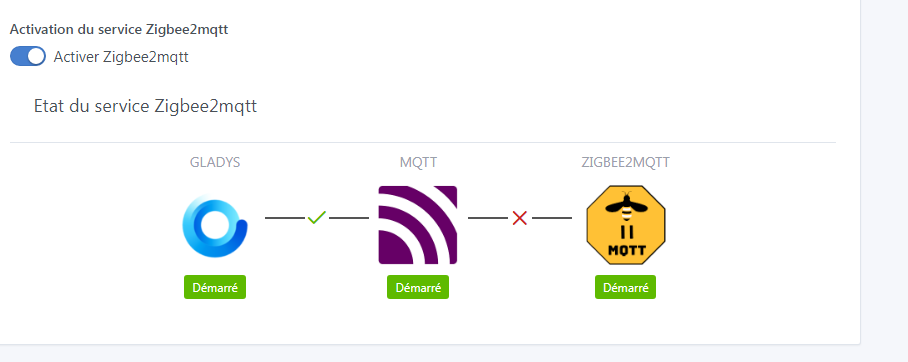
so here’s an update: I did a complete Gladys reinstallation yesterday around 5 PM; everything works except the Zigbee, which remains stuck — still a red cross between Z2M and MQTT. The rest works and it allowed me to reorganize my dashboard. However this morning Gladys was running with constant disk access; I rebooted and everything works again but still no Zigbee, nothing helps. I also have 2 cameras in RTSP — one of the two no longer connects even though it worked fine before. In short, just tinkering, thanks for the help anyway.
I’ll add that I can’t reach the Zigbee-to-MQTT interface, but I think that’s normal as long as it’s not fixed in Gladys
Hi @pascal_sapin,
I did a complete investigation by setting up a fresh Gladys instance on a Raspberry Pi, and the Zigbee
Here we may be reaching the « famous » power issue given that you’re using an RPi + an SSD + zigbee2mqtt
Ideally you would do a similar install but power your SSD separately (on a hub, for example).
yes but it’s been working like that for months, never any dongle
I tried powering the SSD with its own power supply, it’s the same
I set another password on MQTT and maybe that’s it, I’d like to know if it’s a software or hardware issue
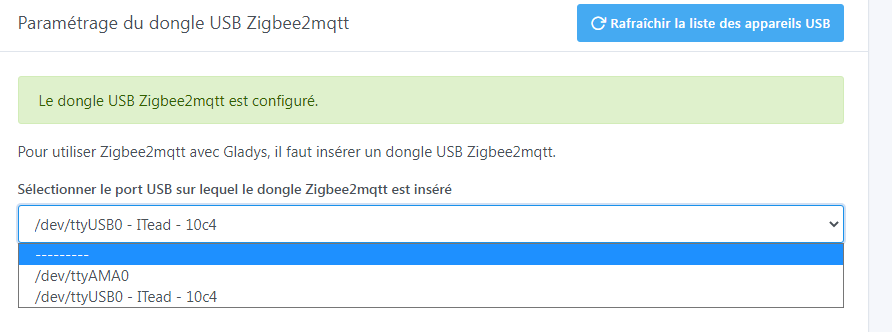
is it normal that I have 2 items in the list, well my key is ttyUSB0 of course
Tried everything, see message below, the dongle works very well, it’s a configuration or software problem, I’m stumped
@pascal_sapin One option would be to check the Zigbee2mqtt logs to see what’s happening on the Zigbee2mqtt side 
As a reminder, Zigbee2mqtt is a separate project, external to Gladys that we don’t control — we just run a container to « help » the user. Beyond that, what happens on the Zigbee2mqtt side is another project ^^
Can you run this command on your Pi to view the logs of the Zigbee2mqtt container?
docker logs gladys-z2m-zigbee2mqtt
Using ‹ /app/data › as data directory
Zigbee2MQTT:info 2022-12-13 15:11:57: Logging to console and directory: ‹ /app/d ata/log/2022-12-13.15-11-57 › filename: log.txt
Zigbee2MQTT:info 2022-12-13 15:11:57: Starting Zigbee2MQTT version 1.28.4 (comm it #52e545f)
Zigbee2MQTT:info 2022-12-13 15:11:57: Starting zigbee-herdsman (0.14.76)
Zigbee2MQTT:error 2022-12-13 15:12:18: Error while starting zigbee-herdsman
Zigbee2MQTT:error 2022-12-13 15:12:18: Failed to start zigbee
Zigbee2MQTT:error 2022-12-13 15:12:18: Check https://www.zigbee2mqtt.io/guide/in stallation/20_zigbee2mqtt-fails-to-start.html for possible solutions
Zigbee2MQTT:error 2022-12-13 15:12:18: Exiting…
Zigbee2MQTT:error 2022-12-13 15:12:19: Error: Failed to connect to the adapter ( Error: SRSP - SYS - ping after 6000ms)
at ZStackAdapter.start (/app/node_modules/zigbee-herdsman/src/adapter/z-stac k/adapter/zStackAdapter.ts:103:27)
at Controller.start (/app/node_modules/zigbee-herdsman/src/controller/contro ller.ts:132:29)
at Zigbee.start (/app/lib/zigbee.ts:58:27)
at Controller.start (/app/lib/controller.ts:101:27)
at start (/app/index.js:107:5)
Using ‹ /app/data › as data directory
Zigbee2MQTT:info 2022-12-13 15:12:27: Logging to console and directory: ‹ /app/d ata/log/2022-12-13.15-12-27 › filename: log.txt
Zigbee2MQTT:info 2022-12-13 15:12:28: Starting Zigbee2MQTT version 1.28.4 (comm it #52e545f)
Zigbee2MQTT:info 2022-12-13 15:12:28: Starting zigbee-herdsman (0.14.76)
Zigbee2MQTT:error 2022-12-13 15:12:49: Error while starting zigbee-herdsman
Zigbee2MQTT:error 2022-12-13 15:12:49: Failed to start zigbee
Zigbee2MQTT:error 2022-12-13 15:12:49: Check https://www.zigbee2mqtt.io/guide/in stallation/20_zigbee2mqtt-fails-to-start.html for possible solutions
Zigbee2MQTT:error 2022-12-13 15:12:49: Exiting…
Zigbee2MQTT:error 2022-12-13 15:12:49: Error: Failed to connect to the adapter ( Error: SRSP - SYS - ping after 6000ms)
I just used a piece of software, maybe you know the Zigbee gateway user interface, there indeed seems to be a communication problem
well for me Zigbee is finished, totally rubbish, a colleague the same, and at work we have Zigbee
The error you have is very clear: power problem
This issue is in the Zigbee2mqtt documentation
Your Pi doesn’t have enough juice to power the dongle and the SSD
(For the record, this has nothing to do with Zigbee; the Pi is more to blame. A mini PC doesn’t have these issues)
We always come back to the same answer.
Failed to connect to the adapter ( Error: SRSP - SYS - ping after 6000ms)
It’s an error we’re becoming quite familiar with = Raspberry Pi power supply problem.
Yes, but why right now?
I did power the SSD externally, but to be on the safe side I’ll buy a USB dongle.
I can’t tell you, but several people have already reported the same thing: a working system that suddenly has a power issue.
I’m looking into installation on a mini PC; I have an industrial mini PC with everything you could want on it, Lanner model LEC-7020D.
I’m not sure it’s 100% due to a power supply issue because I had it on the NAS. After updating the dongle it was OK.
@spenceur is right it could be the dongle itself