@billona
You can add (if it’s not too complex) a test LED to light up a PIN? This allows you to know if it’s the Arduino that is BUGging or if the code is not received by the device.
Function: « LED » ON
STATE « ON »/« OFF »
@benPi You can easily do this with the IR emission by replacing the IR LED with a standard LED. Then you can increase the number of pulses to better visualize the result 
Hello everyone!
Quick update on the service progress:
1. The transmission part
I worked a bit on it so that IR and 433 MHz transmissions are compatible with the « switch » and « light » features. Thanks to this, we can now define ON/OFF codes in the device that will be sent when the device changes value 
2. The reception part
Well… I must admit that this part took me quite a while  But after some work, I finally managed to get something « more or less correct » as a first step! I modified the creation of Arduino devices so that they poll every minute, which allows receiving messages from the card. Subsequently, I list the devices attached to this card, and assign the values to the devices that have the respective functions.
3. Interface
Concretely, here’s what the interface looks like for now:
Devices in the devices page:

My dashboard:

4. The Arduino code
I have added the implementation of the DHT11, and a servo motor control function. I still have some work to do to allow configuration in Gladys, but the base is there 
For info, as the development is still far from being finished, it is certain that the code will evolve a lot in the coming days. My goal now is to optimize the existing base thanks to usage feedback, and to implement as many features as possible in the Arduino code
Thanks again to the testers for taking the time to send me feedback, it helps me a lot and it makes the service evolve in the right direction
@billona I read the entire thread, great job! It’s really very clean, and I see that you are improving the service following the feedback given, which is cool 
Hmm what do you mean? You poll what?
Regarding the dashboard, for « RX », it would be good to let the user choose to put it either in the « MOTION_SENSOR » category or in the « OPENING_SENSOR » category, which will display a custom display showing only the relative time since the last movement/last door opening.
If you’re interested in seeing how this box works, it’s here →
Small additional question: what’s missing for us to be able to publish a first version of the service?
I think it’s better to publish a first version, even if not all the devices you plan to manage are managed, and then iterate on the code. That way I could also do a first code review of your PR 
Thanks @pierre-gilles, it’s nice to hear that
I use poll to create a parser.on(‹ data ›, async (data) => « … »); at the Arduino board level:
https://github.com/billonalex/Gladys/blob/master/server/services/arduino/lib/poll.js
We’ll see if this is the ideal solution, or if a simple initialization script for the board is not enough… But it seemed the best to me given that at a certain frequency, this ensures that the port is always open in ‹ data ›.
Yes, that seems more interesting as an idea, I’ll work on it! But I won’t hide from you that the way I presented it on the dashboard was mainly to be able to make the device say « I’m here! Look, I’ve captured a value » 
Well, if I base myself on your comments, I have that to do, and then we can indeed consider publishing a first version
But I won’t hide from you that the code is not entirely optimized, so there will certainly still be work to do, but if we stick to everything that has already been done, then the API is in place. So it’s up to you to tell me what’s better
Oh, and could you also guide me on the steps I need to take for the PR? Given that it’s the first time I’ve worked on such a big project, I don’t have all the right reflexes yet
Wow, that’s quite heavy 
A simple initialization script for the board is enough!
You only need to call the parser.on('data', async (data) => once in an « init.js » function that you call at the service start
If you can fix the poll issue + the RX dashboard, then it seems good in terms of features.
No problem
At the top of your PR, you should have noticed there is a checklist of things to verify before submitting your PR for review:
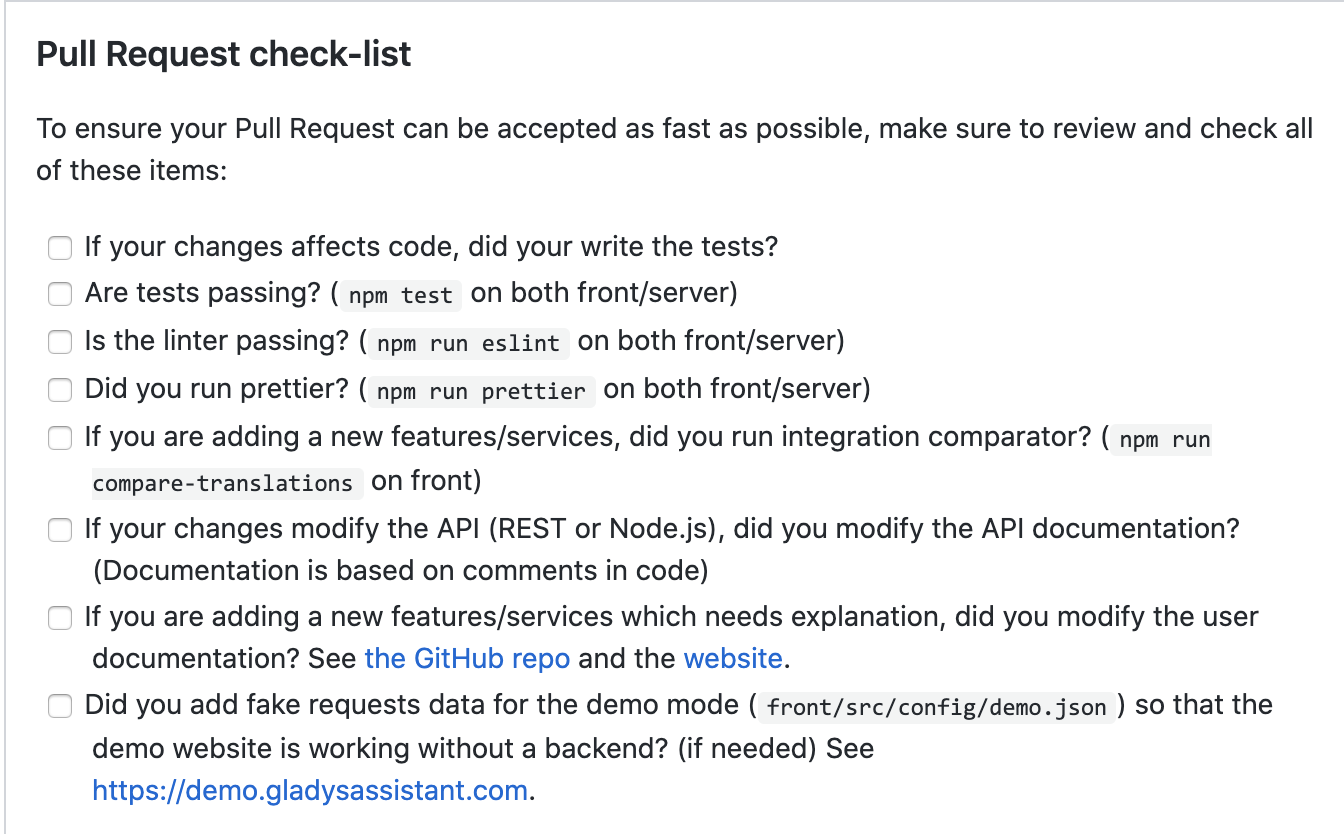
Each point must be checked and validated. I’ll let you look at them one by one
The most important ones:
The tests
You should have written tests for your integration, I don’t think that’s the case for you? You can take inspiration from the tests of other services (Gladys/server/test/services at master · GladysAssistant/Gladys · GitHub)
To run the tests, you can do npm test in the server folder. If you only want to run a single test, you can set the test to it.only (cf the mocha documentation: Mocha | Classic, reliable, trusted. ☕)
The goal of the tests is to ensure that absolutely everything you have coded is covered by tests and that, in the future, we can be sure that regressions are not introduced by another PR.
The linting
We use eslint and prettier in Gladys 4 to ensure that the code is formatted exactly the same regardless of the developer working on the project.
If you have any questions, don’t hesitate! And if you’re really struggling, we can always call each other for a quick training session
Yes, I thought so too  But before coding the poll for Arduino cards… I had coded a poll for EVERY device that was supposed to receive something! Even heavier, but at least we were sure So I’ll look into fixing that today.
No problem, I’ll do that and as soon as it’s done I’ll let you know!
No problem, I’ll take care of it after the few changes I have to make
No, I haven’t written any tests yet, I’ll take care of that.
Regarding prettier, I modified VS Code to take into account the desired requirements, I’ll recheck file by file.
As specified in the checklist, you have 2 CLI that allow you to automatically check the linting:
npm run eslint
npm run prettier
In (server and front)
Version modifications made in package.json and package-lock.json after an npm run prettier can I keep as well? Or should I unstage that? Typically, the installation and prettier changed this:
"prettier": "^1.17.1"
to this:
"prettier": "^1.19.1"
You can remove that! It’s not related to your PR, we’ll update the dependencies separately
It’s removed
Good for the init() function, it’s good! Only issue… When I create devices after creating the Arduino, the server needs to restart for them to be taken into account, otherwise if I put a 433 receiver and I don’t reboot the server, no value will be assigned to it…
Same, when I create an Arduino, I make an API request to call the init() function, otherwise I would have to restart the server for the Arduino to be taken into account…
Here is my script:
Would you have a tip to avoid this? It just needs to be fixed, then the RX dashboard should work smoothly ^^
Ah, that’s a real problem ^^ Gladys isn’t supposed to reboot frequently. You need to add a listener: when a device is added/modified, you need to add the port listening!
What I advise you to do is to split your init function into 2 functions:
- a function like « listen » that takes the Arduino to listen to as a parameter
- the init function, which retrieves the list of Arduinos and for each Arduino calls the listen function
When an Arduino is added, this listen function must be called. Similarly, if an Arduino is modified (I don’t know if it’s possible to modify the port?), then the function must be called.
Be careful to manage all states properly, so that a port is not listened to twice! Otherwise, we risk receiving messages in duplicate/ or it can cause problems.
I think you need to create your port + parser by recording a reference to the port and your parser in your ArduinoManager object.
In your code:
const port = new SerialPort(arduinoPath, {
        baudRate: 9600,
        lock: false,
      });

 const parser = port.pipe(new Readline({ delimiter: '\n' }))
Your variables are « lost », we can’t call them from the ArduinoManager object
You could for example store them in an object:
// index.js
this.arduinosPorts = {};
this.arduinoParsers = {};

// listen.js
this.arduinosPorts[arduinoPath] = new SerialPort(arduinoPath, {
            baudRate: 9600,
            lock: false,
          });
this.arduinoParsers[arduinoPath] = port.pipe(new Readline({ delimiter: '\n' }))
(It’s a suggestion written in 30 seconds like that, but you get the idea?
Thanks to this, you can test in your « listen » function if an Arduino is already being listened to, and avoid double listening. In case of a second listening, you can close the serialport and then reopen it, you see the idea?
I followed your advice as best as I could!
Here is my listen.js script:
Regarding checking for already open ports, does this roughly correspond to what you had in mind?
Why didn’t you split it into 2 functions? From what I see, every time someone adds an Arduino, you close all the ports and then reopen them, which isn’t very optimized. We risk missing messages.
I really advise you to split it into 2 functions to make it simpler and clearer
I think I didn’t quite understand you then
In my mind, the 2 functions in question were init() and listen(arduino), maybe I missed a step there ^^
That’s it! Sorry, I read your code a bit quickly, it seems fine to me now
That’s great to hear then
However, I sometimes get this error in my logs:
2020-05-25T15:06:45+0200 <warn> listen.js:78 (listen) Unable to listen to device
2020-05-25T15:06:45+0200 <debug> listen.js:79 (listen) TypeError: Cannot read property 'device' of undefined
at listen (/home/pi/Gladys/server/services/arduino/lib/listen.js:26:31)
at arduinoList.forEach.arduino (/home/pi/Gladys/server/services/arduino/lib/init.js:41:7)
at Array.forEach (<anonymous>)
at ArduinoManager.init (/home/pi/Gladys/server/services/arduino/lib/init.js:40:17)
Sometimes, when I call this.gladys to retrieve my devices, if I do a logger.warn(this.gladys), the displayed result is « undefined ».
Edit: from what I can see currently, the error appears at the first listen of the service, when we call listen(arduino) in init.js. After modifying the Arduino (and thus a new call to listen), it works…
Booooon!! After a fierce struggle, I finally found the error
So normally at the init and listen level, we’re good, just need to get rid of my useless scripts
On the other hand, @pierre-gilles, I worked on the sensors as you asked. For the motion sensor, we’re good, it tells me how much time has passed since the last value change. On the other hand, I’m having a bit of trouble figuring out how to handle the opening sensor… Given that it’s a binary type, is it really worth storing the code received in an opening sensor?
What do you mean? As a value, in my opinion, you store « 1 » when the door is open, « 0 » when the door is closed, right?
Same for the motion detector, except there you store « 1 » when there is movement, that’s all
Do not store the received code in the value if that’s your question