Gladys Assistant 4.32: Sonos integration is available! đŸŽ”

I’m looking into this and I’m really struggling


I opened all the ports indicated on the SONOS site: Configurez votre pare-feu pour fonctionner avec Sonos | Sonos

That didn’t work. I found this post on the Home Assistant forum: Sonos - which ports do I need to open for auto-discovery? - #9 by jjlawren - Configuration - Home Assistant Community

So, I opened a UDP port range: 32768-60999

It works but the range seems huge to me.

I’m still looking (if you have any suggestions, I’m all ears).

You should monitor your network on the Sonos test IP addresses to see which ports are used (which also amounts to reading the blocking logs)

You could maybe create a specific rule that

on Windows download

and scan your network, it should show your Sonos devices and the ports open on them

on Linux

and the same but in the command line

I don’t know since when, but the link to the Sonos documentation doesn’t work, it redirects to :https://gladysassistant.com/fr/docs/undefined/sonos

Instead of redirecting to :

Yes, apparently this has been fixed!! Available in the next version

Hello,

I integrated SONOS and set up the speaker last December. Since then, apart from a few successful tests, I haven’t been able to get my speaker to speak during regular use. I test from time to time, starting from scratch several times, deleting the integration and the scene, but nothing works.

Is anyone else experiencing the same issue?

Hi @Jluc :slight_smile: I’ll let others reply if they also have problems — I’m curious to know whether you’re the only one experiencing this issue!

On my side, I looked a bit into the Sonos library and found 2 possible improvements:

  • There is a timeout for playing the voice announcement part, which is currently 10 seconds. If your network is a bit slow, or the TTS API takes more than 10 seconds to respond, that could explain the issue. I’ll increase it to 20 seconds.
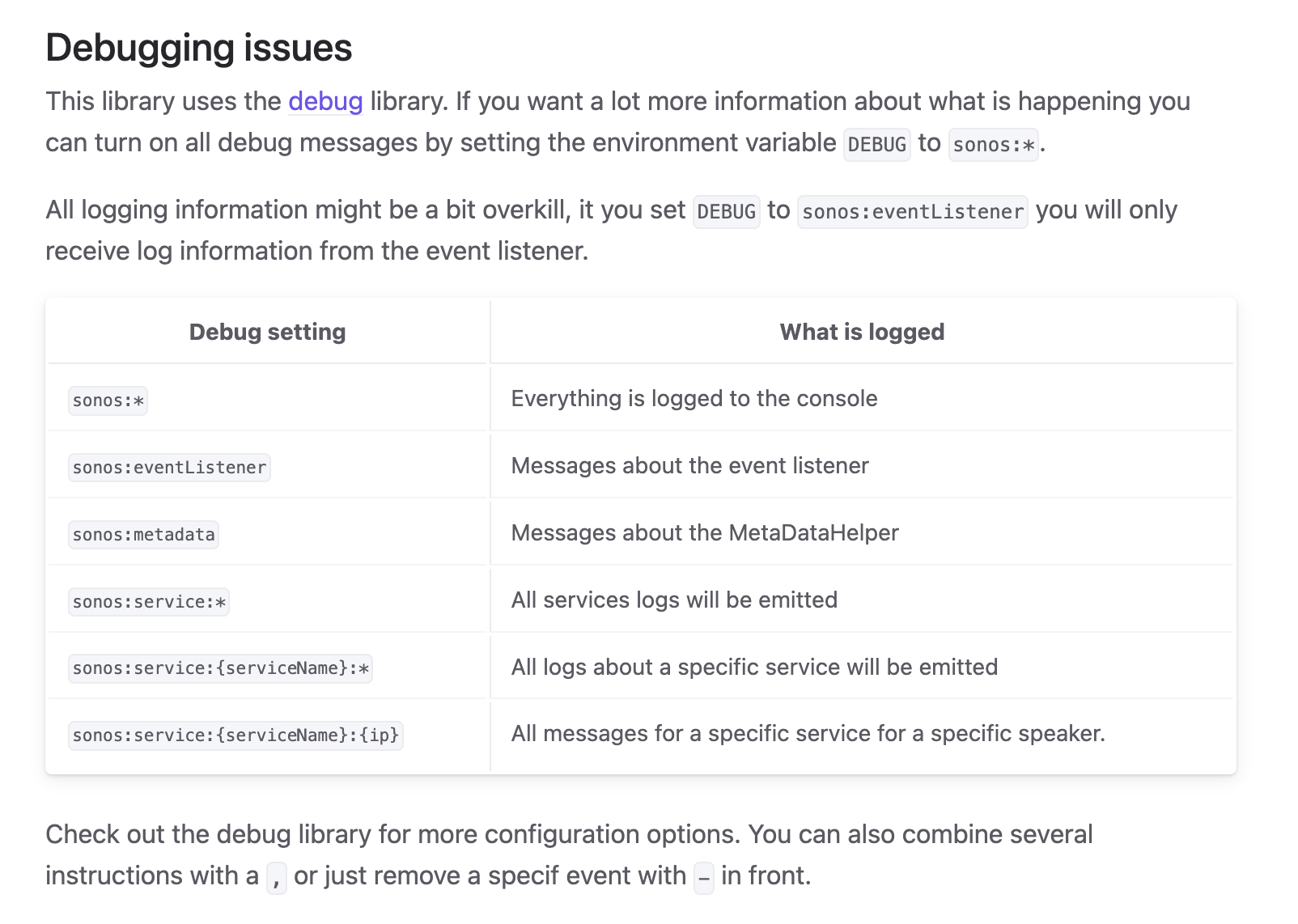
  • If that doesn’t improve the issue, it seems possible in the library we use for the Sonos part to pass an environment variable to enable logs and better understand what’s failing on their side:

Source: Getting started - Sonos

Is restarting your Gladys container with the environment variable something within your skills? (If not, tell me and we’ll find another solution)

In the meantime, I’ve already made a PR for the first point to add a bit more logs on the Gladys side:

Unfortunately, I have no skills and I’d rather not tinker and break everything :slight_smile:

I understand!

We’ll first look at the PR to increase the timeout and we’ll see afterwards if we need more logs :slight_smile:

I’ll keep you posted as soon as it goes into production.

Hello :slight_smile:

The audio feature in Gladys seems to be well progressed by this integration, but have you thought about all those who don’t use SONOS hardware?

Wouldn’t it be possible to separate the integration/use of sound in a scene from the playback method, in order to more broadly target everything currently available on the market (Amazon Echo, Google Home

Hi @jean_bruder :slight_smile: It’s already the case!

As always in Gladys, the core is separated from the integrations that bridge a Gladys device and the

Hello. After the wave of new features, I’m retesting Gladys, which I’ve been keeping an eye on for quite some time. I started by trying to integrate my Sonos speakers, and it seems that it doesn’t work because the speakers are on a dedicated VLAN, separate from the one where Gladys is running? Has anyone managed to make it work with this configuration? The scan doesn’t return any results, and as far as I can tell, there’s no way to specify the IPs of the speakers?

Thanks!

Hello,

I have the same issue on my end :innocent:

Hi,

I think you need to enable the mdns protocol between your VLANs (Sonos and Gladys) on your router.

I thought I understood that the Sonos integration doesn’t use mDNS?

Hi, maybe so, but there must be some kind of automatic discovery protocol?

Hi,

Yes, that seems consistent with your network configuration.

The current Sonos integration in Gladys uses automatic SSDP/UPnP discovery. It therefore sends a multicast request on 239.255.255.250:1900.

https://sonos.svrooij.io/sonos-communication

With Gladys and the Sonos devices placed on two different VLANs, this multicast generally does not traverse the router by default. The scan may therefore find nothing even if Gladys is allowed to communicate directly with the IP addresses of the speakers.

And indeed, looking at the current integration, the scan only goes through InitializeWithDiscovery(): it does not seem possible in Gladys to manually enter the IP address of a speaker.

However, the Sonos library used by Gladys allows starting from a known device rather than just doing network discovery. This could therefore be an interesting evolution of the integration: allowing to manually enter the IP address of a Sonos for installations with VLANs.

In the short term, the other solution would be to configure the network to correctly relay SSDP between the two VLANs.

@David I’m going to work on Sonos externally to add management of known IPs, plus playback by URI. (The rest will be identical to the native version :slight_smile:
I’ll need you to test it @prohand you’re also welcome to join :slight_smile:

With pleasure :winking_face_with_tongue:

@prohand @David

Tell me if you find your Sonos with this :slight_smile:

https://ghcr.io/vincentbesseau/gladys-sonos:0.1.1

{
  "manifest_version": 1,
  "type": "device",
  "name": "Sonos",
  "description": {
    "en": "Control Sonos speakers locally, including VLAN setups, and play any content URI.",
    "fr": "ContrĂŽlez vos enceintes Sonos en local, y compris en VLAN, et lancez n'importe quelle URI."
  },
  "version": "0.1.1",
  "docker_image": "ghcr.io/vincentbesseau/gladys-sonos:0.1.1",
  "gladys_version": ">=4.86.0",
  "cover_image": "https://raw.githubusercontent.com/vincentBesseau/gladys-sonos/main/cover.jpg",
  "categories": [
    "multimedia"
  ],
  "transports": [
    "local"
  ],
  "network_discovery": [
    {
      "type": "ssdp",
      "st": "urn:schemas-upnp-org:device:ZonePlayer:1"
    }
  ],
  "config_schema": [
    {
      "key": "intro",
      "type": "section",
      "label": {
        "en": "Sonos, controlled locally",
        "fr": "Sonos, piloté en local"
      },
      "description": {
        "en": "This integration controls your Sonos speakers directly over your local network - no cloud account, no Sonos app login. It discovers them automatically (SSDP). If your Sonos speakers are on a different VLAN/subnet than Gladys, automatic discovery will not find them: fill in one known IP below instead, it is enough to recover the whole household.",
        "fr": "Cette intégration pilote vos enceintes Sonos directement sur votre réseau local - aucun compte cloud, aucune connexion à l'app Sonos. Elle les découvre automatiquement (SSDP). Si vos enceintes Sonos sont sur un VLAN/sous-réseau différent de Gladys, la découverte automatique ne les trouvera pas : renseignez plutÎt une IP connue ci-dessous, cela suffit à retrouver toute l'installation."
      }
    },
    {
      "key": "known_ips",
      "type": "string",
      "label": {
        "en": "Known IPs (VLAN fix)",
        "fr": "IPs connues (contournement VLAN)"
      },
      "description": {
        "en": "One Sonos speaker IP is enough: this integration then asks it for your whole household's layout. Separate multiple entries with a comma or a new line.",
        "fr": "L'IP d'une seule enceinte Sonos suffit : l'intégration lui demande ensuite l'organisation de toute votre installation. Séparez plusieurs entrées par une virgule ou un retour à la ligne."
      },
      "placeholder": {
        "en": "192.168.10.21",
        "fr": "192.168.10.21"
      }
    }
  ],
  "actions": [
    {
      "key": "scan_now",
      "label": {
        "en": "Scan for Sonos speakers",
        "fr": "Rechercher les enceintes Sonos"
      },
      "timeout_seconds": 30
    }
  ]
}