Is it dead? Am I good for a reinstallation (of the container)?
In the logs, it’s the same series of messages that loops endlessly…
MQTT works and the rest of the pi also. A reboot didn’t change anything.
If you don’t mind (if you have sensitive data and it bothers you, you’re not obliged, I’m just suggesting), could you do:
docker stop gladys
Then retrieve the DB file: gladys-production.db which is in the volume you must have specified when you launched a Gladys container that points to your SSD.
It’s the left part of this part in your docker run:
And if you don’t mind, send it to me privately on the forum so I can see what’s wrong (you can put it on a dropbox/drive, whatever you want). That way we’ll be sure about the DB migration part.
Eventually, I can correct the file for you and you can reintegrate it into your instance
I know it’s a bit artisanal, but I’m really interested in knowing why it didn’t work for you specifically, while it worked for everyone else (at least my instance updated itself without any problems, @VonOx did the same, and all previous testers didn’t have any issues).
So, since I had made a backup of the DB on the 21st, I thought I would reinject it (before seeing your message).
And it didn’t work, the message is the same.
I can no longer give you the DB in question because, being a bit of an idiot, I overwrote the ‹ defective › one without saving it (since it was defective).
I am sending you the saved DB (700MB) and passed through Gladys, since it also seems defective?
Thanks for your support!
PS: I promise I didn’t do anything unusual during the update (was there an update?)
Gladys just stopped working (‹ inaccessible ›). I realized this when the aquariums did not turn off and we reached 24 degrees in the living room
Ah, at least there’s something positive: it’s a real problem related to your DB and not a random problem (like an instance that reboots, that kind of thing). That’s good to know!
Out of curiosity, when did you first install Gladys (to know when this DB dates from)? At the release of v4? During the beta? During the alpha?
Throughout the life of this DB, do you confirm that you have never installed a « custom build » that affects the same DB?
In any case, I will be fixed by seeing the DB later, I’ll keep you posted!
Yes, I released Gladys v4.6.0 with curve display on the dashboard. I haven’t had time to communicate about it yet, I’ll do it at the end of the week on my Gladys days The idea was also to wait for the first feedback before communicating about it, so far apart from you no one has complained so it’s rather positive
Hello!
The first installation dates back to December '20 and I think the DB is from that time.
I haven’t played with the test or beta versions.
However, I have had a few power outages recently. Maybe a lead?
I had noticed it was in build, but you surprised us… For Halloween?
These files only appear when the DB is in use, they are temporary files that allow SQLite to store « WAL » (write-ahead-log), so that if Gladys crashes, your DB can recover when Gladys reboots.
If you ever want to make a copy/backup of your DB, you necessarily need to stop Gladys / or use the official SQLite backup utility (sqlite3 .backup I think), otherwise if you just copy the .db file you can end up with a corrupted file.
By any chance, did you move this DB without using an official utility/without stopping Gladys?
For your file, I managed to fix it, but I won’t be able to upload it for you until tomorrow at the coworking space, my upload connection at home isn’t strong enough to send it to you
In my memories, I always did a ‹ stop Gladys › before any DB backup, but it’s not impossible that I made a mistake…
I suppose that, since the data wasn’t being used, it didn’t matter if the DB was corrupted.
After that, I looked a lot to transfer the installation to SSD, I had a corrupted SD card, etc. So many potential sources of errors!
In short, thank you very much for taking the time to look at it.
If it’s possible and it suits you, don’t hesitate to truncate the DB to lighten it, I don’t have any vital data…
I am adding the behavior observed on my side, not knowing if there is a link with what is exposed here?
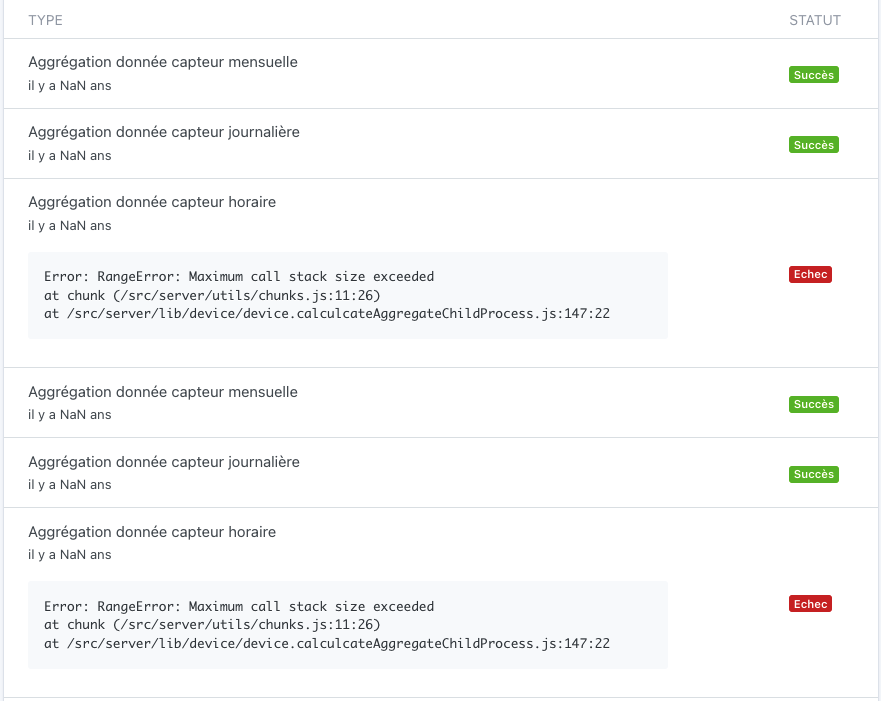
In the task list, I notice 2 types of errors that keep happening (this page is becoming very very long):
« Aggregation sensor monthly/daily/hourly data »:
    at calculateTriangleArea (/src/server/node_modules/downsample/index.js:69:26)
    at LTTBIndexesForBuckets (/src/server/node_modules/downsample/index.js:662:18)
    at /src/server/node_modules/downsample/index.js:690:34
    at /src/server/lib/device/device.calculcateAggregateChildProcess.js:119:27
    at Map.forEach (<anonymous>)
    at /src/server/lib/device/device.calculcateAggregateChildProcess.js:111:35
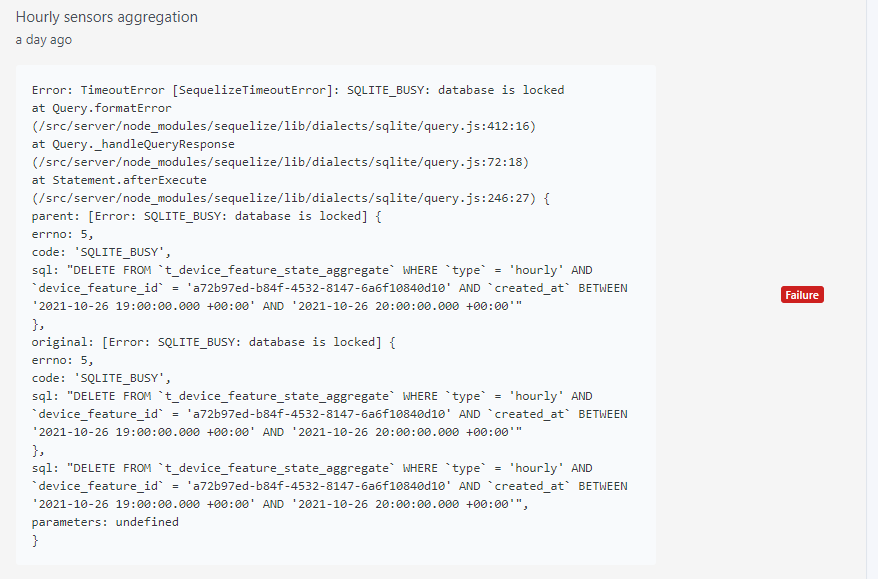
and (just an excerpt as it is much longer), « Aggregation hourly sensor data »:
    at Query.formatError (/src/server/node_modules/sequelize/lib/dialects/sqlite/query.js:412:16)
    at Query._handleQueryResponse (/src/server/node_modules/sequelize/lib/dialects/sqlite/query.js:72:18)
    at Statement.afterExecute (/src/server/node_modules/sequelize/lib/dialects/sqlite/query.js:246:27) {
  parent: [Error: SQLITE_BUSY: database is locked] {
    errno: 5,
    code: 'SQLITE_BUSY',
    sql: "INSERT INTO `t_device_feature_state_aggregate` (`id`,`type`,`device_feature_id`,`value`,`created_at`,`updated_at`) VALUES
Same issue here. It seems that the Gladys Plus backup locks the database, and if the aggregation starts at the same time (e.g., on startup), I get this error.
Additionally, I have errors like this after a few minutes for the hourly aggregation part.
I have restarted the Raspberry Pi several times, but it still gets stuck at 52%. I specify that I am on an SD card and not an SSD
2021-10-28T10:37:51+0200 <info> device.calculateAggregate.js:38 (DeviceManager.calculateAggregate) Calculating aggregates device feature state for interval hourly
2021-10-28T10:37:51+0200 <info> index.js:63 (Server.<anonymous>) Server listening on port 80
2021-10-28T10:44:47+0200 <warn> device.calculateAggregate.js:95 (Socket.<anonymous>) device.calculateAggregate stderr: RangeError: Maximum call stack size exceeded
    at chunk (/src/server/utils/chunks.js:11:26)
    at /src/server/lib/device/device.calculcateAggregateChildProcess.js:147:22
2021-10-28T10:44:47+0200 <warn> device.calculateAggregate.js:101 (ChildProcess.<anonymous>) device.calculateAggregate: Exiting child process with code 1
2021-10-28T10:44:47+0200 <error> device.onHourlyDeviceAggregateEvent.js:22 (DeviceManager.onHourlyDeviceAggregateEvent) Error: RangeError: Maximum call stack size exceeded
    at chunk (/src/server/utils/chunks.js:11:26)
    at /src/server/lib/device/device.calculcateAggregateChildProcess.js:147:22
    at ChildProcess.<anonymous> (/src/server/lib/device/device.calculateAggregate.js:102:23)
    at ChildProcess.emit (events.js:400:28)
    at maybeClose (internal/child_process.js:1058:16)
    at Process.ChildProcess._handle.onexit (internal/child_process.js:293:5)
Same here, the errors are back, from time to time, but not permanent. I thought you had done what was needed @pierre-gilles, but I have the impression that it’s not the same error:
at Query.formatError (/src/server/node_modules/sequelize/lib/dialects/sqlite/query.js:412:16)
at Query._handleQueryResponse (/src/server/node_modules/sequelize/lib/dialects/sqlite/query.js:72:18)
at Statement.afterExecute (/src/server/node_modules/sequelize/lib/dialects/sqlite/query.js:246:27) {
parent: [Error: SQLITE_BUSY: database is locked] {
errno: 5,
code: 'SQLITE_BUSY',
sql: 'UPDATE `t_device_feature` SET `last_monthly_aggregate`=$1,`updated_at`=$2 WHERE `id` = $3'
},
original: [Error: SQLITE_BUSY: database is locked] {
errno: 5,
code: 'SQLITE_BUSY',
sql: 'UPDATE `t_device_feature` SET `last_monthly_aggregate`=$1,`updated_at`=$2 WHERE `id` = $3'
},
sql: 'UPDATE `t_device_feature` SET `last_monthly_aggregate`=$1,`updated_at`=$2 WHERE `id` = $3',
parameters: undefined
}
This drives me crazy, I know @lmilcent had them too during development but I’ve never been able to reproduce… If you could check what the API returns @cicoub13?
It may be due to the Gladys Plus backup running at the same time, I’ll try to see to prevent aggregation when the backup is running.