Release of Debian 11 compatibility next week + improvements for Unraid/Synology?

Here’s what I found in the logs with an error that repeated many times, and eventually it finally worked:

gandalf@hal9000:~ $ docker container logs --follow 26e90d537c66
Using '/app/data' as data directory
Zigbee2MQTT:info  2022-03-19 09:35:10: Logging to console and directory: '/app/data/log/2022-03-19.09-35-08' filename: log.txt
Zigbee2MQTT:info  2022-03-19 09:35:10: Starting Zigbee2MQTT version 1.24.0 (commit #7a2ddf2)
Zigbee2MQTT:info  2022-03-19 09:35:10: Starting zigbee-herdsman (0.14.20)
Zigbee2MQTT:error 2022-03-19 09:36:15: Error while starting zigbee-herdsman
Zigbee2MQTT:error 2022-03-19 09:36:15: Failed to start zigbee
Zigbee2MQTT:error 2022-03-19 09:36:15: Check https://www.zigbee2mqtt.io/guide/installation/20_zigbee2mqtt-fails-to-start.html for possible solutions
Zigbee2MQTT:error 2022-03-19 09:36:15: Exiting...
Zigbee2MQTT:error 2022-03-19 09:36:15: Error: network commissioning timed out - most likely network with the same panId or extendedPanId already exists nearby
    at ZnpAdapterManager.beginCommissioning (/app/node_modules/zigbee-herdsman/src/adapter/z-stack/adapter/manager.ts:347:23)
    at ZnpAdapterManager.start (/app/node_modules/zigbee-herdsman/src/adapter/z-stack/adapter/manager.ts:92:17)
    at Controller.start (/app/node_modules/zigbee-herdsman/src/controller/controller.ts:123:29)
    at Zigbee.start (/app/lib/zigbee.ts:58:27)
    at Controller.start (/app/lib/controller.ts:100:27)
    at start (/app/index.js:101:5)
[...]
Zigbee2MQTT:info  2022-03-19 10:30:41: Logging to console and directory: '/app/data/log/2022-03-19.10-30-39' filename: log.txt
Zigbee2MQTT:info  2022-03-19 10:30:41: Starting Zigbee2MQTT version 1.24.0 (commit #7a2ddf2)
Zigbee2MQTT:info  2022-03-19 10:30:41: Starting zigbee-herdsman (0.14.20)
Zigbee2MQTT:error 2022-03-19 10:31:47: Error while starting zigbee-herdsman
Zigbee2MQTT:error 2022-03-19 10:31:47: Failed to start zigbee
Zigbee2MQTT:error 2022-03-19 10:31:47: Check https://www.zigbee2mqtt.io/guide/installation/20_zigbee2mqtt-fails-to-start.html for possible solutions
Zigbee2MQTT:error 2022-03-19 10:31:47: Exiting...
Zigbee2MQTT:error 2022-03-19 10:31:47: Error: network commissioning timed out - most likely network with the same panId or extendedPanId already exists nearby
    at ZnpAdapterManager.beginCommissioning (/app/node_modules/zigbee-herdsman/src/adapter/z-stack/adapter/manager.ts:347:23)
    at ZnpAdapterManager.start (/app/node_modules/zigbee-herdsman/src/adapter/z-stack/adapter/manager.ts:92:17)
    at Controller.start (/app/node_modules/zigbee-herdsman/src/controller/controller.ts:123:29)
    at Zigbee.start (/app/lib/zigbee.ts:58:27)
    at Controller.start (/app/lib/controller.ts:100:27)
    at start (/app/index.js:101:5)
Using '/app/data' as data directory
Zigbee2MQTT:info  2022-03-19 13:01:45: Logging to console and directory: '/app/data/log/2022-03-19.13-01-43' filename: log.txt
Zigbee2MQTT:info  2022-03-19 13:01:45: Starting Zigbee2MQTT version 1.24.0 (commit #7a2ddf2)
Zigbee2MQTT:info  2022-03-19 13:01:45: Starting zigbee-herdsman (0.14.20)
Zigbee2MQTT:info  2022-03-19 13:01:58: zigbee-herdsman started (resumed)
Zigbee2MQTT:info  2022-03-19 13:01:58: Coordinator firmware version: '{"meta":{"maintrel":1,"majorrel":2,"minorrel":7,"product":1,"revision":20210708,"transportrev":2},"type":"zStack3x0"}'
Zigbee2MQTT:info  2022-03-19 13:01:58: Currently 0 devices are joined:
Zigbee2MQTT:info  2022-03-19 13:01:58: Zigbee: disabling joining new devices.
Zigbee2MQTT:info  2022-03-19 13:01:58: Connecting to MQTT server at mqtt://localhost:1884
Zigbee2MQTT:info  2022-03-19 13:01:58: Connected to MQTT server
Zigbee2MQTT:info  2022-03-19 13:01:58: MQTT publish: topic 'zigbee2mqtt/bridge/state', payload 'online'
Zigbee2MQTT:info  2022-03-19 13:01:58: Started frontend on port 0.0.0.0:8080
Zigbee2MQTT:info  2022-03-19 13:01:58: MQTT publish: topic 'zigbee2mqtt/bridge/config', payload '{"commit":"7a2ddf2","coordinator":{"meta":{"maintrel":1,"majorrel":2,"minorrel":7,"product":1,"revision":20210708,"transportrev":2},"type":"zStack3x0"},"log_level":"info","network":{"channel":11,"extendedPanID":"0x00124b00258de31f","panID":6754},"permit_join":false,"version":"1.24.0"}'
^C

However, I can’t pair the devices; the temperature sensor is not found at all :frowning:

On your RPIs, do you have the SSD plus the key? The doc suggests using a powered USB hub. I already have an official power supply that delivers 3A, and I don’t have a USB hub at home LOL

Well, I’m stopping the tests for today.

On RPI 32 bits, everything works perfectly. I was able to rediscover the devices without any issues, everything was detected easily.

On my fixed machine on Debian bullseye 64 bits (Intel x86_64 « classic » architecture), everything works perfectly as well (the installation is super fast)

Screenshot from 2022-03-19 15-54-38

The MQTT devices were recognized immediately (temperature and motion sensor), I didn’t even have to redetect anything, everything appeared perfectly.

On RPI bullseye 64 bits, detection does not seem to work correctly. The temperature sensor eventually appears as unrecognized (and I think Zigbee2mqtt cannot communicate properly with the sensor) and I can’t do anything with it.

What I should test is maybe buying a USB hub because the Zigbee FAQ mentions it for the errors I had in the logs. The RPI already powers the SSD, so maybe the SSD plus the Zigbee SONOFF key is too much and the key doesn’t work properly. I have no other leads to investigate.

Ah yes, I could switch back to the SD card and see if it works without the SSD, if it’s a problem of insufficient power…

BINGO (Update)!!

I said I stopped, but I wanted to be sure. I restarted on the SD card (still on bullseye 64 bits). Update, installation of Gladys and everything works. So, it seems that on my RPI 4 (8Gb), the SSD plus the Zigbee SONOFF key is too much for an « official » 3A and 5.1V power supply, which is 15.3W (the RPI 4 32 bits was on SD card).

So, everything is fine on my side as well. By the way, I don’t know how many times I deployed Gladys today, but it’s still extraordinarily simple. One docker command, 2 minutes of configuration and off you go. So, sorry for crying wolf, I have no issues with Gladys, but it’s good to know that if you use an SSD, you might need to consider a USB hub powered independently of the RPI.

The sequel to the sequel :slight_smile:

I managed to launch with a cidfile by cheating (the owner of the cidfile is the user pi)

docker run -d \
    --cidfile ~/GladysContainerId \
    --restart=always \
    --privileged \
    --network=host \
    --log-opt max-size=5m \
    --name gladys \
    --cap-add SYS_RAWIO \
    -e NODE_ENV=production \
    -e SERVER_PORT=80 \
    -e SQLITE_FILE_PATH=/var/lib/gladysassistant/gladys-production.db \
    -v ~/GladysContainerId:/var/lib/gladysassistant/containerId:ro \
    -v /var/run/docker.sock:/var/run/docker.sock \
    -v /var/lib/gladysassistant/:/var/lib/gladysassistant/ \
    -v /dev:/dev \
    -v /run/udev:/run/udev:ro \
    -v /sys/class/gpio:/sys/class/gpio \
    -v /etc/localtime:/etc/localtime:ro \
    -v /etc/timezone:/etc/timezone:ro \
    gladysassistant/gladys:dev

But then strange things happen (note that each time I delete the db, the folders, etc…)

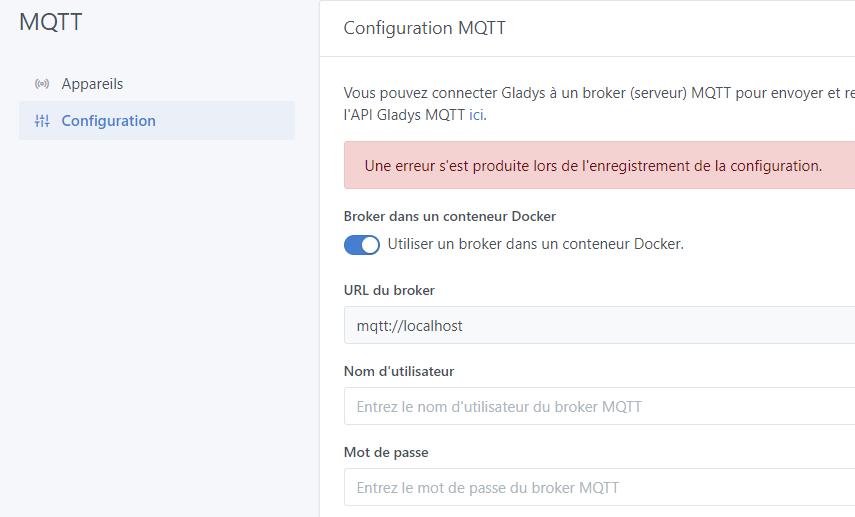
When Gladys starts for the first time, the MQTT integration does its thing ^^, I haven’t even created a user yet.

2022-03-21T09:25:35+0100 <info> 20210129155044-multi-user.js:23 (Object.up) Multi-user migration: 0 users found
2022-03-21T09:25:35+0100 <info> job.purge.js:17 (Job.purge) Deleting all background jobs created before = Mon Mar 14 2022 09:25:35 GMT+0100 (Central European Standard Time)
Initialising OpenZWave 1.6.0 binary addon for Node.JS.
        OpenZWave Security API is ENABLED
        ZWave device db    : /usr/local/etc/openzwave
        User settings path : /src/server/services/zwave/node_modules/openzwave-shared/build/Release/../../
        Option Overrides : --Logging false --ConsoleOutput false --SaveConfiguration true
2022-03-21T09:25:40+0100 <info> index.js:19 (Object.start) Starting example service
2022-03-21T09:25:40+0100 <info> index.js:64 (Object.start) Starting CalDAV service
2022-03-21T09:25:40+0100 <info> index.js:16 (Object.start) Starting MQTT service
2022-03-21T09:25:40+0100 <info> updateContainer.js:13 (MqttHandler.updateContainer) MQTT: checking for required changes...
2022-03-21T09:25:40+0100 <info> updateContainer.js:18 (MqttHandler.updateContainer) MQTT: update to mosquitto v2 required...
2022-03-21T09:25:40+0100 <info> installContainer.js:19 (MqttHandler.installContainer) MQTT broker is being installed as Docker container...
2022-03-21T09:25:40+0100 <info> installContainer.js:23 (MqttHandler.installContainer) Check Gladys network...
2022-03-21T09:25:40+0100 <info> installContainer.js:29 (MqttHandler.installContainer) Pulling eclipse-mosquitto:2 image...
2022-03-21T09:25:42+0100 <info> installContainer.js:33 (MqttHandler.installContainer) Preparing broker environment...
2022-03-21T09:25:42+0100 <info> installContainer.js:37 (MqttHandler.installContainer) Creating container...
2022-03-21T09:25:43+0100 <info> installContainer.js:45 (MqttHandler.installContainer) MQTT broker successfully installed as Docker container
2022-03-21T09:25:44+0100 <info> updateContainer.js:39 (MqttHandler.updateContainer) MQTT: update to mosquitto v2 done
2022-03-21T09:25:44+0100 <info> service.start.js:40 (Service.start) Service mqtt is not configured, so it was not started.
2022-03-21T09:25:44+0100 <info> index.js:14 (Object.start) starting GoogleActions service
2022-03-21T09:25:44+0100 <info> init.js:36 (Zigbee2mqttManager.init) Zigbee2mqtt USB dongle not attached
2022-03-21T09:25:44+0100 <info> index.js:18 (Object.start) Starting TP-Link service

I end up in a shaky state, impossible to get out of.

Oh yeah, I see, but in that case the docker run is specific to the Raspberry Pi, and putting all the data in /home/pi is not very smart.

I prefer the version I posted earlier!

Great!! :smiley: Glad to hear it worked for you :slight_smile:

And I prefer the third one :slight_smile:

aha, you sent your message while I was typing mine, didn’t see it!

It’s already better, but come on, is the user’s home folder really a place where we should store information critical to the execution of Gladys? It’s like if an app stored a super important file on your desktop, a file that if you delete it, the app doesn’t work anymore…

Too risky as it is, I still prefer the first version without the cidfile

We start from the assumption that the user should not have to do ssh etc… and that Gladys is secure but we are much more exposed.

We can have the same discussion about the folder /var/lib/gladysassistant, if the user deletes it everything is broken :slight_smile:


However, there is a bug in the management of containers, I don’t see why Gladys creates a mosquitto config on the first startup

That’s in the case where the user uses the image we pre-conceived, but there are still a non-negligible number of people who install Gladys on a machine that has other containers (Pi-Hole, etc…), and who launch Gladys with the docker run. This experience is also important :slight_smile:

These people, I’m not sure that 6 months later if they come back and there is a file in /home/pi you remember if you need to keep it.

There is still a difference between the folder where you arrive (the equivalent of the desktop), and the folder /var/lib which contains a folder per application.

Are you 100% sure you stopped + deleted the containers before restarting Gladys?

The code is quite clear on this:

It does a getContainers and sees what comes back

Yeah, that’s nitpicking, I put it there to test, but ~/.config/gladys is fine too

I already had mosquitto (which could already exist), if that’s the case, the error should be handled (existing container but service not configured/no config)

Let’s look at the problem from the other side, what’s wrong with the --cgroupns=host option in your opinion?

Wasn’t this the default behavior under Docker until now?

I agree, will you create a GitHub issue?

It’s an additional exposed layer (which we didn’t care about until now, I grant you that)

Yes, the default namespace was that of the host. (This is what caused us problems with cgroupsv2 + systemd)

What is now strongly recommended to use for security is the user namespace.


In conclusion, no cidfile on the rpi image, but we still leave the possibility for those who do not want to use --cgroupns=host?

Ok, I see.

Again, I understand these security measures in a Cloud context (for a host that launches client containers that must be well isolated), in our case a little less.

If the cidfile worked easily and without problems, I would have been motivated to go through the cidfile, except that from the experience we both have with it (and I don’t think we’re idiots in Docker! :p), I already see the messages pouring in on the forum for all those who want to adapt the docker run for their installation.

Where the cgroup works well and is universal.

I think we’re going to go with that.

The --cgroupns=host everywhere: in the Rpi image, on the site, for Synology/Unraid.

I leave the cidfile code snippet in the codebase, it leaves us a rope to our bow on the day when it changes again on the cgroup side, and if someone ever wants to launch Gladys in a particular context without cgroupns=host, we have the option :slight_smile: But I don’t communicate about it on the site.

:pray: that works for me :smiley:

Perfect! :slight_smile:

As the feedback on this build is positive, and this release will unlock many cases (Synology/Unraid/Raspberry Pi OS 64-bit), I am starting the preparation for a release soon!

I’ll keep you posted.