Hello,
When selecting a « Lighting on/off » state in a device widget or the room devices widget, the switch also appears in the title, creating a duplicate:
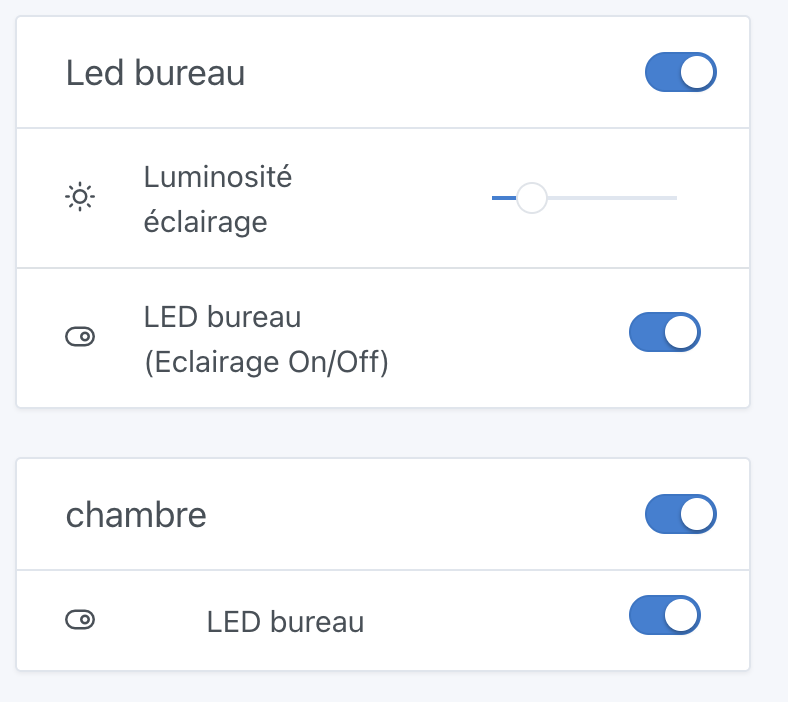
Could we add an option to disable or configure the display of the
Hello,
When selecting a « Lighting on/off » state in a device widget or the room devices widget, the switch also appears in the title, creating a duplicate:
Could we add an option to disable or configure the display of the
This is intended behavior which allows, for example, turning off all the lights in a room: it made sense with the room’s Device widget (which is deprecated, I believe)
But you’re right that the general switch on the box makes less sense in the new Device widget (even if it can be handy)
Indeed, the ability to enable/disable this general switch is a good idea!
We shouldn’t completely get rid of the button because if you group all your lights in the same box, it lets you turn everything off at once.
Let’s see what proposals will be made 
If you want, we can show this switch only when there are 2 lights in the room?
No, just a checkbox in the widget configuration to enable or disable the grouped command
This would let the user choose
Agree with that — three quarters of the time I hear my partner grumbling because she clicks that button.
Less a fan of that option!
In your case, if we only show the button when there are 2 bulbs, it won’t display anything
In my case we have more than two lamps and the buttons annoy us ^^
I’m in favor of leaving the choice as well
I’m not in favor of the « all-options » approach. We make choices and stand by them
I quote myself on the philosophy of v4 :
If this button « annoys », we can also remove it or rethink it so it stops « annoying »; there’s no point in keeping features that people don’t like ^^
I think it might be interesting, personally…
I use it to turn off the eight bulbs in my dining room at the same time.
However, if there’s only one device to turn off, it’s not useful.
Is it possible to display it when there are two or more devices?
That’s my proposal, yes
Whoa, I didn’t mean to sow discord 
Besides, we each have different systems and different expectations for customizing our dashboards.
This isn’t about radically changing the design, but simply about giving a choice and therefore allowing a dashboard that is consistent with one’s system and expectations
Hence my proposal for a checkbox:
This way, the use cases mentioned earlier are all taken into account
I implemented this in this PR; from now on the button that allows turning on the whole widget is only shown if there are 2 or more lights
@pierre-gilles will it behave the same way if they are outlets?
If so, I’m
No — on the contrary, I’m reducing when the general toggle appears in this PR.
The toggle only applies to lights.
Currently: General toggle appears if there is at least one light in the widget
In the PR: General toggle appears if there are 2 or more lights in the widget
This new feature is available in Gladys Assistant 4.58: