Hello,
Before explaining my request, I’ll describe my situation:
I have a Yamaha amplifier on my network. I can communicate with it via HTTP requests. So I don’t have a “amplifier” device in Gladys (I don’t think I can create one). For the moment I therefore created two scenes: one to turn it on, another to turn it off.
To call these scenes from the dashboard, I created a Scene widget called ON-OFF with both scenes inside:
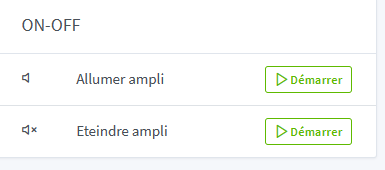
I find several drawbacks: two buttons, non-editable text, I have to click a “start” button to turn my amp off  . It’s not a dealbreaker, and if that’s how it has to be, I’ll do it that way
But if there were the possibility of having a push button  , for example with two states (up position, pressed position) that would trigger a scene when changing from one state to the other. We could also use left-right sliders, but the advantage of the button is that in the long run we could imagine changing the text written on it depending on the state, or placing an explicit icon on it, or changing the color (red, green).
If I continue the reasoning with what I read in the topic Modification of the « device » widget, if the button can also take only one state (or if there are two different types of buttons), wouldn’t that satisfy everyone: :suppression of the slider in the « device » widget, but the possibility to put a button that launches a scene which turns off all the lights.
If you agreed to go for this kind of possibility, either it would be possible to modify the Scene widget (by default it can remain as is, but allow the user to modify it — remove the text and the icon, ability to change the “Start” text…), or create a new “button” widget (which in my idea launches a scene, but that would open the door to other requests like being able to launch a specific request directly (HTTP, MQTT…)).
As for the two-state button, I see one drawback: there is no state feedback (for example, if I press to turn it on, but for some reason the amp did not turn on, the button will still be in the “turn off” position). But is that serious (I’ll click again several times).
As for the one-state button I don’t see any drawback for the moment
I apologize if this topic has already been discussed and decided but I found nothing on the forum, or if there is already an existing way to get something similar, I have not managed to do it.

 . So there is already a way to do it