Good evening,
I must be doing something wrong (  ), but I’m stuck on the condition of the following scene:
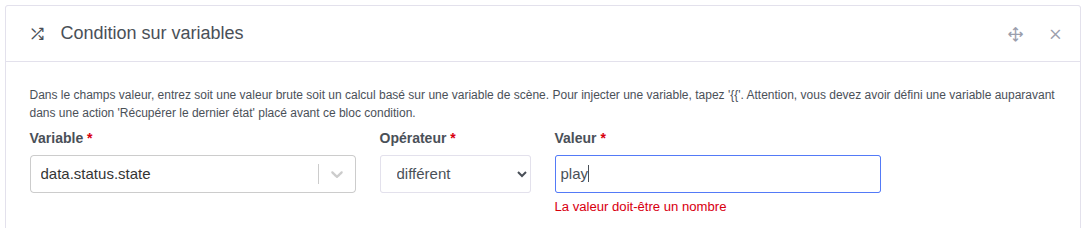
How can I test the state of my variable « state » (which is either « stop » or « play »)?
Thanks for your help,
Have a nice evening,
Jean
Good evening,
I must be doing something wrong ( ), but I’m stuck on the condition of the following scene:
How can I test the state of my variable « state » (which is either « stop » or « play »)?
Thanks for your help,
Have a nice evening,
Jean
Hi @jean_bruder, you’re not crazy, it’s not possible at the moment 
There is a feature request:
Hello @pierre-gilles
As usual, you’ve come to my rescue 
So I’ll have to wait… Do you have any idea of the timeframe for this change to be applied, because I’m stuck…
Once again, I can only thank you for this wonderful product that is Gladys 
Have a nice day,
Jean
You’ll need to vote for this request @jean_bruder 
Hello @mutmut
It’s done 
Hi @jean_bruder,
Can you explain exactly what you’re trying to do?
I’m sure there are some workarounds in the meantime 
Hello @pierre-gilles
I purchased the following button: Neue Tuya ZigBee Smart Knob Schalter DIY Drahtlose Szene Taste Drehbare Dimmer Schalter Haushaltsgeräte Automatisierung Verknüpfung Remoter - AliExpress 13
It is intended to be able to control, per room, the audio ambiance (volume +/-, play/pause, ambience/track/radio previous/next) depending on the interaction: click, double click, left/right rotation, etc…
The most basic need is « play/pause », which will be performed by a single click: if it’s playing, it goes to pause, and vice versa…
To do this, I retrieve the playback state via a request:
And I therefore want to compare the returned « state » value in order to make Gladys react:
But this is currently not possible I admit it’s far from absolutely necessary, since I control the audio from our respective smartphones (MALP app: https://play.google.com/store/apps/details?id=org.gateshipone.malp\u0026hl=fr), but I don’t like being stuck on a silly technical problem
I see that you’re calling an « domotiks » API; I assume that’s a local Domoticz server?
Can you show me the complete scene? What’s your trigger in Gladys?
Good evening @pierre-gilles
« Domotiks » is one of my mini servers dedicated to containerized applications, including a number of microservices, and a custom API that controls the « MPD » daemon (Media Player Daemon) for ambient scene audio. So, nothing to do with « Domoticz » 
The trigger is as follows :
This is followed by a first block that retrieves the current state of the audio server :
Followed by a conditional test aimed at detecting the state and setting the new state (toggle « stop/start ») :
Of course, I didn’t go any further, as I couldn’t run the test…
Have a nice rest of the evening,
Jean
Thanks for the details
Do you have a way to modify this custom API?
This custom API could return an integer instead of a string, which would also match the native music features we currently have in Gladys:
Using these native features would also let you use the player on the dashboard with your MPD server:
Ideally, if you can modify the custom API to send state changes via MQTT to Gladys, that would allow you to have the music widget always up to date on your dashboard
If this is something that works for you, I can walk you through the entire procedure! And honestly, I think it’s a better solution than using a string that doesn’t correspond to anything in Gladys
Hello @pierre-gilles
That seems pretty good to me. I had (mistakenly…) understood that this player is limited to Sonos 
Now, I need to understand how to adapt all of this?
Looking forward to hearing from you,
Jean
Great No, in Gladys nothing is reserved for a single integration, everything is developed to be 100% open.
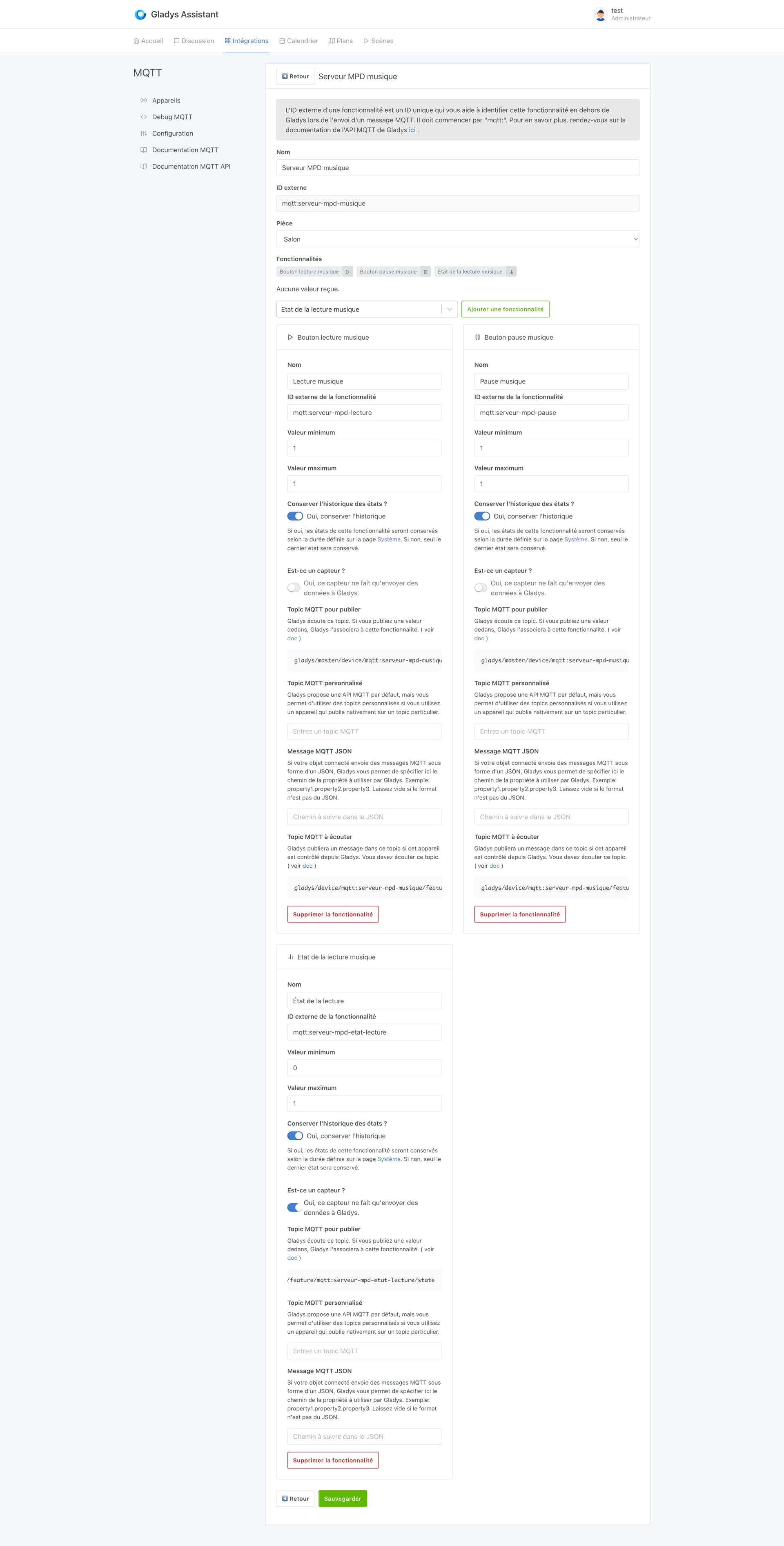
You can use the MQTT integration to create a « Virtual » music device:
You can add all music-related features of course, we currently support:
Then, on your home server, you need to propagate the playback state to Gladys, and listen for a change on Gladys’s side.
I don’t know which language your home server is written in; if it were in Node.js, you could do:
const mqtt = require("mqtt");
const client = mqtt.connect("mqtt://192.168.1.10", {
  username: 'gladys',
  password: 'aaaaaaaaa'
});

const PLAYBACK_TOPIC = "gladys/master/device/mqtt:serveur-mpd-musique/feature/mqtt:serveur-mpd-etat-lecture/state";

client.on("connect", () => {
    // Example for playback
   client.publish(PLAYBACK_TOPIC, "1");
  // Example for pause
   client.publish(PLAYBACK_TOPIC, "0");
});
I made a video on the MQTT integration topic: https://www.youtube.com/watch?v=o5yn_FnYtkc
Then, to send a command from Gladys, 2 options:
If your server can listen to an MQTT topic, then you can just listen to each topic for each command (play, pause, etc…), and react to each message. It’s the most convenient and efficient in my opinion.
Otherwise, if you prefer to do this over HTTP, you can create a scene that listens for the state change of each button (you’ll need to create a scene per button, which is less convenient than via MQTT):
But in my opinion, you can integrate all this in a few minutes
Don’t hesitate if you need help, we can even call each other if you want to debug this with me.
@jean_bruder So, did it work out in the end?
Good evening @pierre-gilles
I must admit I’m a bit busy with outdoor work given the season, and I save activities of that kind for long evenings by the fireside But I’ll be sure to keep you posted!
Have a lovely evening to all the Gladistes
Hello @pierre-gilles
Answer that will not necessarily satisfy you, but the JSON format returned by the wrapper I use for MPD’s playback state is based on MPD’s « formal » response (described here: Protocol — Music Player Daemon 0.25~git documentation), and the state is therefore indeed either « play », « stop », or « pause ». This brings us back to the initial request, which will make it possible to meet another expressed need, which is to be able to perform conditional tests on textual values
I remind you that the requirement is not to use a graphical interface, but a « multi-choice rotary button » allowing audio control (click = pause/play, rotate left = quieter, rotate right = louder, click+rotate left = previous track, click+rotate right = next track, etc …).
The ball is in the developers’ court … Thanks in advance to them
Have a nice rest of the day,
Jean
Ah, on s’était mal compris, je pensais que tu avais développé toi-même ce wrapper et que donc tu pouvais le modifier
In the meantime, the solution I proposed to you is a good workaround; it can be done in Node-RED, or in a custom script. Don’t hesitate to ask if you need help doing it.
Good evening @pierre-gilles
Not wanting to start tinkering via Node-RED, I made the « proper » modification at the wrapper level, and everything now works as desired.
It remains that the conditional test on a string would still be simpler than having to call on Node-RED
Have a nice evening,
Jean