After quite a few hours getting to grips with Gladys + Node-RED + RFXcom
I’m writing a tutorial to keep a procedure and maybe help some people ^^
What do we need?
- SOMFY RTS shutters (the tutorial also works with any RTS device)
- an RFXcom compatible with RTS (RFX433XL or RFX433E)
- a working Gladys and Node-RED installation
- the official Rfxcom software: RFXmngr available here: http://www.rfxcom.com/WebRoot/StoreNL2/Shops/78165469/MediaGallery/Downloads/RFXmngr.zip
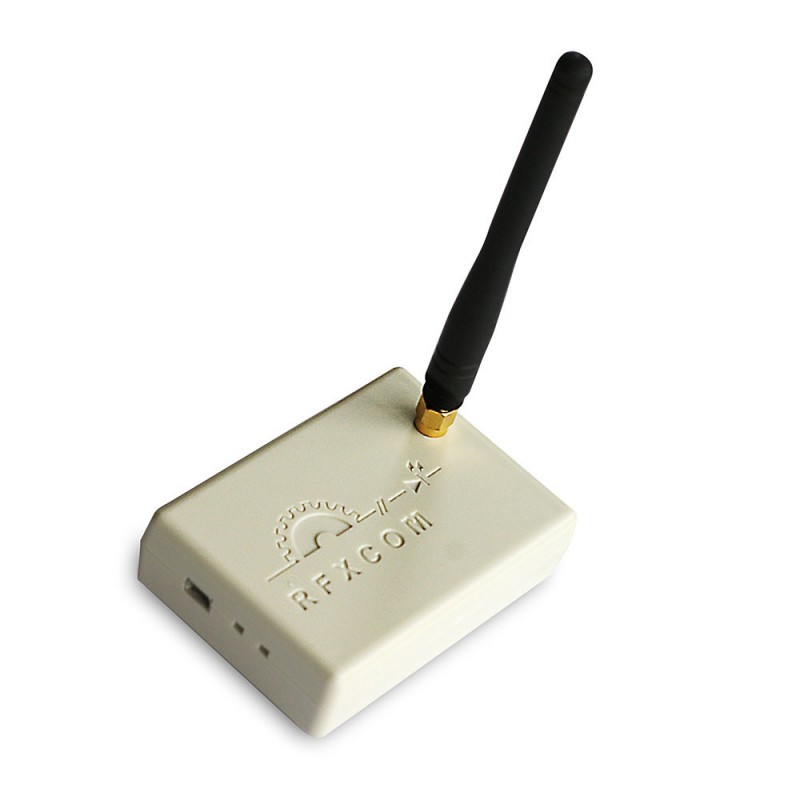
I personally use the RFX433E:
To start we’ll launch the RFXmngr program in order to associate a code with the shutters to be controlled.
I didn’t find any way to retrieve existing codes, so you must add an association for each RTS device; this means arbitrarily assigning a chosen code to each device. This does not break the existing link with a remote control, for example.
Two ways to do this:
- connect the dongle to a Windows PC running the RFXmngr application — very simple
- connect remotely, less simple but more convenient for me because my server is in my attic ^^
Here’s the procedure to connect to the dongle remotely — commands to run on your Gladys machine (Raspberry Pi, Docker) in console mode:
cd
curl -LO https://github.com/andrew-d/static-binaries/raw/master/binaries/linux/x86_64/socat
chmod +x socat
./socat file:/dev/serial/by-id/usb-RFXCOM_RFXtrx433_A1K5N6B-if00-port0,raw,echo=0 tcp4-l:3007
warning, your RFXcom will probably have a different address; you can retrieve it with the following command:
ls /dev/serial/by-id/usb-RFXCOM_RFXtrx433_*
and modify the path to your RFXcom accordingly…
then launch the RFXmngr program
click the Connect button
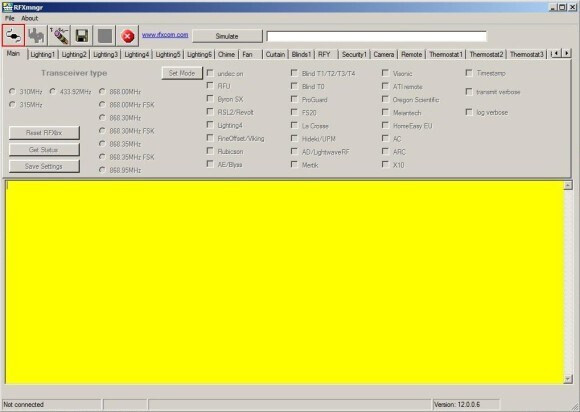
choose:
- the USB port if the dongle is local
- the IP (Gladys IP) and port (3007) if you access it remotely
by clicking OK, RFXmngr will be connected to the RFXcom
Once connected, click the « RFY » tab, then you’ll need to generate a unique ID in « ID » and a unique unit code in « Unit Code » for your RTS device. Here we use ID « 1 01 00 » and unit code « 1 ». (don’t rely on the screenshot, it’s only there to show the interface  )
)
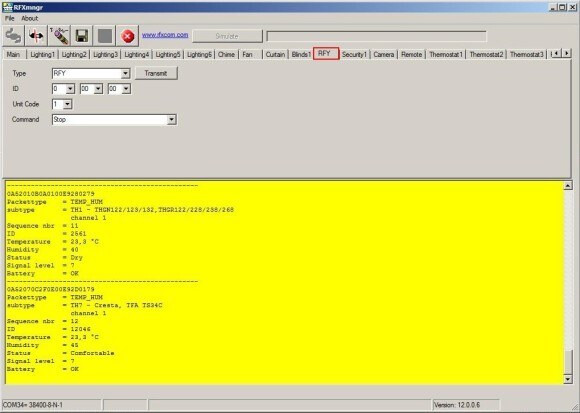
All that’s left is to pair your door/shutter with the dongle by putting your door/shutter into learning mode (consult your motor’s documentation) and click in the « command » list on the « PROGRAM » command of the application, then on « transmit » — there you go, your motor is associated with a code, it can now be controlled!
In Gladys:
To begin we’re going to set up an MQTT device in Gladys:
With a « Curtain/Shutter State » feature configured like this:
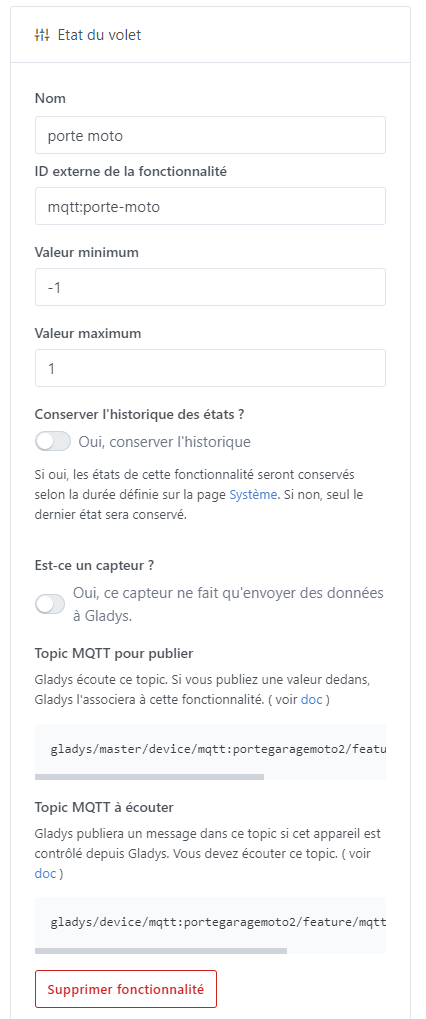
With min value -1 and max value 1
-1 closes the shutter
0 stops the shutter
1 raises the shutter
The rest will happen in Node-RED:
first, install the « node-red-contrib-rfxcom » palette to get the necessary nodes
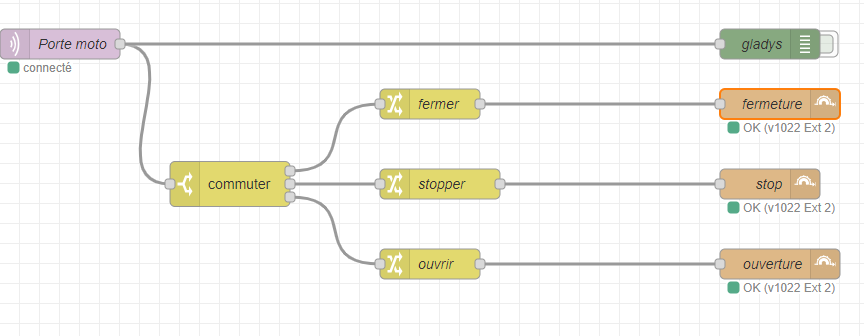
Here is an export of my garage doors flow:
just import this flow and set your server parameters and Gladys topic in the MQTT in node
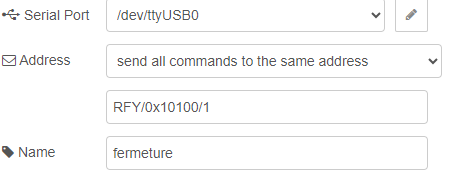
and in the rfx-blinds-out node, set the USB device corresponding to your dongle and the RFY address given via the RFXmngr app:
[
    {
        "id": "c58f505d143ae7e9",
        "type": "tab",
        "label": "Portes de garage",
        "disabled": false,
        "info": "",
        "env": []
    },
    {
        "id": "a9ae1a361b44c464",
        "type": "mqtt in",
        "z": "c58f505d143ae7e9",
        "name": "Porte moto",
        "topic": "gladys/device/mqtt:portegaragemoto2/feature/mqtt:porte-moto/state",
        "qos": "2",
        "datatype": "auto-detect",
        "broker": "041d2917313dea6e",
        "nl": false,
        "rap": true,
        "rh": 0,
        "inputs": 0,
        "x": 60,
        "y": 120,
        "wires": [
            [
                "cf1072ce938eb86b",
                "ed1a6590de4a9312"
            ]
        ]
    },
    {
        "id": "cf1072ce938eb86b",
        "type": "switch",
        "z": "c58f505d143ae7e9",
        "name": "",
        "property": "payload",
        "propertyType": "msg",
        "rules": [
            {
                "t": "eq",
                "v": "-1",
                "vt": "str"
            },
            {
                "t": "eq",
                "v": "0",
                "vt": "str"
            },
            {
                "t": "eq",
                "v": "1",
                "vt": "str"
            }
        ],
        "checkall": "false",
        "repair": false,
        "outputs": 3,
        "x": 230,
        "y": 260,
        "wires": [
            [
                "f1c6dbe6146fde4e"
            ],
            [
                "f9cae6d5f71b1f74"
            ],
            [
                "1783b4006754428c"
            ]
        ]
    },
    {
        "id": "ed1a6590de4a9312",
        "type": "debug",
        "z": "c58f505d143ae7e9",
        "name": "gladys",
        "active": false,
        "tosidebar": true,
        "console": false,
        "tostatus": false,
        "complete": "payload",
        "targetType": "msg",
        "statusVal": "",
        "statusType": "auto",
        "x": 770,
        "y": 120,
        "wires": []
    },
    {
        "id": "f1c6dbe6146fde4e",
        "type": "change",
        "z": "c58f505d143ae7e9",
        "name": "fermer",
        "rules": [
            {
                "t": "set",
                "p": "payload",
                "pt": "msg",
                "to": "Down",
                "tot": "str"
            }
        ],
        "action": "",
        "property": "",
        "from": "",
        "to": "",
        "reg": false,
        "x": 430,
        "y": 180,
        "wires": [
            [
                "8de8b0dc91284d7b"
            ]
        ]
    },
    {
        "id": "8de8b0dc91284d7b",
        "type": "rfx-blinds-out",
        "z": "c58f505d143ae7e9",
        "name": "fermeture",
        "port": "16459ba880d0837b",
        "topicSource": "node",
        "topic": "RFY/0x10100/1",
        "x": 780,
        "y": 180,
        "wires": []
    },
    {
        "id": "f9cae6d5f71b1f74",
        "type": "change",
        "z": "c58f505d143ae7e9",
        "name": "stopper",
        "rules": [
            {
                "t": "set",
                "p": "payload",
                "pt": "msg",
                "to": "Stop",
                "tot": "str"
            }
        ],
        "action": "",
        "property": "",
        "from": "",
        "to": "",
        "reg": false,
        "x": 440,
        "y": 260,
        "wires": [
            [
                "3079920a261a7a4d"
            ]
        ]
    },
    {
        "id": "3079920a261a7a4d",
        "type": "rfx-blinds-out",
        "z": "c58f505d143ae7e9",
        "name": "stop",
        "port": "16459ba880d0837b",
        "topicSource": "node",
        "topic": "RFY/0x10100/1",
        "x": 770,
        "y": 260,
        "wires": []
    },
    {
        "id": "1783b4006754428c",
        "type": "change",
        "z": "c58f505d143ae7e9",
        "name": "ouvrir",
        "rules": [
            {
                "t": "set",
                "p": "payload",
                "pt": "msg",
                "to": "Up",
                "tot": "str"
            }
        ],
        "action": "",
        "property": "",
        "from": "",
        "to": "",
        "reg": false,
        "x": 430,
        "y": 340,
        "wires": [
            [
                "b67c7c98c5bcf352"
            ]
        ]
    },
    {
        "id": "b67c7c98c5bcf352",
        "type": "rfx-blinds-out",
        "z": "c58f505d143ae7e9",
        "name": "ouverture",
        "port": "16459ba880d0837b",
        "topicSource": "node",
        "topic": "RFY/0x10100/1",
        "x": 780,
        "y": 340,
        "wires": []
    },
    {
        "id": "041d2917313dea6e",
        "type": "mqtt-broker",
        "name": "",
        "broker": "mqtt://192.168.0.1",
        "port": "1883",
        "clientid": "",
        "autoConnect": true,
        "usetls": false,
        "protocolVersion": "4",
        "keepalive": "60",
        "cleansession": true,
        "birthTopic": "",
        "birthQos": "0",
        "birthPayload": "",
        "birthMsg": {},
        "closeTopic": "",
        "closeQos": "0",
        "closePayload": "",
        "closeMsg": {},
        "willTopic": "",
        "willQos": "0",
        "willPayload": "",
        "willMsg": {},
        "userProps": "",
        "sessionExpiry": ""
    },
    {
        "id": "16459ba880d0837b",
        "type": "rfxtrx-port",
        "port": "/dev/ttyUSB0",
        "enableDebug": true,
        "rfyVenetianMode": "EU"
    }
]
In principle you have everything you need; don’t hesitate to give me feedback — any modifications will be welcome to make this tutorial as clear and easy as possible
Z.