Thanks
You can safely install Tasmota on a Wemos D1 Mini (I personally use fakes).
For flashing, a microUSB cable is sufficient. The ‹ Tasmotizer › app is particularly easy to use
In fact, I discovered Tasmota last week. I bought a SONOFF WiFi double relay and it bothered me to use Chinese servers with Ewelink to manage a relay, so I flashed it to have Tasmota. But I had stopped there.
But being able to integrate this OS on small, inexpensive modules opens the door to many possibilities.
I’m posting a copy of the response here as it may be useful to others…
That’s a lot of answers to give
The ultrasonic modules are JSN-SR04T. They are natively supported by Tasmota, but I made a more complete assembly/program to have both sensors and a percentage conversion via Arduino and ESP-01.
For the Chacon remote control, you just need to connect an rf433 sensor to a module (ex: Wemos D1 mini) flashed with the ‹ sensors › version of Tasmota. It is then directly visible on the device’s web page (and soon directly in Gladys I hope ). The rf433 sensor used is an Arduino kit fs1000a, but I think the reception issue I have comes from a poorly adapted antenna.
Powering the Wemos is rather simple! A microUSB cable connected to a phone charger or any other free USB port (modem, TV, set-top box…)
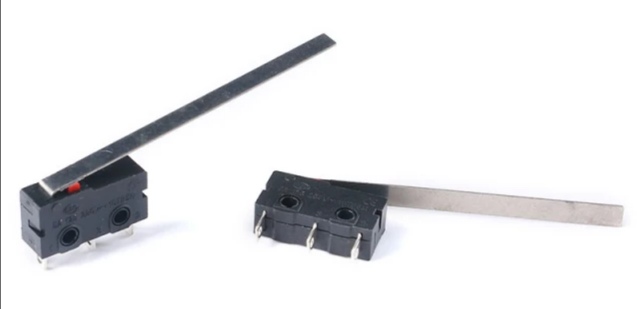
For the RFID controller, I made a tutorial on the Gladys forum that I invite you to check out. For the mail, a simple mechanical switch is used…
Here is a small photo of the switch used for the mail:
So how is the information sent to Gladys, do you have a cable up to your mailbox (I assume not), this interests me because at my place the mailman can come as early as 9:00 AM or as late as 3:00 PM and the motion detector is not suitable.
I have a power outlet in the mailbox (tapped from the gate’s power supply) to which I was able to connect my Tasmota module (and a WiFi amplifier)!
Otherwise, an external battery allows it to last for a few days/weeks depending on its capacity…
There is also a deepsleep mode but I don’t have any information to give you about that…


 (let’s finally find out why he inherited that nickname
  )
) It will become a biweekly Tuesday evening show!
 (it’s a time that those under 20 can’t know
  …
…  )
)