Control IPX800-v5 in Gladys

Ok so actually:

gladys/device/mqtt:commutateur/feature/mqtt:commutateur/state

When Gladys publishes, the topic on Mosquitto is gladys and the keys are
device/commutateur/feature
device/commutateur/state

gladys/master/device/mqtt:commutateur/feature/mqtt:commutateur/state

When Gladys receives, the topic on Mosquitto is always gladys and the keys are
master/commutateur/feature
master/commutateur/state

Actually, it’s the device/master side (since there’s no indication of the data sending direction) that’s misleading :exploding_head:, slave/master (not great) or publish/suscribe (more consistent because it implicitly indicates the direction of the data sending since the « device » like « master » is both master and slave in behavior!

In this case, I think everyone will agree that both addresses should be displayed by default and if you check « Is this a sensor? », only the corresponding line is displayed!
Indeed, it’s when it’s implemented in node-red that you have to be careful to put the correct line in the mqtt objects! :wink:

In essence, I agree with your analysis.
However, in our case with Gladys, we can assume that our central point (home automation box) controls the rest and manages all the logical/scheduling aspects. In this context, it is quite logical to name this main node « master ».
I don’t want to jump the gun, but I think that’s the logic that led to choosing these terms.

I support this part; I think this button is often a source of confusion on the forum. Maybe we should create another topic to discuss it?

Yes, if Gladys and Mosquitto are indeed hosted on the same machine, we can see it as a central point, but the Mosquitto server deployed by Gladys on the machine on which it runs also serves as a server for other clients that do not go through Gladys. And if Gladys goes through another Mosquitto server (which is possible since it is configurable, for example, in my case, I have another NUC on which Home Assistant is hosted and Mosquitto runs). And if the main node is « master », the logic would have wanted the devices to be …slave! :roll_eyes:

I confirm, I took some time to understand this point, although I deployed a flow node-red on Home Assistant without any problems, which interacts with my IPX800V5 home automation module (this module integrates MQTT objects « subscribe » and « publish »).

Yes, 100% agree, it’s a UX issue :slight_smile: There is already a GitHub issue that has been created →

Well, almost good news (now I have no more hair! :rofl:)
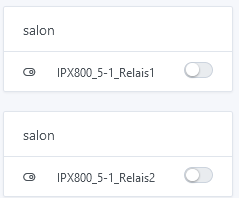
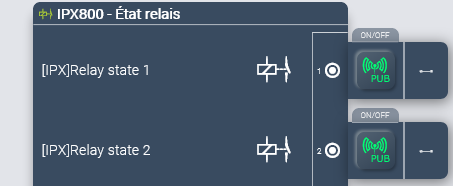
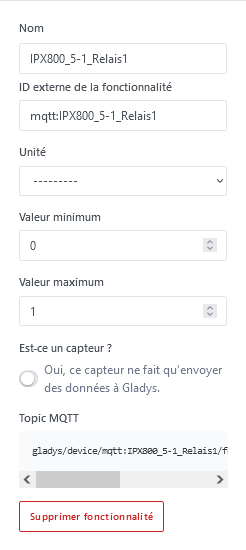
I finally managed to get the two-way functionality working (IPX800V5 relay <=> Gladys) by using « switches » (adding the relay would be good because for me switch=switch :thinking:)

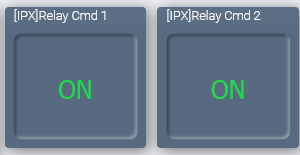
And the same on the IPX800V5 side

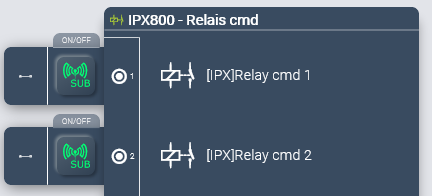
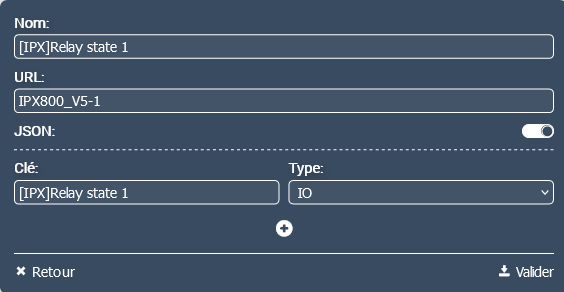
MQTT subscriptions on the IPX800V5 side

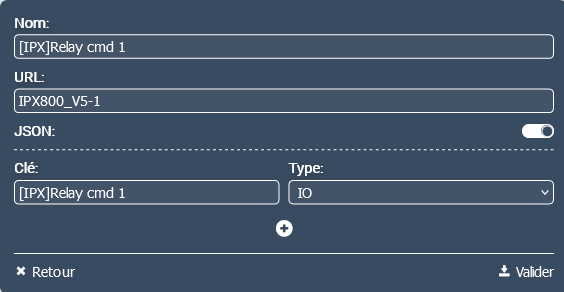
MQTT publications on the IPX800V5 side

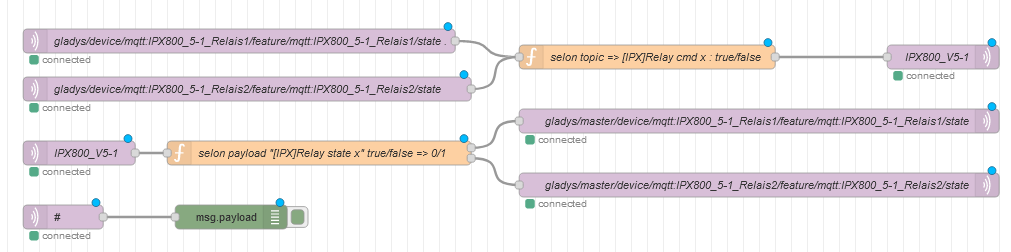
The graphical flow

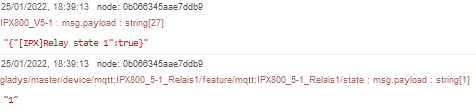
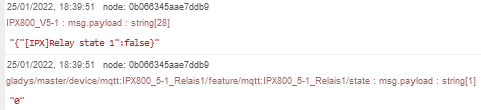
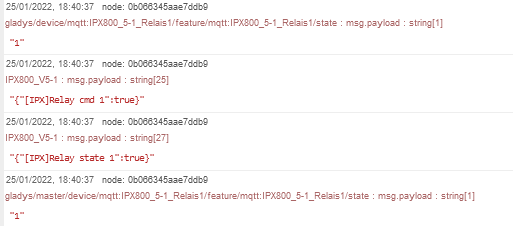
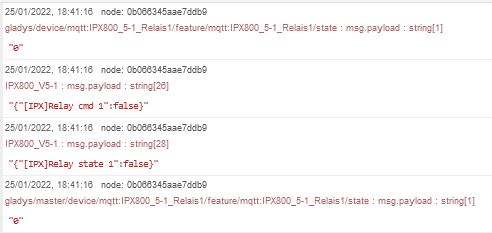
And the debug in order:
Relay 1 « On » from IPX800V5

Relay 1 « Off » from IPX800V5

Relay 1 « On » from Gladys

Relay 1 « Off » from Gladys

And the flow in JSON format

[{"id":"cf6dc2aae7c8ab92","type":"tab","label":"Flow 3","disabled":false,"info":"","env":[]},{"id":"91ee9c360eac6d43","type":"mqtt out","z":"cf6dc2aae7c8ab92","name":"IPX800_V5-1","topic":"IPX800_V5-1","qos":"1","retain":"false","respTopic":"","contentType":"","userProps":"","correl":"","expiry":"","broker":"291914c5c9c68f02","x":1230,"y":100,"wires":[]},{"id":"c2659b7b2ff21d6e","type":"function","z":"cf6dc2aae7c8ab92","name":"according to payload \"[IPX]Relay state x\" true/false => 0/1","func":"var msg1,msg2;\n\nswitch (msg.payload) {\n    \n  case \"{\\\"[IPX]Relay state 1\\\":true}\":\n    msg1 = {payload:\"1\" }; \n    break; \n  case \"{\\\"[IPX]Relay state 1\\\":false}\":\n    msg1 = {payload:\"0\" }; \n    break; \n    \n  case \"{\\\"[IPX]Relay state 2\\\":true}\":\n    msg2 = {payload:\"1\" }; \n    break; \n  case \"{\\\"[IPX]Relay state 2\\\":false}\":\n    msg2 = {payload:\"0\" }; \n    break; \n    \n  default:\n    break;\n}\n\nreturn[msg1,msg2];\n","outputs":2,"noerr":0,"initialize":"","finalize":"","libs":[],"x":450,"y":220,"wires":[[ "d7e02d71312aa03e" ],[ "6ea07d03df94f62e" ]]},{"id":"d9a7d3602448c88a","type":"mqtt in","z":"cf6dc2aae7c8ab92","name":"IPX800_V5-1","topic":"IPX800_V5-1","qos":"1","datatype":"auto","broker":"291914c5c9c68f02","nl":false,"rap":true,"rh":0,"inputs":0,"x":150,"y":220,"wires":[[ "c2659b7b2ff21d6e" ]]},{"id":"d7e02d71312aa03e","type":"mqtt out","z":"cf6dc2aae7c8ab92","name":"gladys/master/device/mqtt:IPX800_5-1_Relais1/feature/mqtt:IPX800_5-1_Relais1/state","topic":"gladys/master/device/mqtt:IPX800_5-1_Relais1/feature/mqtt:IPX800_5-1_Relais1/state","qos":"1","retain":"false","respTopic":"","contentType":"","userProps":"","correl":"","expiry":"","broker":"291914c5c9c68f02","x":1000,"y":180,"wires":[]},{"id":"6ea07d03df94f62e","type":"mqtt out","z":"cf6dc2aae7c8ab92","name":"gladys/master/device/mqtt:IPX800_5-1_Relais2/feature/mqtt:IPX800_5-1_Relais2/state","topic":"gladys/master/device/mqtt:IPX800_5-1_Relais2/feature/mqtt:IPX800_5-1_Relais2/state","qos":"1","retain":"false","respTopic":"","contentType":"","userProps":"","correl":"","expiry":"","broker":"291914c5c9c68f02","x":1000,"y":260,"wires":[]},{"id":"4dc3520e0af08d51","type":"mqtt in","z":"cf6dc2aae7c8ab92","name":"gladys/device/mqtt:IPX800_5-1_Relais1/feature/mqtt:IPX800_5-1_Relais1/state      .","topic":"gladys/device/mqtt:IPX800_5-1_Relais1/feature/mqtt:IPX800_5-1_Relais1/state","qos":"1","datatype":"auto","broker":"291914c5c9c68f02","nl":false,"rap":true,"rh":0,"inputs":0,"x":350,"y":80,"wires":[[ "1bedbf53cbd0b7c2" ]]},{"id":"e51228ced7b818c2","type":"mqtt in","z":"cf6dc2aae7c8ab92","name":"gladys/device/mqtt:IPX800_5-1_Relais2/feature/mqtt:IPX800_5-1_Relais2/state","topic":"gladys/device/mqtt:IPX800_5-1_Relais2/feature/mqtt:IPX800_5-1_Relais2/state","qos":"1","datatype":"auto","broker":"291914c5c9c68f02","nl":false,"rap":true,"rh":0,"inputs":0,"x":360,"y":140,"wires":[[ "1bedbf53cbd0b7c2" ]]},{"id":"658e6d08a9bfa70c","type":"mqtt in","z":"cf6dc2aae7c8ab92","name":"#","topic":"#","qos":"2","datatype":"auto","broker":"291914c5c9c68f02","nl":false,"rap":true,"rh":0,"inputs":0,"x":130,"y":300,"wires":[[ "0b066345aae7ddb9" ]]},{"id":"0b066345aae7ddb9","type":"debug","z":"cf6dc2aae7c8ab92","name":"","active":true,"tosidebar":true,"console":false,"tostatus":false,"complete":"false","statusVal":"","statusType":"auto","x":340,"y":300,"wires":[]},{"id":"1bedbf53cbd0b7c2","type":"function","z":"cf6dc2aae7c8ab92","name":"according to topic => [IPX]Relay cmd x: true/false","func":"var msg1,msg2;\n\nswitch (msg.topic) {\n  case \"gladys/device/mqtt:IPX800_5-1_Relais1/feature/mqtt:IPX800_5-1_Relais1/state\":\n    \n    switch (msg.payload) {\n      case \"0\":\n        msg1 = {payload:\"{\\\"[IPX]Relay cmd 1\\\":false}\" }; \n        break; \n      case \"1\":\n        msg1 = {payload:\"{\\\"[IPX]Relay cmd 1\\\":true}\" }; \n        break; \n      default:\n        break; \n    }\n    break; \n    \n  case \"gladys/device/mqtt:IPX800_5-1_Relais2/feature/mqtt:IPX800_5-1_Relais2/state\":\n\n    switch (msg.payload) {\n      case \"0\":\n        msg1 = {payload:\"{\\\"[IPX]Relay cmd 2\\\":false}\" }; \n        break; \n      case \"1\":\n        msg1 = {payload:\"{\\\"[IPX]Relay cmd 2\\\":true}\" }; \n        break; \n      default:\n        break; \n    }\n    break; \n    \n  default:\n    break; \n}\n\nreturn[msg1,msg2];","outputs":1,"noerr":0,"initialize":"","finalize":"","libs":[],"x":860,"y":100,"wires":[[ "91ee9c360eac6d43" ]]},{"id":"291914c5c9c68f02","type":"mqtt-broker","name":"mqtt://localhost","broker":"mqtt://localhost","port":"1883","clientid":"","autoConnect":true,"usetls":false,"protocolVersion":"4","keepalive":"60","cleansession":true,"birthTopic":"","birthQos":"0","birthPayload":"","birthMsg":{},"closeTopic":"","closeQos":"0","closePayload":"","closeMsg":{},"willTopic":"","willQos":"0","willPayload":"","willMsg":{},"sessionExpiry":""}]

I have latencies or even non-acknowledgment if the orders are made too quickly but if you wait, it works very well. However, from a node red in Home Assistant, so Home Assistant <=> IPX800V5 no latency!
On the other hand, from Gladys, it generates 4 messages on the debug instead of 2 when it’s from the IPX800V5.

@pierre-gilles
Well, I’m going to make a tutorial on the Gladys website and on the GCE website to show how to create a gateway via node-red between gladys and the IPX800V5 (it doesn’t work directly in the IPX800V5, the MQTT string is too long). Otherwise, do you know https://www.youtube.com/watch?v=jTeJxQFD8Ak made by one of the members of the MQTT specifications committee. However, for the rosbeef buttoners, it’s not subtitled :rofl:

Very strange! You confirm that the conditions are the same (Home Assistant/node-red/Gladys are on the same machine?), Gladys wasn’t doing anything special?

Great, thanks @cce66! :pray:

@pierre-gilles


I think it would also be simpler not to include the « mqtt: » part of the « External Feature ID » in the topic, it doesn’t make sense to me and it lengthens the topic and on the ipx800v5 it becomes too long! (I couldn’t find if there is a limit for the topic)
For example, by renaming IPX800V5-1 to IPX800V5

gladys/device/mqtt:IPX800V5_Relais1/feature/mqtt:IPX800V5_Relais1/state

would become

gladys/device/IPX800V5_Relais1/feature/IPX800V5_Relais1/state

or even (according to the MQTT standard)

gladys/device/IPX800V5_Relais1/state

Similarly

gladys/master/device/mqtt:IPX800V5_Relais1/feature/mqtt:IPX800V5_Relais1/state

would become

gladys/master/device/IPX800V5_Relais1/state

Doesn’t that make more sense right away? :wink:

And like the Duponts and Duponts, I would even say more:

IPX800V5 subscribes to « Gladys\switch\state » (payload 0 or 1 / on or off / true or false)
Gladys publishes on « Gladys\switch\state » (payload 0 or 1 / on or off / true or false)
If by scene or in the discussion I tell Gladys « open the relay » Gladys opens the switch
and publishes the state of the switch, the IPX800V5 is informed and switches its relay and Versailles high school!

Gladys subscribes to « IPX800V5\Relais1\state » (payload 0 or 1 / on or off / true or false)
IPX800V5 publishes « IPX800V5\Relais1\state » (payload 0 or 1 / on or off / true or false)
If the relay of the IPX800V5 is switched by programming in the IPX800V5, it publishes the state of its relay, Gladys is informed and switches its switch
All with QOS at 1 to avoid loops

So in Gladys we have

  • a subscription to the state of Relais1 of the IPX800V5 (« IPX800V5\Relais1\state »)
  • a publication of the state of the Gladys switch (« Gladys\switch\state »)

And in the IPX800V5 we have

  • a subscription to the state of the Gladys switch (« Gladys\switch\state »)
  • a publication of the state of Relais1 of the IPX800V5 (« IPX800V5\Relais1\state »)

We understand this better if we consider that the mosquito broker only serves to store and transmit messages that clients (publishers) send to other clients (subscribers) and that therefore the clients can indifferently be both publisher and subscriber but it is necessary to specify each time the id of the client sending the publication and the id of the client receiving the publication (Gladys and IPX800V5) :exploding_head:

All this being valid only if there is no objective reason to do otherwise! :thinking:
So even if Gladys plays a ‹ master › role and controls the ‹ slave › peripherals associated with it from an mqtt point of view, it remains a client of mosquitto like the other peripherals!

Actually, you want to remove the mandatory « mqtt: » prefix from the external ID, it’s more of an external ID question than an MQTT topic.

Originally, we added this prefix because this external ID is unique in the DB for all devices in all of Gladys, and we don’t want multiple integrations to collide, since the MQTT integration is the only integration where the user chooses this external ID.

After that, I agree that in terms of readability it’s less clean, and it causes problems with topics that are too long. To be discussed with the team. @AlexTrovato What do you think? (Remove the mandatory « mqtt: » prefix for new MQTT devices)

That’s exactly it :slight_smile:

Actually, the idea of a master is not that Gladys is the « master », I think you misunderstood this notion of the API because you don’t have all the history of the design: one of the future developments of v4 (well, it’s very long term), was to have a notion of a « master » instance, and « pod » instances.

The idea was to theoretically have « mini gladys » that could run on other machines to control remote devices.

Thus, Gladys would not just be an instance but a network of several instances, one master and X pods.

We designed the API to indicate that you are talking to Gladys « master »:

gladys/master/**

Or to a pod instance:

gladys/pod/POD_ID/**

However, since this notion is not developed, I didn’t tell you about it to avoid confusing you :slight_smile:

But I assure you that all this API is months of reflection and work, nothing is left to chance! I invite you to reread the discussions on the design forum, everything is public.

I didn’t find this requirement in the MQTT documentation? Is it in version 5? In any case, it works perfectly without it in the example above between the IPX800 and Node-RED!

Okay, that makes sense « gladys\master » « gladys\pods » and « gladys\device » with properties and methods afterwards! We are indeed in the Internet of Things! :grinning:
By the way, thinking about it :thinking: given this information… the IPX800V5 is somehow… a mini-pod! :smirk:

Hello @pierre-gilles

After a lot of effort, I finally managed to control the IPX800V5 from Gladys, here’s the tutorial!

And the same on the GCE forum to make Gladys known to IPX800V5 owners, I think the Gladys Plus part could really interest them! :wink:

I hope I published in the right place.
On the other hand, regarding voice recognition, I saw this, it’s recent and it looks powerful

It would be interesting to study the possibility of deploying it in Gladys! I will try to deploy it on my NUC and see how to « play » with it. It’s true that it’s missing compared to v3!

I moved the tutorial to the « tutorial » category of the forum :slight_smile:

Great job on the tutorial, it’s awesome!

If this can move the schmilblick forward :+1: and the IPX side coupled with Zigbee via Gladys is complementary (only missing voice recognition… :crazy_face:)

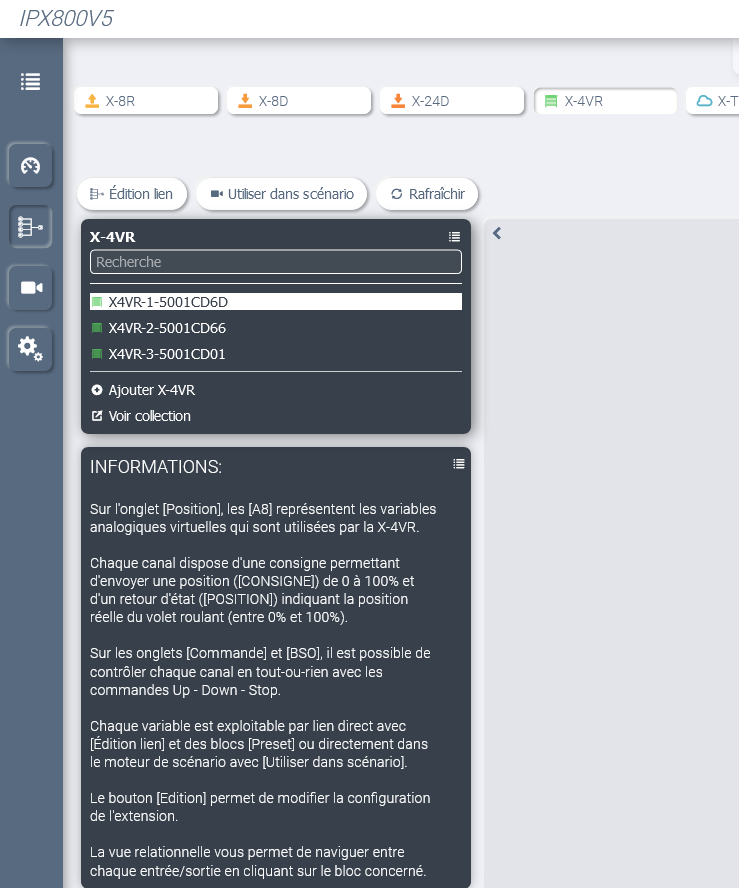
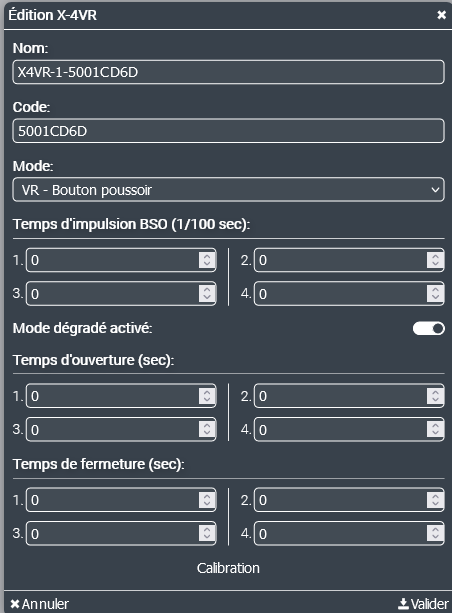
I’m going to do another one because on node-red there is a sun-calc module that allows you to calculate the sun’s position and coupled with temperature sensors, it can create interesting scenarios with the GCE roller shutter module https://www.gce-electronics.com/fr/carte-relais-ethernet-module-rail-din/1097-ipx800-v4-extension-4-volets-roulants-x-4vr-3760309690094.html which is controllable via MQTT through the IPX800V5! :wink:

However @pierre-gilles, are there any buttons that could do the job for the roller shutters?

No! There are 2 feature requests going in this direction:

And more complete:

That’s why I preferred to automate my shutters with my IPX because I have status feedback that I can manage via MQTT and therefore use in Gladys!

And with Node-RED, there is also this module that allows many possibilities to manage the roller shutters. In the end, the integration of Node-RED with Gladys is :+1:

flows.nodered.org

node-red-contrib-blindcontroller-v2

A collection of Node-Red nodes that automates the control of household roller blinds based on the current position of the sun

And we can know the position of the sun on the shutters here Calcul de la position du soleil dans le ciel pour chaque localisation à importe quel moment

All that’s missing is the right button in Gladys!

As they say, all that’s missing from Gladys is speech… and voice recognition! :wink:

To manage the shutters and motors, there is also Tasmota: Shutters and Blinds - Tasmota

In this case, the integration with Gladys is automatic, but to be perfect, either the push button or the « Up and Down » buttons are missing, as proposed by @syper in this integration request: Gestion des volets roulants - #16 par pierre-gilles

The only downside for me in Tasmota mode 1 is that the switching time between « Up » and « Down » is hardcoded in the code to 50 ms. A bit tight for relays, and in some assemblies with triac and even mosfet.

I don’t know tasmota, is there a VR module? Because I prefer a solution that works in case of problems (fire) because insurances in this case always try to smoke you :sob: by saying you did some DIY! :triumph:

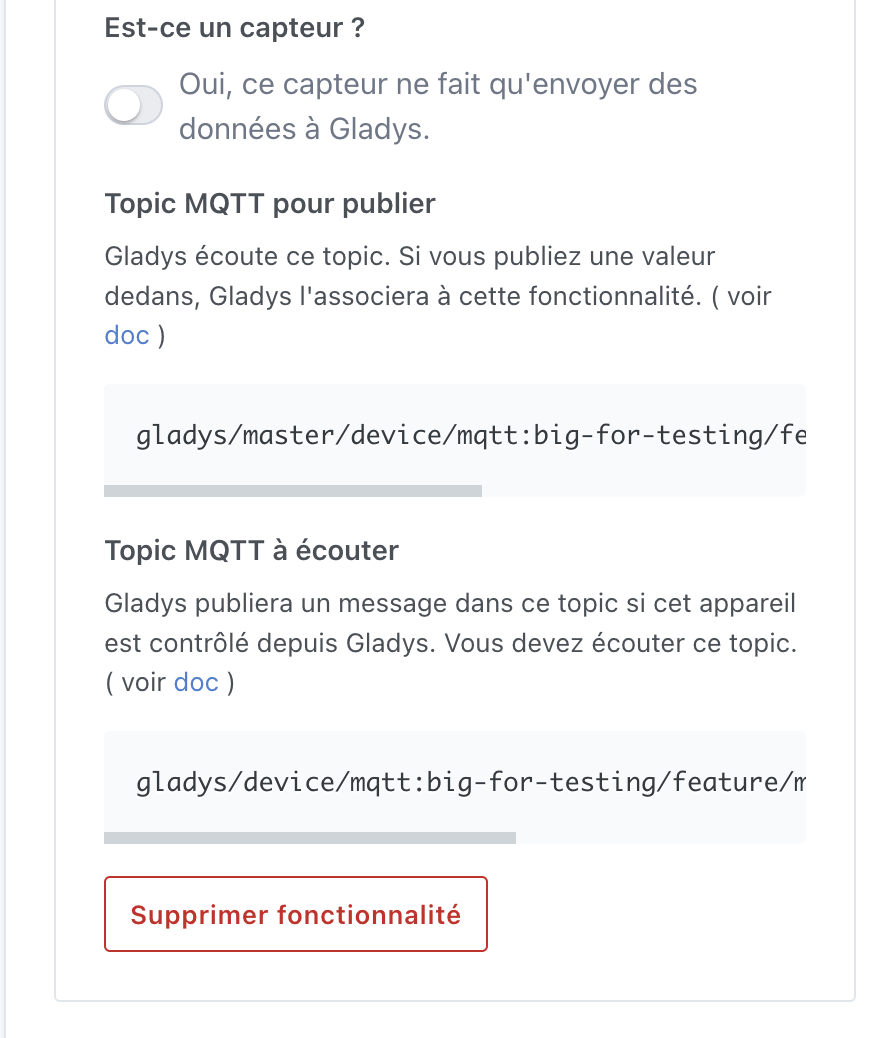
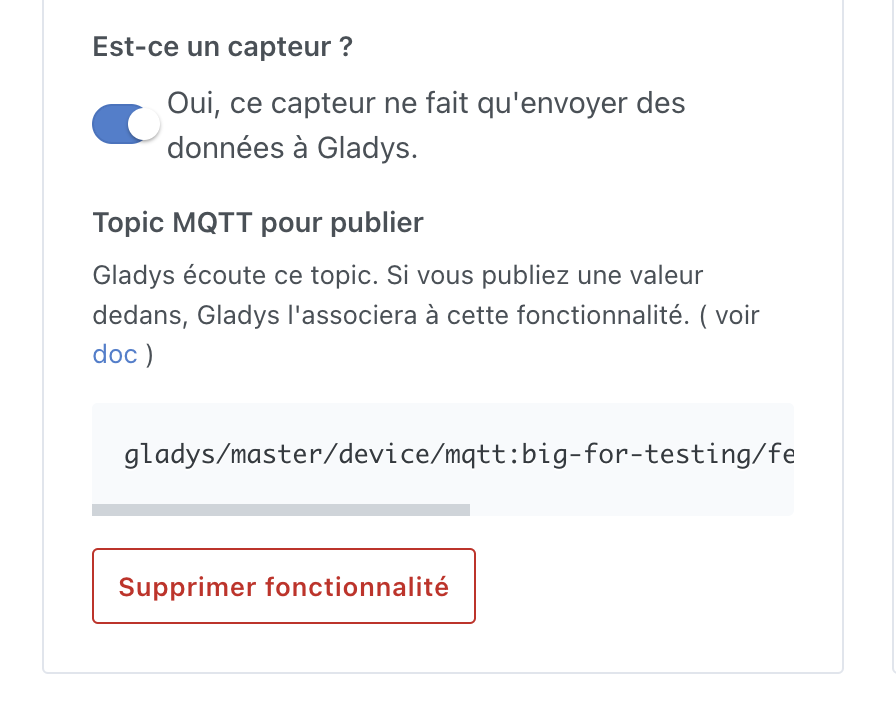
I confirm that I have just improved the UX of the MQTT view by displaying both topics when the option is disabled :slight_smile:

Actuator:

Sensor:

For now, it’s in a PR, it will go out in the next update of Gladys.

I confirm that the UX improvement is available in Gladys Assistant 4.8: