Good evening,
After receiving a Zigbee key and some switches, lights, and other various peripherals, I wanted to test them on Gladys. Unfortunately, it seems that the integration fails to launch 
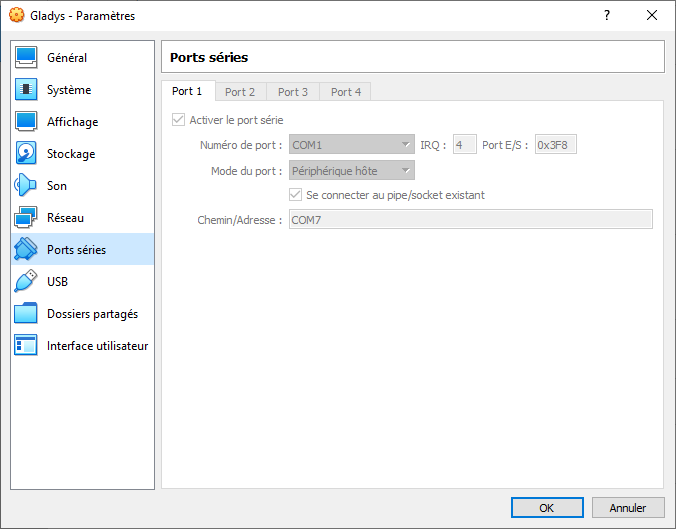
Gladys is installed following the official instructions under Docker, but in a Ubuntu VM (Virtualbox) running on a Windows host. I have shared the Zigbee key on Virtualbox so that it is mapped to the VM. The key appears in Gladys, but it is impossible to make the warning message disappear, even by saving the configuration:

I’m a bit out of ideas of things to try, so if you have any, I’m interested 
I retrieved the logs from the container, in case it helps!
Docker Log
> gladys-server@ start:prod /src/server
> cross-env NODE_ENV=production node index.js

2021-11-05T20:52:50+0100 <info> job.purge.js:17 (Job.purge) Deleting all background jobs created before = Fri Oct 29 2021 21:52:50 GMT+0200 (Central European Summer Time)
Initialising OpenZWave 1.6.0 binary addon for Node.JS.
        OpenZWave Security API is ENABLED
        ZWave device db    : /usr/local/etc/openzwave
        User settings path : /src/server/services/zwave/node_modules/openzwave-shared/build/Release/../../
        Option Overrides : --Logging false --ConsoleOutput false --SaveConfiguration true
2021-11-05T20:52:50+0100 <info> index.js:19 (Object.start) Starting example service
2021-11-05T20:52:50+0100 <info> index.js:14 (Object.start) starting GoogleActions service
2021-11-05T20:52:50+0100 <warn> service.start.js:44 (Service.start) Unable to start service zigbee2mqtt Error: (HTTP code 301) unexpected -
    at /src/server/node_modules/docker-modem/lib/modem.js:301:17
    at getCause (/src/server/node_modules/docker-modem/lib/modem.js:331:7)
    at Modem.buildPayload (/src/server/node_modules/docker-modem/lib/modem.js:300:5)
    at IncomingMessage.<anonymous> (/src/server/node_modules/docker-modem/lib/modem.js:275:14)
    at IncomingMessage.emit (events.js:412:35)
    at endReadableNT (internal/streams/readable.js:1334:12)
    at processTicksAndRejections (internal/process/task_queues.js:82:21) {
  reason: undefined,
  statusCode: 301,
  json: <Buffer >
}
2021-11-05T20:52:50+0100 <info> index.js:18 (Object.start) Starting TP-Link service
2021-11-05T20:52:50+0100 <info> index.js:17 (Object.start) Starting eWeLink service
2021-11-05T20:52:50+0100 <info> service.start.js:40 (Service.start) Service ewelink is not configured, so it was not started.
2021-11-05T20:52:50+0100 <info> index.js:15 (Object.start) Starting Bluetooth service
2021-11-05T20:52:50+0100 <error> index.js:20 (process.<anonymous>) uncaughtException catched: uncaughtException
2021-11-05T20:52:50+0100 <error> index.js:21 (process.<anonymous>) Error: ENODEV, No such device
    at Hci.init (/src/server/services/bluetooth/node_modules/@abandonware/noble/lib/hci-socket/hci.js:100:35)
    at NobleBindings.init (/src/server/services/bluetooth/node_modules/@abandonware/noble/lib/hci-socket/bindings.js:78:13)
    at /src/server/services/bluetooth/node_modules/@abandonware/noble/lib/noble.js:60:24
    at processTicksAndRejections (internal/process/task_queues.js:77:11) {
  errno: 19,
  code: 'ENODEV',
  syscall: 'bind'
}
2021-11-05T20:52:51+0100 <info> index.js:15 (Object.start) Starting Tasmota service
2021-11-05T20:52:51+0100 <info> index.js:16 (Object.start) Starting zwave service
2021-11-05T20:52:51+0100 <info> service.start.js:40 (Service.start) Service zwave is not configured, so it was not started.
2021-11-05T20:52:51+0100 <info> index.js:14 (Object.start) Starting Xiaomi service
2021-11-05T20:52:51+0100 <info> index.js:13 (Object.start) Starting usb service
2021-11-05T20:52:51+0100 <info> index.js:19 (Object.start) Starting Telegram service
2021-11-05T20:52:51+0100 <info> service.start.js:40 (Service.start) Service telegram is not configured, so it was not started.
2021-11-05T20:52:51+0100 <info> index.js:16 (Object.start) Starting RTSP service
2021-11-05T20:52:51+0100 <info> index.js:18 (Object.start) Starting Philips Hue service
2021-11-05T20:52:51+0100 <info> index.js:16 (Object.start) Starting MQTT service
2021-11-05T20:52:51+0100 <warn> service.start.js:44 (Service.start) Unable to start service mqtt Error: (HTTP code 301) unexpected -
    at /src/server/node_modules/docker-modem/lib/modem.js:301:17
    at getCause (/src/server/node_modules/docker-modem/lib/modem.js:331:7)
    at Modem.buildPayload (/src/server/node_modules/docker-modem/lib/modem.js:300:5)
    at IncomingMessage.<anonymous> (/src/server/node_modules/docker-modem/lib/modem.js:275:14)
    at IncomingMessage.emit (events.js:412:35)
    at endReadableNT (internal/streams/readable.js:1334:12)
    at processTicksAndRejections (internal/process/task_queues.js:82:21) {
  reason: undefined,
  statusCode: 301,
  json: <Buffer >
}
2021-11-05T20:52:51+0100 <info> index.js:20 (Object.start) Starting Open Weather service
2021-11-05T20:52:51+0100 <info> service.start.js:40 (Service.start) Service openweather is not configured, so it was not started.
2021-11-05T20:52:51+0100 <info> index.js:64 (Object.start) Starting CalDAV service
2021-11-05T20:52:51+0100 <info> scene.dailyUpdate.js:58 () Sunrise today is at 7:59 today, in your timezone = Europe/Paris
2021-11-05T20:52:51+0100 <info> scene.dailyUpdate.js:59 () Sunset today is at 17:43 today, in your timezone = Europe/Paris
2021-11-05T20:52:51+0100 <info> scene.dailyUpdate.js:70 () The sun rose this morning. Not scheduling for today.
2021-11-05T20:52:51+0100 <info> scene.dailyUpdate.js:84 () The sun has already set. Not scheduling for today.
2021-11-05T20:52:51+0100 <info> device.calculateAggregate.js:38 (DeviceManager.calculateAggregate) Calculating aggregates device feature state for interval hourly
2021-11-05T20:52:51+0100 <info> index.js:63 (Server.<anonymous>) Server listening on port 80
2021-11-05T20:52:51+0100 <info> device.calculateAggregate.js:105 (ChildProcess.<anonymous>) device.calculateAggregate: Finishing processing for interval hourly
2021-11-05T20:52:51+0100 <info> device.calculateAggregate.js:38 (DeviceManager.calculateAggregate) Calculating aggregates device feature state for interval daily