Various bug reports

Thanks for watching @VonOx! It’s great if it’s an issue on our side, we can fix it.

Could you test in your container with the 4.0.9 package? I’m not necessarily keen on moving to a beta version of the package, it’s the best way to have bugs even more mysterious than what we already have ^^

Oh but wait, what timeout did you set?

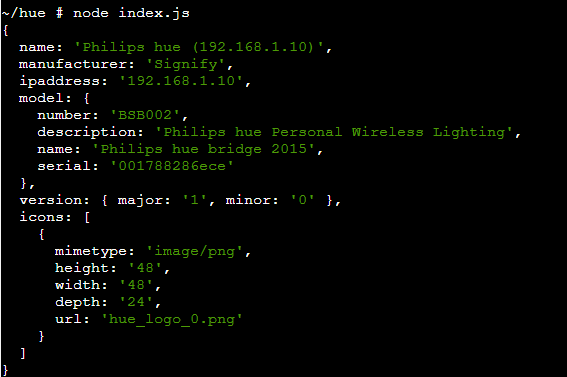
In Gladys, the timeout is currently 5 seconds (Gladys/server/services/philips-hue/lib/light/light.getBridges.js at master · GladysAssistant/Gladys · GitHub)

Maybe it’s not enough on your network?

@Jean34 I confirm that I fixed your weather box + room devices bug :slight_smile: :blush:

It will be included in the next Gladys release, once enough members have tested the dev image :slight_smile: (I’ll do one soon!)

@pierre-gilles It’s also good in 4.0.9 from the container

For the timeout, I haven’t touched anything, the discovery is instant so I don’t know. I’ll increase it to see.

Edit: Timeout at 10 seconds => OK

Ah! So it’s indeed a timeout issue? :slight_smile:

I’ll change it then

Edit:

Oh, it seems to be that, even if I can’t explain why it takes longer on Gladys’s side :thinking:

I launched a dev build with all the recent fixes

The dev build is available, I’m open to any feedback on this build, it would be great to make sure there are no regressions this time ^^

I’ve done quite a bit of testing on my side (both manual and automated as always), but not having the same equipment as you, I can’t test everything in real conditions.

Is there a command I can run via SSH to test if this works?

@pierre-gilles at the top, I’ll try to find some time to also test the latest dev release, I only have Sunday off these days so I make no promises…

@Tlse-vins if you’re talking about the dev image, if I’m not mistaken, you run the docker command line in the doc, you add the dev tag and rename the db. Or you git pull if you have a development environment.

I am on a production image on a Raspberry.

@Tlse-vins I also have a production instance, but nothing prevents you from testing a development instance. Personally, I do it like this:
docker stop gladys

docker run -d --log-opt max-size=10m --restart=always --privileged --network=host --name gladysdev -e NODE_ENV=production -e SERVER_PORT=80 -e TZ=Europe/Paris -e SQLITE_FILE_PATH=/var/lib/gladysassistantdev/gladys-dev.db -v /var/run/docker.sock:/var/run/docker.sock -v /var/lib/gladysassistantdev:/var/lib/gladysassistantdev -v /dev:/dev -v /run/udev:/run/udev:ro gladysassistant/gladys:dev

@pierre-gilles, since my installation is fresh, I’m coming back to you for a possible bug…
So once gladys is installed, I configure the weather for example, and then I ask via the chat what the temperature is. At the moment, it does not respond, so I look at the logs, on the docker side there is nothing abnormal but on the browser side yes:

    close { target: WebSocket, isTrusted: true, wasClean: true, code: 1001, reason: "", srcElement: WebSocket, currentTarget: WebSocket, eventPhase: 2, bubbles: false, cancelable: false, … }
​
bubbles: false
​
cancelBubble: false
​
cancelable: false
​
code: 1001
​
composed: false
​
currentTarget: null
​
defaultPrevented: false
​
eventPhase: 0
​
explicitOriginalTarget: WebSocket { url: "ws://192.168.1.82/", readyState: 3, bufferedAmount: 0, … }
​
isTrusted: true
​
originalTarget: WebSocket { url: "ws://192.168.1.82/", readyState: 3, bufferedAmount: 0, … }
​
reason: ""
​
returnValue: true
​
srcElement: WebSocket { url: "ws://192.168.1.82/", readyState: 3, bufferedAmount: 0, … }
​
target: WebSocket { url: "ws://192.168.1.82/", readyState: 3, bufferedAmount: 0, … }
​
timeStamp: 266627
​
type: "close"
​
wasClean: true
​
<get isTrusted()>
​
<prototype> CloseEventPrototype { wasClean: Getter, code: Getter, reason: Getter, … }
​​
code:
​​
constructor: function ()
​​
reason:
​​
wasClean:
​​
Symbol(Symbol.toStringTag): "CloseEvent"
​​
<get code()>
​​
<get reason()>
​​
<get wasClean()>
​​
<prototype> EventPrototype { composedPath: composedPath(), stopPropagation: stopPropagation(), stopImmediatePropagation: stopImmediatePropagation(), … }
Session.js:60:6

If I refresh my page (very long to load by the way), gladys’s answer is there, often above my question, but it is there ^^. After that, no more issues, you can talk to it as much as you want, it responds immediately.
That’s it, if it can help :slight_smile:

@Jean34 Ok, thanks for your feedback :slight_smile:

I created an issue to not lose the bug:

Hello,
I have a bug in the chat. When I type the word « weather » my Gladys crashes and I have to force restart.

I don’t think this is normal behavior, so I’m posting this here :slight_smile:

I am on version 4.3.1 and there are no errors in the logs or in the console.

Correction, from the moment I send any word or phrase in Gladys it crashes.

You have more details @JeuFore?

At my place it works, I would like to know more about your installation!

Did you install Gladys with the official Raspberry Pi OS image?

I have a Raspberry Pi 4 4GB with Ubuntu Server arm64 installed. Therefore, Gladys was installed manually.

The DB of the instance is saved on a hard drive.

Gladys runs very well except for the chat.
I know that before the new update, the chat worked, but I had to refresh the page to get the answer.

When you say « Gladys was installed manually », are we in agreement that it was via Docker?

Did you use the docker run command provided on the Gladys website?

I apologize, I misspoke :sweat_smile:

Yes, via Docker, I reused the docker run and put it in a docker-compose

version: "3"
services:
  app:
    image: gladysassistant/gladys
    container_name: gladys
    network_mode: host
    environment:
      - SQLITE_FILE_PATH=/var/lib/gladysassistant/gladys-production.db
      - SERVER_PORT=2380
      - TZ=Europe/Paris
    privileged: true
    volumes:
      - /var/run/docker.sock:/var/run/docker.sock
      - /run/udev:/run/udev:ro
      - /dev:/dev
      - ~/disk/docker/appdata/gladys:/var/lib/gladysassistant
    restart: unless-stopped

Hello,

Isn’t this related to my previous message?

@Jean34 I don’t think so, here he clearly says that Gladys crashes, that surprises me :sweat_smile:

@JeuFore so we agree the bug is:

  • you send any message to Gladys
  • Gladys crashes and the container restarts

You really don’t have any logs in Gladys? Because a crash usually doesn’t go unnoticed

Exactly, except that I am the one who restarts the container.

And I just retested, I have no logs either in the browser or on the container.

I also just tested if there is a difference between the local IP address and remote access (nginx + ssl), but the same crash occurs.