pi@gladys:/ $ ls /windir/c
ls: cannot access '/windir/c': No such file or directory
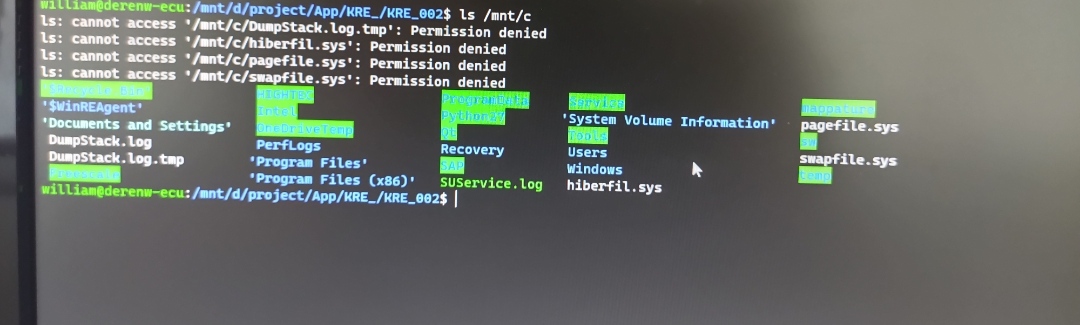
And the command ls /mnt/c/Users?
avec `df -h `,  j'ai retrouvé mon arborescence
et avec ` ls /mnt/c/Users` :
psoy@Zalman:~$ ls /mnt/c/Users
‹ All Users › Default ‹ Default User › Public desktop.ini patrick
oui je retrouve bien les 4 premières lignes, je te les ai envoyé plus hautIn that case it’s fine; the tutorial command should work
My question was whether you could see the directory tree of your PC in addition to the 4 lines. But given the ls afterwards I think so.
Indeed, I managed to enter the directory /mnt/d, but I don’t know why, because I had tried before I couldn’t get past /mnt .
But apparently I
No problem
Hi @Tlse-vins, can you add a step in the tutorial before step 7 to say to properly disconnect from the gladys SSH before running the commands on the PC.
It’s been modified.
Hello everyone,
thanks to the setup that @VonOx dedicated to me, with Zigbee hardware (and his availability whenever I break everything) I think I have something that is valid for backing up z2m from Gladys.
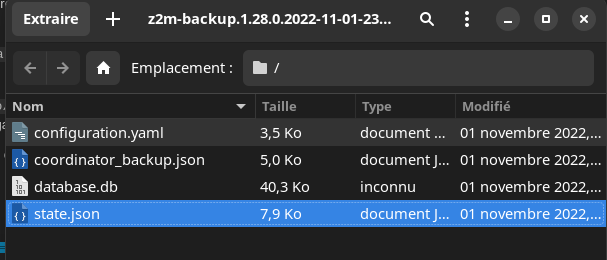
I was able to see that z2m offers an MQTT topic that allows retrieving a backup (zip in base64).
So I can store this zip in the Gladys DB, to reuse it in case of a new installation.
But, I decided to do this backup of backup every 12 hours from Gladys.
@pierre-gilles I don’t know if this is a good approach, or good timing (12 hours after startup, repeated at 12-hour intervals).
It is possible to manually force the backup from the zigbee2mqtt UI, Paramètres -> Outils -> download_z2m_backup.
So, @GBoulvin I’d like another test phase with the image atrovato/gladys:zigbee2mqtt (a « clean » image available in about 2h); you should see some logs announcing the backup or the restore.
Once the backup is restored, I’m at a loss about how to verify that everything is OK (in Gladys and z2m).
I hope we’re on the right track 
Can you schedule a backup at a fixed time instead? Like 11:00 PM for example. (the Gladys Plus backup is between midnight and 2:00 AM)
It’s more predictable for the user that way, and it avoids it happening « by chance at a bad time »
For this kind of task, don’t hesitate to use the wrapper « jobs » which allows creating a job in the « background jobs » interface in the UI and thus lets the user verify that it works properly 
This is what the z2m documentation says about the actions to take when changing environments (changing computers).
To be confirmed among us.
@pierre-gilles
It’s me again,
indeed, « node-schedule » is a good approach, as it’s done today in Gladys Plus backups, but this process is not generalized in the core, it’s only in the « Gateway » part.
In the core, there is a custom « Scheduler » for « interval » tasks.
Is it worth making the « Scheduler » more complete and using it everywhere? Even in the Gateway part?
We agree it’s another project, but if I don’t use a common scheduler, I’ll have to pull a dependency that we already only have in the service…
Otherwise, I add, in addition to the current Scheduler, a « node-schedule » schedule in the core, accessible by all services. But that leads to confusion between schedule and scheduler…
Anyway, before finishing the backup, I’m attempting to standardize the schedulers in Gladys.
If you feel like taking on this project, why not I agree — it would be a shame to ask the services to import node-schedule
Ok, so I opened a PR for the use of the « common-scheduler », and I made sure that the image atrovato/gladys:zigbee2mqtt is based on this refactor.
For testers, I scheduled the backup at 23:00 once per day, so I can generate a new image with a backup every 5 minutes if needed (although I have already validated that the job triggers correctly), otherwise it is possible to manually trigger the backup from the button in the z2m interface Settings -> Tools -> download_z2m_backup.
What I’m
Thanks @AlexTrovato! I’d really welcome a tester for that
As soon as I can, I’ll take a look at your PR
I just migrated my Gladys instance from my Raspberry Pi 4 to a Dell mini PC (i7, 8GB RAM, NVMe SSD). With that everything is very smooth, obviously.
I spent several hours doing the migration because I moved the files by hand and there were permission issues on the configuration files for mosquitto and zigbee2mqtt.
The advantage is that it leaves my Raspberry Pi 4 available for testing, notably for restoration 
Since I’m planning to move my Gladys to a NUC soon (like an i3 at most so it’s not too overkill) I admit your feedback scares me a bit 
Is it doable for someone like me who knows how to tinker but isn’t able to handle chmods or other fun stuff on my own (without a tutorial)?