@pierre-gilles, question before I get to cleaning up the code :
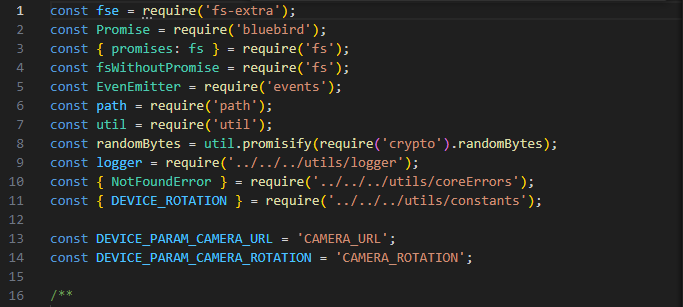
I simply copied the rtsp-camera integration folder which I put directly into netatmo.
Then on the front-end I added a function to retrieve the device’s service in the boxes management to call the correct route.
Would you have 10/20 minutes to discuss it live? What bothers me is the maintainability of two codes that are almost identical over time. In this particular case I’m not a fan of plain copy/paste with only one or two changes. Especially since we might add other integrations someday that use the same code with only a few potential differences.
I may have taken the wrong path, hence the request for a voice/video call.
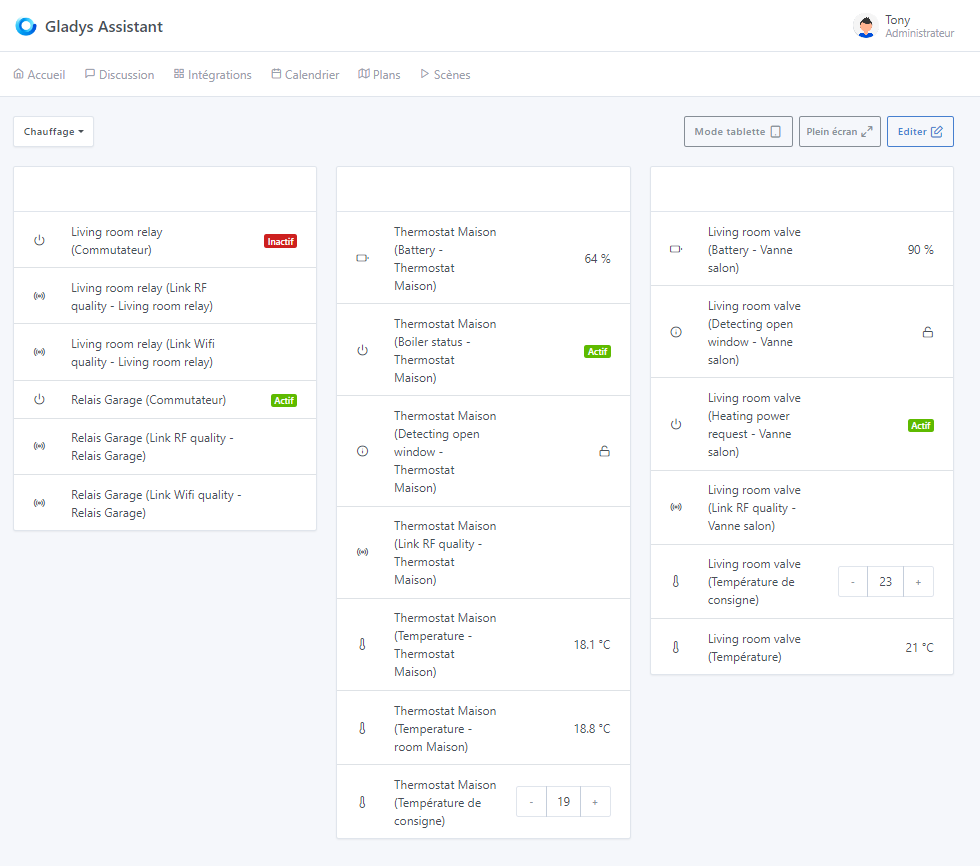
PS: @pierre-gilles speaking of the columns, I noticed that the columns are not equal in size… the middle column is slightly shorter in the middle than the left and right ones. After Netatmo I’ll look to see if I can fix it.
Ok! The point of adding these cameras via the Netatmo integration and not the camera integration is that it’s automatic? Do you have an RTSP stream via Netatmo?
You can use the code of one service in another service
Example: The USB service is used by the Zigbee2mqtt service:
const usb = this.gladys.service.getService('usb');
const usbList = await usb.list();
First, there is the « wifi_strength » and « state » (« disconnect », « on », « off ») info + others that I don’t use yet.
Then the behavior is particular. The initial stream looks like vpnUrl: https://prodvpn-eu-4.netatmo.net/10.255.0.3/d259xxxxxxxxxxxxx/MTU4NDDr-aMZIkmaaLLg,, (hence the mention of a call/demo). To that you add, as with other cameras, ${vpnUrl}/live/snapshot_720.jpg for the image. But the live stream itself is ${vpnUrl}/live/files/high/index.m3u8 in this case, the ‹ MTU4NDDr-aMZIkmaaLLg, › part changes at each restart or disconnection and it’s accessed via their platform. If your Gladys is on the same local network as the camera, there is a property is_local: true to access it directly and there is a double request ${vpnUrl}/command/ping to perform to obtain an address like localUrl: http://192.168.0.10/d259xxxxxxxxxxxxx which then allows having ${localUrl}/live/snapshot_720.jpg for the image and either ${vpnUrl}/live/files/high/index_local.m3u8 or ${localUrl}/live/files/high/index.m3u8. So I have a ‹ CAMERA_URL › param and a ‹ CAMERA_LIVE_URL › param.
Very interesting, but that therefore means I have to modify the ‹ startStreaming › file
I handle both and it works very well ^^ Moreover in the future, I want to add access to the histories as well as the ability to download them… which will differ from the original service… or not.
Well, while writing these lines I realize that we could maybe only use CAMERA_URL = ${vpnUrl}/live/files/high/index.m3u8 or ${localUrl}/live/files/high/index.m3u8 if local = true since it’s the integration that makes the snapshot of the video.
So I will do like the USB service. Thanks for your answer. And that shouldn’t be blocking for future updates either.
PS (continued):
So I’m not talking about the height but the width. For example, with the same name at the limit of double lines we have this:
It’s silly but it comes down to 1 character (368px for the center versus 378px for the left and right columns), if I add the ‹ n › of « consigne » on the right it indeed jumps the line:
I thought it was related to the free spaces between the columns, but no we have 27 or 28px on each side.
I just launched with the image: terdious/gladys:netatmo-features-nrv-weather
I was able to log in with my credentials provided by the Netatmo site. I have a green message in Gladys confirming the connection: Gladys is connected to Netatmo (and I did accept the Netatmo message to allow access to all Netatmo devices (including the weather station)).
However, when I go to the Discovery section, no device is detected:
No Netatmo device was found. If you own a Netatmo Thermostat, have you completed all the steps in the documentation to register your devices on the Netatmo API?
An adjustment seems necessary to this error message; the thermostat contextualization is no longer accurate
Ah yes indeed!!^^ I hadn’t thought of that point ^^
1ere chose a regarder : clique droit => inspecter dans la page et te rendre sur l’onglet « Network ». Faire ensuite un refresh de la page, si tu peux me donner le resultat de la requete « discover » => onglet « Response ». Tu peux ensuite cliquer sur le bouton « Refresh » et voir la requete si c est la meme chose restes en là, si different je veux bien aussi le resultat
Ensuite si tu peux/sais accéder au container sous Linux et faire un « docker logs gladys -f » et me donner le resultat apres refresh de la page et/ou clique sur « Refresh ». Si tu n’as rien de probants je rajouterais des logs.
PS : tu as quoi en plus de la station météo de ton côté ?
Et sinon tu confirmes que toutes les instructions étaient claires pour toi ?
Thanks @Terdious for all the hard work!
If I may, three small typos on the ‹ configuration › page:
‹ You have nothing to configure, these scopes are automatically integrated and will be exposed to you ›.
Further down, the last 'ex
So I ran the full test again from the Docker image. The « bug » is also in the first version:
On the first login, you have to click « Save and connect » twice
Once connected, if you immediately go to the « Netatmo Discovery » page, indeed « Gladys is connected to Netatmo » and no device is visible. In the inspector on the « discover » request, I have:
Oops sorry!! I admit that for screenshots, I didn’t think they could be that big!
I’ll make the change for you tomorrow!
EDIT: I just checked, indeed there are only those two, I don’t understand how there can be such a difference… they have the same dimensions as the others, which are between 150 and 250KB!!!
Ok, so you obviously have something that differs (that’s a good thing) in the retrieval of the devices. It’s lacking logs; I’ll add what’s needed and get back to you.
If you want, we can also go via access to your installation that you can enable/disable as you wish.
Here are the new logs (reminder: I refreshed the client ID and secret yesterday):
2024-02-07T11:04:46+0100 \u003cerror\u003e netatmo.loadDevices.js:40 (NetatmoHandler.loadDevices) e.status:  undefined e.data.error { code: 3, message: 'Access token expired' }
2024-02-07T11:04:46+0100 \u003cerror\u003e index.js:15 (process.\u003canonymous\u003e) unhandledRejection catched: Promise {
  \u003crejected\u003e TypeError: expecting an array or an iterable object but got [object Null]
      at apiRejection (/src/server/services/netatmo/node_modules/bluebird/js/release/promise.js:10:27)
      at MappingPromiseArray.init (/src/server/services/netatmo/node_modules/bluebird/js/release/promise_array.js:64:19)
      at MappingPromiseArray._asyncInit (/src/server/services/netatmo/node_modules/bluebird/js/release/map.js:37:10)
      at _drainQueueStep (/src/server/services/netatmo/node_modules/bluebird/js/release/async.js:97:12)
      at _drainQueue (/src/server/services/netatmo/node_modules/bluebird/js/release/async.js:86:9)
      at Async._drainQueues (/src/server/services/netatmo/node_modules/bluebird/js/release/async.js:102:5)
      at Immediate.Async.drainQueues [as _onImmediate] (/src/server/services/netatmo/node_modules/bluebird/js/release/async.js:15:14)
      at processImmediate (node:internal/timers:476:21)
}
2024-02-07T11:04:46+0100 \u003cerror\u003e index.js:16 (process.\u003canonymous\u003e) TypeError: expecting an array or an iterable object but got [object Null]
    at apiRejection (/src/server/services/netatmo/node_modules/bluebird/js/release/promise.js:10:27)
    at MappingPromiseArray.init (/src/server/services/netatmo/node_modules/bluebird/js/release/promise_array.js:64:19)
    at MappingPromiseArray._asyncInit (/src/server/services/netatmo/node_modules/bluebird/js/release/map.js:37:10)
    at _drainQueueStep (/src/server/services/netatmo/node_modules/bluebird/js/release/async.js:97:12)
    at _drainQueue (/src/server/services/netatmo/node_modules/bluebird/js/release/async.js:86:9)
    at Async._drainQueues (/src/server/services/netatmo/node_modules/bluebird/js/release/async.js:102:5)
    at Immediate.Async.drainQueues [as _onImmediate] (/src/server/services/netatmo/node_modules/bluebird/js/release/async.js:15:14)
    at processImmediate (node:internal/timers:476:21)
I took the opportunity to run a brand new full test from scratch. Everything works perfectly!!
Valve in a call for heat (by changing the setpoint temperature in Gladys):
After 2 minutes, the thermostat also switches to a call for heat to turn on the boiler (of course almost instantaneous in the app … can’t wait for the PR on webhooks ^^):
 Or the option to choose the number of columns ?? Amount of empty space ^^







 Looks good to me!