Okay Pierre-Gilles, I just did it, thank you.!!
Once it’s disconnected, run the commands from @lmilcent above again
Normally, you will see clearer logs.
However, I have trouble understanding where your installation comes from. If you canceled your subscription in July 2020, that means you logged into your instance a very long time ago.
At that time, we were in Gladys beta… Are you on the Raspberry Pi OS image from the Gladys beta?
If that’s the case, it would explain a lot of problems. The beta was the beta, and many things have changed since then 
I would advise you to switch to the brand new Raspberry Pi OS image on the website (Commencer avec Gladys | Gladys Assistant)
So, I’m the ugly duckling of the group..!!! My history is very simple: I started with Gladys a very long time ago, I couldn’t tell you exactly when, but since version 3. I participated in a subscription for at least a year and a half. Then, as I didn’t find it useful to connect to my Gladys instance from outside, I stopped my subscription. I waited for the version 4 beta and I installed it on another Raspberry, always keeping the V3 on the first Raspberry, so I practically didn’t use the V4 since my control interfaces are mainly RF433Mhz. So I waited a bit, thinking I could use my RF433Mhz interfaces in V4 and delete my V3. So when the official version of V4 was released, I loaded the official image of V4 and thus deleted the beta version, so it’s the official version V4.3.0 that is installed on a 120Mo SSD. That’s it..!! Pierre-Gilles, a thousand apologies, I didn’t know it was causing chaos for you. 
Sure! Did you install Gladys with the official Raspberry Pi OS image downloaded from the site? Is this not a manual installation?
If you installed Gladys with the official v4 image after the beta, then you’re good to go You can run the commands from @lmilcent above again so we can see the logs now that you’ve removed the connection to Gladys Plus.
Oh no no, don’t worry about it, it didn’t do any harm  It’s just that I was wondering who it was, pure curiosity
Yes, absolutely!! Bingo, you found it!! C  is indeed the official image downloaded from the site.
docker restart gladys gladys-z2m-mqtt gladys-z2m-zigbee2mqtt
gladys
gladys-z2m-mqtt
Error response from daemon: Cannot restart container gladys-z2m-zigbee2mqtt: error gathering device information while adding custom device « »: no such file or directory
pi@gladys:~ $
I entered the first command, but it seems that zigbee2mqtt is not recognized.
This indicates that the container was never created. In the Gladys interface, from the zigbee2mqtt service, can you:
- Disable the configuration
- Wait a few minutes
- Enable it again
- Check if all containers are started (from the web interface)
If this is not the case or if there is an error, restart the commands docker logs --since 1m ....
You should have this:
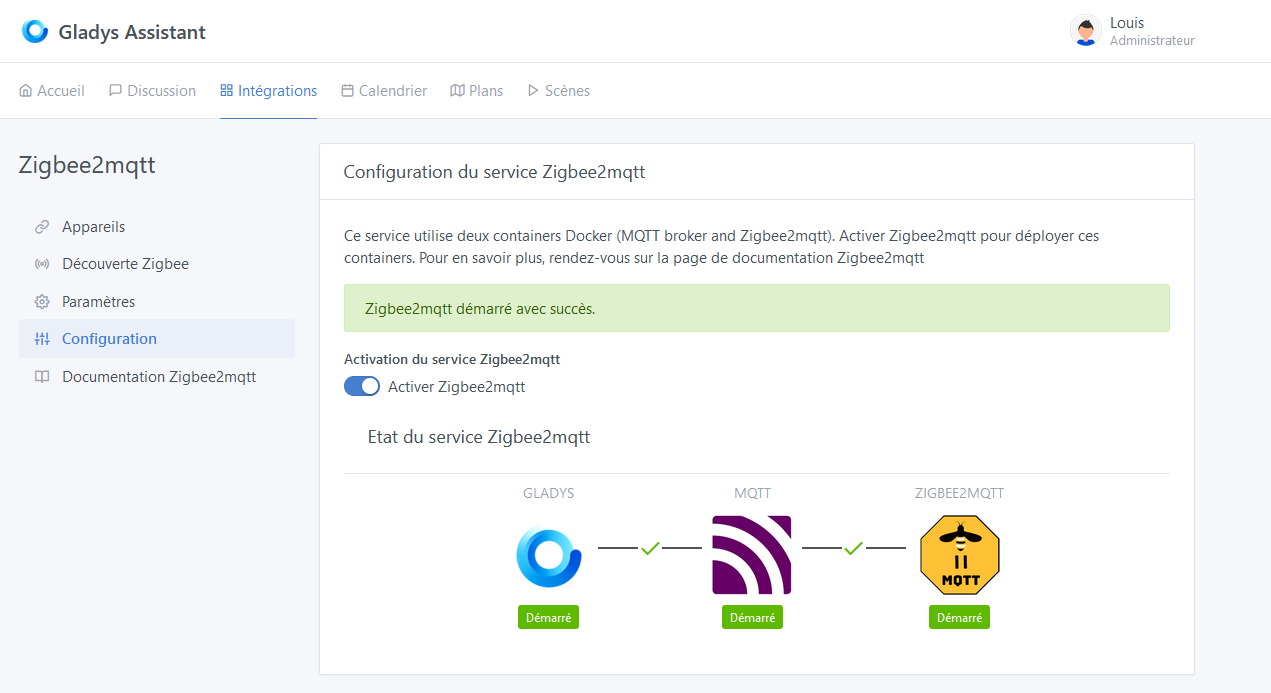
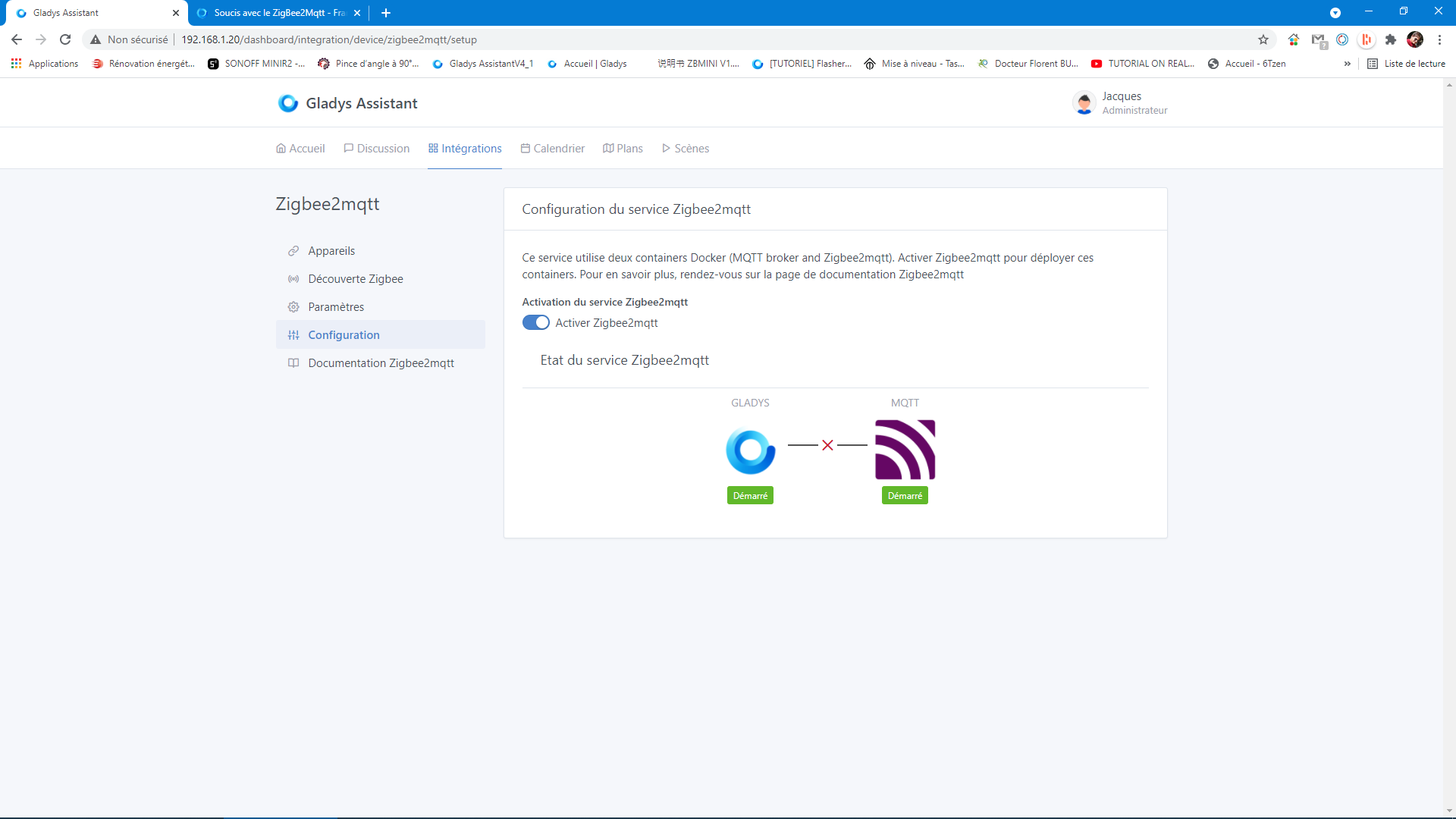
Yes, that’s why the container doesn’t exist. What do Gladys’s logs show?
Is the USB device configured correctly?
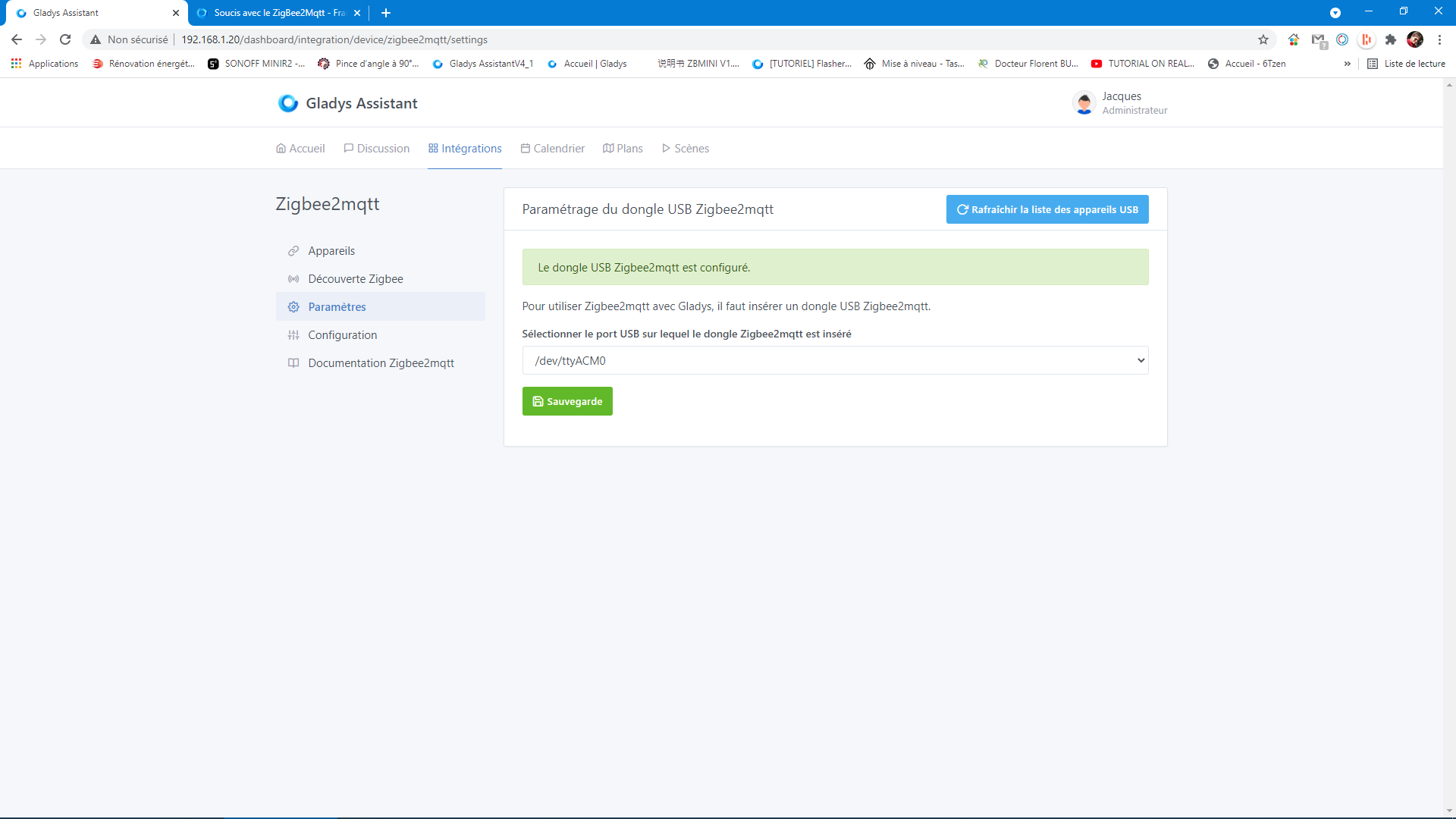
It’s docker logs gladys that you need to do, not a restart 
Go back to the configuration, deactivate and reactivate, then you run the command given above
I got a response from docker logs -f --since 1m gladys :docker logs -f --since 1m gladys
2021-04-29T16:42:00+0200 init.js:47 () Zigbee2mqtt USB dongle attached to /dev/ttyACM0
2021-04-29T16:42:00+0200 installMqttContainer.js:97 (Zigbee2mqttManager.installMqttContainer) MQTT broker is starting…
2021-04-29T16:42:05+0200 installMqttContainer.js:103 (Zigbee2mqttManager.installMqttContainer) MQTT broker container successfully started
2021-04-29T16:42:05+0200 installZ2mContainer.js:65 (Zigbee2mqttManager.installZ2mContainer) Zigbee2mqtt container is starting…
2021-04-29T16:42:05+0200 installZ2mContainer.js:78 (Zigbee2mqttManager.installZ2mContainer) Zigbee2mqtt container failed to start: Error: (HTTP code 500) server error - Cannot restart container 40307386e9e35288cad5104794756357aff44de87415511b18a91641bf012081: error gathering device information while adding custom device « »: no such file or directory
at /src/server/node_modules/docker-modem/lib/modem.js:301:17
at getCause (/src/server/node_modules/docker-modem/lib/modem.js:331:7)
at Modem.buildPayload (/src/server/node_modules/docker-modem/lib/modem.js:300:5)
at IncomingMessage. (/src/server/node_modules/docker-modem/lib/modem.js:275:14)
at IncomingMessage.emit (events.js:327:22)
at endReadableNT (internal/streams/readable.js:1327:12)
at processTicksAndRejections (internal/process/task_queues.js:80:21) {
reason: ‹ server error ›,
statusCode: 500,
json: {
message: ‹ Cannot restart container 40307386e9e35288cad5104794756357aff44de87415511b18a91641bf012081: error gathering device information while adding custom device « »: no such file or directory ›
}
here I have the second log docker logs -f --since 1m gladys-z2m-mqtt :pi@gladys:~ $ docker logs -f --since 1m gladys-z2m-mqtt
1619709029: mosquitto version 2.0.10 terminating
pi@gladys:~ $
Thank you all for your dedication, I will take all this with a clear head, I will keep you informed of the progress of my issue, thank you..!!!
When the service is first initialized, Gladys uses the USB port configuration provided to create the configuration files.
I think there was an issue at that moment. I will try to reproduce it on my side.
To unblock you, you can delete the files present in this folder:
/var/lib/gladysassistant/zigbee2mqtt/
then start again:
- service configuration (USB port selection)
- service activation (this will create the containers)
I think you’re right, because the zigbee2mqtt icon appeared at the beginning when I finished configuring my zigbee dongle without having the green checkmarks between the services.
I must have messed up the config by trying to restore my links.
Thanks to the command you gave me, I was able to go back up the zigbee2mqtt folder tree and of course there is nothing in it, it’s empty.
That’s why all the commands you gave me (the logs) were rejected when calling this folder. 
It’s normal that you don’t have the right.
Execute the following command to perform the cleanup requested by @cicoub13
sudo rm - rf /var/lib/gladysassistant/zigbee2mqtt
Your password will be requested
Thanks vonOx, my command still doesn’t work because the directory of this folder doesn’t exist, as I said the folder is empty. Tell me what I should find in this folder? The names of the folders, files? I reconfigured my USB key but still nothing. Thanks
Hello cicoub13, I delved a bit deeper into the zigbee2mqtt integration mechanism. I visited the zigbee2mqtt directory and found two other directories « mqtt » and « z2m », I assume these are the containers. In the mqtt directory, there were two files « mosquitto.conf » and « mosquitto.passwd », in the other directory a file « configuration.yaml ». So I deleted (after having, of course, given everyone permission to delete) all the files and directories, I only left the zigbee2mqtt directory. And so I restarted my service configuration and activation, and there I noticed that I only found the « mqtt » directory (without the files attached to it) I assume the first container but not the second « z2m ». My first question, should I have also deleted the zigbee2mqtt directory? Now I know where I’m going, I suspect my zigbee dongle is faulty. I hope I haven’t bothered you too much. Thanks!!
Hello. These are the configuration files that allow the containers to function correctly and communicate with the main Gladys container.
The logs you posted earlier indicate that the configuration.yaml configuration file in the zigbee2mqtt folder was incorrect.
If you have deleted all the files and reactivated the service, this should restart the configuration from scratch and help you solve your problem.
The gladys-z2m-zigbee2mqtt container was created with the wrong device
error gathering device information while adding custom device “”: no such file or directory
You should therefore delete it and restart it (via the service activation in Gladys). To do this, you need to run the command
docker rm gladys-z2m-zigbee2mqtt
I reassure you, it is not at all the goal to ask all users to do this kind of manipulation. We try to anticipate all error cases to avoid using the command line but it is difficult and your logs help us 
I will try to reproduce this over the weekend and propose a fix.