Hello,
I will show you here how to display Météo France weather alert maps in Gladys
The maps come from: https://public-api.meteofrance.fr
The usefulness is debatable but it can be nice to have an overview 
The final result:

First you need to create an account and retrieve an API key on the site:
https://portail-api.meteofrance.fr/web/fr/
Next, you need to create the folders in Gladys for receiving the images and the script: (For this you need to connect via ssh to the Gladys host machine)
mkdir /var/lib/gladysassistant/img/meteofrance
mkdir /var/lib/gladysassistant/img/
mkdir /scripts
Then create the script
nano /scripts/meteofrancealertes.sh
#!/bin/bash

# Define the URL of the file to download
URL_TODAY="https://public-api.meteofrance.fr/public/DPVigilance/v1/vignettenationale-J/encours"
URL_TOMORROW="https://public-api.meteofrance.fr/public/DPVigilance/v1/vignettenationale-J1/encours"

# Define destination paths for files
DEST_TODAY="/var/lib/gladysassistant/img/meteofrance/today.png"
DEST_TOMORROW="/var/lib/gladysassistant/img/meteofrance/tomorrow.png"

# Maximum number of attempts
MAX_ATTEMPTS=5

# Function to download the file
download_file() {
    wget --user-agent="Mozilla/5.0 (Windows NT 10.0; Win64; x64) AppleWebKit/537.36" -O "$1" "$2" --header="accept: */*" --header="apikey: apikey_aremplacer"
}

# Download the file for today
attempt=1
while [ $attempt -le $MAX_ATTEMPTS ]; do
    echo "Tentative de téléchargement du fichier pour aujourd'hui ($attempt/$MAX_ATTEMPTS)..."
    if download_file "$DEST_TODAY" "$URL_TODAY"; then
        echo "Téléchargement du fichier pour aujourd'hui réussi."
        break
    else
        echo "Échec du téléchargement du fichier pour aujourd'hui."
        attempt=$((attempt + 1))
        if [ $attempt -le $MAX_ATTEMPTS ]; then
            echo "Nouvelle tentative dans 5 secondes..."
            sleep 5
        else
            echo "Nombre maximal de tentatives atteint pour le fichier d'aujourd'hui. Arrêt du téléchargement."
        fi
    fi
done

# Download the file for tomorrow
attempt=1
while [ $attempt -le $MAX_ATTEMPTS ]; do
    echo "Tentative de téléchargement du fichier pour demain ($attempt/$MAX_ATTEMPTS)..."
    if download_file "$DEST_TOMORROW" "$URL_TOMORROW"; then
        echo "Téléchargement du fichier pour demain réussi."
        break
    else
        echo "Échec du téléchargement du fichier pour demain."
        attempt=$((attempt + 1))
        if [ $attempt -le $MAX_ATTEMPTS ]; then
            echo "Nouvelle tentative dans 5 secondes..."
            sleep 5
        else
            echo "Nombre maximal de tentatives atteint pour le fichier de demain. Arrêt du téléchargement."
        fi
    fi
done
Replace apikey_aremplacer with your API key that you obtained from the site https://public-api.meteofrance.fr
Create the crontab:
Values are retrieved every day at 16:10 and 06:10 because the Météo France site indicates:

crontab -e
10 16 * * * /scripts/meteofrancealertes.sh \u003e/dev/null 2\u003e\u00261
10 06 * * * /scripts/meteofrancealertes.sh \u003e/dev/null 2\u003e\u00261
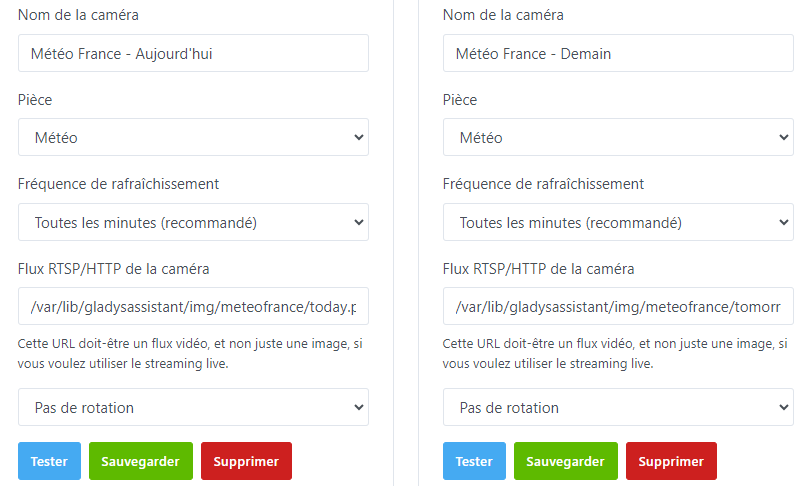
Then create the 2 cameras like this:
You can then display them on the Gladys interface
I haven’t managed to get the white background but if you have a lead I’m open to suggestions 
If you have any questions/comments, feel free to let me know
Changelog to come:
- None (Your feedback welcome )
Edit 13/05/2024 :
- Modified the crontab to run it every hour past 5 minutes
Edit 14/05/2024 :
- Fixed an issue when downloading the maps (Added headers in the Curl)
Edit 15/05/2024 :
- Fixed an issue when downloading the maps (Replaced Curl with Wget)
- Fixed the times in the crontab
Edit 16/05/2024 :
- Modified the download script to handle retries on failure and added a user-agent to try to avoid being detected as a bot by the Météo France site


