Hello,
Often, when you have issues or questions, code citation is necessary. However, the forum tends to « reformat » the code you post → Change some characters and the indentation without warning … 
The consequences are multiple:
- The code is not highlighted,
- It’s hard to read,
- If you want to copy/paste… Oops, the characters are not correct and in computer code, that’s very important…

Example of script reformatted by the forum:
gladys.notification.create({
user: 1,
title: ‹ Notification ›,
text: Bonjour l'ami,
icon: ‹ fa fa-car ›,
iconColor: ‹ bg-green ›
});

With the code tags:
gladys.notification.create({
  user: 1,
  title: 'Notification',
  text: `Bonjour l'ami`,
  icon: 'fa fa-car',
  iconColor: 'bg-green'
});

It’s more readable and MOST IMPORTANT, the characters have not been modified!
How do we do it?
I can’t write the command otherwise it will format my text. 
In French:
- Start by planning the space where you will copy/paste your code:
- Put 4 « backticks ». It’s the weird apostrophe accessible via AltGr+7 on a Windows keyboard and to the left of the « Enter » key on Mac.
- Skip a line
- Again, 4 backticks
- Paste your code in the middle
Voilà! 
A small screenshot for posterity ^^
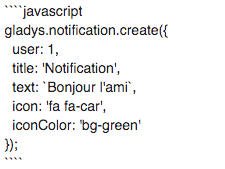
Hé, but what is this « javascript »?!?
You can specify the language (it’s optional) and sometimes, it adds nice colors 
