How do you know in advance all the Z-Wave keys? That’s what I don’t understand actually…
I created a topic to discuss this quite important debate about the management of instances deployed in the long term →
How do you know in advance all the Z-Wave keys? That’s what I don’t understand actually…
I created a topic to discuss this quite important debate about the management of instances deployed in the long term →
Via the vendor ID, you’ll need to account for new keys, so it’s something to maintain, but the advantage is that even if there’s no rule for a key, it remains available on /dev/ttyACM*
It’s just a much more meaningful symbolic link
Ok, I understand, but then to bounce back on the other topic, is it to be maintained in the Docker image, or is it to be maintained on the system? (which we can’t really do…)
It’s on the host system (we’re ruining @Reno’s topic :D)
I think it doesn’t cost much to do, it’s an extra available
I don’t mind because it’s a real question I’ve been asking myself for some time and haven’t taken the time to post.
I agree that there are several topics.
Also, okay for the fact that we leave /dev in shared but I’m not very much in favor of ‹ –privileged › but it’s @pierre-gilles who decides.
My personal example is that I use other Docker containers, on RPi or on NAS, which also use devices (USB sound card, TNT tuner card, …) and I’m afraid that it will generate conflicts if several containers have access to the same devices. I will try to find the time to test.
I modified the Gladys USB service to bring back the ‹ manufacturer ›, the ‹ VendorID › and the ‹ ProducID › to help the user choose the correct interface when they have multiple USB dongles. For Zigbee2mqtt, it works well since the dongle is displayed as ‹ Texas Instrument ›. However, I realized that the Zwave key I own returns a VendorID instead of the Manufacturer, which is not very informative for the user.
Therefore, it would indeed be interesting to display the type of dongle in Gladys (Zwave or Z2M or …). This requires referencing all dongles, but I don’t think there are that many. In any case, if we leave the VendorID displayed in the interface, in the case of an unsupported dongle, we can ask testers to provide this information to take it into account.
For the udev rule, either it will be integrated into the Gladys distribution image, or it will be necessary to provide, in any case, a container startup script, with the necessary options, if the user prefers the Docker image.
In this case, we could add a line (or several) for the creation of udev rules.
Therefore, we could also add a line for the creation of a Docker network for Gladys, for exchanging with the containers of these services (another debate we have with @VonOx and @AlexTrovato) 
In the raspbian image, gladys runs under docker.
I will make the changes to add the udev rules in the raspbian image. (and make it available in the documentation)
However, I’m really not keen on the network as it limits us to the raspberry and those who will create it manually.
This means that a user who uses another network has an unusable service because it’s hard coded.
For services that need to create containers, the best is to create them on the same network as gladys. This is what @AlexTrovato is trying to do with mqtt (fingers crossed  )
)
If it works, we can create the network without any problems as there are no constraints.
And I think it’s good to share the network between Gladys and the containers created by Gladys. Just need to test it  (but I left localhost as the URL)
I don’t understand why you say that with the network, we are limited to the Rpi.
I use Docker a lot (on Arm and Intel) and I always define networks between services to better control communications between containers.
This is actually recommended by Docker for production:
Use user-defined bridge networks shows how to create and use your own custom bridge networks, to connect containers running on the same Docker host. This is recommended for standalone containers running in production.
Moreover, it is possible to create multiple networks for a container and it is even possible to create a network while a container is running to then attach it to that network, on the fly.
For example, for the Zigbee2mqtt service, I created a network ‹ gladys-net › to which Gladys is attached and I also connect the ‹ mqtt › and ‹ zigbee2mqtt › containers. To follow what I usually apply, I would have even had to create a specific network between the zigbee2mqtt and mqtt containers since the zigbee2mqtt container is not intended to communicate directly with Gladys.
At my place, I also have an InfluxDB container to save all the data that passes through the MQTT broker in a database. For this, I define an additional specific network between mqtt and influxdb.
This does not prevent defining the network host or leaving the -p 80:80 to allow connection from a remote machine.
Moreover, this setting will not prevent a user who knows how to define another network ‹ gladys-external › attached to Gladys to connect their own containers…
Because we only provide a Raspbian image, so you shouldn’t hard-code in the services.
Once again, I’m not questioning the validity of networks (I do it myself with about fifteen containers) and isolation. I just want a solution that satisfies everyone.
On this, once again I would like a bit more explanation! I still don’t understand what this brings.
Example:
You have a Zigbee and Z-Wave dongle, Zigbee on /dev/ttyACM0 and Z-Wave on /dev/ttyACM1
You decide to reboot, after which the mount is reversed, your Gladys services no longer work.
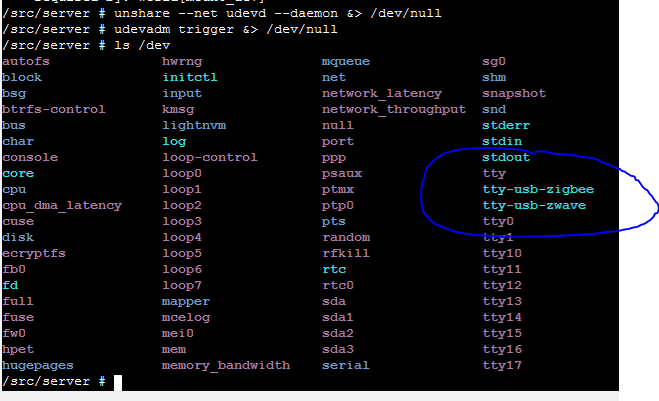
Udev rules will create an alias, Z-Wave will always be available on /dev/zwave and the Zigbee dongle on /dev/zigbee.
This does not prevent the use of /dev/ttyACM* (he who can do the most can do the least)
I got that, but I didn’t understand how this magic works 
Who decides which device lands on /dev/zwave? Anyway, it’s awesome!
Ah, excuse me, well, it’s us who decide, USB devices have a vendor ID and a product ID (and that doesn’t change)
I’ve identified this for the moment (nothing is definitive in this example!)
# Aeotec Zwave S2
SUBSYSTEM=="tty", ATTRS{idVendor}=="10c4", ATTRS{idProduct}=="ea60", SYMLINK+="tty-usb-zwave"
# Aeotec Zwave Gen5
SUBSYSTEM=="tty", ATTRS{idVendor}=="0658", ATTRS{idProduct}=="0200", SYMLINK+="tty-usb-zwave"
# ZWave.me UZB1 stick
SUBSYSTEM=="tty", ATTRS{idVendor}=="0658", ATTRS{idProduct}=="0280", SYMLINK+="tty-usb-zwave"
# Nortek Security & Control HUSBZB-1
SUBSYSTEM=="tty", ATTRS{idVendor}=="10c4", ATTRS{idProduct}=="8a2a", SYMLINK+="tty-usb-zwave-zigbee"
# zigbee2mqtt
SUBSYSTEM=="tty", ATTRS{idVendor}=="0451", ATTRS{idProduct}=="16a8", SYMLINK+="tty-usb-zigbee"
Ok I see, thanks for the explanation And this, would it be possible to do this directly in the Docker image? That way we can update it as we go?
There is an equivalent for Alpine Linux: eudev - Alpine Linux packages
I would say yes but I need to test it.
If it works effectively, it’s better in the Docker image directly
Edit it works:
I agree with @Reno regarding the --privileged option. In security, you should work with the principle of « least privilege. »
For debugging and development, no problem. But in production, especially on an image that Gladys will distribute, it’s important to consider security at all levels.
Several people have already asked the question: https://stackoverflow.com/a/24231872
In short, the best way in terms of security is to share only the desired equipment (link to Docker documentation which confirms this) without using the --privileged option:
docker run -t -i --device=/dev/ttyUSB0 ubuntu bash
To give access to the entire /dev folder, the --privileged option must be used, but also gives all rights on the host!
Docker explains this very well:
In other words, the container can then do almost everything that the host can do.
Nothing prevents us from mounting all the devices we are interested in:
docker run -t -i \
--device=/dev/ttyACM0 \
--device=/dev/ttyACM1 \
 ubuntu bash
In /dev are all the system devices, why would Gladys need access to disk partitions, loopback, etc?
When installed on the host, the OS would have prevented access to these devices (except with root of course), but with the --privileged option I think this will not be the case.
I totally agree with you, if Gladys is complicated to deploy, maintain and requires time from the end user, it won’t work.
Gladys uses Docker to facilitate updates, so with each new version, the container is deleted and then created again, right?
This operation will therefore allow us to easily modify Gladys’ launch parameters to add new accesses to the RPi and follow the evolutions. Security and ease of use are therefore well taken into account
Last security remark, once the development work is finished, we could look into Linux Capabilities. These are parameters to pass to the container to force Docker to limit access rights on the host. Gladys does not necessarily need to create a new network card, interact with the kernel, access system files (except devices), modify partitions, debug a process, etc.
These options are very useful to ensure that in case of container compromise (via a malicious module or if a user has directly exposed their RPi contrary to best practices for example), it cannot exploit the host and cause more damage (Ransomware on the network, espionage, etc.).
I tried to limit the rights of the containers I use on my personal server, if you are interested here is the documentation and examples:
Example taken from Docker documentation:
For interacting with the network stack, instead of using
--privilegedthey should use--cap-add=NET_ADMINto modify the network interfaces.
$ docker run -it --rm  ubuntu:14.04 ip link add dummy0 type dummy

RTNETLINK answers: Operation not permitted

$ docker run -it --rm --cap-add=NET_ADMIN ubuntu:14.04 ip link add dummy0 type dummy
Thanks and bravo if you read all of it 
Sorry for not yet helping you with development, as soon as I have a little more time I will start my home automation project and give you a hand!
It’s impossible to know in advance how many devices the user has.
I’m digging into the subject with udev rules
Well no, that’s not how it works, the container is recreated with the same commands. We use Watchtower
Really interesting all that (I have some reading to do), but be careful there are not only Linux hosts.
Modules don’t exist anymore everything is integrated.
Thanks for your suggestions. Any help is welcome.
Oops, indeed I’m not yet up to speed on all the functionality of Gladys v4
Regarding devices, it’s true that there’s room to explore to know what to set up. User environments will all be different, it’s hard to predict what they will have.
To conclude, my remarks for Docker are indeed applicable to Linux and not Windows
Hello,
Here is a small feedback from my tests:
RoomSelector.jsx:21 Uncaught (in promise) TypeError: Cannot read property 'map' of undefined
    at RoomSelector.jsx:21
    at Array.map (<anonymous>)
    at t.o.componentWillReceiveProps (RoomSelector.jsx:18)
    at b (preact.min.js:1)
    at preact.min.js:1
    at p (preact.min.js:1)
    at h (preact.min.js:1)
    at b (preact.min.js:1)
    at d (preact.min.js:1)
Apart from that, my devices are well detected and the values are well reported, I tested the following devices:
(I will soon have new devices to test, I will update as soon as possible)
Thank you very much for this service, it will be great 
PS: I updated the tested devices
I’m bumping this topic to get some information.
Which « ready-to-use » stick is usable?