Good evening,
In scenes, you can use the action ‹ Check presence › however it seems that it only handles the case where the user leaves the house. Is there a reason?
Thanks in advance,
Good evening,
In scenes, you can use the action ‹ Check presence › however it seems that it only handles the case where the user leaves the house. Is there a reason?
Thanks in advance,
Hi @Romuald_Pochet !
Yes, to set presence, you must use the action « User seen at home » (« Utilisateur vu à la maison ») following a trigger (for example: a Bluetooth sensor seen at home).
The philosophy of this way of managing presence is to allow « multiple » detections and to let the user really do what they want (Bluetooth detection, GPS, facial recognition, button click, …),
I wrote a tutorial for the Bluetooth case (but which applies regardless of the detection mode):
@Romuald_Pochet I saw your PR, the problem with your approach is that detection is going to be too slow!
The point of using a trigger is that the user is set as « home » instantly, and not via a scene executed periodically.
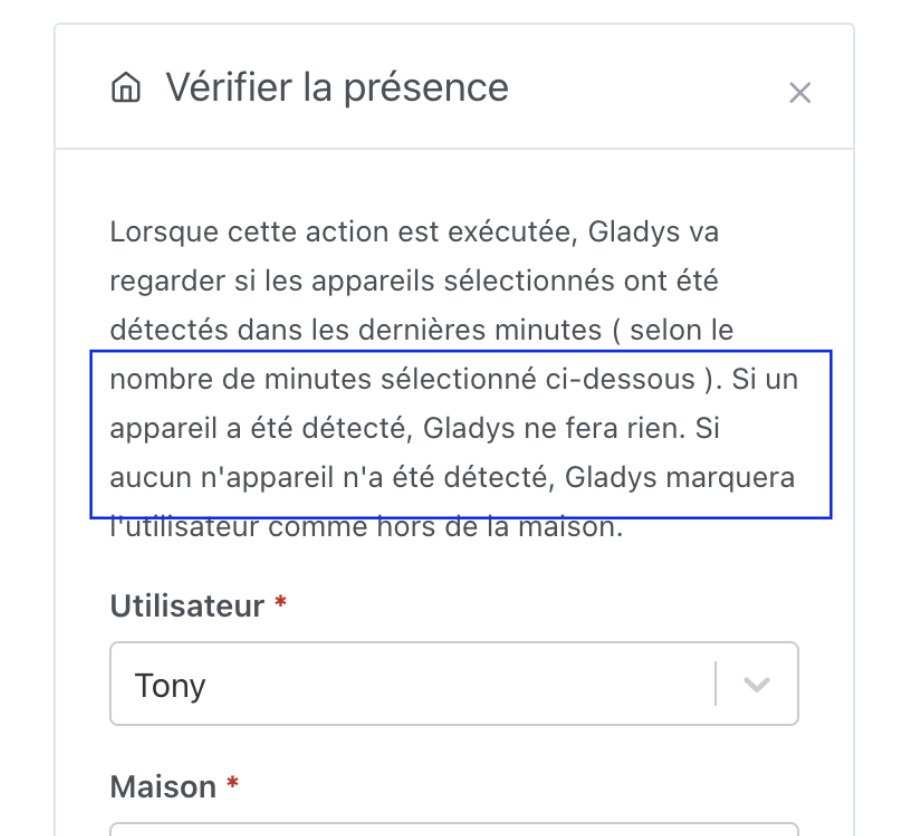
Absence detection, by nature, can only work via a periodic approach (we check every X minutes), to allow some leeway if the sensor isn’t seen once but is quickly seen again.
The scene action even specifies this:
Good evening,
I agree with the principle in place, it’s just that I don’t like creating a scene 
Wouldn’t it be possible to add, on the integration pages, for « presence-type » devices the ability to choose a user in order to manage (non-)presence automatically? For « those who want », scenes will still allow doing specific things.
Currently, each user is detected via ‹ Lan Manager ›, except me who also has a Tile (Bluetooth) but I don’t have much trouble managing the two identically (even if it’s true that if one of the two is missing that could indicate a problem).
PS: having 3 integrations in progress, I was imagining a template for each integration, along the lines of:
That feels a bit like a black box, doesn’t it? How would you handle multi-device in that case?
We can discuss it in another thread if you want, it’s true that we could create a set of ready-to-use components for integrations to simplify development a bit and standardize the integrations’ interface 
What happens now:
single-device:
multi-device:
I suppose the single-device case is probably the most common. For multi-device, we can imagine having a « necessary » device (the mobile phone (GSM) for example) and a « sufficient » device (
[quote=« Romuald_Pochet, post:6, topic:8374 »]
the advantage is that it
Totally agree, but I’m not talking about managing the return home via any kind of scan frequency (especially since presence detection, whether it’s the LAN manager or Bluetooth, is already based on a scan frequency); this box could act directly in response to a state change as we do with scenes.
Ok I understand better, but doesn’t that make it a bit redundant with the trigger?
Currently the recommended scene is:
« Quand mon porte clé Bluetooth est détecté » ALORS « Mettre utilisateur "PG" comme à la maison »
and you propose:
« Quand mon porte clé Bluetooth est détecté » ALORS « Mettre l’utilisateur "PG" comme à la maison si mon porte clé Bluetooth est détecté »
Hello, I can’t get my connected watch to be recognized by the Bluetooth integration, nor can I find my phone’s IP address in the LAN integration.
When scanning the LAN it never finds more than about ten devices, whereas an IP scan from my PC finds 25…
My phone’s IP is reachable by ping from my Gladys server.
Since there is an integration to manage presence in a zone via Owntracks, why can’t this zone presence be used as a presence indicator on a dashboard or in a scene?
Hi @Steph38230,
Tracking of connected devices (watches, phones, etc.) works very poorly over Bluetooth and Wi-Fi. This is largely intentional: manufacturers have implemented many techniques to prevent tracking of people (MAC address randomization, OS-level protections, etc.).
The goal is to make it much more difficult to identify and track a device over time, which is a good thing from a privacy standpoint.
That’s perfectly possible
You create 2 scenes:
For my part, for presence management, I set up 2 shortcuts on my phone:
My phone itself does the zone entry/exit detection, and then it makes a request to Gladys (via the Gladys Plus Open API: Open API | Gladys Assistant )
It works great and I think it’s the most battery-optimized way to do it, because the phone handles all the intelligence and so it’s optimized by Apple
Great. Thanks, I’ll put that in place right away 
I see this integration is often misunderstood so I renamed the « Bluetooth » integration to « Bluetooth Presence »:
And inside the integration I added a small message to make it clearer:
This fix is available in Gladys Assistant 4.71 :
I installed Owntracks on my phone and on my wife’s phone.
In Gladys I generated 2 API keys. It works very well for me, but my wife’s location does not show up on Gladys.
In Open API I generated 2 API keys with our two first names corresponding to the users’ Tag
On Sylvie’s Owntracks app I can clearly see info being sent to Gladys in the log, but she doesn’t appear at all on the map and is not detected when entering or leaving a zone.
Do I need to do something else because she is not the « main user », or should it work and is it therefore probably a configuration problem of Owntracks on her iPhone (I hate iPhones )
Did you generate your wife’s API key on your wife’s Gladys Plus account? From your screenshot, I get the impression you didn’t!
So do I need to create her GladysPlus account as an Admin so she can access the OpenAPI setting?
Exactly! We can revoke his admin access afterwards, but to create an API key you have to be an administrator