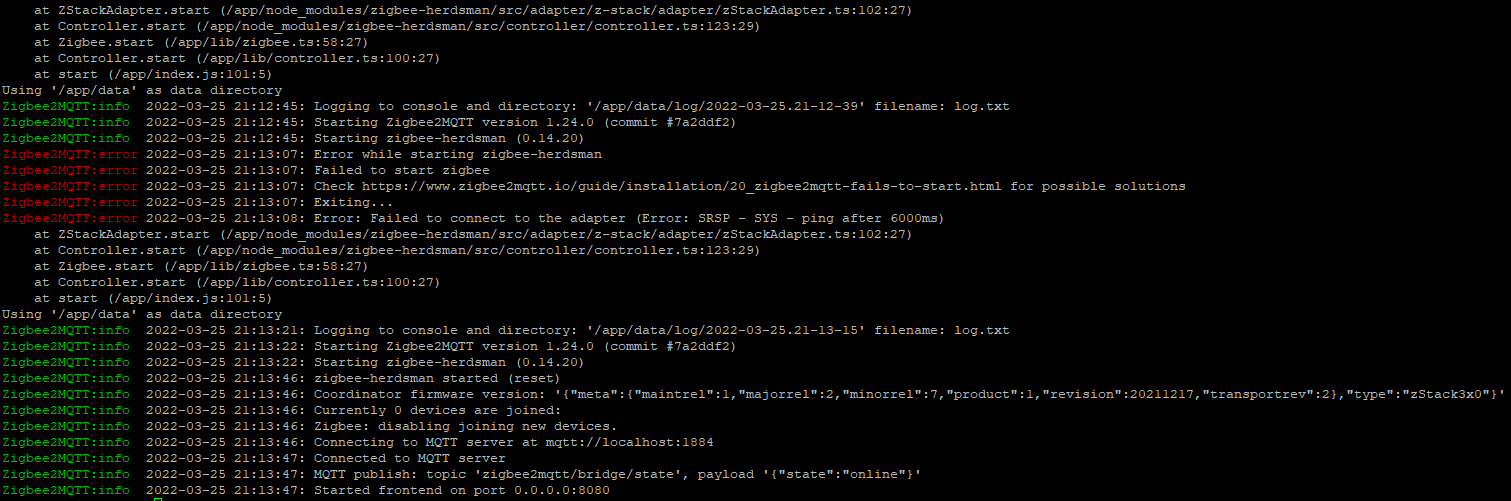
I just placed the order and here’s what I get.
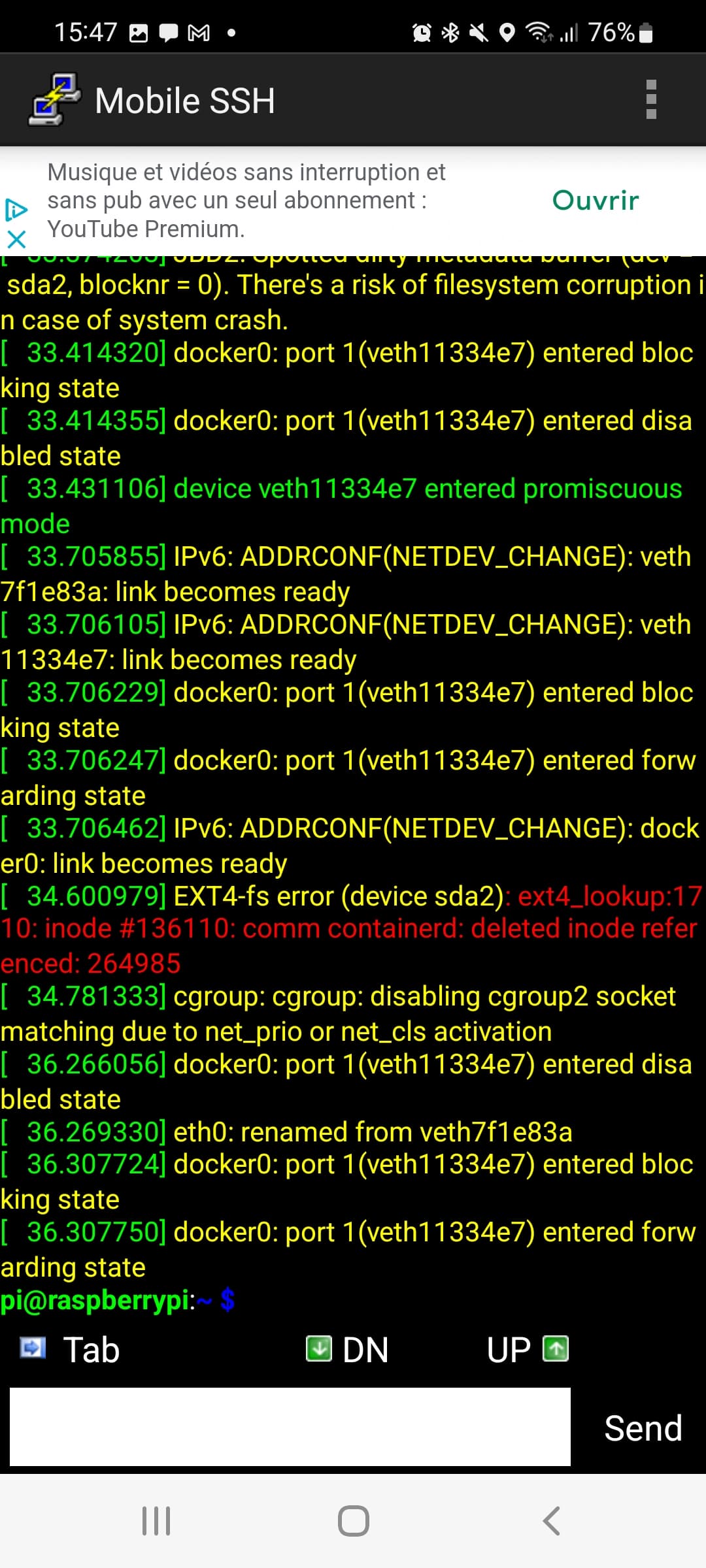
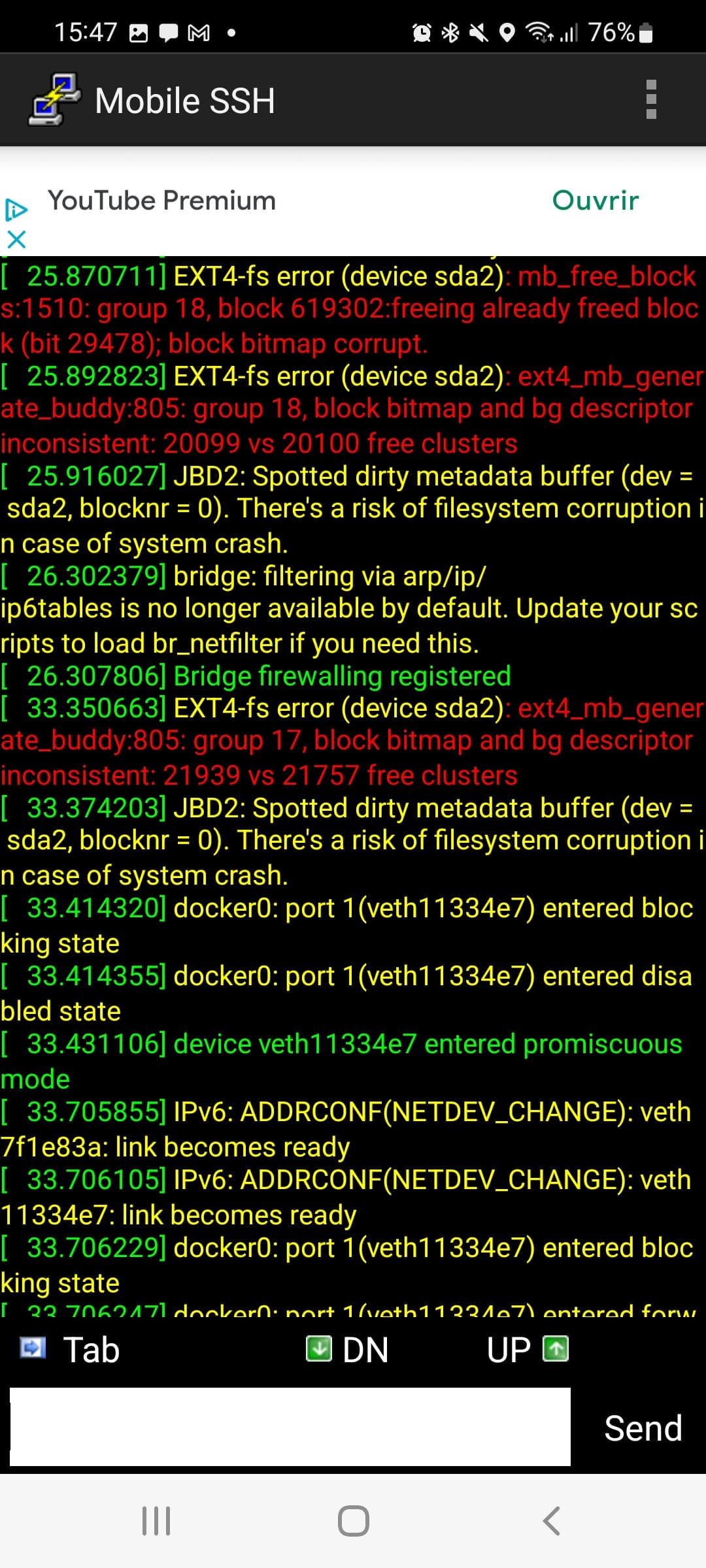

I only noted when there was a red line.
And there is indeed an under voltage detected.
My power supply is the original 5V 3000mA.
If that’s the case, I’ll order one with more amperage.
Ah! We’re making progress! 
Otherwise, you can connect your USB devices to an externally powered USB hub.
I’m on a RPi4 with an SSD and an HDD (+a second self-powered HDD), official power supply. The HDDs alone were running very well but I had to put them on a hub with external power supply when I added the SSD…
OK I’m going to test a powered hub.
I’ll keep you posted.
It’s possible that we’re asking a bit too much of our little RPi ^^
Personally, I boot from a USB key rather than an SSD. I don’t know if that changes much in terms of performance (we’re not talking about running a video game either) and it’s at least more reliable than the usual microSD! On the other hand, it consumes even less than an SSD for the trouble.
I, on the other hand, do not recommend using a USB key; it is as unreliable as a micro-SD (if not worse).
Oh, I see… I didn’t think so. Is there a particular reason? Is it the numerous writings that cause them to crash? Because on my end, it’s already much more reliable than the microSD cards I’ve already fried!
Same reason as for micro-SD cards, these are storage devices designed for a fixed number of read/write cycles, and they are not very durable in general. There may be exceptions, but generally, they should be avoided.
SSDs, on the other hand, are designed for intensive read/write operations and are tested for this purpose. Some SSDs even come with warranties in this regard; it’s more serious hardware
It works, thanks for the advice. My last SSD connected to a Pi recently died… and it really annoyed me ^^
So I’ll look into getting an SSD, because I don’t want everything to crash out of the blue!
Sorry for the off-topic!!
For my part, I have tried several Zigbee configurations:
RPI3 or RPI4 + SSD + CC2652 BLE Simplelink 2.2G Zigbee2MQTT dongle: OK operation in reading (temperature, humidity, vibration, etc.) or writing (switch, lamp, siren, etc.)
RPI3 or RPI4 + SSD + SonOff 3.0 dongle with external 20dBm antenna (compatible with ZHA, Zigbee2MQTT): OK operation in reading only (temperature, humidity, etc.)
Synology DS218+: no Zigbee2MQTT activation regardless of the dongle (apparently USB driver issue with DSM 7.0) to be confirmed.
I’m off on some dumb stuff… But what USB port are your dongles on? USB 2 / USB 3 (the blue ones)? With an extension cable?
If it’s on USB 3, you should try moving the dongle to USB 2, restart the Pi, and see what happens 
Same thing without an extension cable if there is one.
There is no USB3 on Pi 3B+, only USB 2.
For my part, no extension.
I just did a fresh installation and I did not restore a G+ backup and I just noticed that the zigbee2mqtt container is working again.
I just plugged everything back into my Pi as before.
What has changed and I don’t know why, is the IP address of my Pi
In the logs the error was present then the connection succeeded.
However, none of my devices are detected. I’m still looking.
For my part:
RPi3B+
5V 3A power supply
SSD
I noticed the same thing.
Is it a USB3 hub and is that why? I don’t know.
When I connect the hub to my PC, there is no problem, the SSD is recognized and I can access it, but on the Rpi, no way.
Do you see your devices on the « IPgladys:8080 » interface, Zigbee2MQTT interface?
I don’t see them anywhere. Neither in Gladys nor in the zigbee2mqtt interface.
First, you need to see them in zigbee2mqtt to have them in gladys. Note that gladys only creates the zigbee2mqtt container. So as long as zigbee2mqtt is not working, there will be nothing in gladys.
Have you followed the zigbee2mqtt FAQ?
What you need to test:
Unplug and replug the dongle.
Have the firmware up to date.
Have a proper power supply.
And disable autosuspend if it is active.
cat /sys/module/usbcore/parameters/autosuspend returns 1 or 2 it is enabled; to disable execute:sed -i 's/GRUB_CMDLINE_LINUX_DEFAULT="/&usbcore.autosuspend=-1 /' /etc/default/grub
update-grub
systemctl reboot
Hello,
As several people are experiencing malfunctions with the SONOFF key, I have responded to DOMADOO’s request for feedback, who provided it to me:
« Hello,
After several connection and disconnection attempts on a Raspberry Pi, the Zigbee 3.0 USB Key with external 20dBm antenna (compatible with ZHA, Zigbee2MQTT) is not detected.
My goal is to develop a network on GLADYS, so I submitted the problem online, on the forum. It turns out that this issue affects many cases (with the same model of key) and that it is a malfunction at the MQTT library level.
I am using a Pi 3 with boot on SSD.
Thank you for informing me about the solution to implement so that I can use the key under normal conditions.
Best regards. »
I hope to receive a response with elements that can enlighten us.
Have a nice end of the day.
We’ll see what they tell you, but in my opinion they won’t be able to help you with this, it’s still a Domadoo reseller ^^
If you want to contact someone, here it would be more the Zigbee2mqtt community (which I remind you is a separate project from Gladys, just like Node-RED), they have a community here:
By the way, I have this dongle @Jluc, and I did a reinstallation of Gladys no later than last week to test the Bullseye image ([Recherche de testeurs] Nouvelle image Gladys Raspberry Pi OS sous Bullseye - #50 par pierre-gilles), and everything was working for me (Raspberry Pi 3B+, Sonoff 3.0 USB key bought at Domadoo as well).