
Then I have a doubt about the last lines:

I thought about it last night. I don’t have one, but I’ll ask a friend.
Are we in agreement that you flashed this firmware?
In the zzh! documentation, there is this:
I think so because I downloaded the coordinator directly from the website.
I will check this evening, I have a doubt about the version.
I will also look at the configuration file, because I don’t remember exactly.
In the configuration, if you don’t have it, it’s false by default
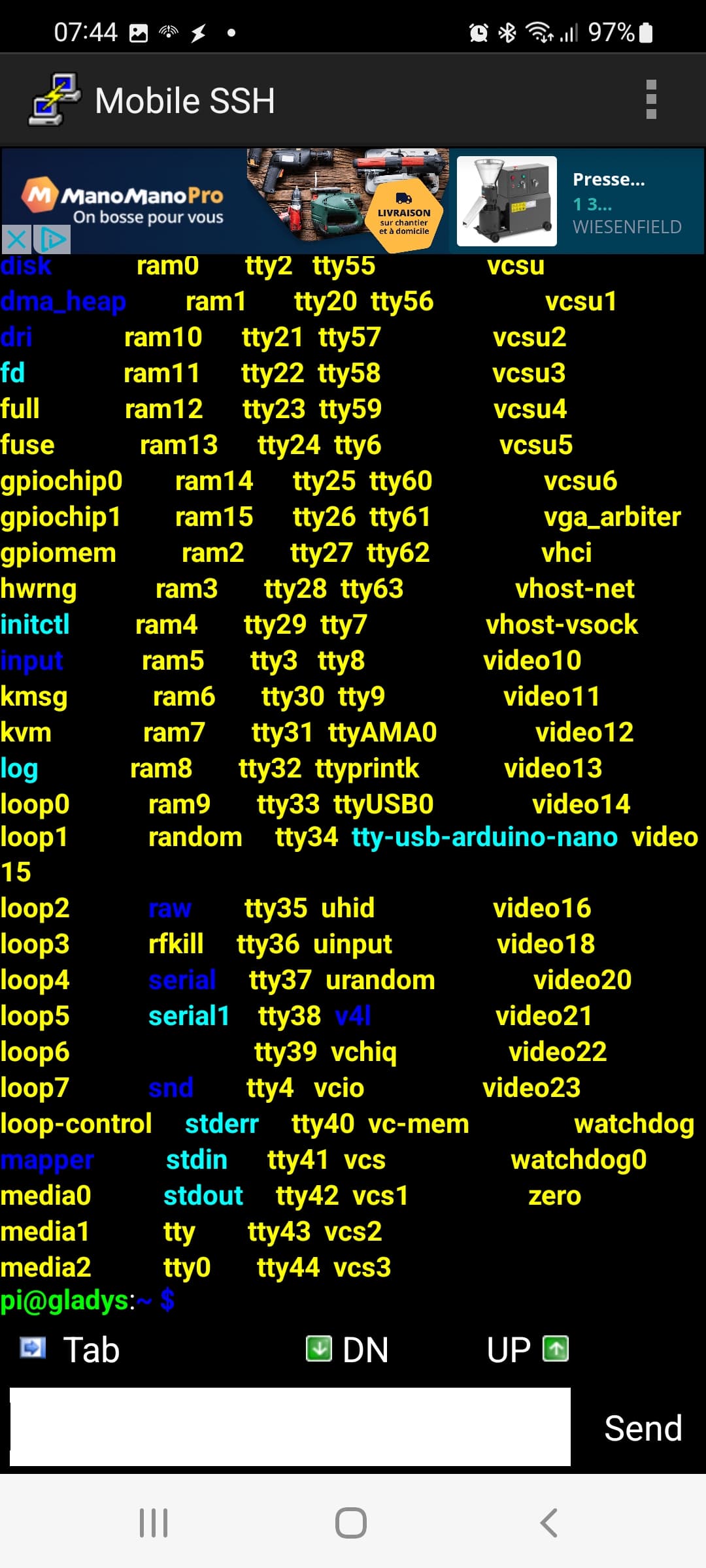
Also, there’s something that bothers me, you have a tty-usb-arduino-nano, there’s a rule error (no impact on your problem but I need to fix it)
vonox@odin in  /etc/udev/rules.d ❯ udevadm info /dev/tty-usb-zigbee-zzh
P: /devices/pci0000:00/0000:00:1d.0/usb2/2-1/2-1.1/2-1.1:1.0/ttyUSB0/tty/ttyUSB0
N: ttyUSB0
L: 0
S: serial/by-path/pci-0000:00:1d.0-usb-0:1.1:1.0-port0
S: tty-usb-zigbee-zzh
S: serial/by-id/usb-1a86_USB_Serial-if00-port0
E: DEVPATH=/devices/pci0000:00/0000:00:1d.0/usb2/2-1/2-1.1/2-1.1:1.0/ttyUSB0/tty/ttyUSB0
E: DEVNAME=/dev/ttyUSB0
E: MAJOR=188
E: MINOR=0
E: SUBSYSTEM=tty
E: USEC_INITIALIZED=1460387909861
E: ID_BUS=usb
E: ID_VENDOR_ID=1a86
E: ID_MODEL_ID=7523
E: ID_PCI_CLASS_FROM_DATABASE=Serial bus controller
E: ID_PCI_SUBCLASS_FROM_DATABASE=USB controller
E: ID_PCI_INTERFACE_FROM_DATABASE=EHCI
E: ID_VENDOR_FROM_DATABASE=QinHeng Electronics
E: ID_MODEL_FROM_DATABASE=HL-340 USB-Serial adapter
E: ID_VENDOR=1a86
E: ID_VENDOR_ENC=1a86
E: ID_MODEL=USB_Serial
E: ID_MODEL_ENC=USB\x20Serial
E: ID_REVISION=0264
E: ID_SERIAL=1a86_USB_Serial
E: ID_TYPE=generic
E: ID_USB_INTERFACES=:ff0102:
E: ID_USB_INTERFACE_NUM=00
E: ID_USB_DRIVER=ch341
E: ID_USB_CLASS_FROM_DATABASE=Vendor Specific Class
E: ID_PATH=pci-0000:00:1d.0-usb-0:1.1:1.0
E: ID_PATH_TAG=pci-0000_00_1d_0-usb-0_1_1_1_0
E: ID_MM_CANDIDATE=1
E: DEVLINKS=/dev/serial/by-path/pci-0000:00:1d.0-usb-0:1.1:1.0-port0 /dev/tty-usb-zigbee-zzh /dev/serial/by-id/usb-1a86_USB_Serial-if00-port0
E: TAGS=:systemd:
Can you return this for me: udevadm info /dev/ttyUSB0
For my part, apparently, it’s the same, I have this « tty-usb-arduino-nano » that appears even though I’ve never had an Arduino Nano ^^
pi@gladys-maison:~ $ udevadm info /dev/ttyUSB0
P: /devices/platform/scb/fd500000.pcie/pci0000:00/0000:00:00.0/0000:01:00.0/usb1/1-1/1-1.3/1-1.3:1.0/ttyUSB0/tty/ttyUSB0
N: ttyUSB0
L: 0
S: serial/by-path/platform-fd500000.pcie-pci-0000:01:00.0-usb-0:1.3:1.0-port0
S: serial/by-id/usb-1a86_USB_Serial-if00-port0
S: tty-usb-arduino-nano
E: DEVPATH=/devices/platform/scb/fd500000.pcie/pci0000:00/0000:00:00.0/0000:01:00.0/usb1/1-1/1-1.3/1-1.3:1.0/ttyUSB0/tty/ttyUSB0
E: DEVNAME=/dev/ttyUSB0
E: MAJOR=188
E: MINOR=0
E: SUBSYSTEM=tty
E: USEC_INITIALIZED=1891987565
E: ID_BUS=usb
E: ID_VENDOR_ID=1a86
E: ID_MODEL_ID=7523
E: ID_PCI_CLASS_FROM_DATABASE=Serial bus controller
E: ID_PCI_SUBCLASS_FROM_DATABASE=USB controller
E: ID_PCI_INTERFACE_FROM_DATABASE=XHCI
E: ID_VENDOR_FROM_DATABASE=VIA Technologies, Inc.
E: ID_MODEL_FROM_DATABASE=VL805 USB 3.0 Host Controller
E: ID_PATH=platform-fd500000.pcie-pci-0000:01:00.0-usb-0:1.3:1.0
E: ID_PATH_TAG=platform-fd500000_pcie-pci-0000_01_00_0-usb-0_1_3_1_0
E: ID_VENDOR=1a86
E: ID_VENDOR_ENC=1a86
E: ID_MODEL=USB_Serial
E: ID_MODEL_ENC=USB\x20Serial
E: ID_REVISION=0264
E: ID_SERIAL=1a86_USB_Serial
E: ID_TYPE=generic
E: ID_USB_INTERFACES=:ff0102:
E: ID_USB_INTERFACE_NUM=00
E: ID_USB_DRIVER=ch341
E: DEVLINKS=/dev/serial/by-path/platform-fd500000.pcie-pci-0000:01:00.0-usb-0:1.3:1.0-port0 /dev/serial/by-id/usb-1a86_USB_Serial-if00-port0 /dev/tty-usb-arduino-nano
E: TAGS=:systemd:
E: CURRENT_TAGS=:systemd:
And my Zigbee key is the same as yours normally « zzh »
Yes it’s fixed, it will be for the next version of gladys-os
First error logs on April 4th with the error « Error: SRSP - SYS - ping after 6000ms »:
Zigbee2MQTT:info  2022-04-04 10:03:07: Logging to console and directory: '/app/data/log/2022-04-04.10-03-05' filename: log.txt
Zigbee2MQTT:debug 2022-04-04 10:03:07: Removing old log directory '/app/data/log/2022-04-04.09-58-56'
Zigbee2MQTT:info  2022-04-04 10:03:07: Starting Zigbee2MQTT version 1.25.0 (commit #6f1460e)
Zigbee2MQTT:info  2022-04-04 10:03:07: Starting zigbee-herdsman (0.14.20)
Zigbee2MQTT:debug 2022-04-04 10:03:08: Using zigbee-herdsman with settings: '{"adapter":{"concurrent":null,"delay":null,"disableLED":false},"backupPath":"/app/data/coordinator_backup.json","databaseBackupPath":"/app/data/database.db.backup","databasePath":"/app/data/database.db","network":{"channelList":[11],"extendedPanID":[221,221,221,221,221,221,221,221],"networkKey":"HIDDEN","panID":6754},"serialPort":{"path":"/dev/ttyACM0"}}'
Zigbee2MQTT:error 2022-04-04 10:03:28: Error while starting zigbee-herdsman
Zigbee2MQTT:error 2022-04-04 10:03:28: Failed to start zigbee
Zigbee2MQTT:error 2022-04-04 10:03:28: Check https://www.zigbee2mqtt.io/guide/installation/20_zigbee2mqtt-fails-to-start.html for possible solutions
Zigbee2MQTT:error 2022-04-04 10:03:28: Exiting...
Zigbee2MQTT:error 2022-04-04 10:03:28: Error: Failed to connect to the adapter (Error: SRSP - SYS - ping after 6000ms)
    at ZStackAdapter.start (/app/node_modules/zigbee-herdsman/src/adapter/z-stack/adapter/zStackAdapter.ts:102:27)
    at Controller.start (/app/node_modules/zigbee-herdsman/src/controller/controller.ts:123:29)
    at Zigbee.start (/app/lib/zigbee.ts:58:27)
    at Controller.start (/app/lib/controller.ts:100:27)
    at start (/app/index.js:101:5)
Using '/app/data' as data directory
I then modified the configuration.yaml file as recommended on Zigbee, it still wouldn’t start and the error became:
Zigbee2MQTT:info  2022-04-04 11:42:09: Logging to console and directory: '/app/data/log/2022-04-04.11-42-08' filename: log.txt
Zigbee2MQTT:debug 2022-04-04 11:42:09: Removing old log directory '/app/data/log/2022-04-04.11-36-40'
Zigbee2MQTT:info  2022-04-04 11:42:10: Starting Zigbee2MQTT version 1.25.0 (commit #6f1460e)
Zigbee2MQTT:info  2022-04-04 11:42:10: Starting zigbee-herdsman (0.14.20)
Zigbee2MQTT:debug 2022-04-04 11:42:10: Using zigbee-herdsman with settings: '{"adapter":{"concurrent":null,"delay":null,"disableLED":false},"backupPath":"/app/data/coordinator_backup.json","databaseBackupPath":"/app/data/database.db.backup","databasePath":"/app/data/database.db","network":{"channelList":[11],"extendedPanID":[221,221,221,221,221,221,221,221],"networkKey":"HIDDEN","panID":6754},"serialPort":{"adapter":"deconz","path":"/dev/ttyUSB0"}}'
CREATED DECONZ ADAPTER
Zigbee2MQTT:error 2022-04-04 11:42:10: Error while starting zigbee-herdsman
Zigbee2MQTT:error 2022-04-04 11:42:10: Failed to start zigbee
Zigbee2MQTT:error 2022-04-04 11:42:10: Check https://www.zigbee2mqtt.io/guide/installation/20_zigbee2mqtt-fails-to-start.html for possible solutions
Zigbee2MQTT:error 2022-04-04 11:42:10: Exiting...
Zigbee2MQTT:error 2022-04-04 11:42:10: Error: Error while opening serialport 'Error: Error: No such file or directory, cannot open /dev/ttyUSB0'
    at SerialPort.<anonymous> (/app/node_modules/zigbee-herdsman/src/adapter/deconz/driver/driver.ts:182:28)
    at SerialPort._error (/app/node_modules/zigbee-herdsman/node_modules/@serialport/stream/lib/index.js:198:14)
    at /app/node_modules/zigbee-herdsman/node_modules/@serialport/stream/lib/index.js:242:12
Using '/app/data' as data directory
And today… who knows why, following the messages from @VonOx, I retested by restoring the original configuration.yaml file, and it works perfectly again…
Zigbee2MQTT:debug 2022-04-07 09:26:05: Loaded state from file /app/data/state.json
Zigbee2MQTT:info  2022-04-07 09:26:05: Logging to console and directory: '/app/data/log/2022-04-07.09-26-04' filename: log.txt
Zigbee2MQTT:debug 2022-04-07 09:26:05: Removing old log directory '/app/data/log/2022-04-07.09-23-37'
Zigbee2MQTT:info  2022-04-07 09:26:05: Starting Zigbee2MQTT version 1.25.0 (commit #6f1460e)
Zigbee2MQTT:info  2022-04-07 09:26:06: Starting zigbee-herdsman (0.14.20)
Zigbee2MQTT:debug 2022-04-07 09:26:06: Using zigbee-herdsman with settings: '{"adapter":{"concurrent":null,"delay":null,"disableLED":false},"backupPath":"/app/data/coordinator_backup.json","databaseBackupPath":"/app/data/database.db.backup","databasePath":"/app/data/database.db","network":{"channelList":[11],"extendedPanID":[221,221,221,221,221,221,221,221],"networkKey":"HIDDEN","panID":6754},"serialPort":{"adapter":"deconz","path":"/dev/ttyACM0"}}'
CREATED DECONZ ADAPTER
Zigbee2MQTT:error 2022-04-07 09:26:16: Error while starting zigbee-herdsman
Zigbee2MQTT:error 2022-04-07 09:26:16: Failed to start zigbee
Zigbee2MQTT:error 2022-04-07 09:26:16: Check https://www.zigbee2mqtt.io/guide/installation/20_zigbee2mqtt-fails-to-start.html for possible solutions
Zigbee2MQTT:error 2022-04-07 09:26:16: Exiting...
Zigbee2MQTT:error 2022-04-07 09:26:16: undefined
Using '/app/data' as data directory
Zigbee2MQTT:debug 2022-04-07 09:26:20: Loaded state from file /app/data/state.json
Zigbee2MQTT:info  2022-04-07 09:26:20: Logging to console and directory: '/app/data/log/2022-04-07.09-26-18' filename: log.txt
Zigbee2MQTT:debug 2022-04-07 09:26:20: Removing old log directory '/app/data/log/2022-04-07.09-23-51'
Zigbee2MQTT:info  2022-04-07 09:26:20: Starting Zigbee2MQTT version 1.25.0 (commit #6f1460e)
Zigbee2MQTT:info  2022-04-07 09:26:20: Starting zigbee-herdsman (0.14.20)
Zigbee2MQTT:debug 2022-04-07 09:26:20: Using zigbee-herdsman with settings: '{"adapter":{"concurrent":null,"delay":null,"disableLED":false},"backupPath":"/app/data/coordinator_backup.json","databaseBackupPath":"/app/data/database.db.backup","databasePath":"/app/data/database.db","network":{"channelList":[11],"extendedPanID":[221,221,221,221,221,221,221,221],"networkKey":"HIDDEN","panID":6754},"serialPort":{"path":"/dev/ttyACM0"}}'
Zigbee2MQTT:info  2022-04-07 09:26:24: zigbee-herdsman started (resumed)
Zigbee2MQTT:info  2022-04-07 09:26:24: Coordinator firmware version: '{"meta":{"maintrel":1,"majorrel":2,"minorrel":7,"product":1,"revision":20210120,"transportrev":2},"type":"zStack3x0"}'
Zigbee2MQTT:debug 2022-04-07 09:26:24: Zigbee network parameters: {"channel":11,"extendedPanID":"0xdddddddddddddddd","panID":6754}
Zigbee2MQTT:info  2022-04-07 09:26:24: Currently 1 devices are joined:
Zigbee2MQTT:info  2022-04-07 09:26:24: Mi motion Sensor 2 (0x00158d000315248f): RTCGQ01LM - Xiaomi MiJia human body movement sensor (EndDevice)
Zigbee2MQTT:info  2022-04-07 09:26:24: Zigbee: disabling joining new devices.
Zigbee2MQTT:info  2022-04-07 09:26:24: Connecting to MQTT server at mqtt://localhost:1884
Zigbee2MQTT:debug 2022-04-07 09:26:24: Using MQTT login with username: z2m
Zigbee2MQTT:info  2022-04-07 09:26:24: Connected to MQTT server
Zigbee2MQTT:info  2022-04-07 09:26:24: MQTT publish: topic 'zigbee2mqtt/bridge/state', payload 'online'
Zigbee2MQTT:info  2022-04-07 09:26:24: Started frontend on port 0.0.0.0:8080
Zigbee2MQTT:info  2022-04-07 09:26:24: MQTT publish: topic 'zigbee2mqtt/bridge/config', payload '{"commit":"6f1460e","coordinator":{"meta":{"maintrel":1,"majorrel":2,"minorrel":7,"product":1,"revision":20210120,"transportrev":2},"type":"zStack3x0"},"log_level":"debug","network":{"channel":11,"extendedPanID":"0xdddddddddddddddd","panID":6754},"permit_join":false,"version":"1.25.0"}'
Zigbee2MQTT:info  2022-04-07 09:26:24: MQTT publish: topic 'zigbee2mqtt/Mi motion Sensor 2', payload '{"battery":100,"occupancy":true,"voltage":3025}'
I don’t understand anything. So for information, I don’t know if it was the trigger on my side, but just before this failure I clicked on « Touchlink » / « Scan »:
Here’s what I have on my side.
pi@gladys:~ $ udevadm info /dev/ttyUSB0
P: /devices/platform/soc/3f980000.usb/usb1/1-1/1-1.1/1-1.1.2/1-1.1.2:1.0/ttyUSB0/tty/ttyUSB0
N: ttyUSB0
L: 0
S: tty-usb-arduino-nano
S: serial/by-path/platform-3f980000.usb-usb-0:1.1.2:1.0-port0
S: serial/by-id/usb-1a86_USB_Serial-if00-port0
E: DEVPATH=/devices/platform/soc/3f980000.usb/usb1/1-1/1-1.1/1-1.1.2/1-1.1.2:1.0/ttyUSB0/tty/ttyUSB0
E: DEVNAME=/dev/ttyUSB0
E: MAJOR=188
E: MINOR=0
E: SUBSYSTEM=tty
E: USEC_INITIALIZED=171145265651
E: ID_PATH=platform-3f980000.usb-usb-0:1.1.2:1.0
E: ID_PATH_TAG=platform-3f980000_usb-usb-0_1_1_2_1_0
E: ID_VENDOR=1a86
E: ID_VENDOR_ENC=1a86
E: ID_VENDOR_ID=1a86
E: ID_MODEL=USB_Serial
E: ID_MODEL_ENC=USB\x20Serial
E: ID_MODEL_ID=7523
E: ID_REVISION=0264
E: ID_SERIAL=1a86_USB_Serial
E: ID_TYPE=generic
E: ID_BUS=usb
E: ID_USB_INTERFACES=:ff0102:
E: ID_USB_INTERFACE_NUM=00
E: ID_USB_DRIVER=ch341
E: DEVLINKS=/dev/tty-usb-arduino-nano /dev/serial/by-path/platform-3f980000.usb-usb-0:1.1.2:1.0-port0 /dev/serial/by-id/usb-1a86_USB_Serial-if00-port0
E: TAGS=:systemd:
E: CURRENT_TAGS=:systemd:
I checked the version for the key, I had a 2021 version.
I updated to the latest, but mine is the C2652R and not the RB. I don’t know if that makes a difference.
You don’t want to click on it again to see and break everything! 
I don’t want to do anything, it won’t work again.
I will send you my key so you can test it on your installation if it continues.
@Tlse-vins Have you investigated a bit on the Zigbee2mqtt forum? Here we make assumptions, but as it’s not our specialty, we’re struggling a bit ^^
By doing a search on their forum, there are still quite a few cases:
The hardware problem is often to blame, some say that the Zigbee key was to blame:
I saw the founder of the project even talk about cases of Zigbee key corruption:
Did you flash the firmware I sent you?
Yes, but I think I need to delete the zigbee2mqtt container to update, right?
That’s true, I haven’t been to the forum, I’ll go see what’s being said.
After reading a lot on their forum, the only thing I found to try to solve the problem:
Is to add these lines but I’m not sure if it’s in the configuration.yaml file
Or: is to add this in the configuration.yaml file
serial:
  port: 'tcp://MY-IP:PORT' not sure about this line
  baudrate: 115200
  rtscts: false
advanced:
  pan_id: GENERATE
I’m going to test it.
Not at all, this has nothing to do with it
It’s during a TCP port configuration
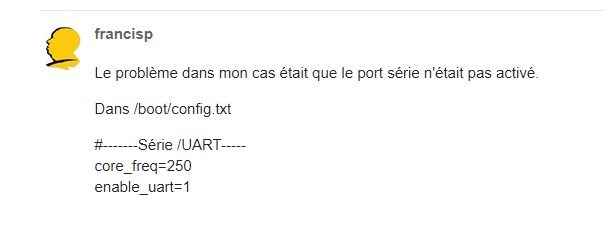
You can check your config.txt but the UART must already be activated
ok I understand.
Where can I find the config.txt file? I can’t find it.
/boot/config.txt (as in the screenshot  )
)
Big change finally!!
But here are the logs
Zigbee2MQTT:info  2022-04-13 19:15:36: Starting Zigbee2MQTT version 1.25.0 (commit #6f1460e)
Zigbee2MQTT:info  2022-04-13 19:15:36: Starting zigbee-herdsman (0.14.20)
Zigbee2MQTT:info  2022-04-13 19:15:58: zigbee-herdsman started (reset)
Zigbee2MQTT:info  2022-04-13 19:15:58: Coordinator firmware version: '{\"meta\":{\"maintrel\":1,\"majorrel\":2,\"minorrel\":7,\"product\":1,\"revision\":20210708,\"transportrev\":2},\"type\":\"zStack3x0\"}'
Zigbee2MQTT:info  2022-04-13 19:15:59: Currently 0 devices are joined:
Zigbee2MQTT:info  2022-04-13 19:15:59: Zigbee: disabling joining new devices.
Zigbee2MQTT:info  2022-04-13 19:15:59: Connecting to MQTT server at mqtt://localhost:1884
Zigbee2MQTT:info  2022-04-13 19:15:59: Connected to MQTT server
Zigbee2MQTT:info  2022-04-13 19:15:59: MQTT publish: topic 'zigbee2mqtt/bridge/state', payload '{\"state\":\"online\"}'
Zigbee2MQTT:info  2022-04-13 19:16:00: Started frontend on port 0.0.0.0:8080
Zigbee2MQTT:info  2022-04-13 19:19:59: Starting network scan (includeRoutes 'false')
Zigbee2MQTT:info  2022-04-13 19:20:00: Network scan finished
Zigbee2MQTT:info  2022-04-13 19:20:00: MQTT publish: topic 'zigbee2mqtt/bridge/response/networkmap', payload '{\"data\":{\"routes\":false,\"type\":\"raw\",\"value\":{\"links\":[],\"nodes\":[{\"definition\":null,\"failed\":[],\"friendlyName\":\"Coordinator\",\"ieeeAddr\":\"0x00124b0024c12ad5\",\"lastSeen\":null,\"networkAddress\":0,\"type\":\"Coordinator\"}]}},\"status\":\"ok\",\"transaction\":\"egsp9-1\"}'
I don’t know if everything is normal.
Because none of my devices are coming up in Gladys or in the Zigbee interface.
Have you paired? You changed your key, so you have to do everything again
Yes, I knew about that.
I pressed the pairing buttons on an opening sensor and a thermometer, but nothing happened.