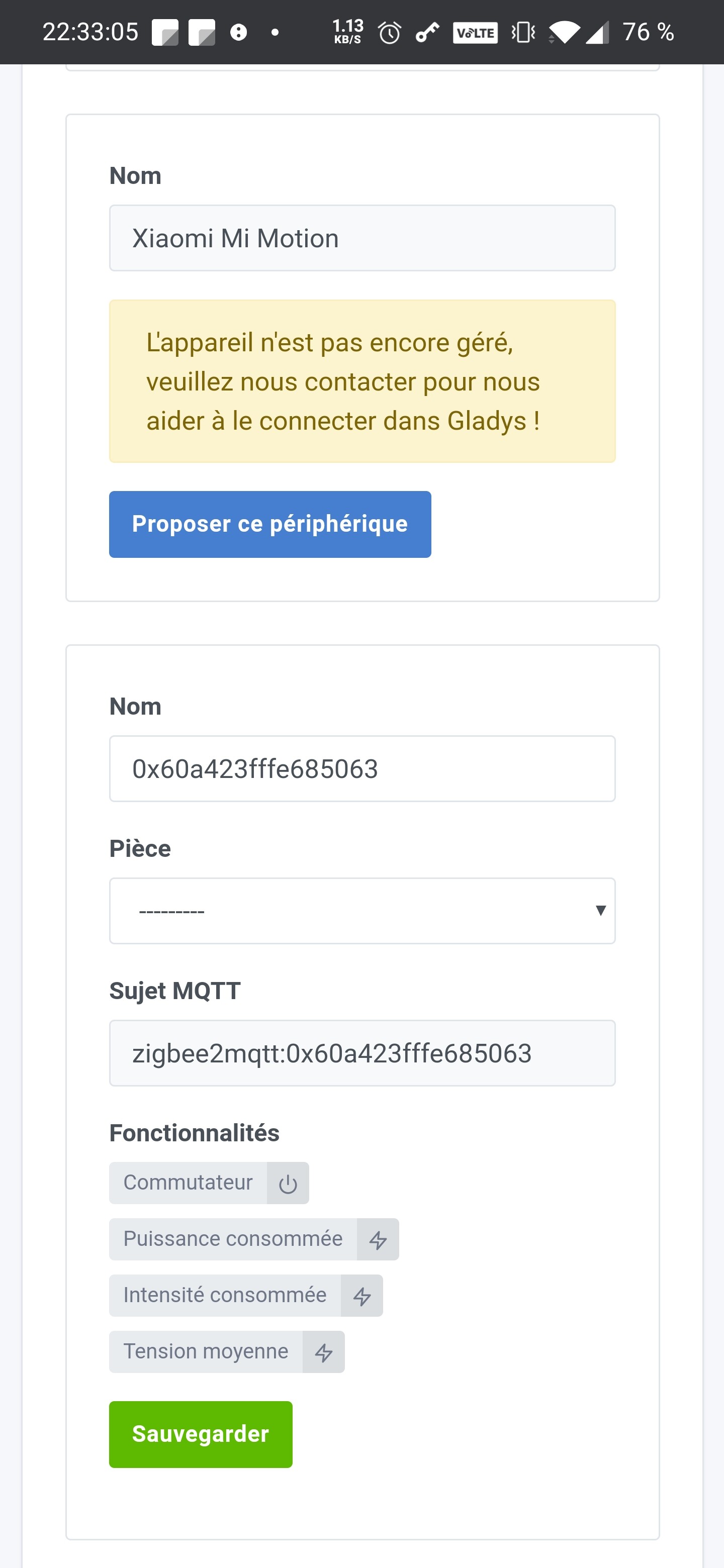
This would be the most user-friendly. By default, what is supported in zigbee2mqtt should be supported in Gladys.
It’s not that simple 
I believe I managed the connected outlets as switches for Tasmota.
I imagine so!
Otherwise, to make it very user-friendly, I suggest:
- The scan displays all devices, even unsupported ones
- Unsupported devices are grayed out, explaining that they are not yet supported
- An option in Gladys allows collecting logs from the Gladys and Zigbee2Mqtt containers to submit on the forum and enable creating a PR afterward.
What do you think?
In any case, nothing is displayed in Gladys regarding my outlet, which still returns the status, voltage, and instantaneous power.
Another bug: when I use the mobile interface, the scan doesn’t work and displays an error.
If I check « show PC version » from the same mobile browser, it works again.
Hello. It is indeed impossible to deduce the features available for a device without including it in the code 
According to the documentation here, the list of devices returned does not contain the features but only the model/brand:
But I agree with you that this should be explained to the user. And I like your proposal, it’s what we do on other services.
I propose the following interface. The Suggest this device button allows opening an issue on Github with the brand + model. This will allow us to have all the information to add it to Gladys.
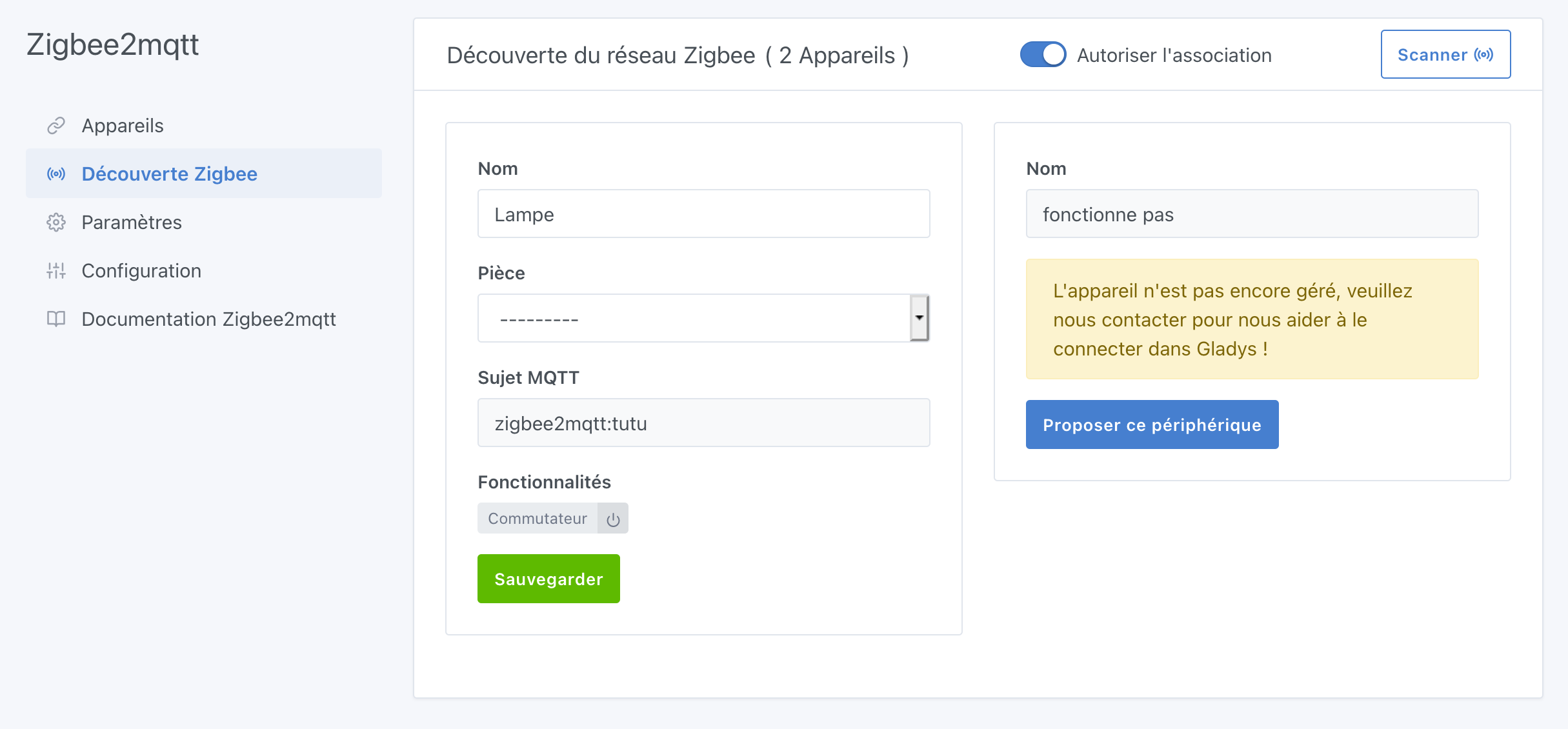
Let me know what you think of it.
It’s approved @cicoub13, clean!
Great that you like my idea 
Your proposal is very good, exactly what I would have liked to see as a user.
For the sentence, I suggest: « This device is not yet supported, but contact us to help us connect it in Gladys ».
It would be great to have this for other integrations as well.
@pierre-gilles Should we perhaps write this in black and white in the development guidelines for a new module, as you did for other points (+ PR proposals if possible)?
Hmm, it’s not that simple, I think. Some services don’t work the same way! In my opinion, we shouldn’t standardize. However, when it’s possible, yes, it’s really interesting
Great!
It’s already the case! We have it in 2 integrations: z-wave and previously Philips Hue (before we automated)
But I agree, it should be added to the development guidelines.
That’s exactly the idea: if the case can occur, then it should be handled. In itself, it’s not difficult to do, less so than managing equipment dynamically  (which doesn’t seem possible anyway).
Otherwise, as a user, I think « it’s weird, either Gladys isn’t working, or my smart plug is broken ».
Fortunately, I had the reflex to check the logs, but it doesn’t count because I’m in the « advanced users » box.
Yes, I understand, you’re right After some services just say « Equipment not supported ». But this will clearly make it easier to add a lot of equipment, especially for those who don’t understand GitHub, etc. No need to be on the forum even
Yes, I knew about Philips Hue but not about Z-wave.
In my search, I just noticed that we also have it on the TP-Link service
Do you know where I can find the list of features supported by Gladys (to create the file)?
Here is what is exposed by my Zigbee plug (Lonsonho Tuya ZigBee Smart Plug):
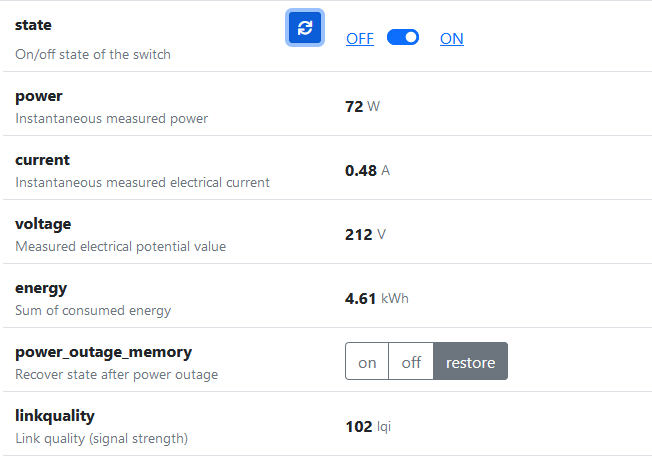
(Image from Zigbee2MQTT, port 8080 of Gladys)
With this code, I get errors:
const { features } = require('../utils/features');

/**
 * Tuya managed models.
 */
const Tuya = {
  brand: 'Tuya',
  models: {
    'TS0121_plug': [features.state, features.power, features.current, features.voltage, features.energy, features.power_outage_memory, features.linkquality] // Lonsonho Tuya Smart Plug
  },
};

module.exports = {
  Tuya,
};
Errors:
2021-02-08T10:06:53+0100 <warn> handleMqttMessage.js:87 () Zigbee2mqtt device 0x60a423fffe685063, feature state not configured in Gladys.
2021-02-08T10:06:53+0100 <warn> handleMqttMessage.js:87 () Zigbee2mqtt device 0x60a423fffe685063, feature voltage not configured in Gladys.
2021-02-08T10:07:53+0100 <warn> handleMqttMessage.js:87 () Zigbee2mqtt device 0x60a423fffe685063, feature current not configured in Gladys.
2021-02-08T10:07:53+0100 <warn> handleMqttMessage.js:87 () Zigbee2mqtt device 0x60a423fffe685063, feature energy not configured in Gladys.
2021-02-08T10:07:53+0100 <warn> handleMqttMessage.js:87 () Zigbee2mqtt device 0x60a423fffe685063, feature linkquality not configured in Gladys.
2021-02-08T10:07:53+0100 <warn> handleMqttMessage.js:87 () Zigbee2mqtt device 0x60a423fffe685063, feature power not configured in Gladys.
2021-02-08T10:07:53+0100 <warn> handleMqttMessage.js:87 () Zigbee2mqtt device 0x60a423fffe685063, feature power_outage_memory not configured in Gladys.
2021-02-08T10:07:53+0100 <warn> handleMqttMessage.js:87 () Zigbee2mqtt device 0x60a423fffe685063, feature state not configured in Gladys.
2021-02-08T10:07:53+0100 <warn> handleMqttMessage.js:87 () Zigbee2mqtt device 0x60a423fffe685063, feature voltage not configured in Gladys.
Here: Gladys/server/utils/constants.js at master · GladysAssistant/Gladys · GitHub
The file you created looks good. Be careful with brand (TuYa instead of Tuya) and don’t forget to import the file in the list of models here: https://github.com/cicoub13/Gladys/blob/zigbee2mqtt-service/server/services/zigbee2mqtt/model/index.js