On the « Devices » page, you can search by name when there are many devices.
But it would also be very useful to be able to display by rooms, as on the dashboard.
What do you think @cicoub13?
In terms of feasibility, it should be rather easy, since there is already a sort by name.
Bug when adding devices
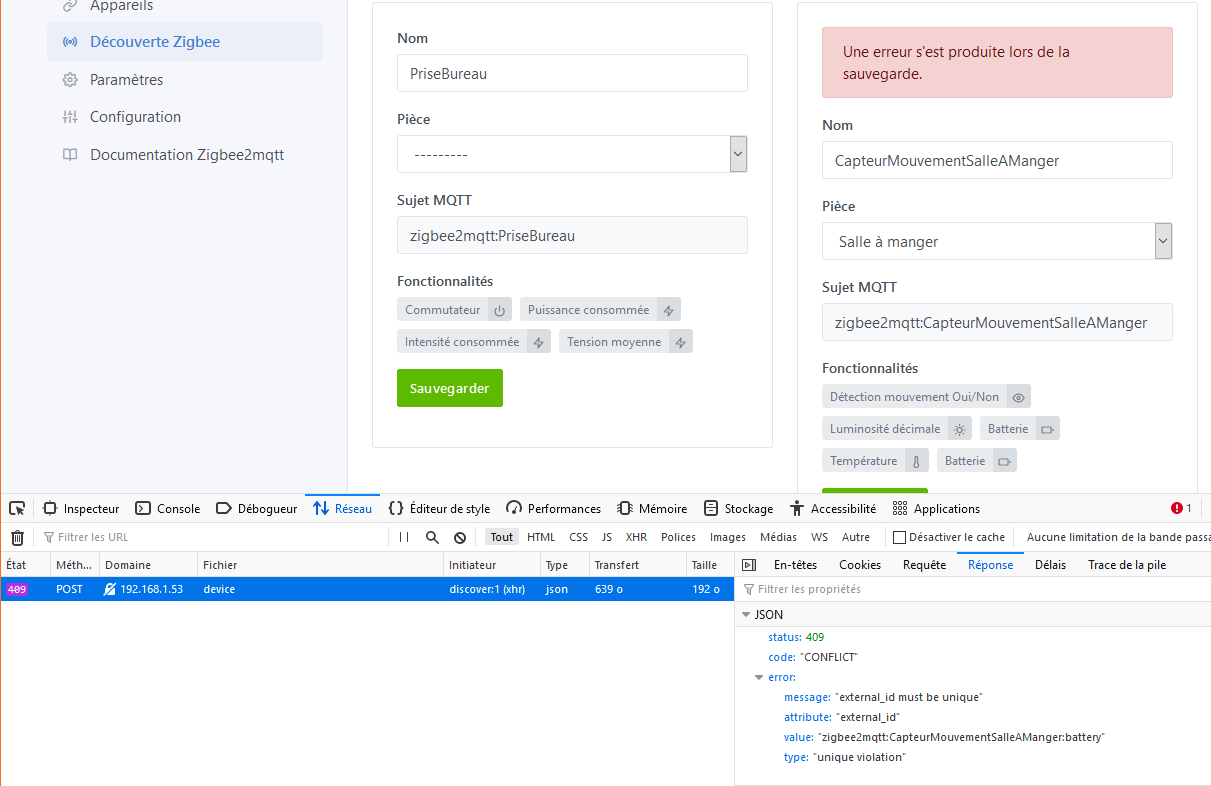
Bug details: When I add a new device, I regularly get the error « An error occurred during saving ».
The action « turn on/off the lights in scenes » takes all devices of category « light ».
This device should not be of category « light » simply
Just a small general remark on this development ^^
The development of the Zigbee2mqtt service started in October 2019, so it has been in development for 1 year and 4 months.
I have the impression that this service is a bit stuck in its own branch… The project has been in a tunnel effect for a while, and as a result, no one can use it, which is a shame!
Wouldn’t it be better to focus developments on the « quality » rather than the « quantity » of features, be able to merge it into master and benefit everyone?
Honestly, I prefer small PRs that iterate quickly on a subject, even if it means making 5 PRs one after the other to add new features, rather than a monolithic PR that takes 2 months to be reviewed because it’s so dense!
The PRs of @AlexTrovato are good examples of effective PRs
@cicoub13@lmilcent For you, is the service ready for production, and if not, what would be missing?
For me, here’s what remains to be completed before pushing a functional v1:
Issue #1, the « search » part must be functional at all times. I regularly encounter scans that don’t work on Gladys’ side but work correctly on Zigbee2Mqtt’s side. @cicoub13 seemed to mention a socket issue. Once this issue is resolved, it’s functional for a v1 in production.
Issue #2 before going into production: managing the deletion/addition of devices with the same names. As I explained, it should be possible to delete and then re-add the same device with the same name without any issues.
In my tests, this is not yet the case.
The rest are improvements that could be added, but they don’t affect the server part, it’s purely front-end. Typically, better error handling to avoid losing the user (which I mentioned earlier and relates to point 2) and being able to filter the display of devices integrated into Gladys as there can quickly be many of them.
This part will be done as we go along once in production: verifying that each sensor is fully supported by Gladys. I realized that my opening detectors and temperature sensors are managed, but for example, the battery and temperature values are missing.
I will push a PR to cicoub13’s repo for the sensors I have at home.
I totally agree with you, it’s time for this feature, highly anticipated by many of us, to be released! And we are really very close now, once points 1 and 2 are resolved, it’s ready.
What do you think @cicoub13?
In my opinion, point 3 is also very important. Frontend errors are anything but optional, error messages must be clear, otherwise when they go live, it’s impossible to debug in case of issues on an instance!
I think the core is there but it lacks finishing touches. I don’t have too many issues with my 4 sensors but @lmilcent is facing quite a few blockers that prevent us from releasing the integration as is.
I’m focusing on bugs and user experience.
Adding devices is really well thought out by Renaud so I’m adding a few along the way.
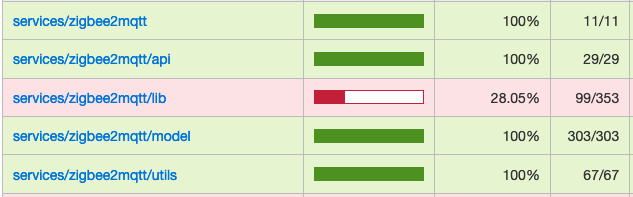
This weekend, I looked at test coverage and there is none So that’s the big part I’m tackling this week
I agree with @pierre-gilles that we shouldn’t add features for now but focus on quality.
If other people could test, that would also be great
Ok thanks for the feedback! Of course, service stability is extremely important. I don’t want to rush this part, as long as the integration isn’t rock-solid in terms of stability, we won’t release it
Ouch Of course, without tests it’s hard to have good stability…
It’s a shame that the tests weren’t developed at the same time as the integration. Now, to add them afterward, really try to test the expected functionality, and not to start from the code to make tests of no real interest.
In any case, don’t hesitate if you encounter any blockages/questions along the way
Good luck with writing the tests, it’s a lot of work (but necessary…).
On the bug side, I tried to get more information about my bug when adding equipment, but I don’t have anything more despite the verbose mode logs
When I recreate the bug, nothing is displayed on Gladys. I only have the API in the browser that responds:
« External ID must be unique » « zigbee2mqtt:CapteurMouvementSalleAManger:battery »
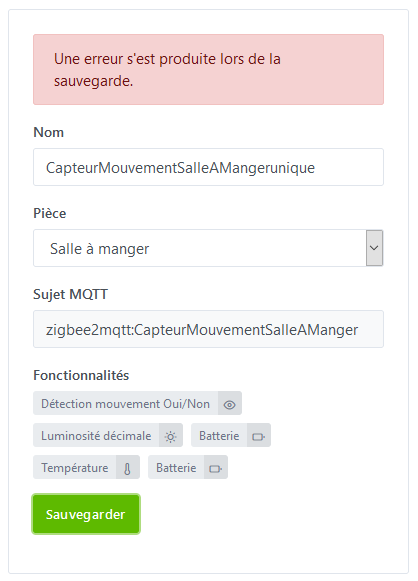
However, I had renamed this device before adding it, to « CapteurMouvementSalleAMangerunique ». So in the front end, the renaming does not seem correct at all levels.
Tonight I tried to find out what could generate the error when adding my Lonsonho (or TuYa) outlet.
On the backend it’s here:
The feature variable is empty when I try to add my outlet, which causes the error. I haven’t looked yet at how this variable is retrieved, but it’s already a lead to explore.
[edit]
Model side:
My TuYa connected plug didn’t want to be added to Gladys. By modifying the model file, I removed several features and the plug could be integrated. I don’t really have an explanation because all features are supposed to be supported by Gladys.
If you have other leads to explore to find the source of the bug, don’t hesitate to point out the interesting files to me and I’ll take a look as soon as I have a few minutes!
[edit 2]
I understood what is causing the problem for my plug (and therefore for other models as well I think).
In the associated model file, the applied configuration was features.switch, features.power, features.current, features.voltage.
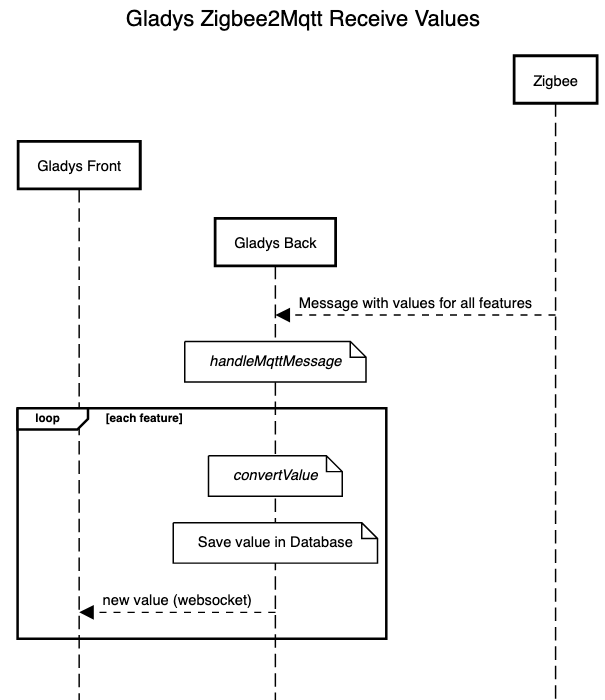
These features specific to the zigbee2mqtt service are then translated into features understandable by Gladys.
For example, features.switch will be translated with the associated category in Gladys.
Zigbee2mqtt Service:
Translation to match Gladys features which are there:
And what I realized is that it is not necessary to indicate in the Zigbee2mqtt model all the features, because some are implicit (contained in the SWITCH object in any case). For Switch, the featurescurrent, voltage, power and energy are implicit (cf the piece of code above).
So in the Zigbee2mqtt model, you should simply indicate: features.switch. But what I still don’t understand is that by doing this, the web interface only displays the On / Off function. The consumption, voltage or current data are not displayed.
@cicoub13 you who have worked a bit more on it, could you provide some clarification on the operation?
Is my reasoning at least partially correct? I still haven’t understood how Gladys adds the features based on what is returned by the zigbee2mqtt service.
@lmilcent I’m currently looking into the devices and the Zigbee feature mapping / Gladys feature mapping. Once I understand better, I think we can easily fix your devices.
It would be great if we could have a session together on Google Meet to look at all the weird behaviors and backend logs in this case. As soon as I have a new image, I’ll message you to schedule an evening (depending on our availability).
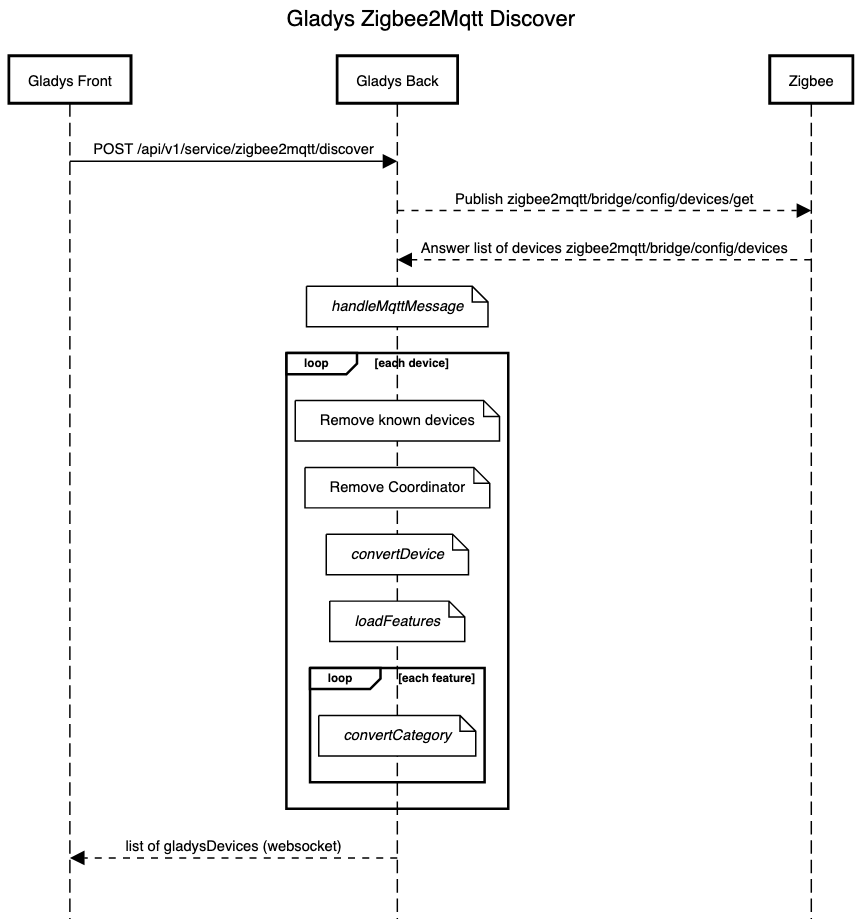
during the Discover phase, all feature categories are detected with a conversion in convertCategory (for those that don’t have the same name between Gladys and Zigbee). If there are issues with incompatible devices or missing features, that’s where they occur
For information, on March 2nd, @cicoub13 and I reviewed all the bugs and details I had found.
We identified the blocking bugs preventing a « production release » and the tweaks or new features that can be added in other versions.
Everything is now in the hands of @cicoub13, who is finishing writing the tests (a big job, well done to you ) and generating one of the last test images, I hope
It’s now just a matter of days for a PR and weeks before it is reviewed, modified, approved, and integrated into Gladys!
The pressure But yes, this call allowed us to better understand the latest bugs and I will be able to work on them this weekend
The next image will be quite stable and it would be great if other people could test with lots of different devices

 So that’s the big part I’m tackling this week

 Of course, without tests it’s hard to have good stability…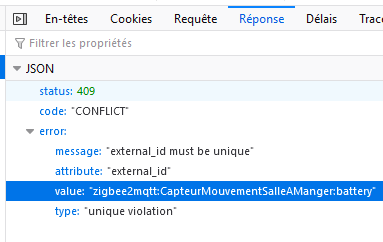


 We identified the blocking bugs preventing a « production release » and the tweaks or new features that can be added in other versions.
 ) and generating one of the last test images, I hope
 It’s now just a matter of days for a PR and weeks before it is reviewed, modified, approved, and integrated into Gladys!