Could you display a bit more of the logs Gladys, especially the part where you choose your dongle?
The name of the selected device should appear, I think.
Logs
WARNING: The requested image's platform (linux/amd64) does not match the detected host platform (linux/arm/v7) and no specific platform was requested

> gladys-server@ start:prod /src/server
> cross-env NODE_ENV=production node index.js

Initialising OpenZWave 1.6.1051 binary addon for Node.JS.
        OpenZWave Security API is ENABLED
        ZWave device db    : /usr/local/etc/openzwave
        User settings path : /src/server/services/zwave/node_modules/openzwave-shared/build/Release/../../
        Option Overrides : --Logging false --ConsoleOutput false --SaveConfiguration true
2021-01-15T14:34:10+0100 <info> init.js:38 (Zigbee2mqttManager.init) Zigbee2mqtt USB dongle not attached
2021-01-15T14:34:10+0100 <info> index.js:15 (Object.start) Starting Bluetooth service
2021-01-15T14:34:11+0100 <info> index.js:16 (Object.start) Starting zwave service
2021-01-15T14:34:11+0100 <info> service.start.js:40 (Service.start) Service zwave is not configured, so it was not started.
2021-01-15T14:34:11+0100 <info> index.js:19 (Object.start) Starting telegram service
2021-01-15T14:34:11+0100 <info> service.start.js:40 (Service.start) Service telegram is not configured, so it was not started.
2021-01-15T14:34:11+0100 <info> index.js:13 (Object.start) Starting usb service
2021-01-15T14:34:11+0100 <info> service.start.js:40 (Service.start) Service mqtt is not configured, so it was not started.
2021-01-15T14:34:11+0100 <info> index.js:20 (Object.start) Starting Open Weather service
2021-01-15T14:34:11+0100 <info> service.start.js:40 (Service.start) Service openweather is not configured, so it was not started.
2021-01-15T14:34:11+0100 <info> index.js:63 (Server.<anonymous>) Server listening on port 80
2021-01-15T14:34:53+0100 <info> init.js:49 () Zigbee2mqtt USB dongle attached to /dev/ttyUSB0
2021-01-15T14:34:54+0100 <info> init.js:49 () Zigbee2mqtt USB dongle attached to /dev/ttyUSB0
2021-01-15T14:34:54+0100 <info> installMqttContainer.js:32 (Zigbee2mqttManager.installMqttContainer) MQTT broker is being installed as Docker container...
2021-01-15T14:34:54+0100 <info> installMqttContainer.js:33 (Zigbee2mqttManager.installMqttContainer) Pulling eclipse-mosquitto:latest image...
2021-01-15T14:34:56+0100 <info> installMqttContainer.js:37 (Zigbee2mqttManager.installMqttContainer) Preparing broker environment...
2021-01-15T14:34:56+0100 <info> installMqttContainer.js:41 (Zigbee2mqttManager.installMqttContainer) Creating container...
2021-01-15T14:34:56+0100 <info> installMqttContainer.js:55 (Zigbee2mqttManager.installMqttContainer) Zigbee2MQTT MQTT broker is starting...
2021-01-15T14:35:01+0100 <info> installMqttContainer.js:61 (Zigbee2mqttManager.installMqttContainer) Creating user/pass...
2021-01-15T14:35:02+0100 <info> installMqttContainer.js:73 (Zigbee2mqttManager.installMqttContainer) Zigbee2MQTT MQTT broker is starting...
2021-01-15T14:35:07+0100 <info> installMqttContainer.js:77 (Zigbee2mqttManager.installMqttContainer) MQTT broker container successfully started
2021-01-15T14:35:07+0100 <info> installZ2mContainer.js:25 (Zigbee2mqttManager.installZ2mContainer) Zigbee2mqtt is being installed as Docker container...
2021-01-15T14:35:07+0100 <info> installZ2mContainer.js:26 (Zigbee2mqttManager.installZ2mContainer) Pulling koenkk/zigbee2mqtt:latest image...
2021-01-15T14:35:09+0100 <info> installZ2mContainer.js:29 (Zigbee2mqttManager.installZ2mContainer) Preparing Zigbee2mqtt environment...
2021-01-15T14:35:09+0100 <info> installZ2mContainer.js:35 (Zigbee2mqttManager.installZ2mContainer) Creating container...
2021-01-15T14:35:09+0100 <info> installZ2mContainer.js:43 (Zigbee2mqttManager.installZ2mContainer) Zigbee2mqtt successfully installed as Docker container
2021-01-15T14:35:09+0100 <info> installZ2mContainer.js:55 (Zigbee2mqttManager.installZ2mContainer) Zigbee2mqtt is starting...
2021-01-15T14:35:09+0100 <error> installZ2mContainer.js:74 (Zigbee2mqttManager.installZ2mContainer) Zigbee2mqtt container failed to start: Error: (HTTP code 500) server error - Cannot restart container bb25be6b4a4e0a5bd10398f720afa57e8fe08c017c1d34e50c8c594a4d82f45b: error gathering device information while adding custom device "/dev/ttyACM0": no such file or directory
    at /src/server/node_modules/docker-modem/lib/modem.js:257:17
    at getCause (/src/server/node_modules/docker-modem/lib/modem.js:287:7)
    at Modem.buildPayload (/src/server/node_modules/docker-modem/lib/modem.js:256:5)
    at IncomingMessage.<anonymous> (/src/server/node_modules/docker-modem/lib/modem.js:232:14)
    at IncomingMessage.emit (events.js:326:22)
    at endReadableNT (_stream_readable.js:1241:12)
    at processTicksAndRejections (internal/process/task_queues.js:84:21) {
  reason: 'server error',
  statusCode: 500,
  json: {
    message: 'Cannot restart container bb25be6b4a4e0a5bd10398f720afa57e8fe08c017c1d34e50c8c594a4d82f45b: error gathering device information while adding custom device "/dev/ttyACM0": no such file or directory'
  }
}
2021-01-15T14:35:09+0100 <error> index.js:14 (process.<anonymous>) unhandledRejection catched: Promise {
  <rejected> Error: (HTTP code 500) server error - Cannot restart container bb25be6b4a4e0a5bd10398f720afa57e8fe08c017c1d34e50c8c594a4d82f45b: error gathering device information while adding custom device "/dev/ttyACM0": no such file or directory
      at /src/server/node_modules/docker-modem/lib/modem.js:257:17
      at getCause (/src/server/node_modules/docker-modem/lib/modem.js:287:7)
      at Modem.buildPayload (/src/server/node_modules/docker-modem/lib/modem.js:256:5)
      at IncomingMessage.<anonymous> (/src/server/node_modules/docker-modem/lib/modem.js:232:14)
      at IncomingMessage.emit (events.js:326:22)
      at endReadableNT (_stream_readable.js:1241:12)
      at processTicksAndRejections (internal/process/task_queues.js:84:21) {
    reason: 'server error',
    statusCode: 500,
    json: {
      message: 'Cannot restart container bb25be6b4a4e0a5bd10398f720afa57e8fe08c017c1d34e50c8c594a4d82f45b: error gathering device information while adding custom device "/dev/ttyACM0": no such file or directory'
    }
  }
}
2021-01-15T14:35:09+0100 <error> index.js:15 (process.<anonymous>) Error: (HTTP code 500) server error - Cannot restart container bb25be6b4a4e0a5bd10398f720afa57e8fe08c017c1d34e50c8c594a4d82f45b: error gathering device information while adding custom device "/dev/ttyACM0": no such file or directory
    at /src/server/node_modules/docker-modem/lib/modem.js:257:17
    at getCause (/src/server/node_modules/docker-modem/lib/modem.js:287:7)
    at Modem.buildPayload (/src/server/node_modules/docker-modem/lib/modem.js:256:5)
    at IncomingMessage.<anonymous> (/src/server/node_modules/docker-modem/lib/modem.js:232:14)
    at IncomingMessage.emit (events.js:326:22)
    at endReadableNT (_stream_readable.js:1241:12)
    at processTicksAndRejections (internal/process/task_queues.js:84:21) {
  reason: 'server error',
  statusCode: 500,
  json: {
    message: 'Cannot restart container bb25be6b4a4e0a5bd10398f720afa57e8fe08c017c1d34e50c8c594a4d82f45b: error gathering device information while adding custom device "/dev/ttyACM0": no such file or directory'
  }
}
I think your issue comes from the management of permissions under Linux.
Gladys retrieves your device name (see logs) but cannot update the file services/zigbee2mqtt/docker/zigbee2mqtt-container.json.
We can see that PathOnHost remains at /dev/ttyACM0 in the docker inspect.
Can you do a
docker exec -ti zigbee2mqtt ls -als ./services/zigbee2mqtt/docker/zigbee2mqtt-container.json
No, impossible because the container is not running (does not start).
docker exec -ti zigbee2mqtt ls -als ./services/zigbee2mqtt/docker/zigbee2mqtt-container.json
Error response from daemon: Container bb25be6b4a4e0a5bd10398f720afa57e8fe08c017c1d34e50c8c594a4d82f45b is not running
Apologies, it’s on the Gladys container that you need to run the command
docker exec -ti gladysDEBUG ls -als ./services/zigbee2mqtt/docker/zigbee2mqtt-container.json
     4 -rw-r--r--    1 root     root           646 Jan 15 14:35 ./services/zigbee2mqtt/docker/zigbee2mqtt-container.json
pi@gladys:~ $ docker exec -ti gladysDEBUG cat ./services/zigbee2mqtt/docker/zigbee2mqtt-container.json
{
  "name": "zigbee2mqtt",
  "Image": "koenkk/zigbee2mqtt:latest",
  "ExposedPorts": {},
  "HostConfig": {
    "Binds": ["/var/lib/gladysassistant/zigbee2mqtt/z2m:/app/data"],
    "PortBindings": {},
    "RestartPolicy": {
      "Name": "always"
    },
    "NetworkMode": "host",
    "Dns": [],
    "DnsOptions": [],
    "DnsSearch": [],
    "BlkioWeightDevice": [],
    "Devices": [
      {
        "PathOnHost": "/dev/ttyACM0",
        "PathInContainer": "/dev/ttyACM0",
        "CgroupPermissions": "rwm"
      }
    ]
  },
  "NetworkDisabled": false,
  "AttachStdin": false,
  "AttachStdout": false,
  "AttachStderr": false,
  "Tty": false
}
I think part of my PR is correct: the part where I modify the variable before launching the containers.
Otherwise, the execution of the sed that modifies the config file is not taken into account, because the import at the beginning retrieves the content of the file before its modification.
      // Update config, for future starts
      await exec(`sed -i 's%\"PathOnHost\":.*%\"PathOnHost\": \"${driverPath}\",%' ./services/zigbee2mqtt/docker/zigbee2mqtt-container.json`);
      await exec(`sed -i 's%\"PathInContainer\":.*%\"PathInContainer\": \"${driverPath}\",%' ./services/zigbee2mqtt/docker/zigbee2mqtt-container.json`);
      // Update containerDescriptor var to reflect the previous changes
      containerDescriptor.HostConfig.Devices[0].PathOnHost = driverPath;
      containerDescriptor.HostConfig.Devices[0].PathInContainer = driverPath;
Ok. Possible. But it’s surprising that I never had this issue, with several dongles.
I will retest at home.
However, the DB is mandatory (you said « test without » a bit earlier) and therefore -v /var/lib/gladysassistant:/var/lib/gladysassistant as well since the device is stored in it, and then, retrieved in Gladys to update the config file.
I tested again, same problem and same error.
On your end to retest, don’t forget to delete or set default values in the config file that is supposed to be modified by the code before launch.
This is how I did it with the file ./services/zigbee2mqtt/docker/zigbee2mqtt-container.json and I realized it was used before its modification.
It should work on your side because you have already modified this file in the past, which is present on the OS and not just in the container.
This file is not shared with the OS. It should only be in the container.
To be continued…
Have you managed to renew the problem I encountered?
Good evening,
I am new to the Gladys community, I just left Domoticz for Gladys with my Zigbee equipment (Xiaomi, Ikea and Blitzwoif).
I have a CC2531 sniffer set up on a Raspberry Pi 3.
First of all, thank you for the integration of Zigbee2mqtt into Gladys. Otherwise, I have successfully integrated my Xiaomi temperature and door sensors, but I have not yet found out how to do it with my Ikea bulb (LED1736G9) or the connected plug E1603 but I have successfully integrated the Switch E1743, however nothing for the plug BW-SHP13.
I am not a programmer and I am in the discovery phase.
I am also looking to see how to take a data reading (temperature, humidity…) to plot a curve.
Hello 
I worked today on the Zigbee2MQTT part initiated by @Reno 
Done:
- copy Reno’s branch, update from master and merge commits
- fix the issue with devices different from
/dev/ttyACM0(thanks @Reno and @lmilcent) - fix the support for devices without led
- generate a new image to test
- add a prefix to the containers (
gladys-z2m-) - adapt mobile and tablet display
To do:
- allow the use of an already installed MQTT container
- handle the case « I created my containers but I want to change device »
- finish tests and check coverage
- fix new bugs
The code is available here: Zigbee2mqtt service by cicoub13 · Pull Request #1 · cicoub13/Gladys · GitHub
The image here: Image Layer Details - cicoub13/gladys:dev-zigbee2mqtt
To test, run a new Docker container on your Raspberry Pi with a different port and base:
docker run -d \
--log-opt max-size=10m \
--restart=always \
--privileged \
--network=host \
--name gladys-dev-zigbee2mqtt \
-e NODE_ENV=production \
-e SERVER_PORT=1080 \
-e TZ=Europe/Paris \
-e SQLITE_FILE_PATH=/var/lib/gladysassistant/gladys-zigbee2mqtt.db \
-v /var/run/docker.sock:/var/run/docker.sock \
-v /var/lib/gladysassistant:/var/lib/gladysassistant \
-v /dev:/dev \
-v /run/udev:/run/udev:ro \
cicoub13/gladys:dev-zigbee2mqtt
PS: I will push a PR to the official Gladys repo when we have progressed on the fact of contributing to several on a branch OR when I have completed the previous points.
I am open to tests + feedback.
Hi,
Great, thanks! The service is in demand for many people, including me.
I’ll test the image tonight
I would indeed put gladys but also the name of the service. We can imagine having two identical dockers later, but for two different services. What do you think?
I can help with this part if needed
wow, it’s progressing super well! 

Euh don’t wait for these projects, if you want to finish the PR with the help of someone else, you can give access to your fork to someone else
@cicoub13 Have you been able to use the GitHub flow to build the image from your fork?
Edit: First try (I edited the Docker run command from your post, you need udev otherwise nothing in the dongle list)
2021-01-31T10:52:23+0100 <info> installMqttContainer.js:32 (Zigbee2mqttManager.installMqttContainer) MQTT broker is being installed as Docker container...
2021-01-31T10:52:23+0100 <info> installMqttContainer.js:33 (Zigbee2mqttManager.installMqttContainer) Pulling eclipse-mosquitto:latest image...
2021-01-31T10:52:24+0100 <info> installMqttContainer.js:37 (Zigbee2mqttManager.installMqttContainer) Preparing broker environment...
2021-01-31T10:52:24+0100 <info> installMqttContainer.js:41 (Zigbee2mqttManager.installMqttContainer) Creating container...
2021-01-31T10:52:25+0100 <info> installMqttContainer.js:55 (Zigbee2mqttManager.installMqttContainer) Zigbee2MQTT MQTT broker is starting...
2021-01-31T10:52:30+0100 <info> installMqttContainer.js:61 (Zigbee2mqttManager.installMqttContainer) Creating user/pass...
2021-01-31T10:52:31+0100 <info> installMqttContainer.js:73 (Zigbee2mqttManager.installMqttContainer) Zigbee2MQTT MQTT broker is starting...
2021-01-31T10:52:36+0100 <info> installMqttContainer.js:77 (Zigbee2mqttManager.installMqttContainer) MQTT broker container successfully started
2021-01-31T10:52:36+0100 <info> installZ2mContainer.js:54 (Zigbee2mqttManager.installZ2mContainer) Zigbee2mqtt is starting...
2021-01-31T10:52:36+0100 <info> installZ2mContainer.js:66 (Zigbee2mqttManager.installZ2mContainer) Zigbee2mqtt successfully started
2021-01-31T10:52:37+0100 <info> connect.js:23 (MqttClient.<anonymous>) Connected to MQTT container mqtt://localhost:1884
2021-01-31T10:52:37+0100 <info> subscribe.js:12 (Zigbee2mqttManager.subscribe) Subscribing to MQTT topic zigbee2mqtt/#
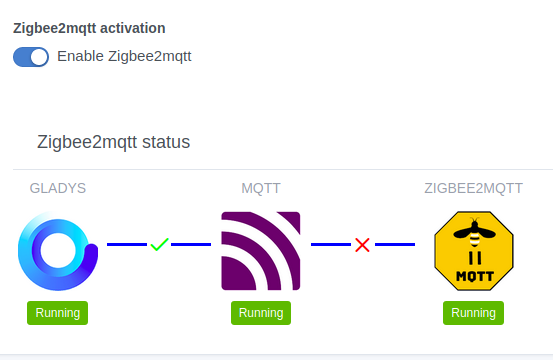
I already have a container named zigbee2mqtt.
Yes here: https://github.com/cicoub13/Gladys/actions/runs/523621070
By filling in the Docker secrets and manually launching the Build Gladys dev images on my branch 
A thing to add to the to-do list as well, the ability to specify an MQTT server if you don’t want Gladys to handle this part.