guim31
September 11, 2023, 6:07pm
1
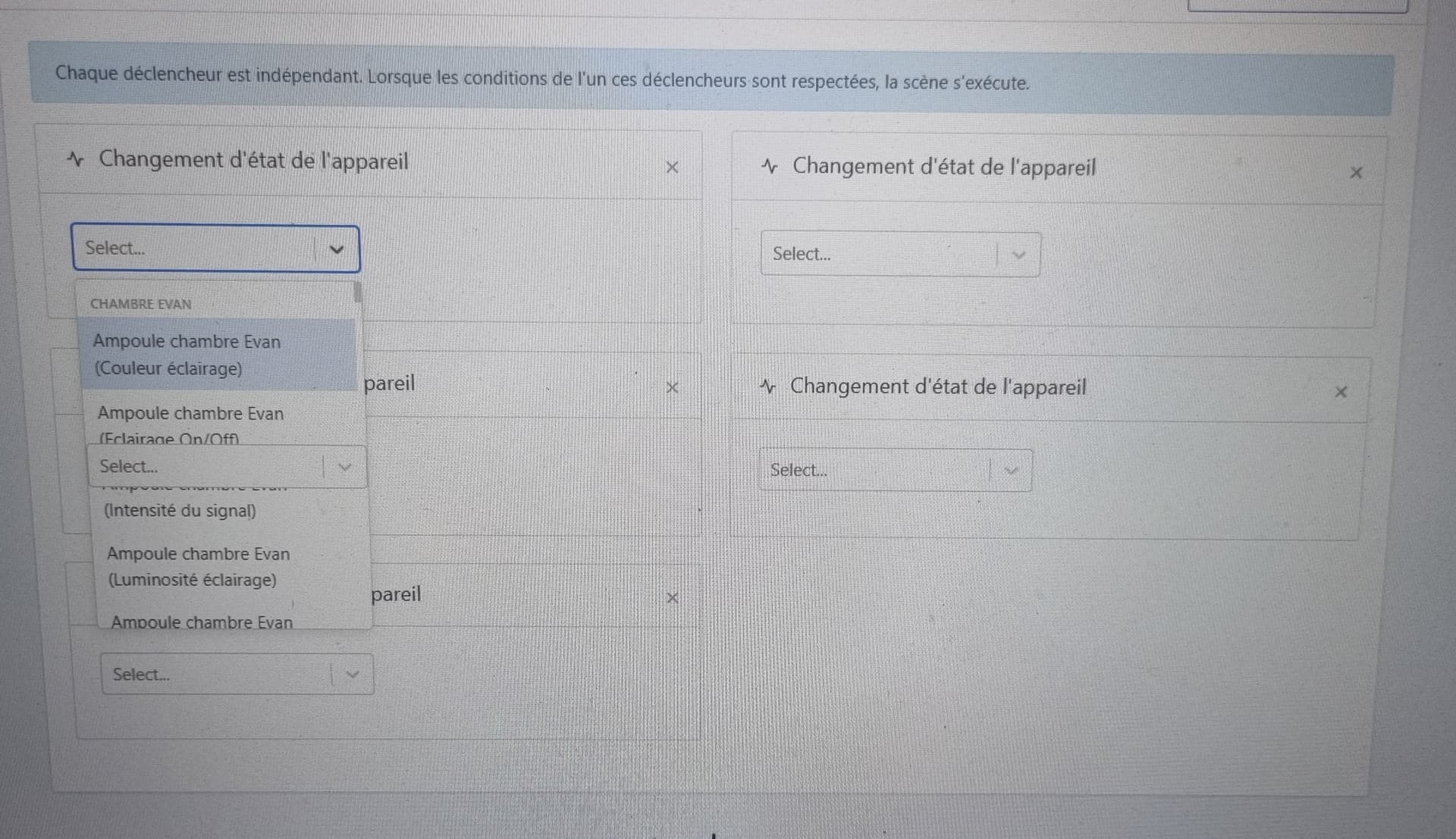
I just noticed an issue (on mobile and desktop) when creating a scene.
Here’s something to illustrate my point: https://streamable.com/e/9hmgrl (this link expires in 48h … heads up to @Pierre-Gilles if you happen to be around in the next two days !!
Thanks for the feedback @guim31 ! Could you create a GitHub issue with the video?
By the way, I should mention that the forum accepts small .mp4 files, so this video would easily be accepted on the forum
guim31
September 12, 2023, 7:50am
3
I’ll create an issue today, no problem.
The thing is the video is in .webm format and I didn’t think to convert it ^^
@guim31 is this what you were talking about?
Because I have the select display… the box underneath is appearing in front of the list.
guim31
November 2, 2023, 7:49am
8
Will_71
November 21, 2023, 10:18pm
9
@pierre-gilles
master ← William-De71:scene-trigger-selectDeviceFeature
ouvert 10:12PM - 21 Nov 23 UTC
### Pull Request check-list
To ensure your Pull Request can be accepted as fa… st as possible, make sure to review and check all of these items:
- [ ] If your changes affects code, did your write the tests?
- [ ] Are tests passing? (`npm test` on both front/server)
- [ ] Is the linter passing? (`npm run eslint` on both front/server)
- [ ] Did you run prettier? (`npm run prettier` on both front/server)
- [ ] If you are adding a new features/services, did you run integration comparator? (`npm run compare-translations` on front)
- [ ] Did you test this pull request in real life? With real devices? If this development is a big feature or a new service, we recommend that you provide a Docker image to the community ([french forum](https://community.gladysassistant.com/)/[english forum](https://en-community.gladysassistant.com/)) for testing before merging.
- [ ] If your changes modify the API (REST or Node.js), did you modify the API documentation? (Documentation is based on comments in code)
- [ ] If you are adding a new features/services which needs explanation, did you modify the user documentation? See [the GitHub repo](https://github.com/GladysAssistant/v4-website) and the [website](https://gladysassistant.com).
- [ ] Did you add fake requests data for the demo mode (`front/src/config/demo.js`) so that the demo website is working without a backend? (if needed) See [https://demo.gladysassistant.com](https://demo.gladysassistant.com).
NOTE: these things are not required to open a PR and can be done afterwards / while the PR is open.
### Description of change
Fix z-index issue in selectDeviceFeature on device change in scene trigger
https://github.com/GladysAssistant/Gladys/issues/1923

Will_71
November 21, 2023, 10:45pm
10
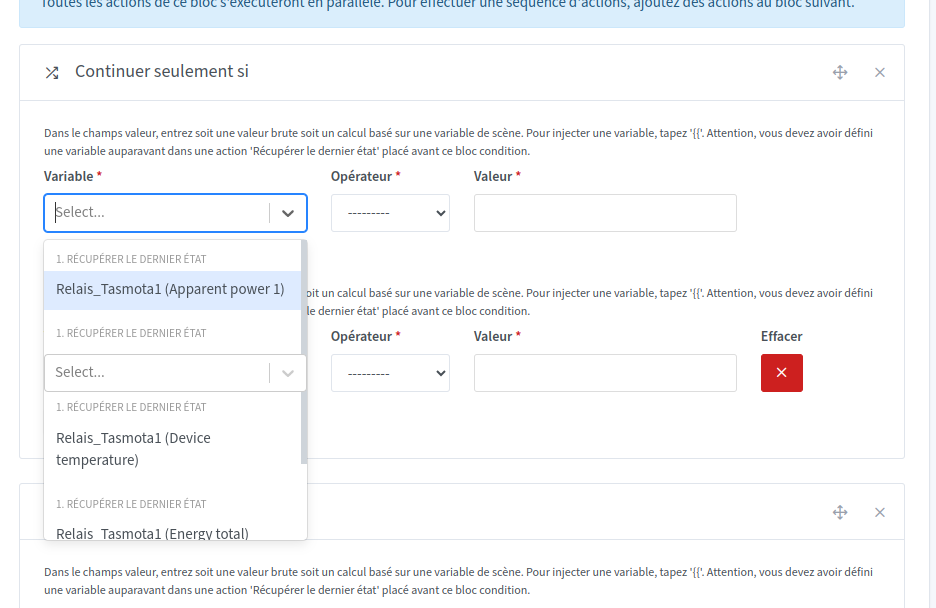
Similar bug with the ‹ Continue only if › action in scenes
Will_71
November 22, 2023, 8:59am
11
The GitHub issue
ouvert 10:42PM - 21 Nov 23 UTC
fermé 10:00AM - 27 Nov 23 UTC
z-issue in scene action only continue if

EDIT : @pierre-gilles
master ← William-De71:scene-action-condition
ouvert 09:12PM - 22 Nov 23 UTC
### Pull Request check-list
To ensure your Pull Request can be accepted as fa… st as possible, make sure to review and check all of these items:
- [ ] If your changes affects code, did your write the tests?
- [ ] Are tests passing? (`npm test` on both front/server)
- [ ] Is the linter passing? (`npm run eslint` on both front/server)
- [ ] Did you run prettier? (`npm run prettier` on both front/server)
- [ ] If you are adding a new features/services, did you run integration comparator? (`npm run compare-translations` on front)
- [ ] Did you test this pull request in real life? With real devices? If this development is a big feature or a new service, we recommend that you provide a Docker image to the community ([french forum](https://community.gladysassistant.com/)/[english forum](https://en-community.gladysassistant.com/)) for testing before merging.
- [ ] If your changes modify the API (REST or Node.js), did you modify the API documentation? (Documentation is based on comments in code)
- [ ] If you are adding a new features/services which needs explanation, did you modify the user documentation? See [the GitHub repo](https://github.com/GladysAssistant/v4-website) and the [website](https://gladysassistant.com).
- [ ] Did you add fake requests data for the demo mode (`front/src/config/demo.js`) so that the demo website is working without a backend? (if needed) See [https://demo.gladysassistant.com](https://demo.gladysassistant.com).
NOTE: these things are not required to open a PR and can be done afterwards / while the PR is open.
### Description of change
Fix z-index issue in only-continue-if selector in scene action

I saw your review, if you’ve tested everything and it doesn’t break anything, I trust you
I’ve merged into master!