I have some « issues » with the mqtt, but I’ll look into that with @AlexTrovato 
I’m skiing too 
 , but don’t worry the problem was on my side. Everything is ok
The code is ready on the ESP12E side, I need to put everything on battery but it’s functional.
On the Gladys side, the PR has not been merged yet.
Hello vonox.
Have you already tested the autonomy once on battery?
I don’t have the gear yet --’
I’m going to get a shield for 18650s
https://fr.aliexpress.com/item/4000870234968.html?spm=a2g0o.productlist.0.0.68c9187es0VVks&algo_pvid=57651259-c059-49c0-b3be-6be785ddfce1&algo_expid=57651259-c059-49c0-b3be-6be785ddfce1-8&btsid=0b0a182b15886318702767323eac6d&ws_ab_test=searchweb0_0,searchweb201602_,searchweb201603_
It outputs 3V and 5V.
For autonomy, I don’t have a REX for the moment, but by taking a measurement every 30 minutes and the rest of the time the ESP12 is in deep sleep, it should last a while (1 month I hope)
Hi @VonOx
I’m trying to get back into my project and I’m making slow progress as I’m still a beginner in computer science, but it fascinates me.
I’m trying to write some code with my ESP8266 but it’s still a bit unclear. Could you help me?
To retrieve the data, do I need to go through MQTT?
Should the message format be in JSON?
Hello, after several attempts I ended up using an Arduino Pro Mini 3V3 powered by 3 AAA batteries, it lasts about 6 months with 433MHz transmissions to the Raspberry Pi which converts to MQTT and HTTP requests for Galdys or a personal website.
To save battery, you need to use deep sleep and in the case of ultrasound, it must be powered via an Arduino output so that it only consumes when it measures.
Hello @ceist
Could you share your code eventually or help me with the MQTT part?
For reception 433, I have an Arduino Nano connected to a Raspberry Pi 1, it sends the received data via the serial port in the form of 24, 26, or 56-bit binary messages depending on the type of data (specific protocol for my application).
On the Raspberry side, I have a small Python script launched via crontab that processes the data and transmits it to MQTT.
The Python code:
    broker = "192.168.X.XX" : the address of the gladys broker
    port = "1883" : the port of the broker
    auth = {"username": "usr","password": "pass"} the connection parameters to the broker (see the gladys tutorial about mqtt)
    ########################### libraries
    import time
    from time import gmtime, strftime
    import datetime
    import serial
    import paho.mqtt.client as mqtt
    import paho.mqtt.publish as publish
    ###########################
    ser = serial.Serial('/dev/ttyUSB0', 9600) serial port definition

    def message_management(m):
        try:
            # print(len(m))
            if len(m)==(24+2):
                try:
                    publish.single("gladys/master/device/mqtt:binaire:mouvement_"+str(int(m[0:24],2))+"/feature/mqtt:binaire:"+str(int(m[0:24],2))+"/state", 1, hostname=broker, port=port, auth=auth)
                except:
                    print (time.strftime("%Y-%m-%d" " " "%X.", gmtime())+"error 100: mqtt error./n")
                    pass
        except:
            pass

    while (True):
        try:
            message=""
            if (ser.inWaiting() > 0):
                try:
                    message = ser.readline()
                except:
                    pass
        except serial.SerialException:
            message=""
            print(time.strftime("%Y-%m-%d" " " "%X.", gmtime())+" error O1: serial communication error./n")
            pass
        try:
            if(message!=""):
                message_management(message)
        except:
            print (time.strftime("%Y-%m-%d" " " "%X.", gmtime())+"error 02: encoding or message management error./n")
            pass
    exit
The complete code is a bit more complex for converting temperature or pressure data, but if you have the frame of your messages published on the serial port, I could help you.
For information, my setup uses a bme280 for temperature/humidity/pressure, a shock detector, a varistor for brightness, the voltage is provided directly by the Arduino Pro Mini.
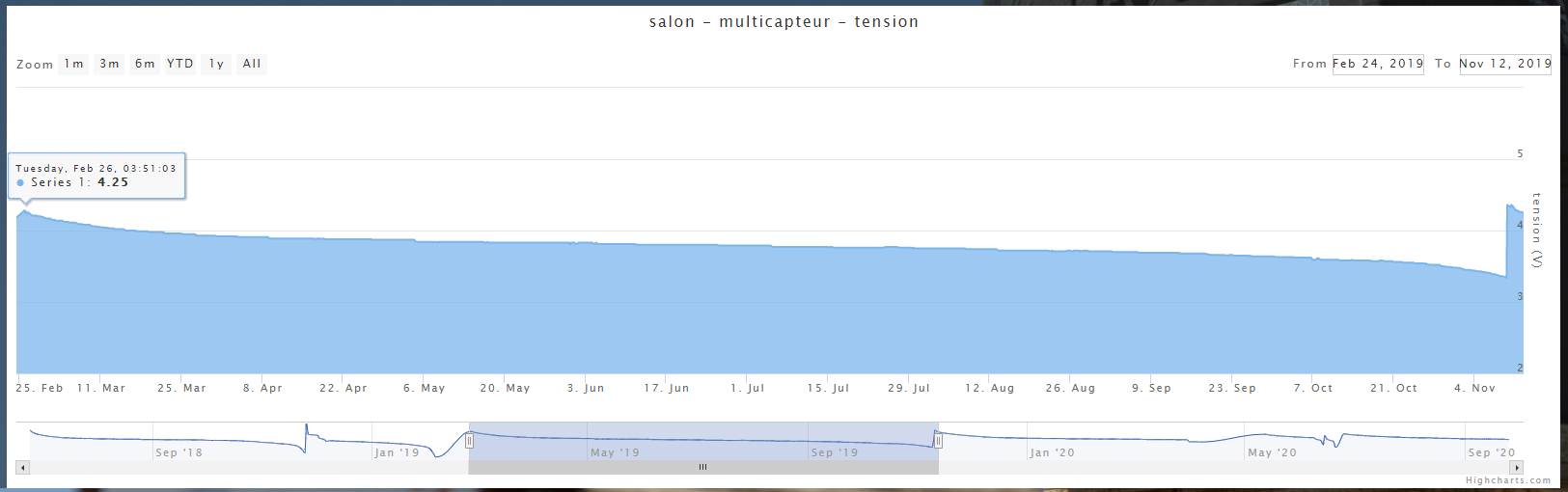
On 3 AAA batteries, I last between 7 and 8 months, below, the discharge curve:
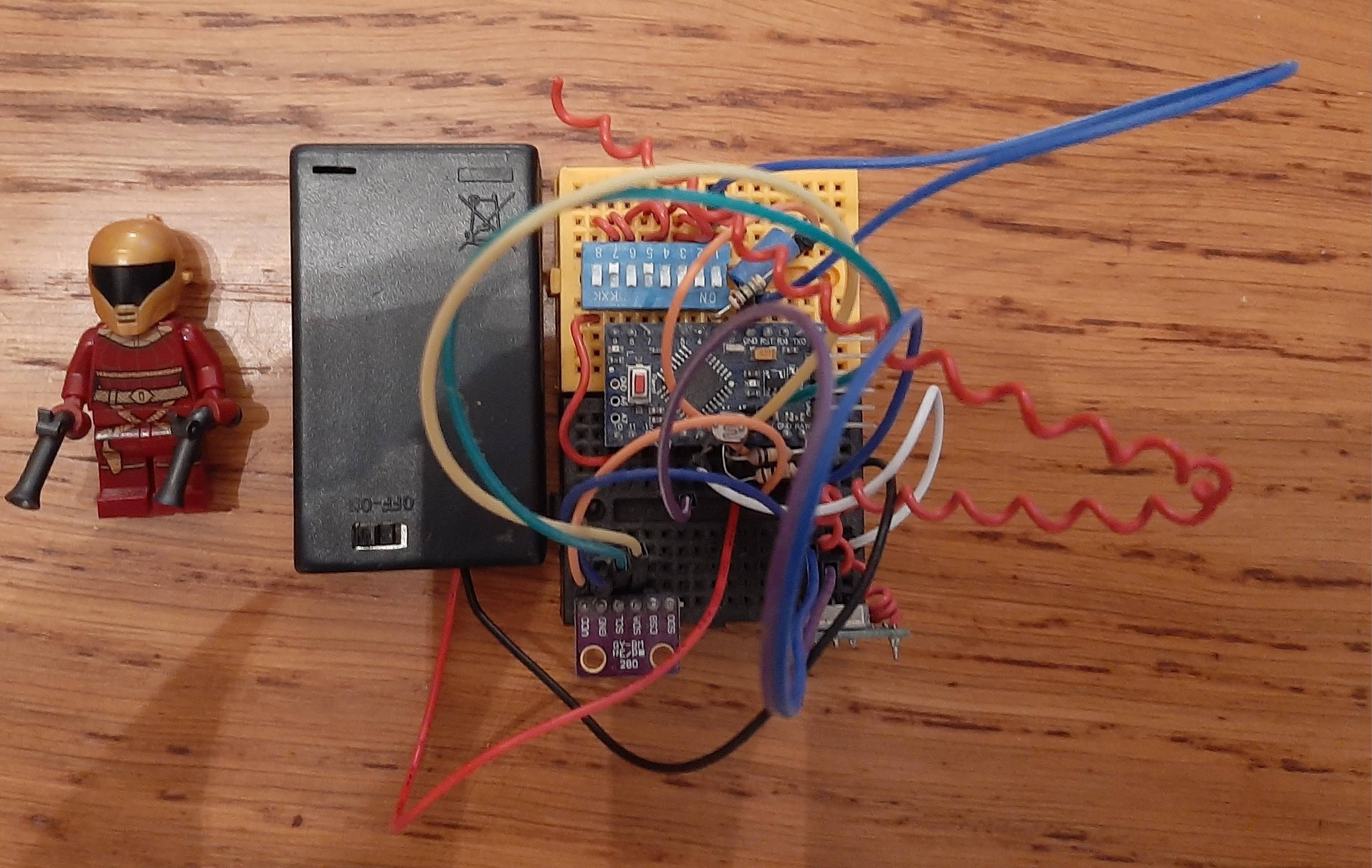
The breadboard setup I have been using for 3 years now:
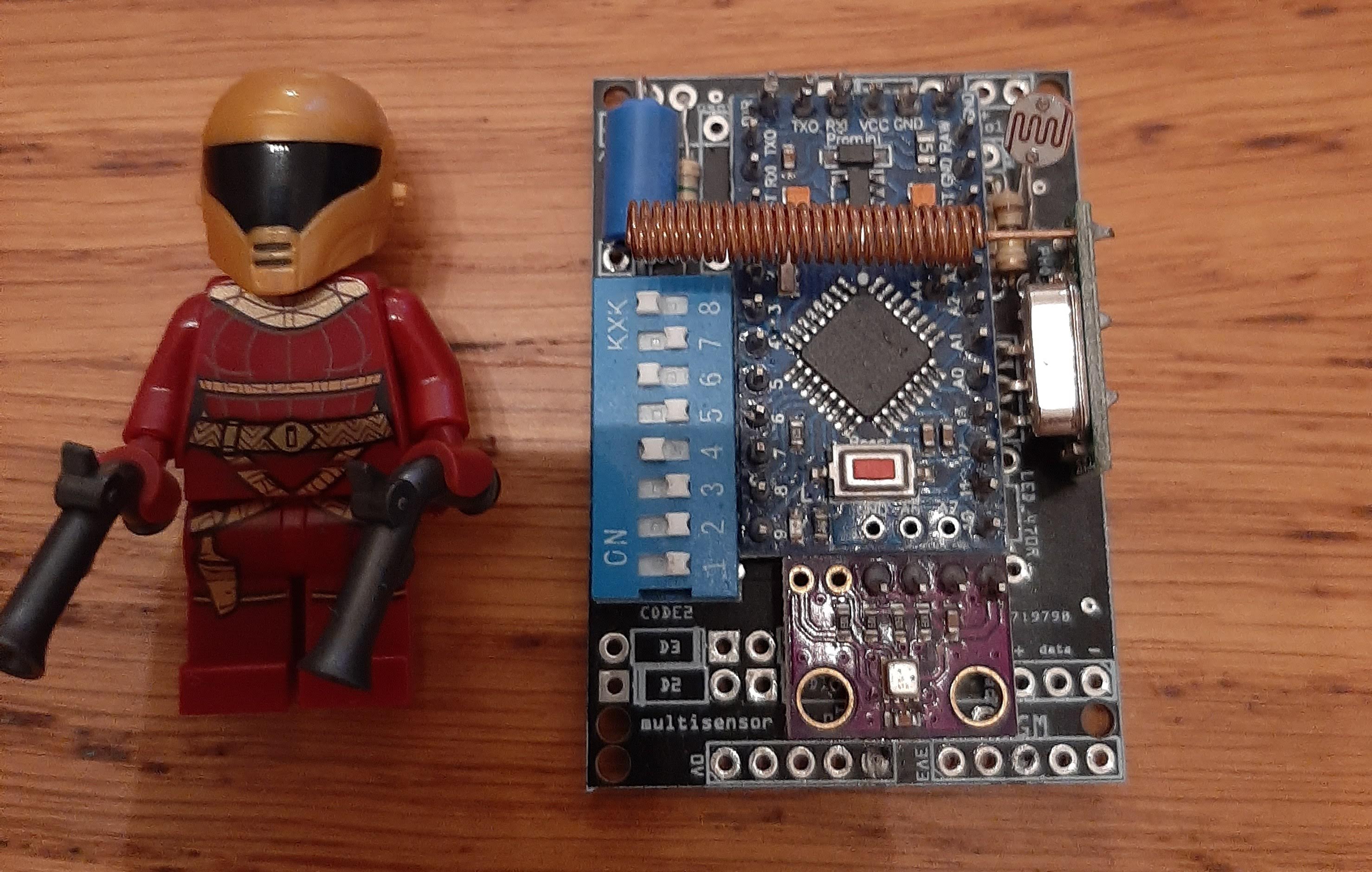
The PCB setup but as I don’t know how to solder (I apparently heat the tracks too much) it doesn’t work (a Lego for the scale).
@+
Thanks for your post, but I must admit I’m still lost. I’ll post my code, which might make things simpler.
I apologize in advance for any potential errors, as I’m a beginner and not a computer scientist or programmer.
I simply love and am passionate about home automation.
#include <ESP8266WiFi.h>
#include <ESP8266WiFiMulti.h>
#include <PubSubClient.h>
#include <ArduinoJson.h>

//MQTT

#define mqtt_server "192.168.X.X"   // server name or IP
#define mqtt_user "gladys"            // username
#define mqtt_password "XXXXXXXXXXXX"        // password
#define gladys_topic "gladys/master/device/mqtt:jardin:capteur-cuve/feature/mqtt:jardin:capteur-cuve:capacite/state"  //
#define mqtt_cuve "mqtt:jardin:capteur-cuve"     //Topic capteur cuve
#define JsonbufferSize     100

//WIFI

const char* ssid = "stormbox";
const char* password = "XXXXXXXXXX";

/* Pin constants */

const byte TRIGGER_PIN = 2; // TRIGGER pin
const byte ECHO_PIN = 3;    // ECHO pin
const byte VW_SET_TX_PIN = 12;

 /* Timeout constants */

const unsigned long MEASURE_TIMEOUT = 25000UL; // 25ms = ~8m at 340m/s

/* Sound speed in air in mm/us */

const float SOUND_SPEED = 340.0 / 1000;

WiFiClient espClient;
ESP8266WiFiMulti WiFiMulti;
PubSubClient client(espClient);

void reconnect() {

  while (!client.connected()) {
    Serial.print("Connecting to MQTT broker ...");
    if (client.connect("Cuve", mqtt_user, mqtt_password)) {
      Serial.println("OK");
    } else {
      Serial.print("[Error] Not connected: ");
      Serial.print(client.state());
      Serial.println("Wait 5 seconds before retry.");
      delay(5000);
    }
  }
}

void setup_wifi(){
  //connect to wifi
  WiFiMulti.addAP(ssid, password);
  while ( WiFiMulti.run() != WL_CONNECTED ) {
    delay ( 500 );
    Serial.print ( "." );
  }
  Serial.println("");
  Serial.println("WiFi connected");
  Serial.print("MAC : ");
  Serial.println(WiFi.macAddress());
  Serial.print("IP Address : ");
  Serial.println(WiFi.localIP());
}

void setup() {

    // Initialize the serial port //
    Serial.begin (115200);
    Serial.println("\n");

    setup_wifi();                           //Connect to Wifi network
    client.setServer(mqtt_server, 1883);    // Configure MQTT connection, change port if needed.
    if (!client.connected()) {
        reconnect();

    // Initialize the pins //
    pinMode(TRIGGER_PIN, OUTPUT);
    digitalWrite(TRIGGER_PIN, LOW); // The TRIGGER pin must be LOW at rest
    pinMode(ECHO_PIN, INPUT);
    }
}

void loop() {

  /* 1. Start a distance measurement by sending a HIGH pulse of 10µs on the TRIGGER pin */
  digitalWrite(TRIGGER_PIN, HIGH);
  delayMicroseconds(10);
  digitalWrite(TRIGGER_PIN, LOW);

  /* 2. Measure the time between sending the ultrasonic pulse and its echo (if it exists) */
  long measure = pulseIn(ECHO_PIN, HIGH, MEASURE_TIMEOUT);

  /* 3. Calculate the distance from the measured time */
  int distance_mm = measure / 2.0 * SOUND_SPEED;
  float cuve = 2000 - distance_mm;
  cuve = cuve / 2000;
  cuve = cuve * 100;

  /* Display the results in mm */
  #ifdef HRC04

  Serial.print(distance_mm, cuve);
  Serial.println();

  /* Send data to mqtt broker */

  #endif

  // Publish values to MQTT topics
    // Gladys expects a JSON file
    // Water percentage
    // Edit JSON objects + publication
    StaticJsonDocument<300> JSONbuffer;

    JSONbuffer["capteur"] = "hrc04";
    JSONbuffer["cuve"] = "cuve";

    char buffer[JsonbufferSize];

    serializeJson(JSONbuffer, buffer);

    Serial.print("Data serialised: ");
    Serial.println(buffer);

    JSONbuffer["cuve"] = cuve;

    serializeJson(JSONbuffer, buffer);
    Serial.print("Data udpated: ");
    Serial.println(buffer);

  // Disconnect from MQTT broker
  client.disconnect();

  // Disconnect from wifi network
  WiFi.disconnect();

  /* Wait delay to avoid displaying too many results per second */
  delay(60000);
}
Hello,
I think this part should be at the beginning of the loop (loop) and not in the initialization (setup):
if (!client.connected()) {
reconnect();
For MQTT, I think the JSON is not correct, you should use the publish function (see https://projetsdiy.fr/esp8266-dht22-mqtt-projet-objet-connecte/). In any case, Gladys v4 directly uses MQTT publish, tested at my place.
#include <ESP8266WiFi.h>
#include <PubSubClient.h>

/* WIFI */

#define wifi_ssid "XXXXXXXX"
#define wifi_password "XXXXXXXXXXXX"

/* MQTT */

#define mqtt_server "192.168.X.X"
#define mqtt_user "gladys"            // username
#define mqtt_password "XXXXXXXXXXXX"        // password
#define gladys_topic "gladys/master/device/mqtt:jardin:capteur-cuve/feature/mqtt:jardin:capteur-cuve:capacite/state"  //
#define mqtt_cuve "mqtt:jardin:capteur-cuve"     //Topic capteur cuve

/* Buffer that allows decoding received MQTT messages */

char message_buff[100];

long lastMsg = 0;   //Timestamp of the last message published on MQTT
long lastRecu = 0;
bool debug = false;  //Displays on the console if True

/* Constants for the pins */

const byte TRIGGER_PIN = 2; // TRIGGER pin
const byte ECHO_PIN = 3;    // ECHO pin
const byte VW_SET_TX_PIN = 12;

/* Constants for the timeout */

const unsigned long MEASURE_TIMEOUT = 25000UL; // 25ms = ~8m at 340m/s

/* Speed of sound in air in mm/us */

const float SOUND_SPEED = 340.0 / 1000;

//Object creation

WiFiClient espClient;
PubSubClient client(espClient);

void setup() {

/* Initialize the serial port */

  Serial.begin(9600);     //Optional for debugging

/* Initialize the pins */

   pinMode(TRIGGER_PIN, OUTPUT);
   digitalWrite(TRIGGER_PIN, LOW); // The TRIGGER pin must be LOW at rest
   pinMode(ECHO_PIN, INPUT);

  setup_wifi();           //Connect to the wifi network
  client.setServer(mqtt_server, 1883);    //Configuration of the connection to the MQTT server
}

void setup_wifi() {
  delay(10);
  Serial.println();
  Serial.print("Connecting to ");
  Serial.println(wifi_ssid);

  WiFi.begin(wifi_ssid, wifi_password);

  while (WiFi.status() != WL_CONNECTED) {
    delay(500);
    Serial.print(".");
  }

  Serial.println("");
  Serial.println("WiFi connection established");
  Serial.print("=> IP Address: ");
  Serial.print(WiFi.localIP());
}

//Reconnection
void reconnect() {
  //Loop until a reconnection is obtained
  while (!client.connected()) {
    Serial.print("Connecting to MQTT server...");
    if (client.connect("ESP8266Client", mqtt_user, mqtt_password)) {
      Serial.println("OK");
    } else {
      Serial.print("KO, error: ");
      Serial.print(client.state());
      Serial.println(" Waiting 5 seconds before retrying");
      delay(5000);
    }
  }
}

void loop() {
  if (!client.connected()) {
    reconnect();
  }
  client.loop();

  long now = millis();

/*Send a message every minute*/

  if (now - lastMsg > 1000 * 60) {
    lastMsg = now;

/* 1. Start a distance measurement by sending a HIGH pulse of 10µs on the TRIGGER pin */

  digitalWrite(TRIGGER_PIN, HIGH);
  delayMicroseconds(10);
  digitalWrite(TRIGGER_PIN, LOW);

  /* 2. Measure the time between the sending of the ultrasonic pulse and its echo (if it exists) */

  long measure = pulseIn(ECHO_PIN, HIGH, MEASURE_TIMEOUT);

  /* 3. Calculate the distance from the measured time */

  int distance_mm = measure / 2.0 * SOUND_SPEED;
  float c = 2000 - distance_mm;
  c = c / 2000;
  c = c * 100;

    //No need to go further if the sensor returns nothing
    if ( isnan(c)) {
      Serial.println("Reading failure! Check your HRC-04 sensor");
      return;
    }

    if ( debug ) {
      Serial.print("Tank: ");
      Serial.print(c);
    }
    client.publish(gladys_topic, String(c).c_str(), true);   //Publish the temperature on the temperature_topic
  }
  if (now - lastRecu > 100 ) {
    lastRecu = now;
    client.subscribe("homeassistant/switch1");
  }
}
Here is the error message I have:
error: expected primary-expression before ‹ , › token
client.publish(gladys_topic, String(c).c_str(), true); //Publishes the temperature on the topic temperature_topic
^
exit status 1
expected primary-expression before ‹ , › token
Is there a / at the end of the line #define gladys_topic ?
Cool thanks @Reno it compiles.