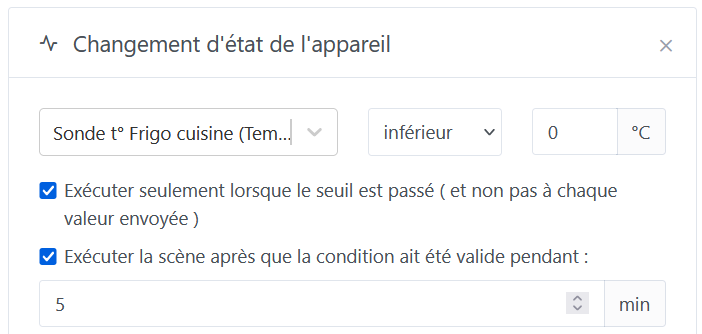
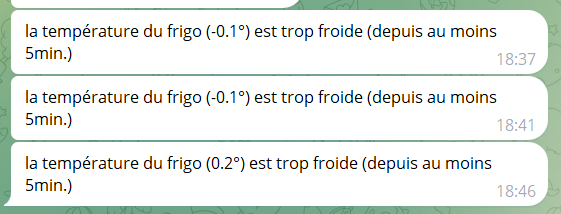
@pierre-gilles, I think I’ve spotted a bug in the delayed trigger: I enabled this ‹ delay › option on a trigger, and it seems the other option ‹ only if the threshold is exceeded › is no longer being taken into account correctly.
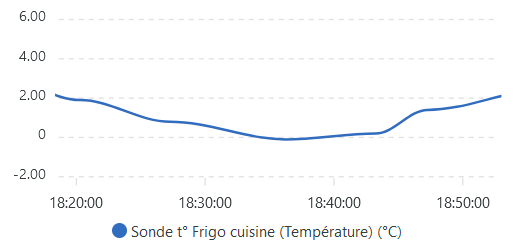
Specifically, I’m monitoring my fridge temperature so it doesn’t get too cold. I want Gladys to warn me if it goes below 0°, only if that lasts for more than 5 minutes, and without repeating the information for every subsequent measurement that is still below 0°.
I’ve just run some tests, and the behavior seems correct to me. I can’t reproduce any faulty behavior.
In your case, since temperatures are hovering around 0°C, it’s possible that a value goes back to 0°C, then back to -0.1°C, which resets the process because the threshold has been crossed again.
Your messages cannot attest to the bug, because your messages are triggered with a « retrieve the last state » which itself is triggered after the 5-minute wait, so it’s not the same value as the one in the trigger.
If you want us to push the investigation further, you would need to extract from your database the actual values received by Gladys and replay the same scenario, but it’s up to you to tell me whether this is a behavior you continue to see or not
@pierre-gilles,
I came back across this issue that you hadn’t been able to reproduce. So in my view it is still present. My new situation may be easier to reproduce:
In Gladys, I defined an MQTT device of type « switch ».
A Node-RED flow monitors my network every 5 minutes and sends « 0 » or « 1 » to the MQTT device, depending on the internet connection: absent or present
In Gladys, a scene is supposed to trigger when the MQTT device goes to 0 and remains so for at least 12 minutes. Here is its config:
Thanks for taking the time to test, @pierre-gilles. But I’m not sure we’re doing exactly the same test .
I checked, and my device doesn’t switch back to 1 between two triggers. Since it’s a binary sensor, I’m certain of this thanks to the graph widget that lets you see the start and end of the ‹ 0 › state.
I’ll try to clarify what’s happening on my side:
before 1:00 PM: the MQTT device is at 1
1:00 PM: the MQTT device switches to 0. The scene does not trigger (but in the background it should start checking the 12-minute trigger delay). Behavior OK.
1:05 PM: the MQTT device receives ‹ 0 › again. Nothing happens. Behavior OK
1:10 PM: the MQTT device receives ‹ 0 › again. Nothing happens. Behavior OK
1:12 PM: the MQTT device hasn’t received anything, but the scene triggers (12 minutes after 1:00 PM). Behavior OK
1:15 PM: the MQTT device receives ‹ 0 › again. Nothing happens (but this is where I suspect the trigger starts checking the 12-minute delay again). But for now, behavior OK
1:20 PM: the MQTT device receives ‹ 0 › again. Nothing happens. Behavior OK
1:25 PM: the MQTT device receives ‹ 0 › again. Nothing happens. Behavior OK
1:27 PM: the MQTT device hasn’t received anything, but the scene triggers (12 minutes after 1:15 PM). And this is the behavior that is not correct since the MQTT device hasn’t switched back to 1 since 1:12 PM!
If you want to investigate further, in the logs you should have 2 log entries:
2025-05-29T14:40:39+0200 \u003cinfo\u003e scene.triggers.js:61 (Object.device.new-state) Scheduling timer to check for device_feature "mqtt:connexion-internet-perdue" state in 60000ms
(Starting the timer)
And:
2025-05-29T14:41:39+0200 \u003cinfo\u003e scene.triggers.js:43 (Object.device.new-state) Scene trigger device.new-state: Timer for sensor mqtt:connexion-internet-perdue has finished.


 .
.

