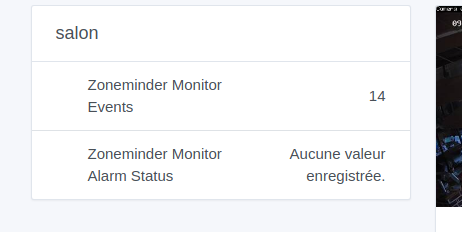
Dev Integration for Zoneminder

Hello,

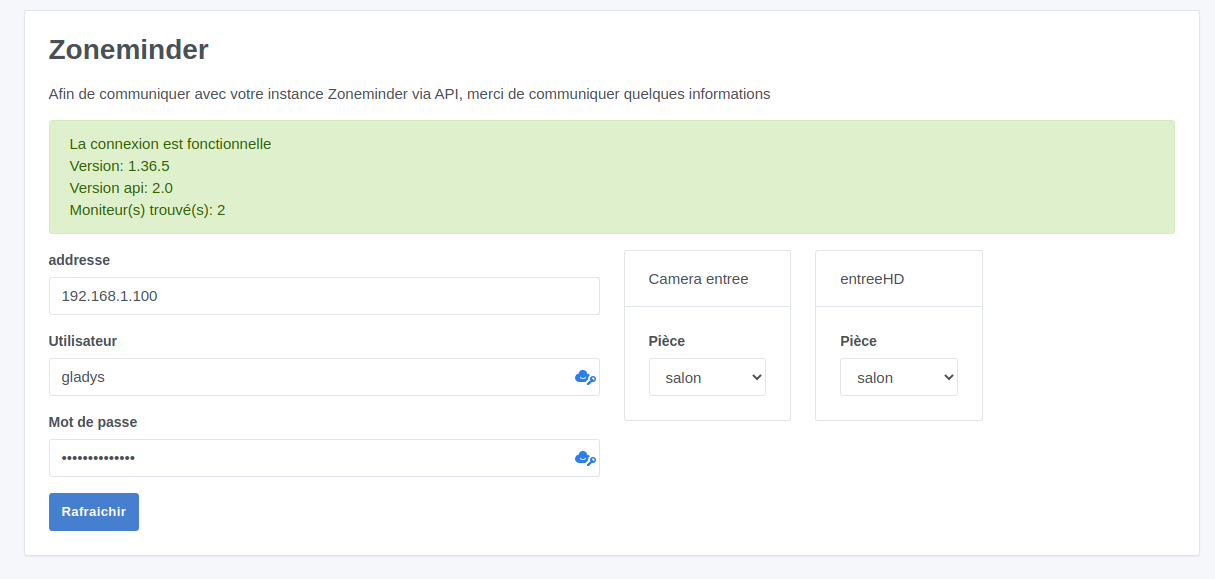
I am currently developing an integration that uses Zoneminder APIs (open-source video surveillance software that supports cameras of your choice).

On Gladys V3, I had developed a home-made module based on SSH that launched a Perl command, so not very clean… but it still serves me today to activate/deactivate video surveillance depending on whether we enter or leave the house.
So to migrate to V4, I absolutely need to have this solution available.

A preview:

So I did this quickly, I think I will build a home version first.

So I post this here, in case anyone else uses ZM and would like to integrate it with Gladys…
I discovered that ZM exposes quite a few APIs, for my part, for the time being, I limit myself to putting a camera in Modect or Monitor mode, but in the future, we could consider much more…

Hello sympa integration, so does it update the image in the dashboard?

Not at the moment, I haven’t looked at how to integrate an image into the dashboard, after that it may be redundant with the Display a camera box already available.

Exactly, you can add a camera and add an associated image to this camera and the box will work

Absolutely, it’s a really nice integration anyway!

Don’t hesitate if you need help @Jean-Philippe to integrate it with the « display a camera » box :slight_smile:

@damalgos Yes, I thought I saw that when I set the type to CAMERA
The problem is that the associated features are specific (such as usage mode, detection, passive, etc.), so to have a switchable mode, I added a feature type SWITCH, but the category is not the same, so in the box, it gave undefined values everywhere and without an icon.
In this case, maybe I could add feature types for the CAMERA category?

What is the switchable mode then?
But yes, of course, if you need to add, add it :wink:

For the image, it depends on what the API can give you. It might give you just a URL and you’re all set (just do the same as the camera module). If, on the other hand, it sends you a JPEG for example, you can do it like this:
Gladys/server/services/netatmo/lib/update/netatmo.updateCamera.js at netatmo · thibautmery/Gladys · GitHub (Netatmo integration, there is a part where the image is downloaded and added)

Exactly :slight_smile: If your camera handles additional features, you can create new feature types.

In Gladys v4, we are trying to have something uniform regardless of the model/brand/technology, so the behavior is generic everywhere.

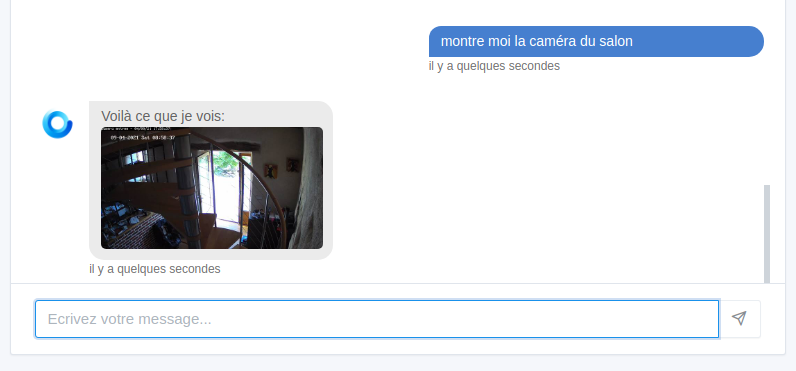
Example here: if you give the Gladys camera type to your zoneminder cameras, it means that natively we will be able to manage phrases in Telegram like « show me the living room camera », as well as the display on the dashboard.

ok I will go in this direction, I will see what the netatmo module does, then I need to see if I can retrieve the image via zoneminder.

Regarding the modes, the first use is that a camera (or a monitor as we can have several monitors from the same camera for different uses) can be in several modes, for example:

  • Motion detection with recording on detection
  • Simple playback without recording
  • Playback with continuous recording
  • And other modes that I do not use

So I want to be able, with minimal use of the module, to change this mode. When we are at home, we switch to Simple Playback, and when the house is empty, to Detection.

Quickly I saw this: wget "http://yourserver/cgi-bin/zms?mode=single&monitor=1&user=xxx&pass=yyy" -O foo.jpg
So it’s possible that you can retrieve the image and therefore do as I did in netatmo :slight_smile:

It works indeed, the password isn’t even checked :shushing_face:

You need to enable authentication in ZoneMinder, by default it’s open access

That’s normally the case, I don’t really know what’s going on … well, my ZM isn’t open on the internet, it’s not a big deal.

@damalgos I looked at your netatmo integration, I’m trying to understand how Gladys requests the update of the jpg?
I don’t plan to poll the image at regular intervals on the server side, I thought the image should be requested when the user requests the dashboard, is that right? In that case, how does the front-end request the back-end?

Edit 1:
Ok I see in server/lib/device/camera/camera.getImage.js:
return Promise.resolve(deviceFeature.last_value_string);

Edit 2:
Should I put a poll_frequency on the Image feature..?

Edit 3:
It’s good I found it ^^

I’m making progress, I’ve added the appropriate categories and I have my image on the dashboard.

However, while adding categories, I also added:

CAMERA: {
    IMAGE: 'image',
    MODE: 'mode',
    MOTIONS: 'integer',
    POWER: 'power'
}

MODE = the camera mode (motion capture, continuous recording, etc.)
MOTIONS = the number of captured events (read only)
POWER = whether the camera is on or off (from a Zoneminder perspective)

This is good, but on the Box side, I see this:

// for now, we only supports binary on/off and sensors
if (feature.read_only || SUPPORTED_FEATURE_TYPES.includes(feature.type)) {
     roomDeviceFeatures.push(featureOption);
}

Therefore, I cannot modify the camera’s state or mode in the dashboard.
Similarly, I had tested at the beginning by setting the mode to type SWITCH, but it’s not ideal to know that 1 = recording, 2 = surveillance, etc.

So, how can I have a dropdown menu, for example, with the proposed modes in the dashboard? I think this is not yet planned/coded/started?

But can I manage this in a scene anyway?

On the model side, the min and max are mandatory in the feature. Does this mean that a numerical value must always be recorded, and that we need to do the mapping on the integration side?

Edit:
I added the Zoneminder alarm state, i.e., whether the camera is in Alarm due to an intrusion detection.
And so I looked for which category.type to put. On the box (SensorDeviceFeature.js), I see that currently if it’s not a Motion, Presence, or Opening sensor, the rendering is the default one.

<td>{props.deviceFeature.name}</td>
    {SPECIAL_SENSORS.indexOf(props.deviceFeature.category) === -1 && (
      <td class={cx('text-right', { 'text-nowrap': props.deviceFeature.last_value !== null })}>
        {props.deviceFeature.last_value !== null && props.deviceFeature.last_value}
        {props.deviceFeature.last_value === null && <Text id="dashboard.boxes.devicesInRoom.noValue" />}
        {props.deviceFeature.last_value !== null && (
          <span>
            {' '}
            <Text id={`deviceFeatureUnitShort.${props.deviceFeature.unit}`} />
          </span>
        )}
      </td>
    )}

Is there a dedicated type for Alarm (in general), I saw a Category « Siren » .. I await your feedback before going further with my classification.
@pierre-gilles

:heart_eyes: :heart_eyes: :heart_eyes:

I see too much usage when you’re not at home via Telegram, finish launching my OpenVPN, the browser, going to the Zoneminder interface…

Yes, that’s normal. In this box, we only display devices that we can manage in the UI :slight_smile: After that, nothing prevents you from adding a new component in the front end to manage a new type of device!

Each device display in the front end is managed here: Gladys/front/src/components/boxs/device-in-room/device-features at master · GladysAssistant/Gladys · GitHub

It’s up to you to create a frontend component that does it :slight_smile:

In Gladys 4, we avoid making « super generic » components (except when they can be factored between integrations) to instead make components really adapted, defined in the code (and not in the database), which allows:

  • Having translations (since Gladys is available in several languages)
  • The behaviors of these components are versioned and tested (we use Cypress for frontend tests)

In short, for you, it would be a « drop-down list » component with several states, specific to the Zoneminder integration, right?

Same, you need to add this component with the values you want in the scene control action and in the scene trigger

Example: Gladys/front/src/routes/scene/edit-scene/triggers/DeviceFeatureState.jsx at master · GladysAssistant/Gladys · GitHub

Note: it may seem like a lot of work, but it’s the philosophy of v4: we take the time to do things well, and we prefer to have a product that requires a bit more work for the developer, but so that in the end the user experience is the best :slight_smile:

Alarm for what? I don’t think so. Siren is just an outdoor siren (you know the boxes that make noise)

Magnificent!! :heart_eyes:

Otherwise, have you already tested Gladys Plus for remote access? It’s end-to-end encrypted, and I recently added a free 14-day trial if you want to test it :slight_smile:

I will look into how to add the front-end component to handle this.

Regarding the alarm, I was thinking of surveillance alarms, the ones that go off when a burglar enters :smiley:
In my case, if my camera detects motion, it goes into « alarm » mode and sends me a notification on my Gladys3 instance.

For Gladys Plus, I haven’t tested it on Gladys4, currently my instance is just in development on my PC, I will test it when I switch over :wink:

We don’t yet have native alarm management, I would like to do something really clean in « arm/disarm » mode for your home with a nice UI and triggers/actions in scenes to be able to react to this state change (IF movement AND armed alarm THEN…)

But I think that in the meantime you can manage with another binary type (0/1), it will do the job in the meantime :slight_smile:

You can upvote the feature here if you want to see it in Gladys:

Cool, don’t hesitate at that time if you have any questions, we can take the time together to make sure everything is well configured, there are many possibilities with Gladys Plus and I try to support the installation as much as possible!

I saw on the rtsp-camera integration that you can add a box to the dashboard.
But is it possible, via an integration, to add features to devices usable from the device of a room box to avoid adding a dedicated box?

Absolutely! :slight_smile: If you create a new pair (Category + type) for a device, it is entirely possible to manage this new pair in the « room device » box.

What kind of control are you thinking of?