Gladys and external MQTT broker

Hello

I’m reinstalling Gladys once again..

I have an external MQTT broker and when I try to connect Gladys to it, it doesn’t work… the only solution is to use a container in Gladys, which works, but if I want to return to my original setup, it’s impossible.

Has anyone experienced this?

Thanks in advance

Hello,

Could you maybe give a bit of detail:

  • Which external broker?
  • How is it installed?
  • Is it on the same network as Gladys?
  • Can you connect to it via an app like MQTTBox or another?

As an example:
I use a Mosquitto installed via Docker and accessible via IP on my internal network or via an authenticated mqtts URL for external access.

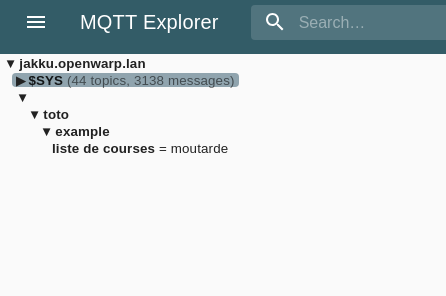
yes, I’m on the same network, and I can connect to the broker with a client (user aldi, with MQTT Explorer or from the command line, auchan )

it’s a perfectly normal Mosquitto broker, I’d say. I’m using a Raspberry Pi and the distribution is DietPi, so it was installed using the menus

in the broker’s logs you can see that it doesn’t even try

Feb 27 14:32:56 jakku mosquitto[11748]: 1709044376: New client connected from 10.8.0.2:37682 as mqtt-explorer-a8b51e9f (p2, c1, k60, u'aldi').
Feb 27 15:02:56 jakku mosquitto[11748]: 1709046176: Saving in-memory database to /var/lib/mosquitto//mosquitto.db.
Feb 27 15:04:52 jakku mosquitto[11748]: 1709046292: New connection from ::1:39908 on port 1883.
Feb 27 15:04:52 jakku mosquitto[11748]: 1709046292: New client connected from ::1:39908 as auto-E16CFA39-A5B7-7115-BE34-3929FAC7C5F9 (p2, c1, k60, u'auchan').
Feb 27 15:04:52 jakku mosquitto[11748]: 1709046292: Client auto-E16CFA39-A5B7-7115-BE34-3929FAC7C5F9 disconnected.
Feb 27 15:32:57 jakku mosquitto[11748]: 1709047977: Saving in-memory database to /var/lib/mosquitto//mosquitto.db.
Feb 27 16:02:58 jakku mosquitto[11748]: 1709049778: Saving in-memory database to /var/lib/mosquitto//mosquitto.db.
Feb 27 16:32:59 jakku mosquitto[11748]: 1709051579: Saving in-memory database to /var/lib/mosquitto//mosquitto.db.
Feb 27 17:03:00 jakku mosquitto[11748]: 1709053380: Saving in-memory database to /var/lib/mosquitto//mosquitto.db.
Bonjour Protz

Feb 27 17:33:01 jakku mosquitto[11748]: 1709055181: Saving in-memory database to /var/lib/mosquitto//mosquitto.db.

I’ve done numerous tests between 2:30 PM and now

Olivier

Hi @bong101,

That’s strange, I’ve been using this configuration (mosquitto installed on another Pi) for years and have never had any issues. How did you configure it in Gladys?

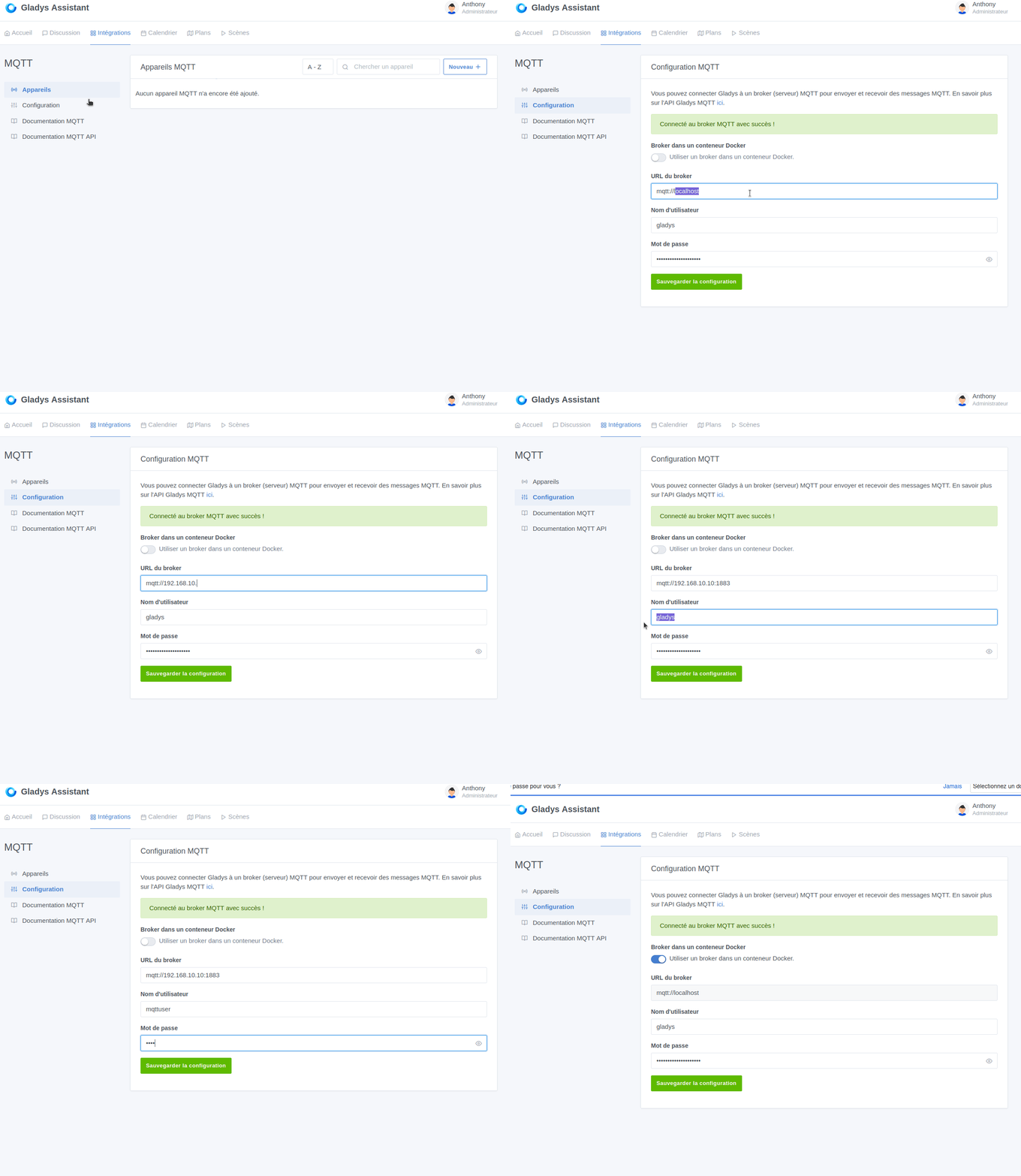
Like this:

Name resolution works correctly from the Gladys server

root@raspberrypi:~# ping jakku.openwarp.lan
PING jakku.openwarp.lan (10.16.5.20) 56(84) bytes of data.
64 bytes from jakku.openwarp.lan (10.16.5.20): icmp_seq=1 ttl=64 time=0.542 ms

Port 1883 is open

root@raspberrypi:~# openssl s_client -connect jakku.openwarp.lan:1883
CONNECTED(00000003)
write:errno=104
---
no peer certificate available
---
No client certificate CA names sent
---
SSL handshake has read 0 bytes and written 324 bytes
Verification: OK
---
New, (NONE), Cipher is (NONE)
Secure Renegotiation IS NOT supported
Compression: NONE
Expansion: NONE
No ALPN negotiated
Early data was not sent
Verify return code: 0 (ok)

In the Gladys logs, well, nothing…

2024-03-01T09:30:00+0100 scene.checkCalendarTriggers.js:25 (SceneManager.checkCalendarTriggers) Checking calendar triggers at Fri, 01 Mar 2024 08:30:00 GMT
2024-03-01T09:31:00+0100 scene.checkCalendarTriggers.js:25 (SceneManager.checkCalendarTriggers) Checking calendar triggers at Fri, 01 Mar 2024 08:31:00 GMT
2024-03-01T09:31:18+0100 lan-manager.scan.js:19 (LANManager.scan) LANManager starts scanning devices…
2024-03-01T09:31:32+0100 lan-manager.scan.js:66 (NmapScan.onSuccess) LANManager discovers 8 devices
2024-03-01T09:31:32+0100 lan-manager.stop.js:12 (LANManager.stop) LANManager stops scanning devices
2024-03-01T09:32:00+0100 scene.checkCalendarTriggers.js:25 (SceneManager.checkCalendarTriggers) Checking calendar triggers at Fri, 01 Mar 2024 08:32:00 GMT
2024-03-01T09:33:00+0100 scene.checkCalendarTriggers.js:25 (SceneManager.checkCalendarTriggers) Checking calendar triggers at Fri, 01 Mar 2024 08:33:00 GMT
2024-03-01T09:33:18+0100 lan-manager.scan.js:19 (LANManager.scan) LANManager starts scanning devices…
2024-03-01T09:33:32+0100 lan-manager.scan.js:66 (NmapScan.onSuccess) LANManager discovers 8 devices
2024-03-01T09:33:32+0100 lan-manager.stop.js:12 (LANManager.stop) LANManager stops scanning devices
2024-03-01T09:34:00+0100 scene.checkCalendarTriggers.js:25 (SceneManager.checkCalendarTriggers) Checking calendar triggers at Fri, 01 Mar 2024 08:34:00 GMT
2024-03-01T09:35:00+0100 scene.checkCalendarTriggers.js:25 (SceneManager.checkCalendarTriggers) Checking calendar triggers at Fri, 01 Mar 2024 08:35:00 GMT

I made at least 5 attempts between 9:30 and 9:35

and in the Mosquitto logs, no connection attempts

Mar 01 08:58:30 jakku mosquitto[465]: 1709279910: New connection from 10.8.0.2:55308 on port 1883.
Mar 01 08:58:30 jakku mosquitto[465]: 1709279910: New client connected from 10.8.0.2:55308 as mqtt-explorer-a8b51e9f (p2, c1, k60, u'aldi').
Mar 01 09:10:58 jakku mosquitto[465]: 1709280658: Client mqtt-explorer-a8b51e9f disconnected.
Mar 01 09:11:20 jakku mosquitto[465]: 1709280680: New connection from 10.8.0.2:34648 on port 1883.
Mar 01 09:11:20 jakku mosquitto[465]: 1709280680: New client connected from 10.8.0.2:34648 as mqtt-explorer-a8b51e9f (p2, c1, k60, u'aldi').
Mar 01 09:18:41 jakku mosquitto[465]: 1709281121: Saving in-memory database to /var/lib/mosquitto//mosquitto.db.
root@jakku:~#

no trace of a connection from 10.16… but I am connected via my VPN

I think it’s more a bug, because in the configuration screen, when I go back to Integrations/MQTT/Configuration, the toggle gets stuck on ON for « Broker in a Docker container/Use a broker in a Docker container. »

Am I the only one experiencing this?

Thanks

Olivier

I should mention that this malfunction occurs on

  • a Raspberry Pi 3, Raspberry Pi OS
  • a Raspberry Pi 4, DietPi
  • a Nano R4S, DietPi

How strange … you can try with :

  • mqtt://jakku.openwarp.lan (without the port)
  • mqtt://j10.16.5.20
  • mqtt://j10.16.5.20:1883
    ?

Without the ‹ j ›, I suppose :innocent:

By any chance, any autocomplete issue on your Gladys configuration page?

I’ve tried everything!!

No disrespect to the people who want to help, I’m an IT specialist, and I install and configure applications, etc., but I’m not immune to making a mistake

What would be great would be for someone to kindly test a Raspberry Pi, an installation of an MQTT broker, and off we go!!!

Thanks again!!
Olivier

Hi @bong101,

As mentioned above, I have exactly this setup, my mosquitto broker is 12.5.0.100, my Gladys and most of my devices are on 12.5.0.xxx and some devices on 12.1.0.xxx and I have no issues by specifying the broker address in Gladys mqtt://12.5.0.100:1883.

As suggested above, are you sure your browser is not auto-filling the fields? (Really to rule out that possibility)
Because usually fields that appear in yellow like in your photo are autocompleted:

And from other conversations on the forum, some browsers would replace the password when clicking Save, from what I understood.

Does it matter whether the browser replaces the yellow fields or not? In the sense that on the broker I don’t see the connection attempt arriving, and it doesn’t seem to occur in Gladys either.

@Terdious, which version of Gladys have you been running like this since?
@all has anyone tested on a recent version of Gladys?

Olivier

Can you try to contact your MQTT server from the Gladys docker (and not from the host Raspberry Pi)? Maybe the domain name jakku.openwarp.lan is not known to Gladys :thinking:

docker exec -it gladys /bin/sh

ping jakku.openwarp.lan

openssl s_client -connect jakku.openwarp.lan:1883

ah, interesting, I’ll test it as soon as I get home !!

Hello @bong101,

There is already a discussion about Docker Node-RED where when you put « localhost » in the « mqtt in » node it doesn’t work; you had to put the IP (DNS resolution doesn’t happen outside the container).

So in your case put « mqtt:xxx.xxx.xxx.xxx:1883 » — all the x’s = the IP of your MQTT broker, that should work

re,


root@raspberrypi:~ $ sudo su -
root@raspberrypi:~# docker exec -it gladys /bin/sh
/src/server # ping jakku.openwarp.lan
PING jakku.openwarp.lan (10.16.5.20): 56 data bytes
64 bytes from 10.16.5.20: seq=0 ttl=64 time=1.287 ms
^C
--- jakku.openwarp.lan ping statistics ---
5 packets transmitted, 5 packets received, 0% packet loss
round-trip min/avg/max = 0.610/0.760/1.287 ms
/src/server # openssl s_client -connect jakku.openwarp.lan:1883
CONNECTED(00000003)
write:errno=104
---
no peer certificate available
---
No client certificate CA names sent
---
SSL handshake has read 0 bytes and written 320 bytes
Verification: OK
---
New, (NONE), Cipher is (NONE)
This TLS version forbids renegotiation.
No ALPN negotiated
Early data was not sent
Verify return code: 0 (ok)
---
/src/server #

This is a bug, isn’t it?

Thanks for checking.
Actually, it works for several people (myself included) and it doesn’t work for you.
So it could be a bug, but we need to find a lead or a way to reproduce it; otherwise we won’t be able to fix it.

Hello everyone,

I have the same problem with Gladys installed in Docker on a Proxmox VM. I’m testing Gladys.

I’m trying to connect to the Mosquitto Broker of my Home Assistant. The connection works fine via MQTT Explorer.

I’m attaching a GIF; the toggle automatically switches to a Docker container.

gladys mqttbroquer

Thank you in advance

Gladys version 4.38
PS: If you prefer that I open another thread, I can do so.

Ah,welcome @McFlyPartages !!!

and thank you, I feel less alone

1 Like

Does the toggle switch back by itself when saving the settings, like it does for me?

yes!!! as if we didn’t have a choice