Hello everyone,
For those whose network goes through an OPNsense firewall, here is an external integration that brings it into Gladys.
What it does
It reads the OPNsense API on your local network (local transport), with a dedicated API key, every 30 seconds. Nothing is sent to a cloud. Gladys does not have a native OPNsense integration; on the presence side, it complements Bluetooth by seeing phones connected to Wi-Fi.
Features
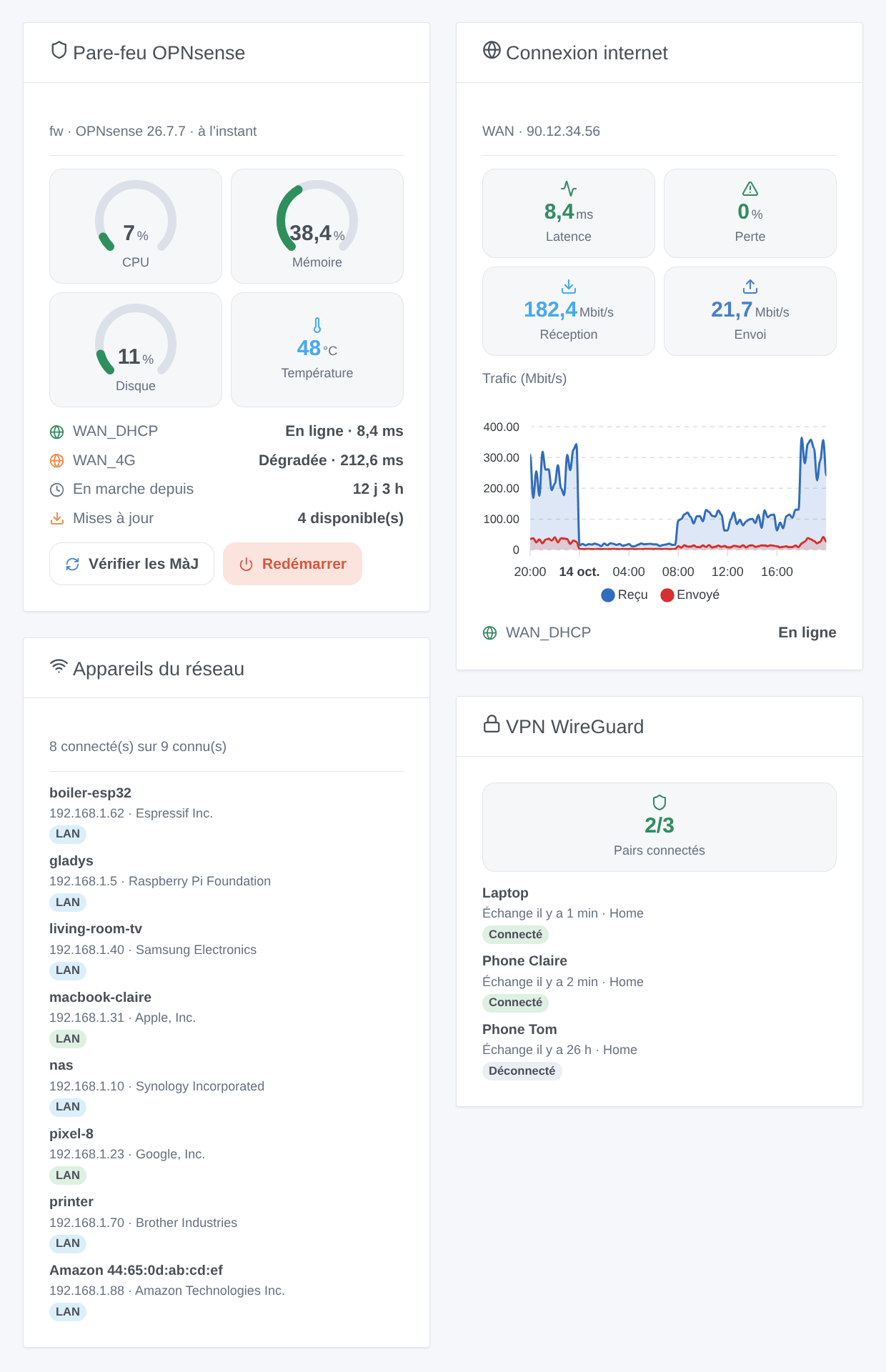
- Firewall: CPU, memory, disk, temperature, uptime, pending updates, version, connected WireGuard peers.
- Gateways (status, latency, loss) and interfaces (throughput, link, IP address).
- Firewall rules of a category (
gladysby default) in the form of switches. - Presence of network devices (ARP table and DHCP leases), usable with the « Check Presence » action.
- 6 triggers: gateway, device arrived or left, new device, VPN peer, service, update available.
- 6 actions: read status, Wake-on-LAN (through VLANs), alias, restart a service, check for updates, reboot.
- 4 widgets: firewall, internet connection, network devices, WireGuard VPN.
Examples of scenes:
- when the main gateway goes offline → send me « Internet is down »;
- when a new device appears on the network → send me its name, manufacturer, and IP;
- every evening at 9 p.m. → add the kids’ tablet to a blocked alias, remove it at 7 a.m.
Installation
- From the store: search for « OPNsense ». Available within the day, pending indexing.
- Or from the repository URL:
https://github.com/William-De71/gladys-opnsense. - Gladys 5.1.0 minimum (widgets and scenes).
Configuration:
- In OPNsense, create a dedicated user with the rights listed in the documentation, then an API key (file
key.txt). - In Gladys, enter the OPNsense address, key, and secret; leave « Verify Certificate » unchecked with the original self-signed certificate.
- Click « Test Connection », then run Discovery and add the desired devices.
Required OPNsense rights
Lobby: Dashboard; System: Gateways; Status: Interfaces; Reporting: Traffic; Diagnostics: ARP Table; Services: Dnsmasq DNS/DHCP or DHCP: Kea(v4); VPN: WireGuard: Status; Status: Services; System: Firmware (update search); Firewall: Rules [new] and Firewall: Categories (switches); Diagnostics: PF Table IP addresses (alias); Diagnostics: Reboot System; Services: Wake on LAN (os-wol plugin). A missing right only disables its function.
Known limitations
- Written according to the OPNsense 26.7 API and tested against a fake OPNsense: your feedback on real installations is welcome.
- Only rules from the new rule editor can be toggled, not automatic rules.
- Presence relies on the ARP table: a phone in standby sometimes disappears for a few minutes (hence the absence delay), and a changing random MAC address messes up tracking.
- Wake-on-LAN requires the os-wol plugin. No OpenVPN or IPsec for now, only WireGuard.
Feedback
Via a GitHub issue or in response to this thread, with the versions of Gladys, the integration, and OPNsense, and the logs (DEBUG=gladys-integration-sdk).