Okay, thanks for the info, can you just check if the command above is correct? Just a quick glance
Thanks in advance
docker run -d \
--log-driver json-file \
--log-opt max-size=10m \
--cgroupns=host \
--restart=always \
--privileged \
--network=host \
--name gladys \
-e NODE_ENV=production \
-e SERVER_PORT=80 \
-e TZ=Europe/Paris \
-e SQLITE_FILE_PATH=/var/lib/gladysassistant/gladys-production.db \
-v /var/run/docker.sock:/var/run/docker.sock \
-v /var/lib/gladysassistant:/var/lib/gladysassistant \
-v /dev:/dev \
-v /run/udev:/run/udev:ro \
gladysassistant/gladys:v4
Here is the official command from the docs, so apart from a few lines you’re good.
Okay, you changed the name, the port, and the image name.
Do you have this folder?
No, it’s a different one, I installed the Gladys image with Raspberry Pi Imager and ran the command above. So there are
Yes, indeed, and inside I have this:
pi@gladys:/var/lib/gladysassistant_test_nodered $ ls
gladys-production.db  gladys-production.db-shm  gladys-production.db-wal  homekit
I think the Node-RED folder is not in the right directory.
Remove your two containers gladys and gladys-test-nodered and also Node-RED, and then install @Lokkye’s image with the command below
docker run -d \
--log-driver json-file \
--log-opt max-size=10m \
--cgroupns=host \
--restart=always \
--privileged \
--network=host \
--name gladys \
-e NODE_ENV=production \
-e SERVER_PORT=80 \
-e TZ=Europe/Paris \
-e SQLITE_FILE_PATH=/var/lib/gladysassistant/gladys-production.db \
-v /var/run/docker.sock:/var/run/docker.sock \
-v /var/lib/gladysassistant:/var/lib/gladysassistant \
-v /dev:/dev \
-v /run/udev:/run/udev:ro \
delogzway/gladys:nodered
Change the port if you want but not the path names. Then try to reinstall the Node-RED integration.
Okay, I’ll do that, it will take a little more time. Thanks for your help 
Normally it should be fast because there’s no need to re-download the Docker images
keep us
I suspected something like that, that’s why I asked you to confirm my order. And indeed you are right , it works  . Thank you for giving me your time. Have a good evening
With pleasure. Have a good evening.
@Lokkye, so maybe we should take into account if someone installs Gladys in a different directory, right?
Hello @Lokkye
There is no problem, thanks to you for all this work that makes our lives easier  .
.
For info I took a test example from a PR of RFLink and I changed the file names, I thought that the file names were independent
[quote=« Psoy, post:62, topic:6584, full:true »]
hello @c
@Lokkye Thanks for the changes! I’ve left other comments on the PR :
For me, we’re good on functionality. Once the stability fixes and my PR feedback are OK, it’s good to go to production 
For a first development, I think we’re good in terms of functionality. Once the stability fixes and my technical feedback are addressed, for me we can go to production as-is.
Totally
@pierre-gilles: I just pushed the fix for the feedback you gave me on the PR as well as the fix for the configuration folder issue.
@cce66: Thanks
Good evening,
I tested with my command (where I modified the filenames myself), here is that command
docker run -d \
--log-opt max-size=10m \
--restart=always \
--privileged \
--network=host \
--name gladys-test-nodered \
-e NODE_ENV=production \
-e SERVER_PORT=8001 \
-e TZ=Europe/Paris \
-e SQLITE_FILE_PATH=/var/lib/gladysassistant/gladys-production.db \
-v /var/run/docker.sock:/var/run/docker.sock \
-v /var/lib/gladysassistant_test_nodered:/var/lib/gladysassistant \
-v /dev:/dev \
-v /run/udev:/run/udev:ro \
delogzway/gladys:nodered
I still have the same problem. Everything goes well up to this point:
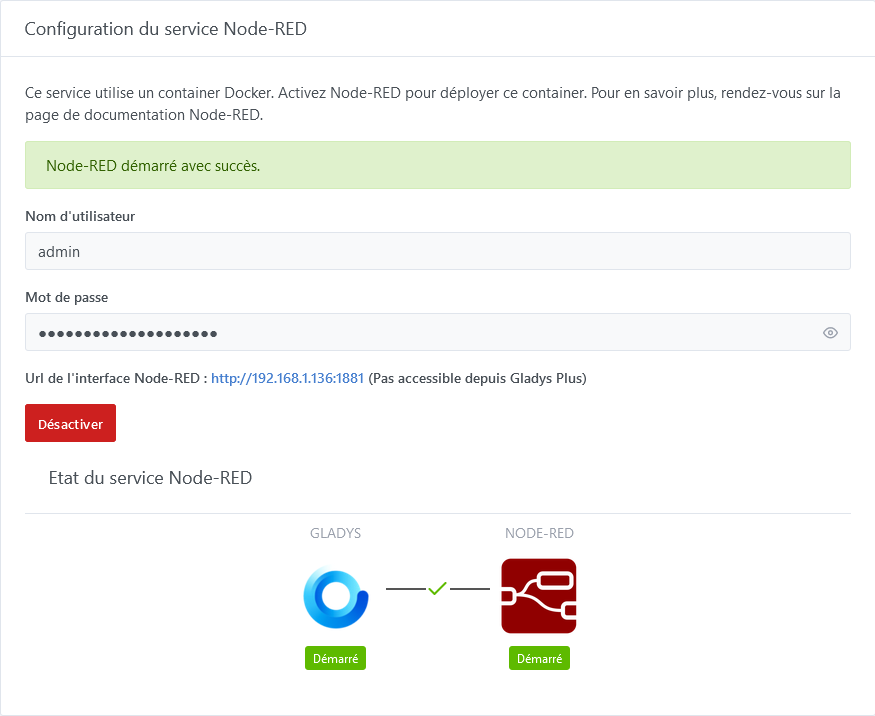
Then when I click on the Node-RED interface link, the connection fails
La connexion a échoué

Firefox ne peut établir de connexion avec le serveur à l’adresse 192.168.1.136:1881.

    Le site est peut-être temporairement indisponible ou surchargé. Réessayez plus tard ;
    Si vous n’arrivez à naviguer sur aucun site, vérifiez la connexion au réseau de votre ordinateur ;
    Si votre ordinateur ou votre réseau est protégé par un pare-feu ou un proxy, assurez-vous que Firefox est autorisé à accéder au Web.
But well, since it’s a filename problem (created by myself) on a test image, I don’t know if it’s worth dwelling on it much more.
Here are the logs anyway
2023-09-20T20:43:01+0200 <info> checkForContainerUpdates.js:13 (NodeRedManager.checkForContainerUpdates) Node-RED: Checking for current installed versions and required updates...
2023-09-20T20:43:01+0200 <info> checkForContainerUpdates.js:17 (NodeRedManager.checkForContainerUpdates) Node-RED: update #2 of the container required...
2023-09-20T20:43:01+0200 <info> checkForContainerUpdates.js:34 (NodeRedManager.checkForContainerUpdates) Node-RED: update #2 of the container done
2023-09-20T20:43:01+0200 <info> installContainer.js:44 (NodeRedManager.installContainer) Nodered: is being installed as Docker container...
2023-09-20T20:43:01+0200 <info> installContainer.js:45 (NodeRedManager.installContainer) Pulling nodered/node-red:3.1 image...
2023-09-20T20:43:03+0200 <info> installContainer.js:49 (NodeRedManager.installContainer) Nodered: Preparing environment...
2023-09-20T20:43:03+0200 <info> configureContainer.js:16 (NodeRedManager.configureContainer) Node-RED: Docker container is being configured...
2023-09-20T20:43:03+0200 <info> configureContainer.js:36 (NodeRedManager.configureContainer) Node-RED: Writing default configuration...
2023-09-20T20:43:03+0200 <info> installContainer.js:52 (NodeRedManager.installContainer) Creation of container...
2023-09-20T20:43:05+0200 <info> installContainer.js:57 (NodeRedManager.installContainer) Node-RED: successfully installed and configured as Docker container
2023-09-20T20:43:05+0200 <info> configureContainer.js:16 (NodeRedManager.configureContainer) Node-RED: Docker container is being configured...
2023-09-20T20:43:05+0200 <info> configureContainer.js:34 (NodeRedManager.configureContainer) Node-RED:  configuration file already exists.
2023-09-20T20:43:05+0200 <info> installContainer.js:80 (NodeRedManager.installContainer) Node-RED: container is (re)starting...
2023-09-20T20:43:12+0200 <info> installContainer.js:86 (NodeRedManager.installContainer) Node-RED: container successfully started
All I have to do is change the filename gladysassistant_test_nodered:
`-v /var/lib/gladysassistant_test_nodered:/var/lib/gladysassistant \`
to
-v /var/lib/gladysassistant:/var/lib/gladysassistant \
for everything to work.
Thanks to @_Will_71 who shed light on this problem
You should try another browser or clear Firefox’s cache and check about:logins to see if there are any saved credentials (I had an issue with the MQTT credentials because the fields were autofilled and Firefox replaced them on the fly without indicating it).
Good evening @cce66
I started from a fresh install and reinstalled everything with the following command :
docker run -d \
--log-opt max-size=10m \
--restart=always \
--privileged \
--network=host \
--name gladys-test-nodered \
-e NODE_ENV=production \
-e SERVER_PORT=8010 \
-e TZ=Europe/Paris \
-e SQLITE_FILE_PATH=/var/lib/gladysassistant/gladys-production.db \
-v /var/run/docker.sock:/var/run/docker.sock \
-v /var/lib/gladysassistant_test_nodered:/var/lib/gladysassistant \
-v /dev:/dev \
-v /run/udev:/run/udev:ro \
delogzway/gladys:nodered
and it’s the same result on Chrome, the connection to Node-RED on port 1881 fails:
Ce site est inaccessible192.168.1.136 n'autorise pas la connexion.
Voici quelques conseils :

Vérifier la connexion
Vérifier le proxy et le pare-feu
ERR_CONNECTION_REFUSED
this is the line that’s causing the problem :
-v /var/lib/gladysassistant_test_nodered:/var/lib/gladysassistant \
you need to remove the _test_nodered