I still have a password issue. Are we entering the values correctly on the page?
nom d’utilisateur : admin
mot de passe : the generated password
Because no matter whether I copy/paste or type these values, I still get a login failure :
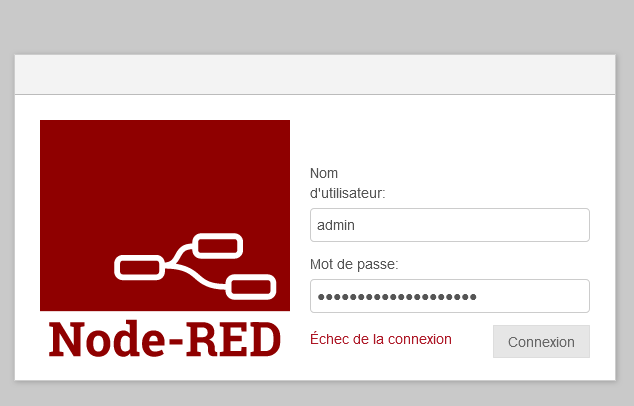
That was my reply for that part 
Hello @cce66
you’re a mind reader  , I hadn’t tried logging in with the password yet. I tried on Chrome, it’s the same. And I checked with about:logins on Firefox, there is no saved password, nor even an address related to NodeRed
Ah, that’s a big problem — some users (notably on Synology or elsewhere) store Gladys in a different folder, so it’s really important that this case works 
But that’s strange, normally your PR detects the host folder, doesn’t it @Lokkye?
oops
I still can’t open Node-Red with the credentials generated on the Gladys page
 . Even after several attempts and reinstallation of the delogzway/gladys:nodered image
Now yes but that hasn’t always been the case. I should have fixed this problem in the latest version. (In this commit : https://github.com/GladysAssistant/Gladys/pull/1809/commits/59d1946fec3cc5d243a387a87fae48761e54a3cd)
[quote="Psoy, post:106, topic
No, I’m reloading the image after having reset everything. I’ll do that and I’ll keep you posted.
So we agree the image is up to date?
pi@gladys:// $ docker pull delogzway/gladys:nodered
nodered: Pulling from delogzway/gladSo after doing a docker pull, reinstalling the image delogzway/gladys:nodered, using the folder /gladysassistant_nodered instead of/gladysassistant, same problem as before: Node-RED restarts in a loop. No access to the Node-RED page.
Here are the logs of gladys-test-nodered \
2023-09-21T16:02:13+0200 <info> checkForContainerUpdates.js:13 (NodeRedManager.checkForContainerUpdates) Node-RED: Checking for current installed versions and required updates...
2023-09-21T16:02:13+0200 <info> checkForContainerUpdates.js:17 (NodeRedManager.checkForContainerUpdates) Node-RED: update #2 of the container required...
2023-09-21T16:02:13+0200 <info> checkForContainerUpdates.js:34 (NodeRedManager.checkForContainerUpdates) Node-RED: update #2 of the container done
2023-09-21T16:02:13+0200 <info> installContainer.js:44 (NodeRedManager.installContainer) Nodered: is being installed as Docker container...
2023-09-21T16:02:13+0200 <info> installContainer.js:45 (NodeRedManager.installContainer) Pulling nodered/node-red:3.1 image...
2023-09-21T16:02:14+0200 <info> installContainer.js:49 (NodeRedManager.installContainer) Nodered: Preparing environment...
2023-09-21T16:02:14+0200 <info> configureContainer.js:16 (NodeRedManager.configureContainer) Node-RED: Docker container is being configured...
2023-09-21T16:02:14+0200 <info> configureContainer.js:36 (NodeRedManager.configureContainer) Node-RED: Writing default configuration...
2023-09-21T16:02:14+0200 <info> installContainer.js:52 (NodeRedManager.installContainer) Creation of container...
2023-09-21T16:02:17+0200 <info> installContainer.js:57 (NodeRedManager.installContainer) Node-RED: successfully installed and configured as Docker container
2023-09-21T16:02:17+0200 <info> configureContainer.js:16 (NodeRedManager.configureContainer) Node-RED: Docker container is being configured...
2023-09-21T16:02:17+0200 <info> configureContainer.js:34 (NodeRedManager.configureContainer) Node-RED:  configuration file already exists.
2023-09-21T16:02:17+0200 <info> installContainer.js:80 (NodeRedManager.installContainer) Node-RED: container is (re)starting...
2023-09-21T16:02:23+0200 <info> installContainer.js:86 (NodeRedManager.installContainer) Node-RED: container successfully started
When I modify my command by replacing
-v /var/lib/gladysassistant_test_nodered:/var/lib/gladysassistant \
with
-v /var/lib/gladysassistant:/var/lib/gladysassistant \
here are the Node-RED logs
pi@gladys:// $ docker logs  gladys-node-red
21 Sep 14:39:48 - [info]

Welcome to Node-RED
===================

21 Sep 14:39:48 - [info] Node-RED version: v3.1.0
21 Sep 14:39:48 - [info] Node.js  version: v16.20.2
21 Sep 14:39:48 - [info] Linux 5.10.103-v8+ arm64 LE
21 Sep 14:39:51 - [info] Loading palette nodes
21 Sep 14:39:55 - [info] Settings file  : /data/settings.js
21 Sep 14:39:55 - [info] Context store  : 'default' [module=memory]
21 Sep 14:39:55 - [info] User directory : /data
21 Sep 14:39:55 - [warn] Projects disabled : editorTheme.projects.enabled=false
21 Sep 14:39:55 - [info] Flows file     : /data/flows.json
21 Sep 14:39:55 - [info] Creating new flow file
21 Sep 14:39:55 - [warn]

---------------------------------------------------------------------
Your flow credentials file is encrypted using a system-generated key.

If the system-generated key is lost for any reason, your credentials
file will not be recoverable, you will have to delete it and re-enter
your credentials.

You should set your own key using the 'credentialSecret' option in
your settings file. Node-RED will then re-encrypt your credentials
file using your chosen key the next time you deploy a change.
---------------------------------------------------------------------

21 Sep 14:39:55 - [info] Server now running at http://127.0.0.1:1880/
21 Sep 14:39:55 - [warn] Encrypted credentials not found
21 Sep 14:39:55 - [info] Starting flows
21 Sep 14:39:55 - [info] Started flows
pi@gladys:// $
I can access the Node-RED page! However I still can’t open Node-RED because the credentials keep leading to a login failure. 
So I don’t know why — I’ve copied and pasted the password and username at least ten times, but now it works  here are the Node-RED logs when the credentials work
Welcome to Node-RED
===================

21 Sep 14:55:55 - [info] Node-RED version: v3.1.0
21 Sep 14:55:55 - [info] Node.js  version: v16.20.2
21 Sep 14:55:55 - [info] Linux 5.10.103-v8+ arm64 LE
21 Sep 14:55:58 - [info] Loading palette nodes
21 Sep 14:56:01 - [info] Settings file  : /data/settings.js
21 Sep 14:56:01 - [info] Context store  : 'default' [module=memory]
21 Sep 14:56:01 - [info] User directory : /data
21 Sep 14:56:01 - [warn] Projects disabled : editorTheme.projects.enabled=false
21 Sep 14:56:01 - [info] Flows file     : /data/flows.json
21 Sep 14:56:01 - [info] Creating new flow file
21 Sep 14:56:01 - [warn]

---------------------------------------------------------------------
Your flow credentials file is encrypted using a system-generated key.

If the system-generated key is lost for any reason, your credentials
file will not be recoverable, you will have to delete it and re-enter
your credentials.

You should set your own key using the 'credentialSecret' option in
your settings file. Node-RED will then re-encrypt your credentials
file using your chosen key the next time you deploy a change.
---------------------------------------------------------------------

21 Sep 14:56:01 - [info] Server now running at http://127.0.0.1:1880/
21 Sep 14:56:01 - [warn] Encrypted credentials not found
21 Sep 14:56:01 - [info] Starting flows
21 Sep 14:56:01 - [info] Started flows
@Psoy and @Lokkye
I found this in case it can help…
III. Customization & Securing Node-RED
To administer Node-RED, there is a tool, node-red-admin. To install it, enter the command sudo npm install -g node-red-admin on your Raspberry Pi.
Enable authentication
It is possible to secure access to the Node-RED interface by requiring login with a username & password. For this, on your Raspberry Pi, you will need to access the Node-RED configuration file, whose default path is:
/home/[you]/.node-red/settings.js. In this file is the property ‹ adminAuth ›. Uncomment it and authentication will be enabled. The default login is admin, and its password is password.Create a new user
In the settings.js file, the ‹ adminAuth › property contains an array ‹ user ›. This array contains the list of users, which are defined by the fields:
◦ username : the user’s identifier
◦ password : the user’s password, hashed in bcrypt format.
To be able to create a password, use the node-red-admin tool.
The command node-red-admin hash-pw will prompt you to enter the password you want, and will return the hash, which you only have to copy-paste into the settings file.
◦ permissions : the granted permissions.
• * : All permissions
• read : Cannot deploy or change settings and any change in the flow cannot be savedChange the editor address
The default address of the editor is [ip-raspberry]:1880.
You can modify it via the settings.js file
You can change the port with the line : uiPort: process.env.PORT || 1880
You can add a path prefix by uncommenting the line : httpRoot: ‹ /red ›.
And by replacing /red with the path you wish to use
The address will then become [ip-raspberry]:[your port] / [your path]
If you want to use port 80 (or any protected port), you will not be able to start Node-RED with the basic command, the port being protected. You will need to use the command sudo node-red -u .node-red, which allows launching Node-RED as root while using your normal .node-red directory.
NOTE: Port 80 being the http port, it is not required in the browser path. Thus, if you use port 80, the path [ip-raspberry] / [your path] will be enough to reach Node-RED.Have multiple Node-RED
You can have multiple Node-RED installations on the same server, each with its own configuration, its own files and its own installed nodes.
Once Node-RED is installed, create the directory(ies) where you want to put it (mkdir path) and copy the Node-RED directory into it, with the command cp -r .node-red path/.node-red. Do this operation as many times as you want different Node-RED instances. Each Node-RED is independent, and you will need to install the desired nodes on each different Node-RED.
To start a particular Node-RED, use the command
node-red -u path/.node-red
The path is absolute or relative from /home/YOU
Don’t forget sudo if you use a protected port (EX: 80)
This solution only allows running one Node-RED at a time
To get things moving, I stop the gladys-node-red container and have the gladys-test-nodered container active
I access Node-RED at http://ip:1880 without authentication and with my flows that I had created with the gladys-node-red container
Normal or not normal?
They shouldn’t have the same working environment, so they shouldn’t see the flows from the other Node-RED, right?
Well, I just understood that in fact gladys-test-nodered is actually a copy of Gladys that @Lokkye uses for his tests (gladys-lokkie would have been less confusing )
I’m going to bed — sleep brings counsel! 
thanks @cce66
I’m following up on this topic, what’s the conclusion? Is the image working for everyone or are there still bugs?
Hi @pierre-gilles
Personally, I can’t connect even though node-red is supposed to be started

However, there’s no option to set a password either when using it or when creating it
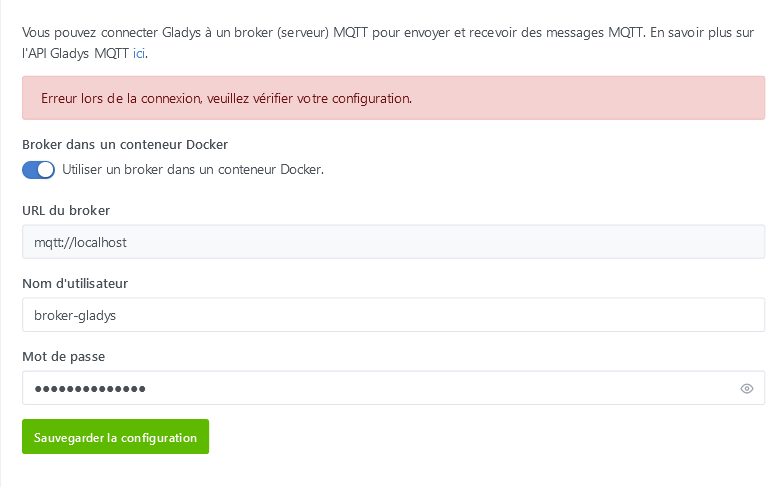
and the gladys-node-red container keeps restarting in a loop
and the output of sudo docker logs -f gladys-node-red
Error: EACCES: permission denied, copyfile ‹ /usr/src/node-red/node_modules/node-red/settings.js › -\u003e ‹ /data/settings.js ›
at Object.copyFileSync (node:fs:2847:3)
at copyFile (/usr/src/node-red/node_modules/fs-extra/lib/copy/copy-sync.js:64:6)
at onFile (/usr/src/node-red/node_modules/fs-extra/lib/copy/copy-sync.js:50:25)
at getStats (/usr/src/node-red/node_modules/fs-extra/lib/copy/copy-sync.js:42:44)
at Object.copySync (/usr/src/node-red/node_modules/fs-extra/lib/copy/copy-sync.js:32:10)
at Object.\u003canonymous\u003e (/usr/src/node-red/node_modules/node-red/red.js:129:20)
at Module._compile (node:internal/modules/cjs/loader:1198:14)
at Object.Module._extensions..js (node:internal/modules/cjs/loader:1252:10)
at Module.load (node:internal/modules/cjs/loader:1076:32)
at Function.Module._load (node:internal/modules/cjs/loader:911:12) {
errno: -13,
syscall: ‹ copyfile ›,
code: ‹ EACCES ›,
path: ‹ /usr/src/node-red/node_modules/node-red/settings.js ›,
dest: ‹ /data/settings.js ›
Hello @pierre-gilles
For me it works, as I said above, I couldn’t copy/paste the credentials, then at some point it worked, and since then it’s fine. However the filename issue is still the same problem.
When I modify my command by replacing
-v /var/lib/gladysassistant_test_nodered:/var/lib/gladysassistant \\
with
-v /var/lib/gladysassistant:/var/lib/gladysassistant \\
it works,
Otherwise I don’t open Node-RED, because it keeps restarting continuously
Hello @cce66
here is the command
pi@gladys:~ $ docker ps -a
CONTAINER ID   IMAGE                       COMMAND                  CREATED          STATUS                          PORTS      NAMES
18e48c1ff18e   nodered/node-red:3.1        \"./entrypoint.sh\"        12 minutes ago   Restarting (1) 48 seconds ago              gladys-node-red
090e1056efb1   gladysassistant/gladys:v4   \"docker-entrypoint.s…\"   30 minutes ago   Exited (137) 12 minutes ago                gladys
*In the command above, I did a copy/paste from a message above (if you look closely Node-RED keeps restarting in a loop). But since I restarted my Raspberry Pi in motioneye mode I can’t run the docker ps -a command right now, but I confirm that I normally have these two containers running.
Yes, I was able to access Node-RED on port 1881
Strange that your gladys-node-red container is looping and your gladys container is « exited »? Did you stop it?
You should try removing the gladys-node-red container, restart gladys, and try to reactivate Node-RED from Gladys
Good evening @cce66
I wrote to you that it was a copy/paste of a previous message, where it wasn’t working; I was just showing you the containers that were installed.
But as I mentioned, at the moment, everything is working fine for me,