Indeed, after purging the containers and restarting with
docker run -d --log-opt max-size=10m --restart=always --privileged --network=host --name gladys-test-nodered -e NODE_ENV=production -e SERVER_PORT=8010 -e TZ=Europe/Paris -e SQLITE_FILE_PATH=/var/lib/gladysassistant/gladys-production.db -v /var/run/docker.sock:/var/run/docker.sock -v /var/lib/gladysassistant:/var/lib/gladysassistant -v /dev:/dev -v /run/udev:/run/udev:ro delogzway/gladys:nodered
everything works perfectly 
Bravo @Lokkye  A thousand thanks — this will make Gladys much more attractive because it’s now open to everything in a simple way via Node-RED! A real breakthrough!
Quick question:
Will it be possible to change the credentials afterwards or even choose to enable or disable authentication, or to launch via

without having to authenticate again afterwards?
Same for the port?
I am running tests on my side. I noticed some minor issues. I am fixing them.
Hello @pierre-gilles @Lokkye
True, but is it really useful to have 2 separate Node-RED instances and why should @Lokkie’s instance have a different path? It seems more coherent to me that the path be that of gladysassistant now that Node-
@pierre-gilles @cce66 @Psoy
I just understood the problem — an issue with « basePathOnContainer » and « basePathOnHost ».
I just released a new version of the Docker image. I’ve tested it in every way (first startup, restart, deleting the node-red folder, changing the volume, …)
Don’t hesitate to pull and give me feedback (thanks in advance)
I don’t have a different path. I just need to install the Node-RED configs in the Gladys folder to be compatible with all possible installations.
That’s exactly it
I don’t know if that can be automatic because until now the Node-RED instances were not known to Gladys. However I just saw that there is the possibility to do exports and imports in Node-RED. So I would recommend doing the exports/imports manually from the old instance to the new Node-RED instance.
I don’t remember where it changed but to access Gladys from your test image what were the credentials again
(I can’t access http://192.168.0.xxx:8010 but I can access Node-RED http://192.168.0.xxx:1881)
yes but that doesn’t import, among other things, the node_modules necessary for the flows
by copying /var/lib/node-red/node_modules/
to /var/lib/gladysassistant/node-red/node_modules/
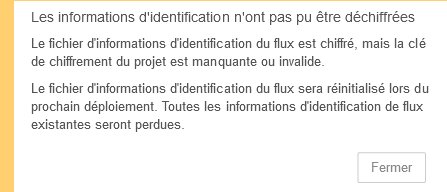
that loads them but there remain credential problems as well
maybe take inspiration from [Tutorial] Automatic Backup of Node-RED https://www.youtube.com/watch?v=l56VQgTpVBY
by modifying it to make a backup of the old Node-RED and a restore to the new one?
I’ll try to see…
Apparently it’s enough to copy the contents of
/var/lib/node-red
to
/var/lib/gladysassistant/node-red
I confirm that by making the copy we recover everything and it works perfectly!
@lokkie @pierre-gilles however a homekit and mosquitto directory is created in the test dir, normal?
@lokkie
after stopping and removing the containers
after docker pull the new image with
docker pull delogzway/gladys:nodered
and started the container with
docker run -d --log-opt max-size=10m --restart=always --privileged --network=host --name gladys-test-nodered -e NODE_ENV=production -e SERVER_PORT=8010 -e TZ=Europe/Paris -e SQLITE_FILE_PATH=/var/lib/gladysassistant/gladys-production.db -v /var/run/docker.sock:/var/run/docker.sock -v /var/lib/gladysassistant_test_nodered:/var/lib/gladysassistant -v /dev:/dev -v /run/udev:/run/udev:ro delogzway/gladys:nodered

I enable Node-RED
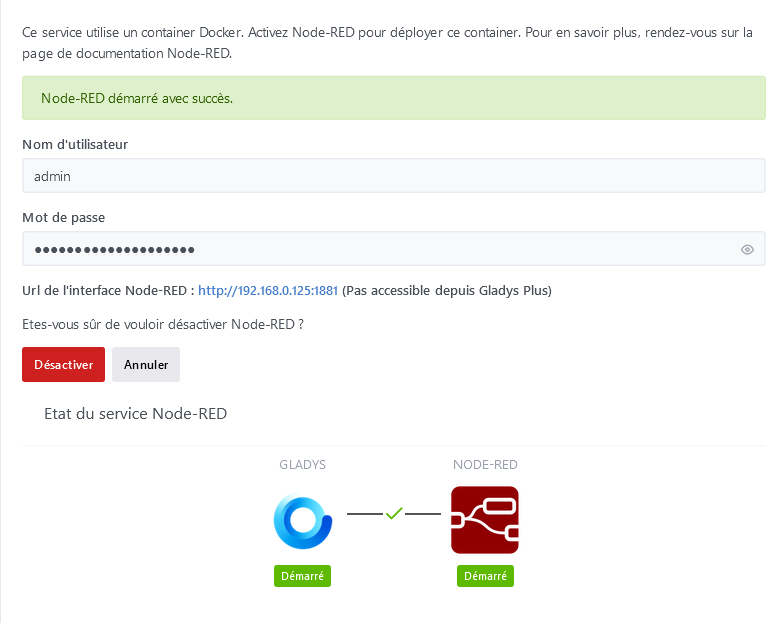
I disable it and I get
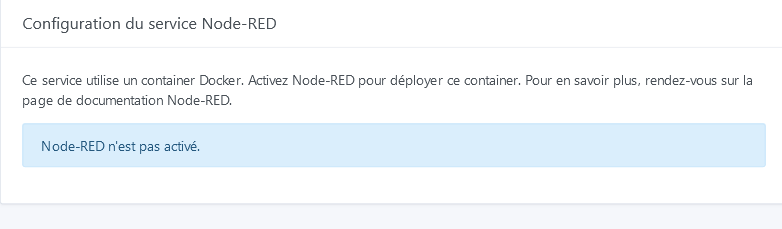
I have to do a refresh to get
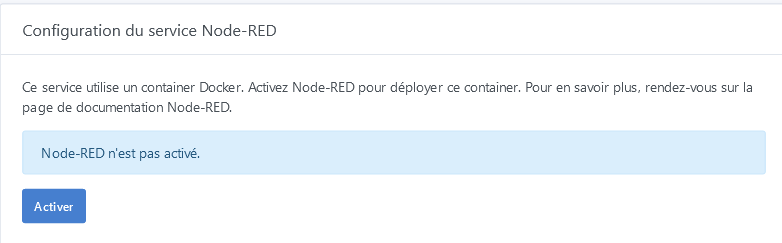
and be able to activate it again
By the way, on the first login (after installation), I enter the credentials and I cannot log in to Node-RED (invalid credentials), I disable Node-RED, I re-enable it and then I can log in — afterwards no problem, it connects normally without requesting authentication, maybe autofill of the fields?
I restart the node_red container, and I can access my old Node-RED with its flows on port 1880
apparently only the JSON files at the root need to be copied
flows.json contains the flows and package.json contains the names of the modules required for the flows
this may help
it should be possible, when you activate the Node-RED container, to get the path of the 1st Node-RED container and that of the 2nd Node-RED container (version @lokkie) and copy the contents of the 1st into the 2nd before launching Node-RED (version @lokkie), if you want?
I don’t think that can be automatic either, the Gladys instance doesn’t have access to the folders currently used.
Anyway, this integration is only intended for an audience that doesn’t know how to run Node-RED themselves. If you’ve already run Node-RED yourself, there’s little reason for you at the moment to run it inside Gladys… ^^
Yes.
That’s true, when this integration is formalized it will be enough to provide the necessary info or even include it in the integration’s documentation
Ah well I’m not agreeing there because for « Gladys Plus » users it’s a plus to be able to back up their Node-RED environment — well, if the /var/lib/gladysassistant/node-red directory is included in the backup (in that case you should back up only the essential items as specified in the video because I assume you have a limit on backup size)
@pierre-gilles afterwards you could make a video for anglophobes showing how to back up the existing Node-RED to restore it into the one managed by Gladys, I’m just saying! 
Good evening @Lokkye
Here I just retested, so now it works with the command
-v /var/lib/gladysassistant_test_nodered:/var/lib/gladysassistant \
Like @cce66, after clicking on the NodeRed link, I can access the NodeRed page, however the copy/paste of the credentials does not work on the first try (connection failure). I had to deactivate NodeRed, then reactivate it, and then the copy/paste worked and I can access NodeRed.
[quote=« cce66, post:129, topic:6584 »]
Ah well, I don’t agree because for « Gladys Plus » users
Hello @pierre-gilles,
Gadzooks, drat, blast, balderdash and thunderation! 
I’m disappointed 
Too bad because in terms of backup it doesn’t represent much data, well maybe in the future… 
Well, let’s say that since we couldn’t do otherwise before… now when this integration is operational, I’ll do a clean install again keeping only the management through Gladys
@Lokkye So can you add a message in the interface saying that Node-RED is not backed up by Gladys Plus, and that if the user wants to back up their Node-RED instance they need to manually export their flows in Node-RED or set up automatic backups on the Node-RED side? It will be clearer and avoid confusion.
Hello,
However, if we create a request specifically for that, do we agree it could be done?
Personally I wouldn’t use this integration, but it was just to understand your remark « that’s not part of this development »
No idea; from what I’ve seen so far I don’t think so, but I’m not a Node-RED expert
I’ve just released a new image with :
- The fix for the connection on first launch
- The button display when Node-RED is disabled
A vos tests, prêt, partez
@pierre-gilles,
For the backup, if I find a way to export and import the Node-RED information, do you think that could be sent to the Gladys Plus backup? (in terms of volume/price of the subscription)
What we do on the Zigbee2mqtt side is that Zigbee2mqtt provides an API that exports in JSON format all the parameters that allow restoring an instance from scratch, and we store that JSON in a « variable » in the DB
Thus, the backup is included in Gladys Plus, and the Zigbee2mqtt integration checks for the presence of the variable when Gladys starts, and restores Zigbee2mqtt.
If Node-RED provides an API, why not. However, you mustn’t naively back up the filesystem; that’s the best way to end up with a corrupted backup (and above all, we’re not going to bother backing up node_modules in Gladys Plus). If Node-RED doesn’t provide an API, then it’s not possible…
Apparently you just need to add a variable that defines the external path to which the flows will be saved
-v /var/lib/gladysassistant_test_nodered/node-red/data:/data
Managing User Data
Once you have Node-RED running with Docker, we need to ensure any added nodes or flows are not lost if the container is destroyed. This user data can be persisted by mounting a data directory to a volume outside the container. This can either be done using a bind mount or a named data volume.
Node-RED uses the
/datadirectory inside the container to store user configuration data.Using a Host Directory for Persistence (Bind Mount)
To save your Node-RED user directory inside the container to a host directory outside the container, you can use the command below. To allow access to this host directory, the node-red user (default uid=1000) inside the container must have the same uid as the owner of the host directory.
docker run -it -p 1880:1880 -v /home/pi/.node-red:/data --name mynodered nodered/node-redIn this example the host
/home/pi/.node-reddirectory is bound to the container/datadirectory.Note: Users migrating from version 0.20 to 1.0 will need to ensure that any existing
/datadirectory has the correct ownership. As of 1.0 this needs to be1000:1000. This can be forced by the commandsudo chown -R 1000:1000 path/to/your/node-red/dataSee the wiki for detailed information on permissions.
I’ll run tests this afternoon for that, in case it’s just a line to add…
Ah well no I can’t, it’s a line to modify in the command that @lokkie runs in his integration snif 
 it’s @lokkie the master of the keys
No, there’s no need — the file /var/lib/gladysassistant_test_nodered/node-red/packages.json includes the list of modules required by the flows and if they are missing they are reinstalled
yes there are APIs but after that I don’t know how this can be implemented by @lokkie
Storage API
The Storage API provides a pluggable way to configure where the Node-RED runtime stores data.
The information stored by the API includes:
flow configuration
flow credentials
user settings
user sessions
node library content
and the methods for this API here
There’s an interesting passage here
When installing Node-Red on Docker, your volume for the data directory was created by and belongs to our user « root », whose identifier is « uid=0 gid=0 ». The Node-Red user inside the container, which owns the /data directory, however has different identifiers: « uid=1000 gid=1000 ». You can resolve this issue by connecting via SSH to your server and changing the ownership of the Docker volume to the user with ID 1000:1000 by running the following command:
I’m connected as « root », the « sudo » command is not necessary, but I’m including it just in case.
sudo chown -R 1000:1000 /mnt/node-red/data
So you’ll need to set the same ownership, I think, on
var/lib/gladysassistant_test_nodered/node-red/data
After that, it’s true that this applies to a Linux setup; on Windows (I don’t think there will be any problems) and on Synology I don’t know (although Syno is Linux-based at its core, but maybe Synology has a built-in backup option if Synology users can provide an answer)