Let's talk about Gladys V4

It’s not disturbing, but it might be worth adding a user_id attribute to t_variable to plan for future capacity, you’re right :slight_smile:

To summarize, we would need:

  • A user_id attribute in t_variable.
  • Modify the functions variable.setValue and variable.getValue

Either you take care of it, or I do, as you wish let me know :slight_smile:

I can take care of it as early as tonight, which will allow me to continue getting familiar with v4.

Thanks for the exchange and the help, by the way.

Hello everyone!

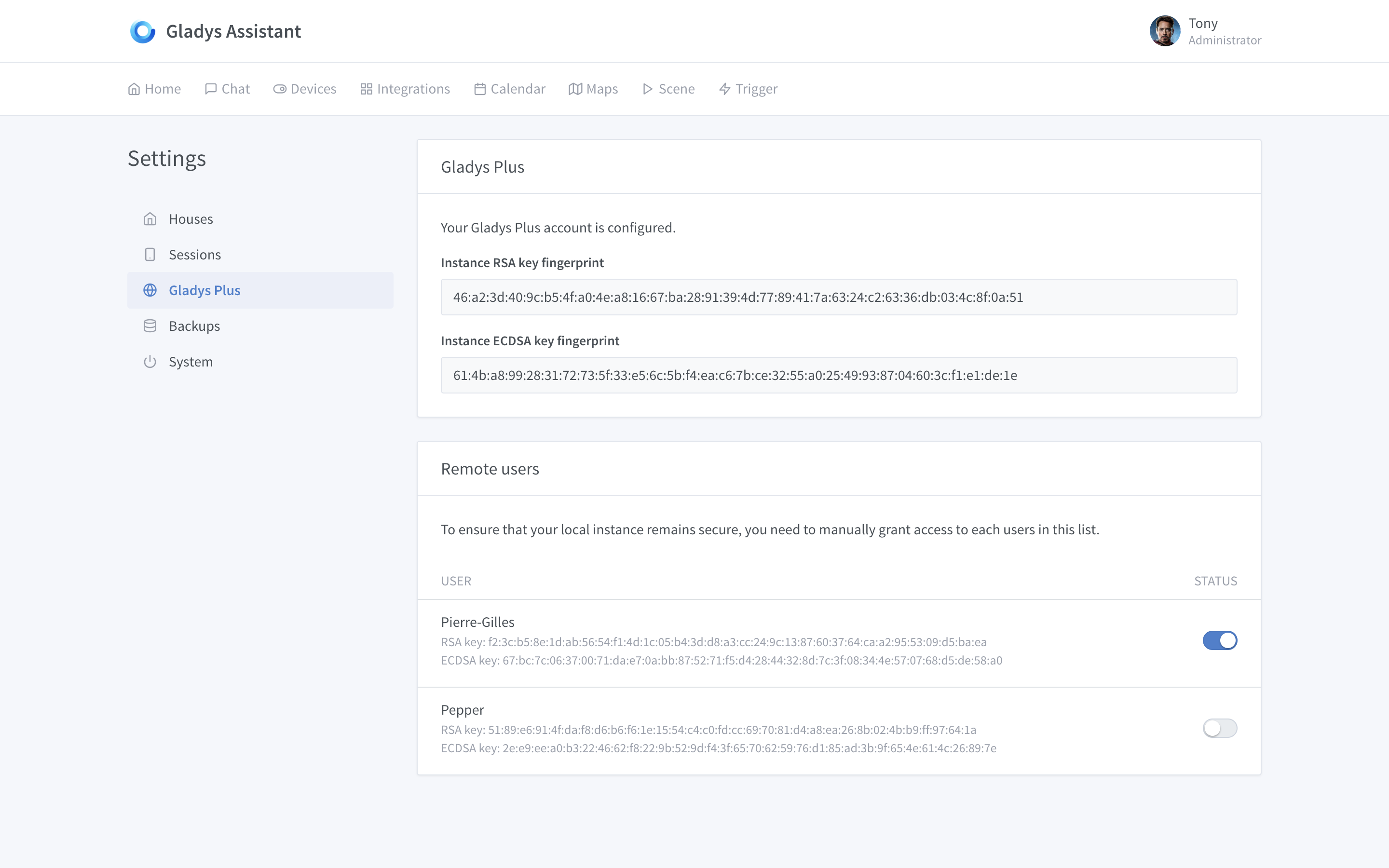
I’m currently working on the integration part with the Gladys Gateway :slight_smile:

I will probably rename the « Gladys Community Package » to « Gladys Plus ».

Easier to understand and more international.

Here is probably the configuration page of Gladys Plus in Gladys 4:

If you have feedback on the offer, if you see improvements, don’t hesitate :slight_smile:

(Of course, I’m showing you all these screenshots in English, but Gladys 4 will be 100% in French too)

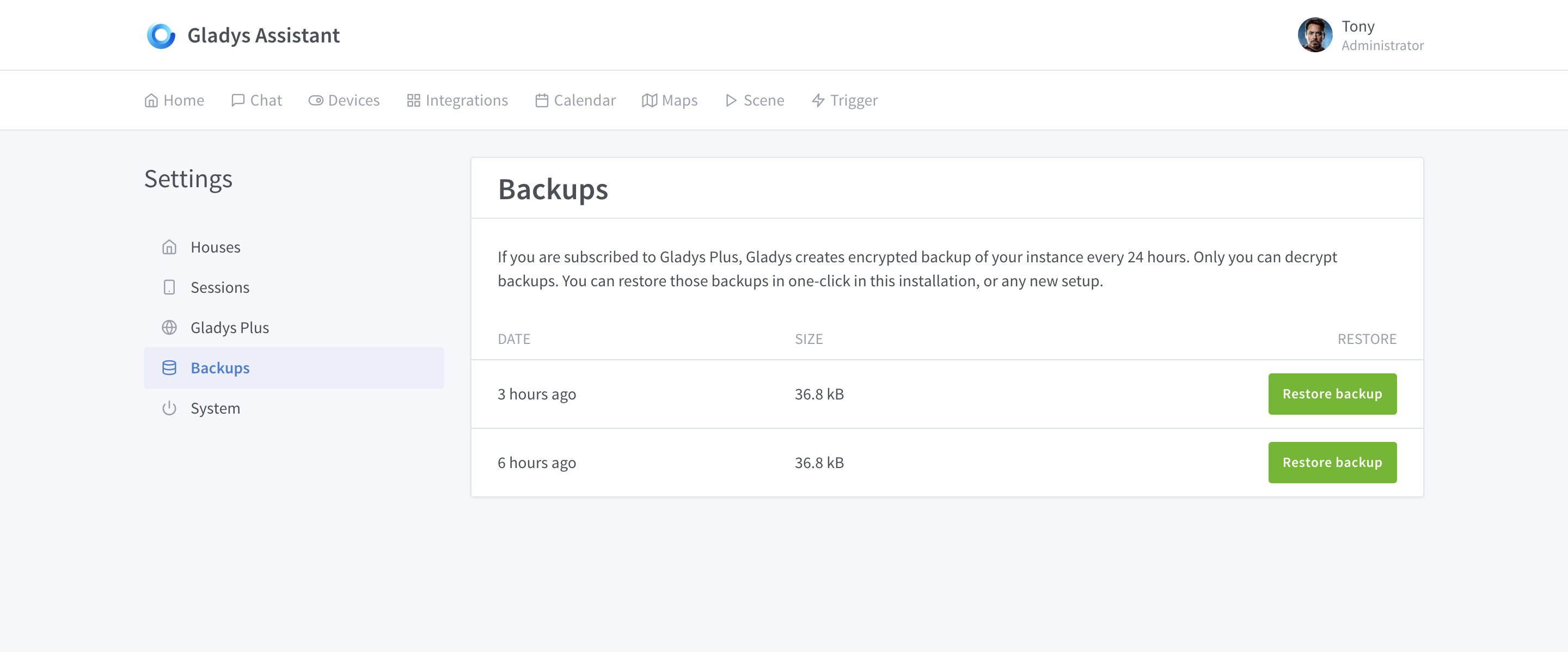
By the way, talking about backup restoration, I just did an end-to-end test:

  1. Automatic backup of Gladys, compressed, encrypted, and saved on the Gateway side.

  2. One-click restoration on a fresh instance, and the instance is identical. I am just speechless, it’s crazy and so fast!

@pierre-gilles Regarding the catering, just to confirm, will we be able to choose which catering service to use? Not necessarily the last one?

In any case, great job with the Gladys Plus feature!

Petit vu when you are connected:

The backups:

Yes! There will be a history (but not infinite either).

I haven’t yet defined exactly how much history will be available, but I’m thinking of a week of backups for example. What do you think?

Hello, I would rather be in favor of a dozen backups but no duration, for example you make a configuration, you make a manual backup, and you try another configuration that lasts 1 month for example, it would be nice to be able to revert to that manual backup

I agree, but I think we should also have automatic backups, it’s the core of the feature after all! If your Raspberry Pi’s SD card fails one day, you’ll be glad to see that you have a backup less than 24 hours old :slight_smile:

We could do 2 things:

  1. Keep 7 days of automatic backups
  2. Give the user the choice to keep about 2-3 « manual » backups

Alternatively, we can remove « gradually »:

  • Keep for 7 days
  • Keep 1 per week for 1 month
  • Keep 1 per month for a few months

This allows us to go back far in case of issues, or if we are on vacation for more than 7 days and an error occurs, without overloading the Gateway storage.

All the work you’ve done @pierre-gilles :+1:

It might be interesting to put some backups on a secure cloud, right? Like Mega, which is free for 50GB (it’s true they’ve had a lot of trouble with the law, but it’s still the best in terms of security), or Hubic, which offers 25GB (slow in terms of speed, but we’re not going to send a large file).

It’s already the case :slight_smile:

Backups are end-to-end encrypted with a key that only you possess :slight_smile: The file is uploaded to the Gateway, which is hosted on storage managed by DigitalOcean (DO Spaces) and redundant on BackBlaze.

Even if the Gateway is hacked, even if I try to open your backup, no one will be able to decrypt the file because only you have the key.

So it’s already at maximum security level!

Edit: To go into detail, DigitalOcean Spaces is a managed storage with an S3-compatible API. They handle the storage (so no possible errors on my part, it’s 100% managed). The data center I chose is in Frankfurt, it was the closest to Gladys users.

Synchronization with BackBlaze is performed daily at 2:00 a.m. to maintain redundancy in case DigitalOcean fails.

Oops, this discussion part had escaped me, sorry for the useless message… Well, in that case, it’s the best of the best for backup on the Gateway!!! :+1::+1:

And then, as you said earlier, if we can also manually back up to our SD, SSD or even a simple HDD, it’s really great.

Indeed, as others have pointed out, a week of backup is good, but above all, having the possibility to have static backups (I think 2 would be sufficient).

POINT ROADMAP! :slight_smile:

Hi everyone,

I wanted to give a quick update on the roadmap and the progress of Gladys 4 development.

Quick reminder of the roadmap:

According to this roadmap, the « feature development » part internal to Gladys 4 should be finished by this weekend. I’ve been working hard all weekend, and it’s almost the case. I’ve made a lot of progress on the front end, which is starting to look good :slight_smile: I plan to finish it quickly this week and work on the brain + actions + triggers as planned in the roadmap.

For information, for two and a half months I’ve been 100% focused on Gladys (I’ve put freelancing on hold) to make a big push for the project. I work every day, and often on weekends to ensure this release is on time.

Regarding services, there are 3 services being migrated by community members:

:warning: For information, the week of June 17th, I will migrate the v4 code to the main Gladys repository. The goal is to be able to start setting up the official build + release process.

So if your PRs are not merged by then, you will need to migrate them to the other repo (it’s not complicated).

I am keeping the goal of the first alpha on June 26th.

Regardless of the progress of the different service developments, on June 26th there will be a first Gladys alpha. This remains a release intended for an informed audience.

Regarding the release process, I will not build a Raspbian image for the alpha. There will just be a clear procedure to install Gladys. (Hence the fact that this alpha is intended for an informed audience).

Ok I’ll keep this idea. It might not be available right away with the manual backups, but it’s a good idea :slight_smile:

Congratulations, I can only admire, unfortunately as a spectator.

Wowwwww wowwwww so cool backups!!! The v4 is going to be a hit!

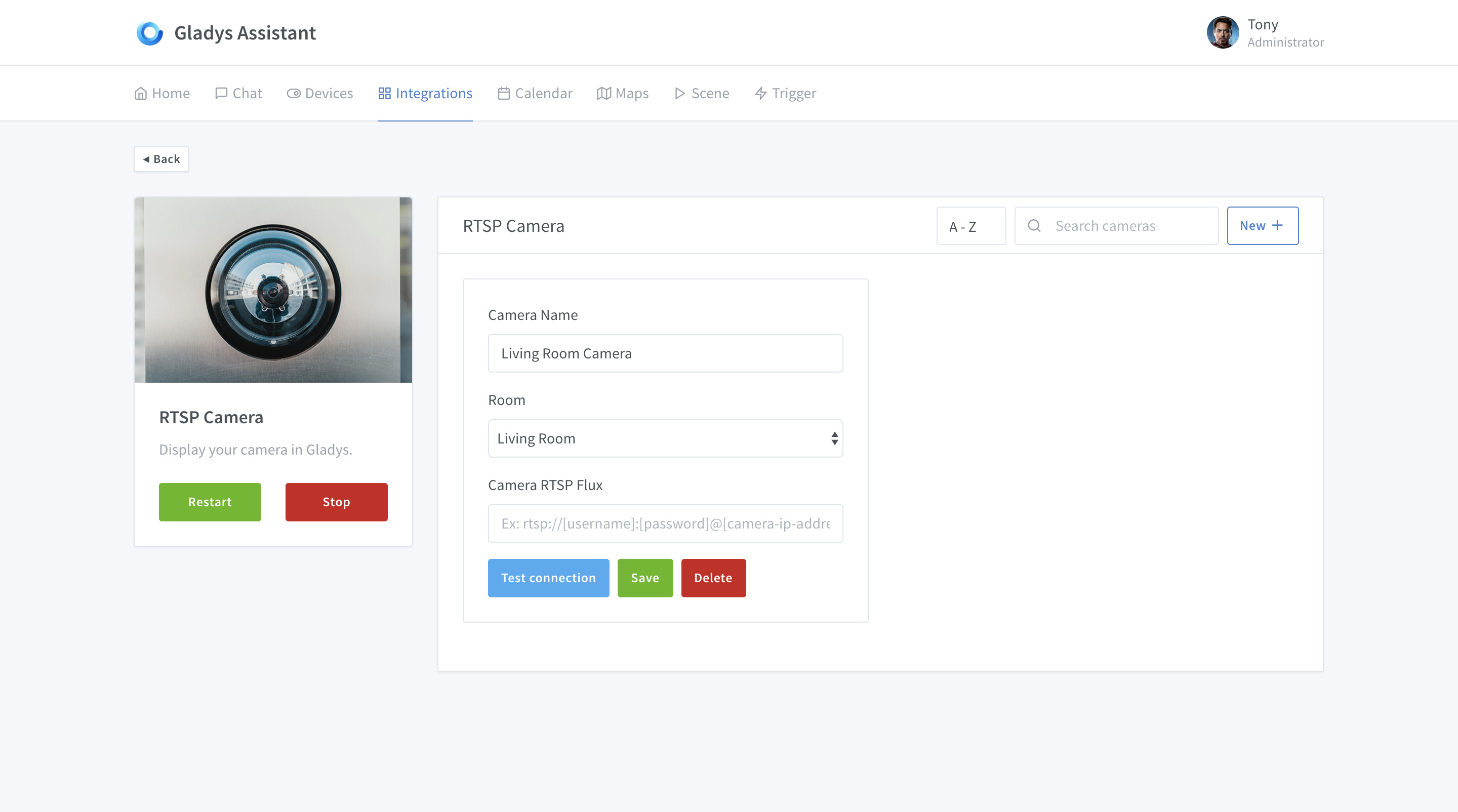
I’m working on the RTSP camera UI in Gladys today!

Awesome @pierre-gilles,
I’m just setting up my HikVision cameras.
Are you also going to integrate the HTTP protocol?

I was able to see this for RTSP for HikVision but then we put the user/pwd in plain text in the URL configuration.

Yes, later on, but for now, only RTSP works.

So the camera is RTSP compatible! :slight_smile:

This is the case for both HTTP and RTSP, what is the problem?

@pierre-gilles impeccable,
no problem with the pwd