It’s a shame we didn’t get the full story, but all the better if it’s working again 
Yes, sorry
I would also have liked to know how to retrieve the file I created so I can download it 
What operating system do you have?
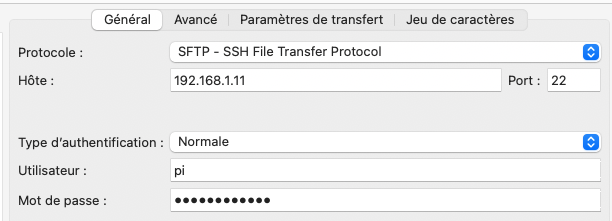
You can use Filezilla to connect via SFTP and view/download the files created in the /tmp/ folder:
Hi everyone !
I had the same problem as Isage with this update and a similar problem with a previous update.
I noticed that the config for my SONOFF dongle
Great, I’ll try
Thanks
Ah strange, no that’s not normal! What makes it complicated is knowing whether the bug

You can copy and paste the file’s contents onto pastebin.com (for example) and then paste the link you get here so we can read it 
If I understand correctly, here is the link for « gladys_logs.txt »
The file « gladys-z2m-zigbee2mqtt.txt » is apparently too large
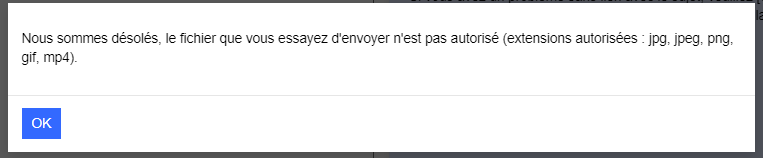
I got this message

The file is not accessible, are you sure about the link?
ah, the file is too large. Could you share it with us otherwise using any file sharing service (Google Drive, Dropbox, whatever you want… )
Here are the Drive links for the 2 txt files
Thanks
I think these aren’t the right links, @Isage…
On Google Drive you need to generate a sharing link and then set the permission to « Viewer » for « Anyone with the link ».
If I’ve understood correctly and perform the procedure, Google Drive should send 2 notifications to hello@gladysassistant.com (separate sends for the 2 txt files)
It’s the only email I have.
Is it ok?
Yes, what’s your temperature/humidity sensor called (the one in the living room that wasn’t working) in Zigbee?
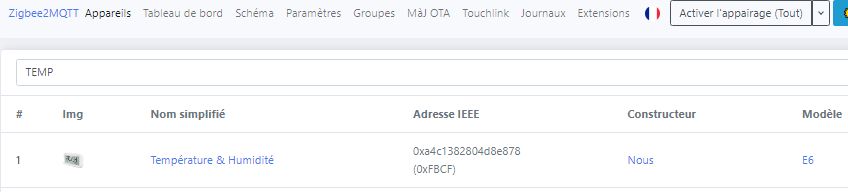
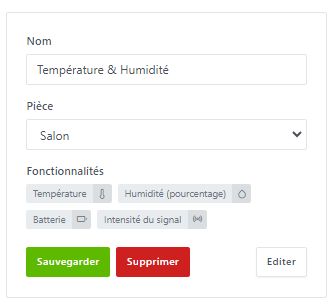
Your sensor is indeed sending data and Zigbee2Mqtt is forwarding it to Gladys (it has a strange behavior of sending the same value 8 times in 8 seconds, but that should not be a problem):
Zigbee2MQTT:info  2023-10-15 08:57:15: MQTT publish: topic 'zigbee2mqtt/Température \u0026 Humidité', payload '{"humidity":49,"linkquality":145,"temperature":23.6,"temperature_unit_convert":"celsius"}'
Zigbee2MQTT:info  2023-10-15 08:57:16: MQTT publish: topic 'zigbee2mqtt/Température \u0026 Humidité', payload '{"humidity":49,"linkquality":145,"temperature":23.6,"temperature_unit_convert":"celsius"}'
Zigbee2MQTT:info  2023-10-15 08:57:17: MQTT publish: topic 'zigbee2mqtt/Température \u0026 Humidité', payload '{"humidity":49,"linkquality":145,"temperature":23.6,"temperature_unit_convert":"celsius"}'
Zigbee2MQTT:info  2023-10-15 08:57:17: MQTT publish: topic 'zigbee2mqtt/Température \u0026 Humidité', payload '{"humidity":49,"linkquality":145,"temperature":23.6,"temperature_unit_convert":"celsius"}'
Zigbee2MQTT:info  2023-10-15 08:57:18: MQTT publish: topic 'zigbee2mqtt/Température \u0026 Humidité', payload '{"humidity":49,"linkquality":142,"temperature":23.6,"temperature_unit_convert":"celsius"}'
Zigbee2MQTT:info  2023-10-15 08:57:18: MQTT publish: topic 'zigbee2mqtt/Température \u0026 Humidité', payload '{"humidity":49,"linkquality":145,"temperature":23.6,"temperature_unit_convert":"celsius"}'
Zigbee2MQTT:info  2023-10-15 08:57:19: MQTT publish: topic 'zigbee2mqtt/Température \u0026 Humidité', payload '{"humidity":43,"linkquality":142,"temperature":23.6,"temperature_unit_convert":"celsius"}'
Zigbee2MQTT:info  2023-10-15 08:57:20: MQTT publish: topic 'zigbee2mqtt/Température \u0026 Humidité', payload '{"humidity":43,"linkquality":145,"temperature":23.6,"temperature_unit_convert":"celsius"}'
But the device is not configured in Gladys
2023-10-13T08:09:57+0200 <warn> handleMqttMessage.js:110 (Zigbee2mqttManager.handleMqttMessage) Zigbee2mqtt device Température et humidité not configured in Gladys.
2023-10-13T08:09:57+0200 <warn> handleMqttMessage.js:110 (Zigbee2mqttManager.handleMqttMessage) Zigbee2mqtt device Température et humidité not configured in Gladys.
2023-10-13T08:09:57+0200 <warn> handleMqttMessage.js:110 (Zigbee2mqttManager.handleMqttMessage) Zigbee2mqtt device Température et humidité not configured in Gladys.
You should try removing/re-adding it (there might be an error in the name \u0026/et  )
)
 Warning, you have a lot of errors in your logs:
Lampe de la plante@Color Temperature] characteristic was supplied illegal value: number -19 exceeded minimum of 140scene.executeActions.js:37 (executeAction) AxiosError: connect ECONNREFUSED 192.168.1.136:1880=> « you need to take out the trash »Error: This callback function has already been called by someone else; it can only be called one time. at /src/server/services/homekit/node_modules/hap-nodejs/src/lib/util/once.ts:12:13
I removed/re-added the device.
Errors in your logs:
•\tPlant lamp@Color Temperature] characteristic was supplied illegal value: number -19 exceeded minimum of 140
=> I can’t find this -19 value
•\tscene.executeActions.js:37 (executeAction) AxiosError: connect ECONNREFUSED 192.168.1.136:1880 => « you need to take out the trash »
=> Node-RED test that doesn’t work
•\tError: This callback function has already been called by someone else; it can only be called one time. at /src/server/services/homekit/node_modules/hap-nodejs/src/lib/util/once.ts:12:13
=> I
@Isage there’s still something with your setup — I don’t know if it works very well on the Z2M side. You renamed your Zigbee2mqtt devices with spaces, whereas the name is then used as the « MQTT topic » and spaces aren’t necessarily recommended. So it might work, but I don’t think it’s a great idea 
What I do on the Zigbee2mqtt side is use underscores (« ampoule_salon », « interrupteur_chambre »)
Then, on the Gladys side put whatever name you want (spaces are fine)
@bertrandda I don’t know if this log means anything to you regarding the Homekit integration