It would be interesting to be able to move one or more services to another RPI.
Example:
My Gladys 4 is installed on a Synology NAS.
I want to use Bluetooth presence detection, so I want to move the Bluetooth service to a dedicated RPI Zero.
It would be interesting to be able to move one or more services to another RPI.
Example:
My Gladys 4 is installed on a Synology NAS.
I want to use Bluetooth presence detection, so I want to move the Bluetooth service to a dedicated RPI Zero.
Hello, I see that you are offering to participate in the development, but do you have any idea how to proceed? I am quite interested in the concept in general, although I don’t think I will need it.
@AlexTrovato I think it’s about the concept of « Gladys Pod » that we’ve talked about at length 
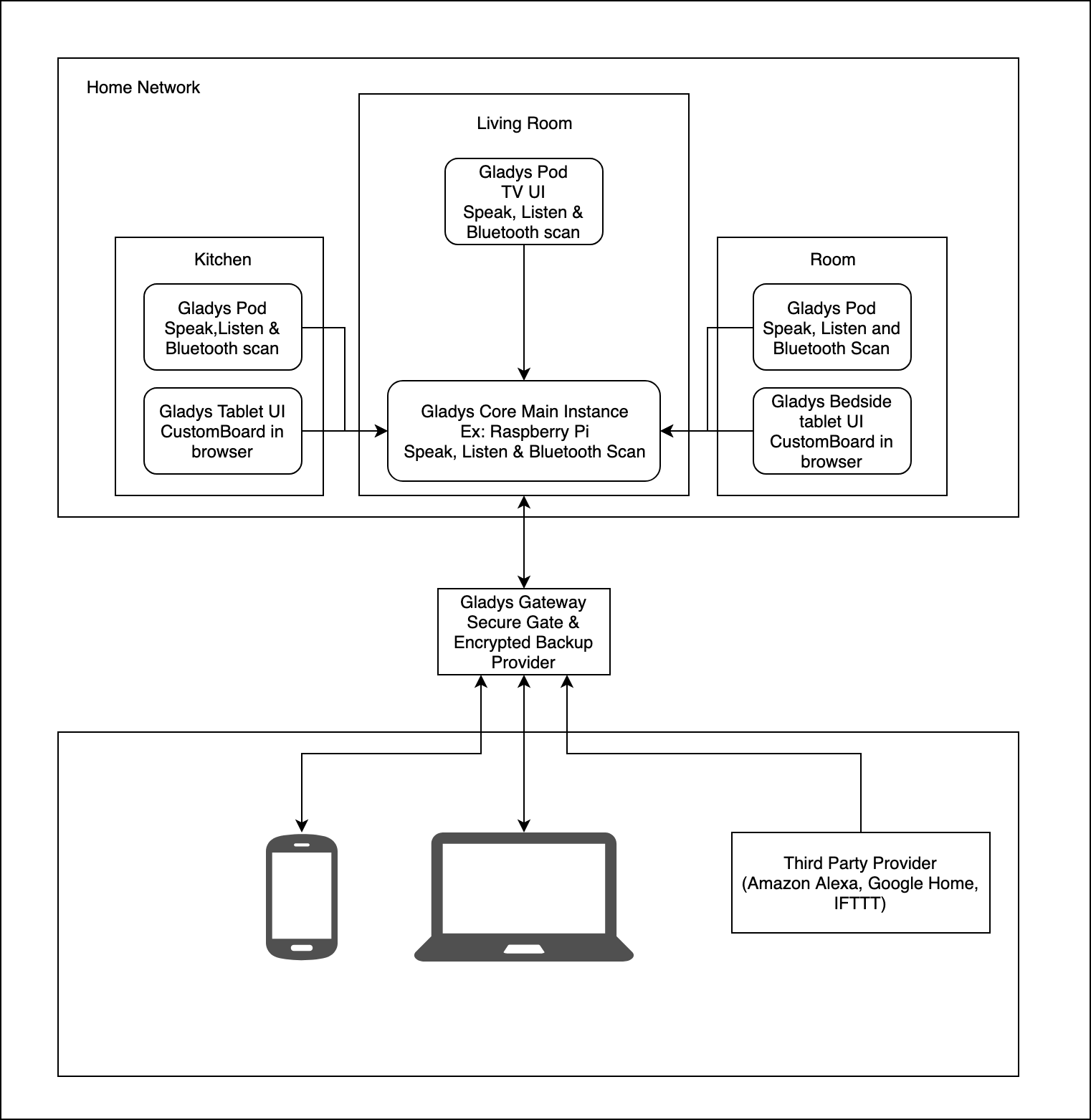
The goal would be to have « pods » that communicate with a main Gladys (probably in MQTT)
We would need to see how this would work in terms of UX. Does the user install a complete Gladys on another machine and then activate a « pod » mod on the instance?
Or does the user just install a « pod » image that contains only the code of certain « pod » compatible services and sends all the data to the master in MQTT? (and how to configure this service, without CLI?)
I think there are many things to discuss but in any case it’s an interesting topic and we were going to address it at some point or another 
This might also interest me! As I can’t retrieve my consumption information from Enedis, I’ll have to go through TIC. And one of the solutions is to connect it to a RPi Zero. And I had in mind to send this information to Gladys via MQTT.
The idea would be to create a Gladys Lite instance with just certain integrations?
More or less, that’s still to be defined!
The idea is to have a main « Gladys » and small pods that send information.
So far, I had only theorized the idea at the beginning of v4, but nothing is defined yet, everything still needs to be done
@pierre-gilles If I understand your Pod concept correctly, it’s about launching a Gladys, disabling everything except the services, and having an event handler that sends all events to MQTT topic(s) to the « Main » Gladys?
@cbe317 In essence, that’s it I even made a diagram in the technical manifesto:
Now we need to define what we want in terms of functionality:
I think this would be the simplest and most practical idea for the user. With, if possible, the choice in the service(s) to deploy. (How much does a clean version of Gladys weigh?)
It weighs nothing I think the full Gladys should weigh around 120 MB.
As you mentioned, an installation option to indicate that the instance is a pod seems to be a good option. No need to start with a « Lite » instance given its weight.
In itself, the user’s platform is the main gladys and especially the dashboard. If we want to keep the philosophy of simplicity and that the user does not have to get their hands dirty, I would see a default connection.
We could imagine, during installation, after choosing to install a pod, a page where we would fill in the IP of the main server or an MQTT server to which we will plug in.