Prises en charge des devices avec l'application Smartlife/tuya

Here is the documentation with the information to use Tuya.

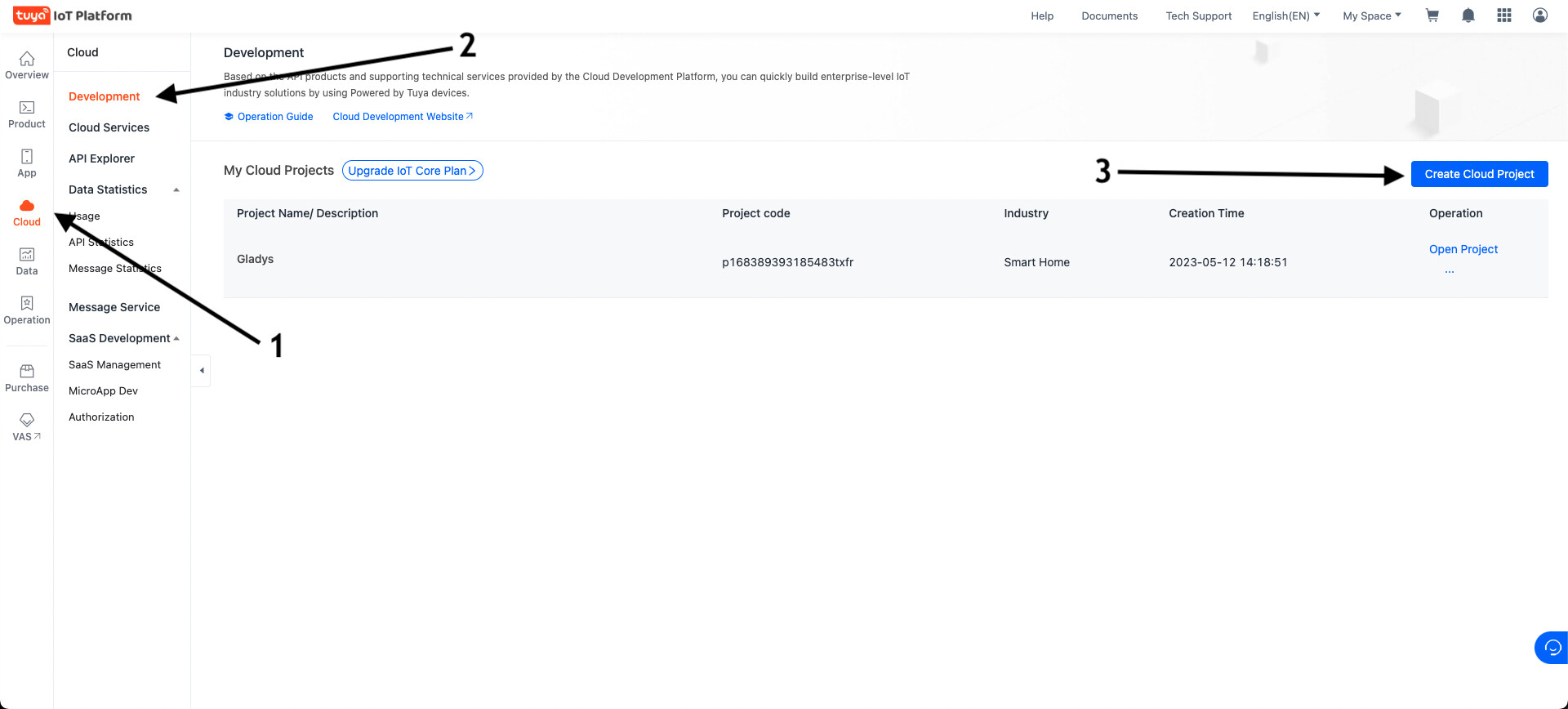
  1. Create an account on http://iot.tuya.com

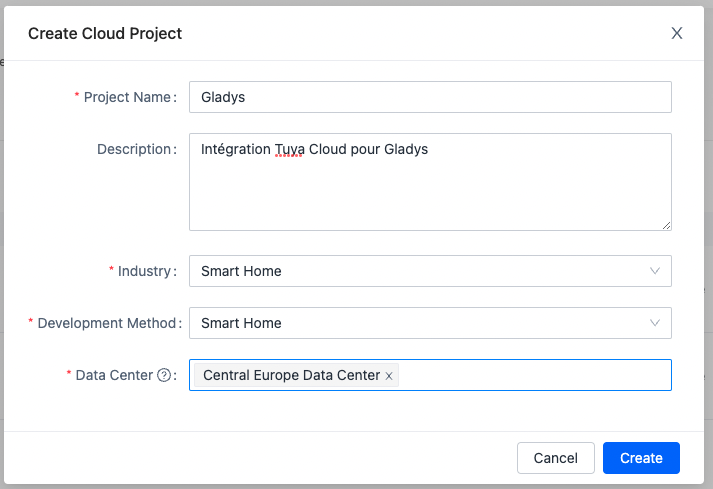
  2. Create a cloud project in the « Cloud » → « Development » → « Create Cloud Project » section

  3. Choose a project name, fill in the different fields:

    • Project Name : The name of your project (ex: Gladys)
    • Industry : Smart Home;
    • Development method : Smart Home;
    • Data Center : Central Europe Data Center (even if you live in Western Europe, it’s better; otherwise select the data center nearest to you).
      Click « Create ».
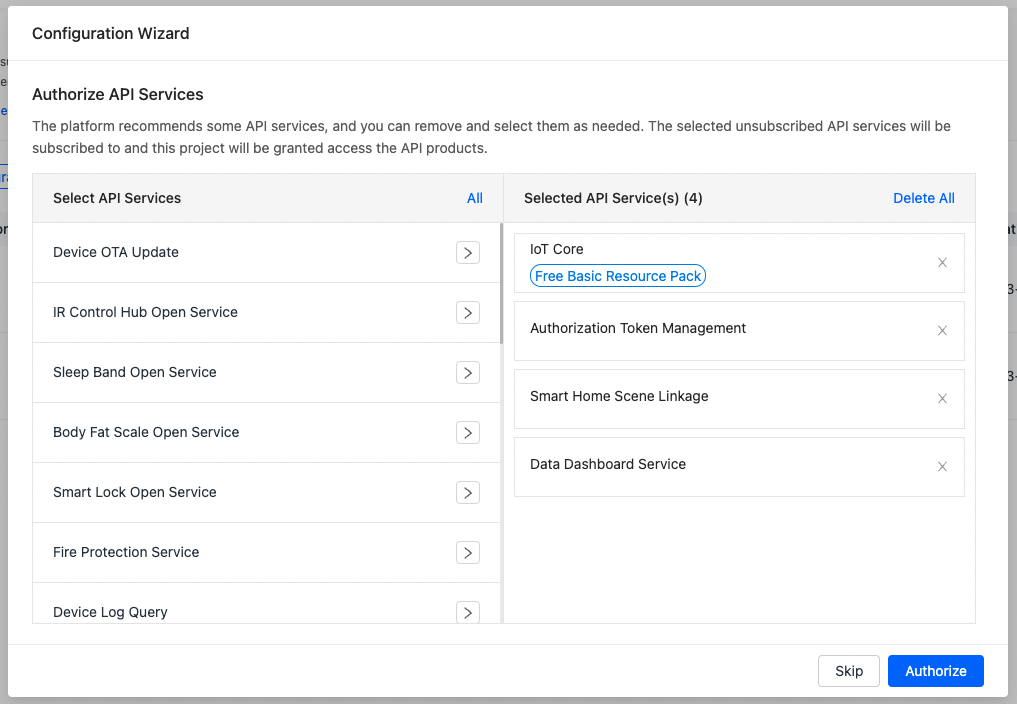
  4. Authorize the following API services:
    (They are normally selected by default)

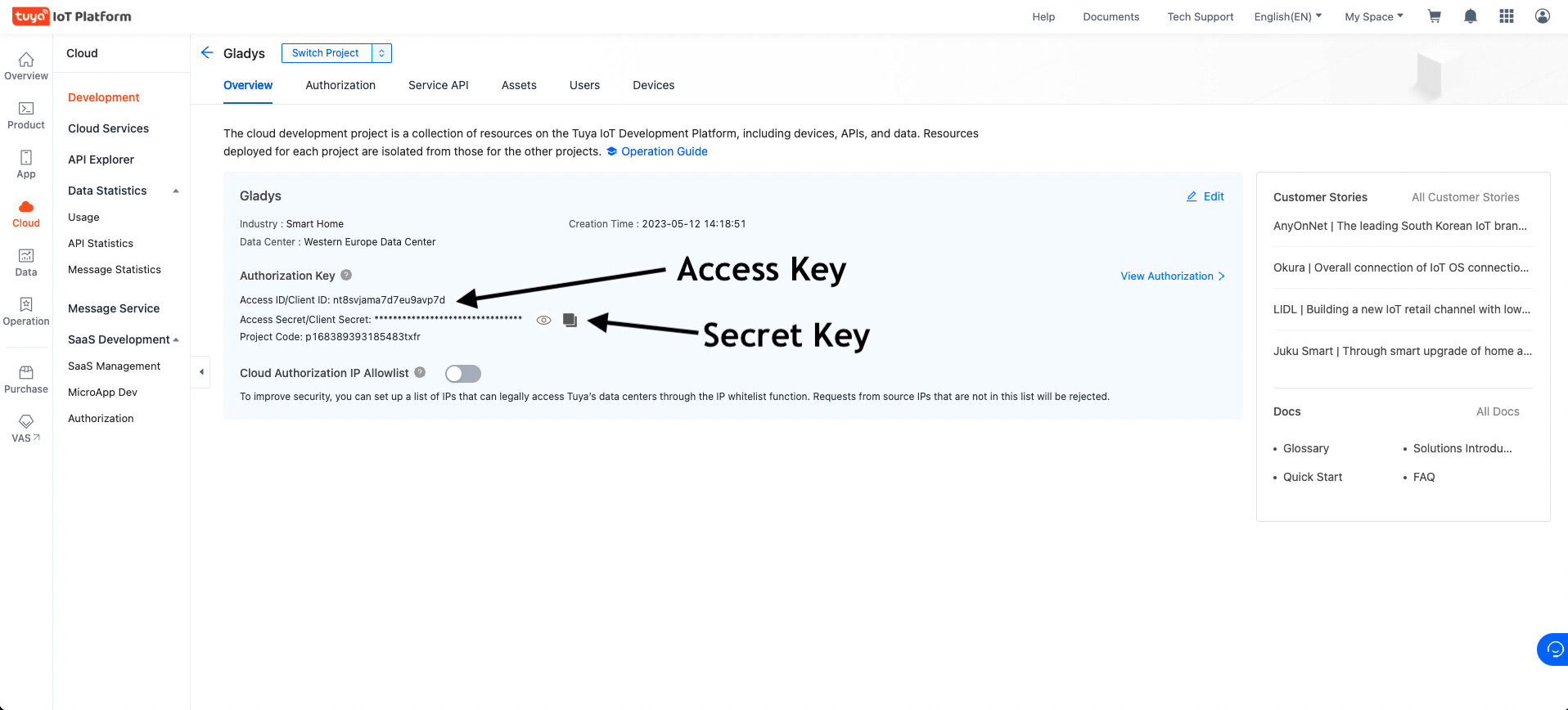
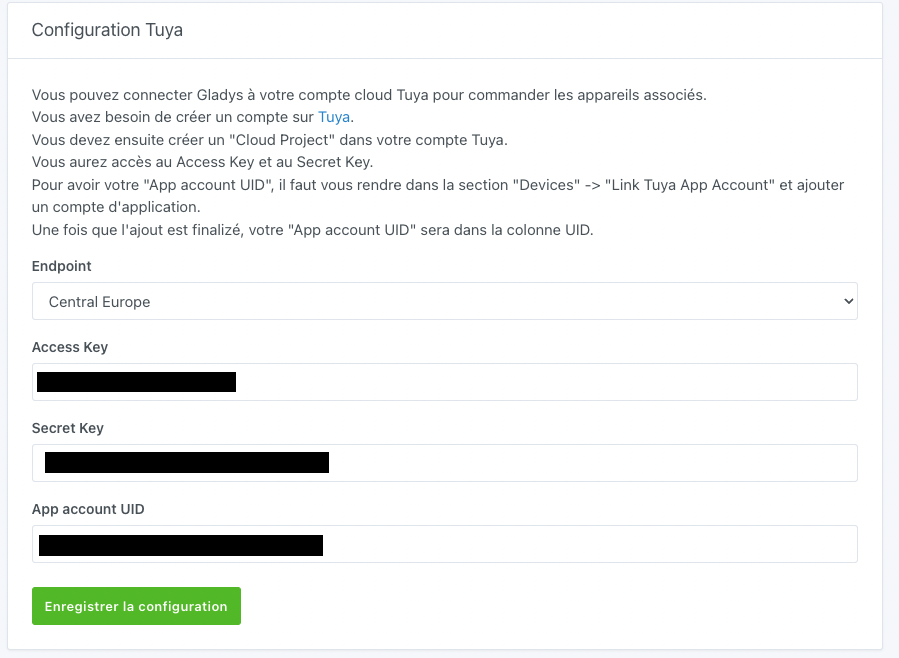
  5. Copy the « Access key » and « Secret Key » information into Gladys

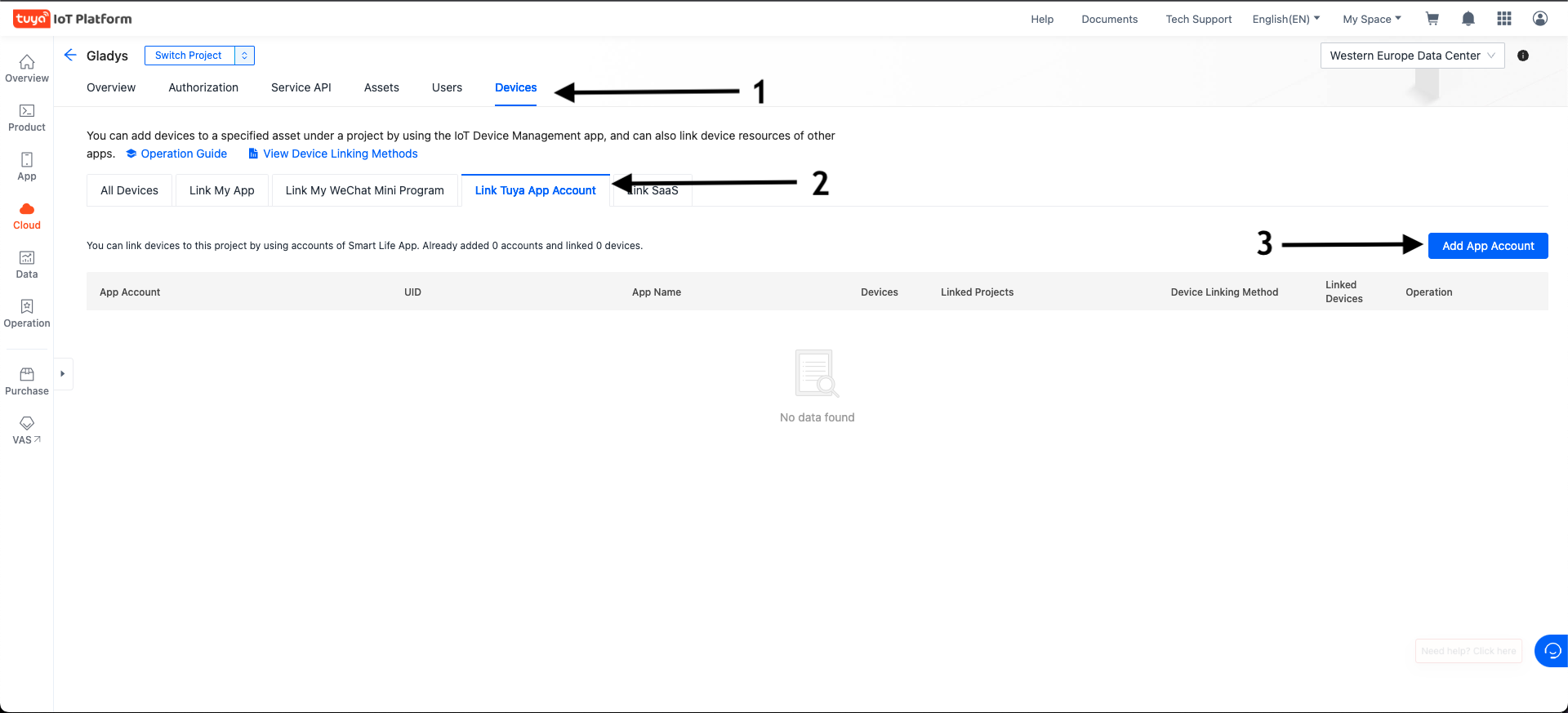
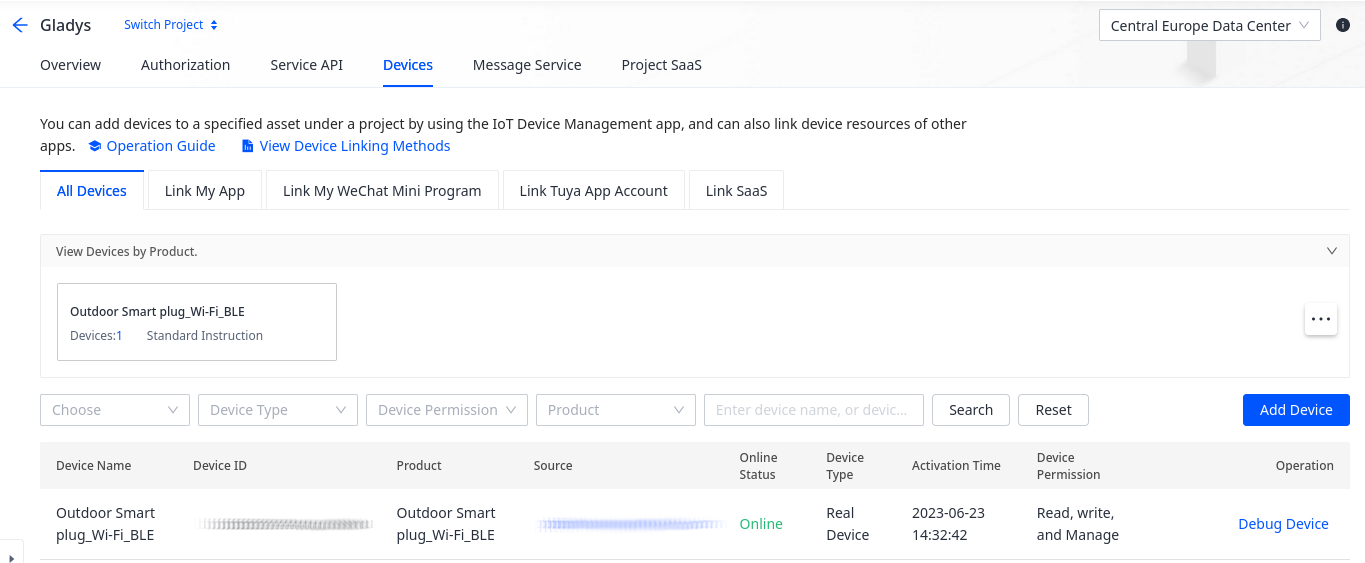
  6. Go to the Devices tab then Link Tuya App Account and click the Add App Account button on the right.

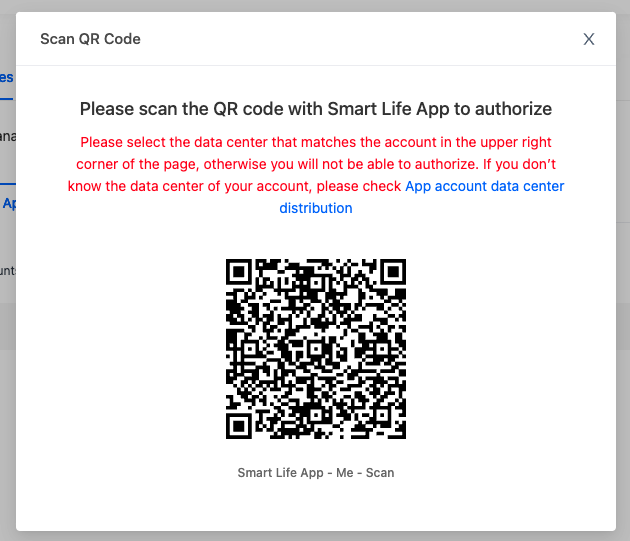
  7. Scan the QR Code with your Smart Life app by going to Profile and then to the code scanner located in the top right.

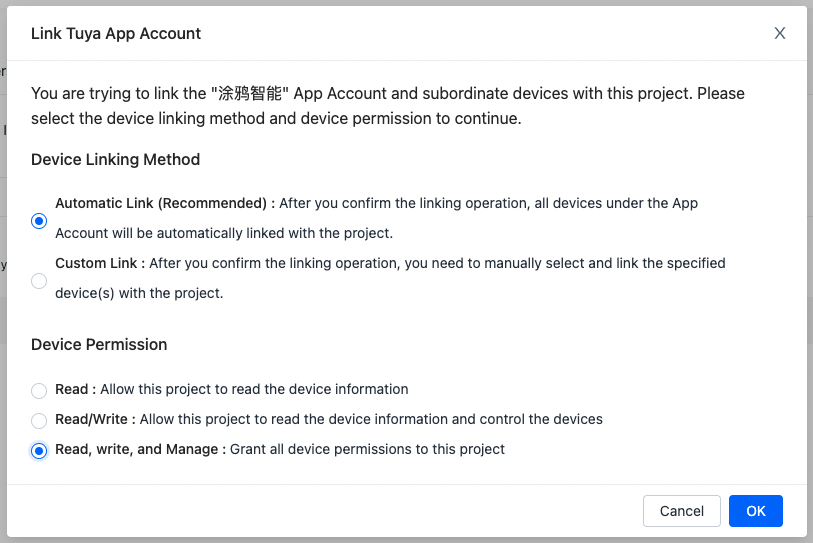
  8. Select Automatic Link then Read, Write and Manage and confirm with OK.

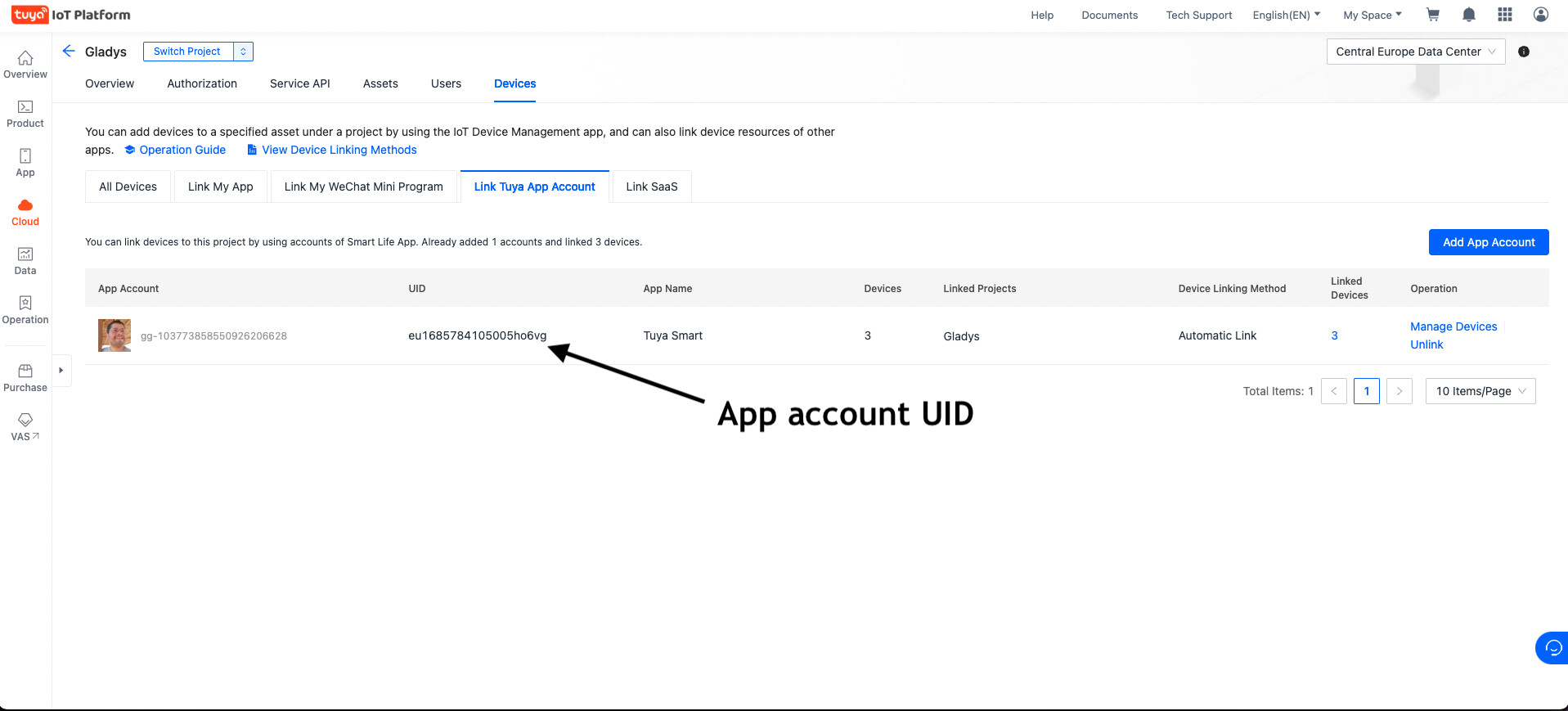
  9. Copy the « App account UID » information into Gladys.

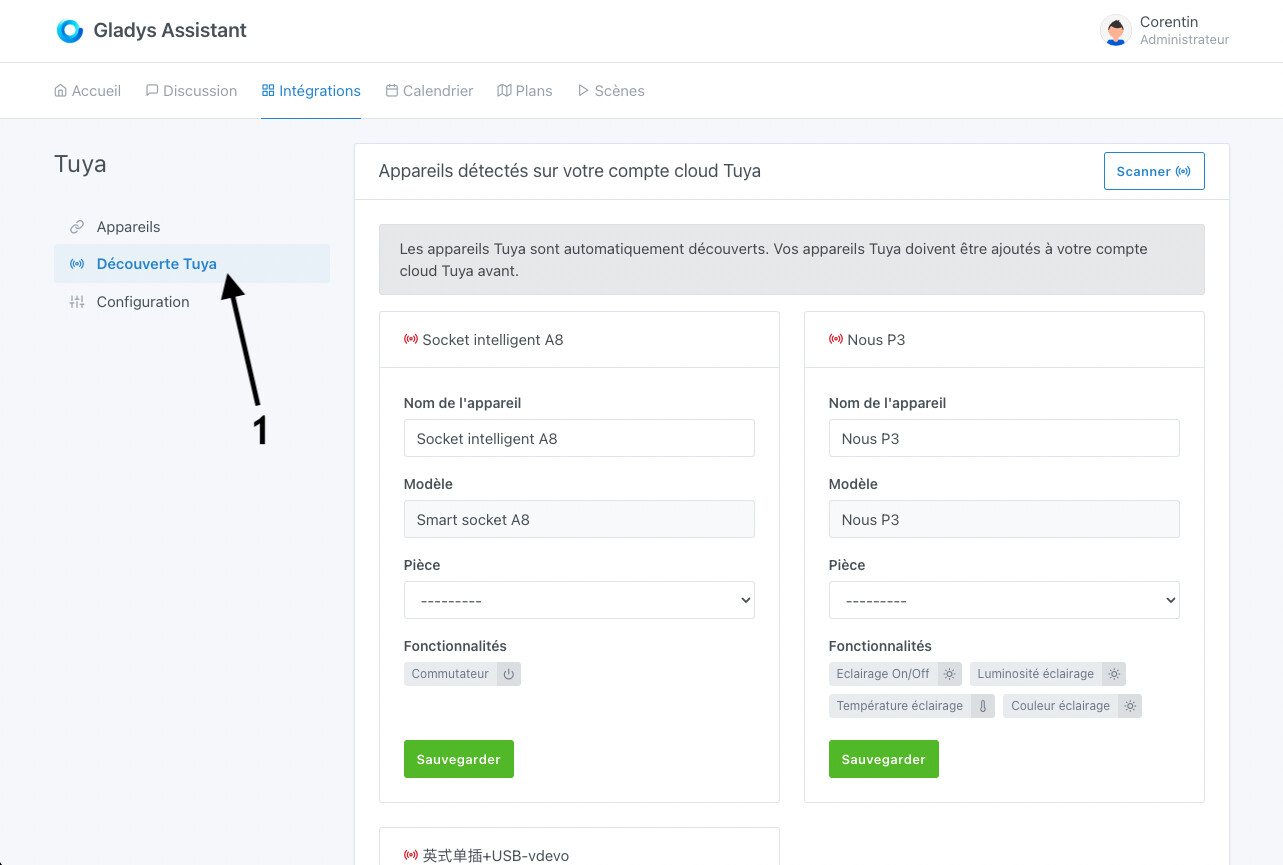
  10. Save the configuration in Gladys, go to the « Tuya Discovery » tab and ta-da… your devices have appeared

1 Like

@pierre-gilles : And here is the result in Gladys :

2 Likes

Thanks for the changes, it’s much clearer! Did you update the Docker image? :slight_smile:

If so, I’ll share it with the community!

I just updated the Docker image :slight_smile:

1 Like

Thank you @Lokkye :folded_hands:

I’m communicating about this today, and I’m adding it to the newsletter that will go out at the end of the week!

2 Likes

Hello,

Thank you for developing this feature. I’m expecting a smart plug with consumption data readings (on/off, current, voltage, energy consumed…) by next week.

I will be able to test it then :slight_smile:

1 Like

Hello,

I just received my plug (model PE-01E).

I followed the tutorial to create the developer account; everything is clear. One remark, « Smart Home Scene Linkage » is deprecated (it is still present though I think with the new API « Smart Home Basic Service »).

Once all the fields are filled in Gladys in the configuration section, I would have appreciated a message that confirms that all the entered items allow the connection — green when it works and red otherwise (I have the impression that this info appears when scanning?). It’s a small detail considering the time we will spend on that screen but it would be a real plus to remove any doubt about a bad configuration.

I then go to the « Tuya Discovery » section; an animation indicates a scan is in progress. Unfortunately, no device is found (although it is present in the Tuya app); is it because it is not supported at the moment or is there a delay between creation and appearance in the Tuya Cloud?

Thanks again for the ongoing development :slight_smile:

Edit: my plug is indeed displayed in the Tuya Cloud

1 Like

@PhilippeMA : First of all, thanks for testing :slight_smile:
Could you show me your configuration in Gladys ?
Could you send me the Gladys logs when you click the button to scan the devices ?

1 Like

Hello @Lokkye,

Here are the logs :

2023-06-26T12:25:35+0200 <error> tuya.discoverDevices.js:38 (TuyaHandler.discoverDevices) Unable to load Tuya devices Error: getaddrinfo EAI_AGAIN openapi-weaz.tuyaeu.com
    at GetAddrInfoReqWrap.onlookup [as oncomplete] (node:dns:107:26) {
  errno: -3001,
  code: 'EAI_AGAIN',
  syscall: 'getaddrinfo',
  hostname: 'openapi-weaz.tuyaeu.com',
  config: {
    url: 'https://openapi-weaz.tuyaeu.com/v1.0/token?grant_type=1',
    method: 'get',
    headers: {
      Accept: 'application/json, text/plain, */*',
      t: '1687775130691',
      sign: 'MONSIGN',
      client_id: 'MONCLIENTID',
      sign_method: 'HMAC-SHA256',
      access_token: '',
      Dev_lang: 'Nodejs',
      Dev_channel: 'SaaSFramework',
      'Signature-Headers': '',
      'User-Agent': 'axios/0.21.4'
    },
    transformRequest: [ [Function: transformRequest] ],
    transformResponse: [ [Function: transformResponse] ],
    timeout: 0,
    adapter: [Function: httpAdapter],
    xsrfCookieName: 'XSRF-TOKEN',
    xsrfHeaderName: 'X-XSRF-TOKEN',
    maxContentLength: -1,
    maxBodyLength: -1,
    validateStatus: [Function: validateStatus],
    transitional: {
      silentJSONParsing: true,
      forcedJSONParsing: true,
      clarifyTimeoutError: false
    },
    data: undefined
  },
  request: <ref *1> Writable {
    _writableState: WritableState {
      objectMode: false,
      highWaterMark: 16384,
      finalCalled: false,
      needDrain: false,
      ending: false,
      ended: false,
      finished: false,
      destroyed: false,
      decodeStrings: true,
      defaultEncoding: 'utf8',
      length: 0,
      writing: false,
      corked: 0,
      sync: true,
      bufferProcessing: false,
      onwrite: [Function: bound onwrite],
      writecb: null,
      writelen: 0,
      afterWriteTickInfo: null,
      buffered: [],
      bufferedIndex: 0,
      allBuffers: true,
      allNoop: true,
      pendingcb: 0,
      constructed: true,
      prefinished: false,
      errorEmitted: false,
      emitClose: true,
      autoDestroy: true,
      errored: null,
      closed: false,
      closeEmitted: false,
      [Symbol(kOnFinished)]: []
    },
    _events: [Object: null prototype] {
      response: [Function: handleResponse],
      error: [Function: handleRequestError]
    },
    _eventsCount: 2,
    _maxListeners: undefined,
    _options: {
      maxRedirects: 21,
      maxBodyLength: 10485760,
      protocol: 'https:',
      path: '/v1.0/token?grant_type=1',
      method: 'GET',
      headers: [Object],
      agent: undefined,
      agents: [Object],
      auth: undefined,
      hostname: 'openapi-weaz.tuyaeu.com',
      port: null,
      nativeProtocols: [Object],
      pathname: '/v1.0/token',
      search: '?grant_type=1'
    },
    _ended: true,
    _ending: true,
    _redirectCount: 0,
    _redirects: [],
    _requestBodyLength: 0,
    _requestBodyBuffers: [],
    _onNativeResponse: [Function (anonymous)],
    _currentRequest: ClientRequest {
      _events: [Object: null prototype],
      _eventsCount: 7,
      _maxListeners: undefined,
      outputData: [],
      outputSize: 0,
      writable: true,
      destroyed: false,
      _last: true,
      chunkedEncoding: false,
      shouldKeepAlive: false,
      maxRequestsOnConnectionReached: false,
      _defaultKeepAlive: true,
      useChunkedEncodingByDefault: false,
      sendDate: false,
      _removedConnection: false,
      _removedContLen: false,
      _removedTE: false,
      strictContentLength: false,
      _contentLength: 0,
      _hasBody: true,
      _trailer: '',
      finished: true,
      _headerSent: true,
      _closed: false,
      socket: [TLSSocket],
      _header: 'GET /v1.0/token?grant_type=1 HTTP/1.1\r\n' +
        'Accept: application/json, text/plain, */*\r\n' +
        't: 1687775130691\r\n' +
        'sign: MONSIGN\r\n' +
        'client_id: MONCLIENTID\r\n' +
        'sign_method: HMAC-SHA256\r\n' +
        'access_token: \r\n' +
        'Dev_lang: Nodejs\r\n' +
        'Dev_channel: SaaSFramework\r\n' +
        'Signature-Headers: \r\n' +
        'User-Agent: axios/0.21.4\r\n' +
        'Host: openapi-weaz.tuyaeu.com\r\n' +
        'Connection: close\r\n' +
        '\r\n',
      _keepAliveTimeout: 0,
      _onPendingData: [Function: nop],
      agent: [Agent],
      socketPath: undefined,
      method: 'GET',
      maxHeaderSize: undefined,
      insecureHTTPParser: undefined,
      joinDuplicateHeaders: undefined,
      path: '/v1.0/token?grant_type=1',
      _ended: false,
      res: null,
      aborted: false,
      timeoutCb: null,
      upgradeOrConnect: false,
      parser: null,
      maxHeadersCount: null,
      reusedSocket: false,
      host: 'openapi-weaz.tuyaeu.com',
      protocol: 'https:',
      _redirectable: [Circular *1],
      [Symbol(kCapture)]: false,
      [Symbol(kBytesWritten)]: 0,
      [Symbol(kNeedDrain)]: false,
      [Symbol(corked)]: 0,
      [Symbol(kOutHeaders)]: [Object: null prototype],
      [Symbol(errored)]: null,
      [Symbol(kUniqueHeaders)]: null
    },
    _currentUrl: 'https://openapi-weaz.tuyaeu.com/v1.0/token?grant_type=1',
    [Symbol(kCapture)]: false
  },
  response: undefined,
  isAxiosError: true,
  toJSON: [Function: toJSON]
}

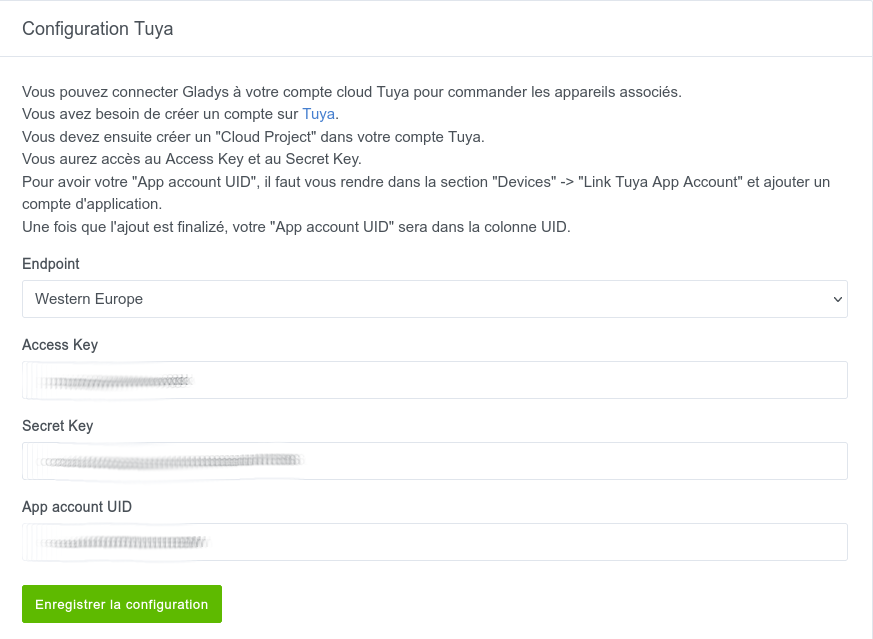
The configuration in Glayds :
@PhilippeMA: The Tuya account is configured to Central Europe (which is very good) but on Gladys it’s configured in Western Europe — could you change it to Central Europe and tell me if that fixed the problem?

The error message is the same.

I have this message on the configuration screen and on the scan screen.

What can I do to help you?

FYI, this error is a timeout during DNS resolution.

The domain is, however, valid:

@PhilippeMA don’t you have a network configuration or a DNS blocker configured on your machine or your network (like PiHole)?

No, none that I’m aware of. Is there a way to check using an app or a command?

You can run a simple curl:

curl -I https://openapi-weaz.tuyaeu.com/

You should see:

HTTP/2 200 
content-type: application/json;charset=UTF-8
date: Tue, 27 Jun 2023 15:43:03 GMT

The command returns:

HTTP/2 200 
content-type: application/json;charset=UTF-8
date: Thu, 29 Jun 2023 07:26:31 GMT
access-control-allow-credentials: true
access-control-allow-headers: 
access-control-allow-headers: access_token,Content-Type
access-control-allow-methods: POST
access-control-allow-methods: OPTIONS
access-control-allow-methods: GET
access-control-allow-methods: DELETE
access-control-allow-methods: PUT
access-control-allow-origin: https://iot.tuya.com
gateway-info: highway
strict-transport-security: max-age=31536000;includeSubDomains;preload 

Ok, everything seems fine then… We’re agreed you tested on the same machine that’s running Gladys?

Are you still seeing the same error in the logs?

No, on my laptop.

Maybe it’s related to the installation?

Here’s what I did (taken from the documentation):

docker run -d \
--log-driver json-file \
--log-opt max-size=10m \
--cgroupns=host \
--restart=always \
--privileged \
--network=host \
--name gladys \
-e NODE_ENV=production \
-e SERVER_PORT=80 \
-e TZ=Europe/Paris \
-e SQLITE_FILE_PATH=/var/lib/gladysassistant/gladys-production.db \
-v /var/run/docker.sock:/var/run/docker.sock \
-v /var/lib/gladysassistant:/var/lib/gladysassistant \
-v /dev:/dev \
-v /run/udev:/run/udev:ro \
delogzway/gladys:tuya

Can you test on your machine that runs Gladys?

I don’t think that’s related, it looks fine to me :slight_smile:

@Lokkye Can you confirm that on your side you tested with each server and it worked fine?

Yes, it works for all of them except China, which is only compatible with Chinese IPs

1 Like

@Lokkye I added a small note on the PR; it would be good to prefix the variables with TUYA_ so it’s clearer in the DB